
Find students, payers and staff
Find students by a payer's name, phone or email, search payers by student, and look up staff with Search in the saved-views row.
Last updated
To find a person in Tutorbase, open a People directory and enter a name or contact detail in Search, in the saved-views row. Students can match a responsible payer's name, phone or email, and Payers can match a linked student's name. Open a matching profile to check the recorded relationship.
Before you start
Use a People directory you can already open. The worked example is a caller, Rachel Brooks, who is recorded as the payer for Amelia and Theo Brooks and whose phone number is 415-555-0174.
Find the caller's students
- Open People.
- Select Students. Choose Students when you want student profiles, even when your clue is a payer's name.
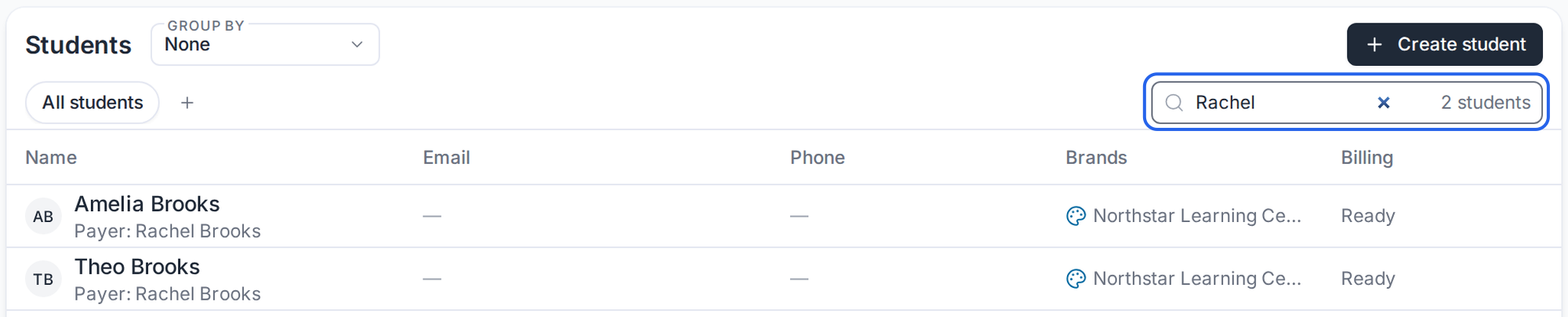
To narrow the directory, enter the caller's name, phone number or email in Search in the saved-views row. Before you type, the field shows how many students the directory lists; after the list narrows, it shows how many match. The list narrows after a short pause in typing, and the query appears as a removable chip, for example Search: Rachel. Use the phone number or email when you have it, because it is more specific than a name when two families share a surname. For example, entering Rachel or 415-555-0174 shows Amelia and Theo with Payer: Rachel Brooks under their names.
- Select Amelia Brooks. Under Related profiles, check that Rachel Brooks is labelled Payer. Confirm the recorded link because a matching name alone does not establish payment responsibility.
- Select Back to Students. The Students directory returns with Rachel still entered.
When you finish the lookup, remove the Search chip or empty Search, because the query hides other profiles. Any selected property filters remain applied. Clear all removes the query together with every active filter.
Search and filters
Use the criteria in Filters when you need a property condition. A person must match both the Search query and the selected criteria. If an expected person is missing, check the active filters before changing the person's record.
Search filters… in the Filters sidebar looks for property criteria and choices. Typing in that finder leaves Search and its query unchanged; choose a criterion explicitly to apply it. On a phone, Search sits above the list; Applied filters in the Filters sheet lists the rest.
Use Search Tutorbase when you want to open a matching record from global Search. Search in the saved-views row keeps you in the current People directory.
Find a registration waiting for review
An identity match can pause registration before a Student or Payer exists. Needs review lists registrations until People processing completes.
On desktop, open Students.
Select Needs review. Its number counts registrations, not profiles.

Open Ivy Brooks's intended registration; do not complete every repeated submission.
Compare Submitted payer and the match. Choose Use Rachel’s Payer profile for Rachel, or Keep separate for a different person sharing her contact details. Matching email or phone does not prove identity.
Check name, roles, email and phone; use Change decision to correct them, or Confirm.
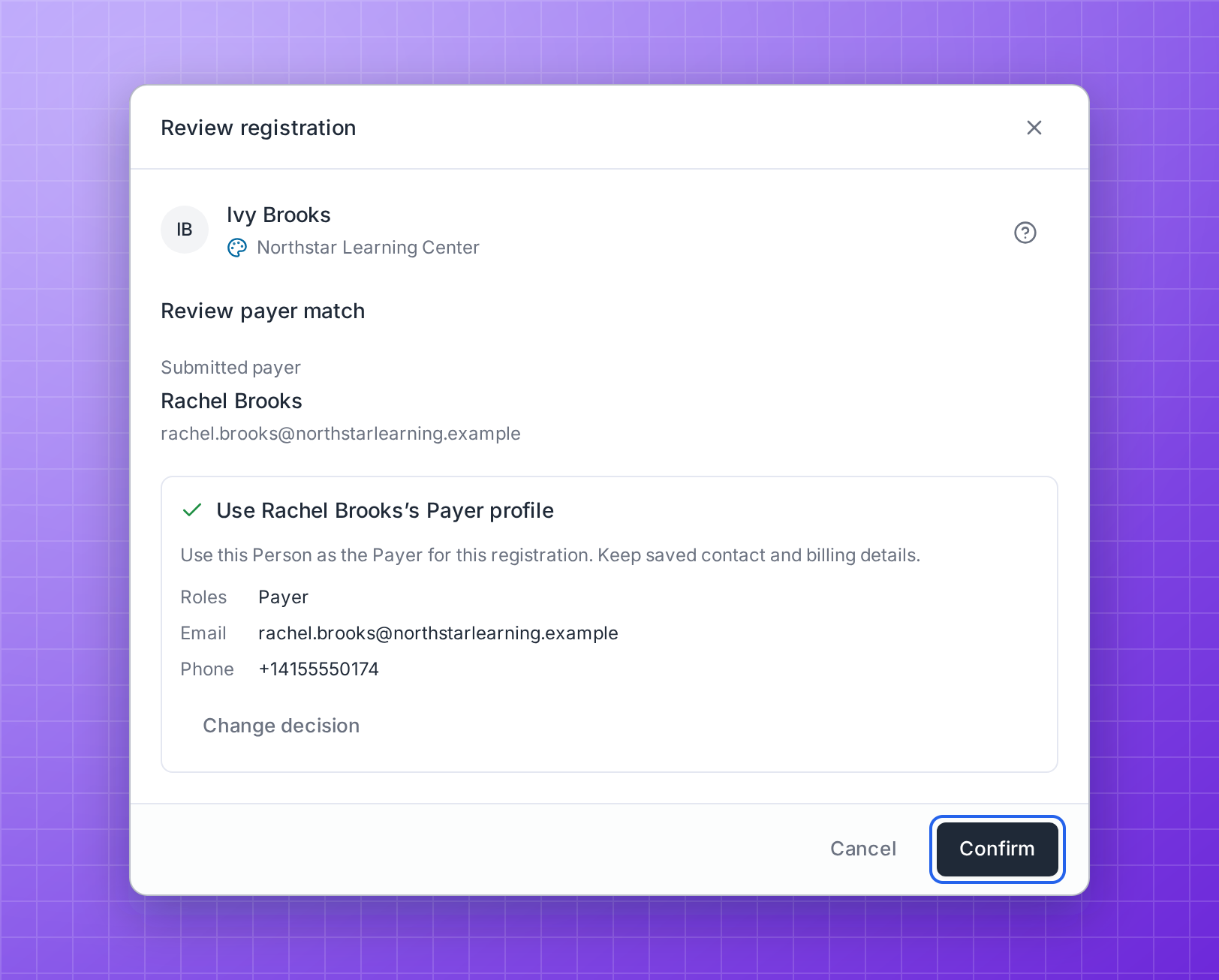
Ivy becomes a Student linked to the original Rachel after processing. Only then does the task disappear.
Choose a person in an action or filter
Search Students, Payers or Staff by name, phone or email. Read the labelled match before selecting. Typing does not select or save.
For example, open Billing → Charges → New charge. Open Payer and search rachel.brooks@northstarlearning.example. Rachel appears with Email: and the match highlighted. Close without creating a Charge.
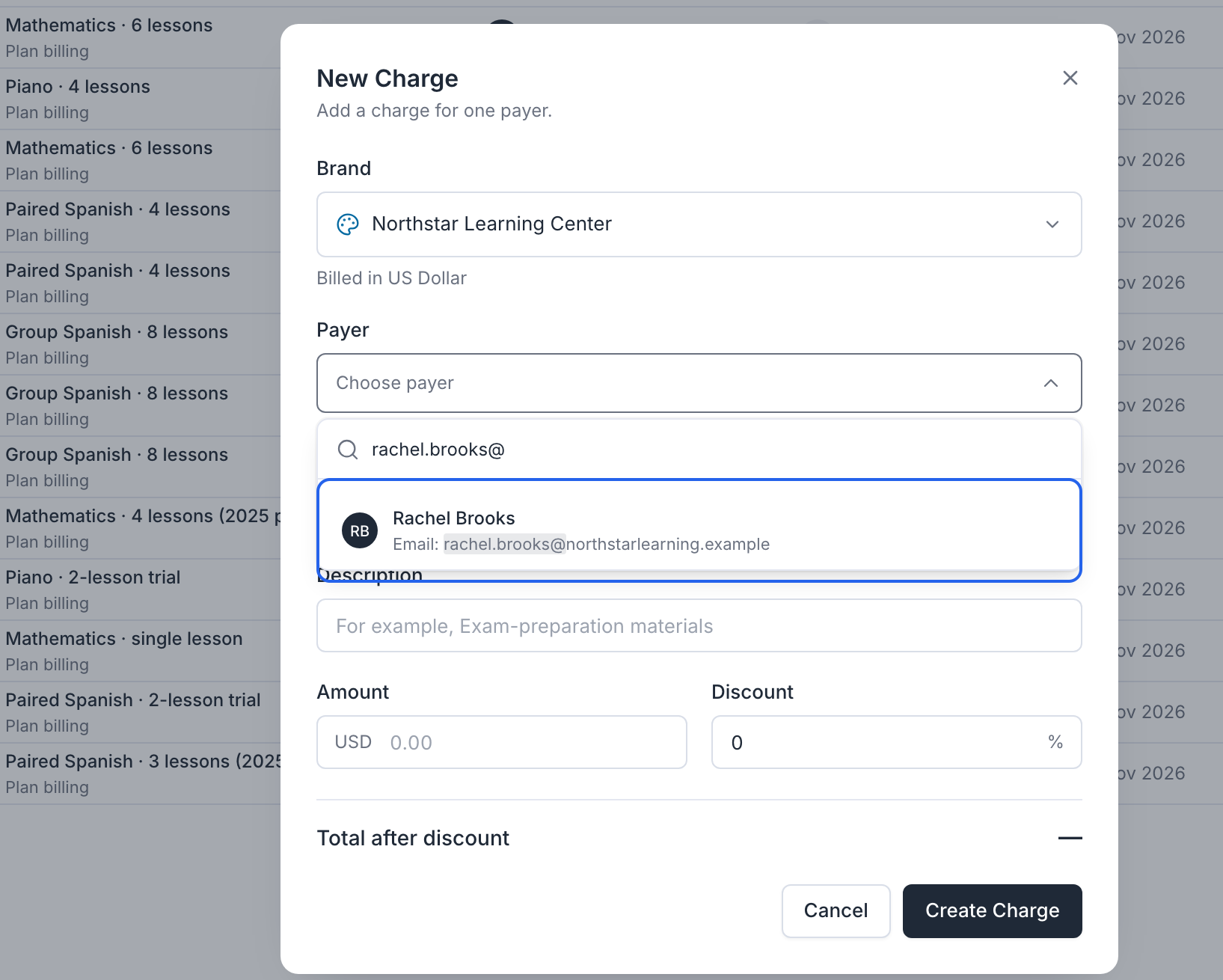
Students found through Rachel's email show Payer: Rachel Brooks. Amelia and Theo remain separate choices; the email belongs to Rachel, not her children.
If nothing matches, check the Brand and try another known detail before editing. This Owner can also find Rachel's billing address with 94107.
Common questions
How do I search for a student by name?
Open People → Students, then enter the student's name in Search in the saved-views row. The Students results narrow to matching profiles.
Can I find students by their parent's name or phone number?
Yes. The Students search matches the recorded responsible payer's name, phone number or email, and each such student shows Payer: with the payer's name. Searching does not create or change a payer link, so check Related profiles on the student's profile before acting on a match.
How do I find a payer from a student's name?
Open People → Payers, then enter the student's name in Search in the saved-views row. The Payers search can match a current linked student or the payer's own name.
Can I search by part of a phone number?
Yes, when the search has digits and no letters. In Students, for example, 0174 finds Amelia and Theo through the end of their payer's number. In People → Staff, Search also matches a staff member's phone number, for example 4155550183 finds Maya Chen.
Can I search by phone when adding a student to a lesson?
Yes: Add student in a lesson uses the same Students search, with the field Search name, phone or email…. A student with a separate payer shows the payer's name and, when one is recorded, a phone number, which helps you tell apart students with the same name. Add student lists only the students offered for that lesson, so a student found in People may not appear there.
Why does filter search say No filters found?
Search filters… searches criteria and choices. To find a person, use Search in the saved-views row in Students, Payers or Staff instead.