
Best Tutoring Management Software 2026

Published: January 5, 2026 by Amy Ashford

The best tutoring management software in 2026 automates core operations like scheduling, billing, and payroll to reduce administrative work by over 60%. Modern platforms provide a unified system to manage everything from student attendance to multi-branch reporting, enabling scalable growth. This guide covers the key automation features to look for and how to choose the right software for your specific business model.

If there's one thing I've learned from working with hundreds of tutoring businesses, it's this: growth exposes every crack in your operations. What worked for 5 students breaks with 50. What worked for one location becomes a nightmare with three.

The best tutoring management software in 2026 is designed to fix those cracks before they appear. It swaps manual chaos for a single, automated platform. This software handles scheduling, billing, and payroll, often cutting admin work by over 60%. This is how you get the control you need to actually scale.

Modern platforms like Tutorbase aren't just a digital calendar. They're the central nervous system for your business. They connect every moving part, from smart scheduling and automated invoicing to multi-location management, all in one place. This is the difference between constantly fighting fires and focusing on growth.

Choosing Your Tutoring Management Software for 2026

A man in a blue shirt uses a laptop displaying a dashboard, next to text 'AUTOMATE OPERATIONS'.

When you're looking at software, the real choice isn't about features, it's about your operational philosophy. Will you keep patching together manual processes, or are you ready to embrace automation? Sticking with spreadsheets or clunky old software creates bottlenecks that don't just waste time; they actively hold your business back.

The market reflects this shift. The global online tutoring software market hit USD 7.42 billion in 2024 and is on track to reach a staggering USD 17.13 billion by 2032. This isn’t just hype. It’s a clear signal that the industry is moving toward smarter, more scalable platforms. You can see these market projections and understand why modern systems are set to dominate in 2026.

How do different operational approaches compare?

So, how do the different options actually stack up for a growing tutoring center? Spreadsheets give you total flexibility but demand endless manual work and are notoriously error-prone. Legacy systems offer some structure but often come with dated interfaces and weak automation, which just trades one set of frustrations for another.

Modern platforms are built differently. They are designed to connect the dots. A tutor marks a student as present, which automatically triggers an invoice, which then updates the tutor's payroll report. It's a seamless flow of information.

The real win with modern tutoring software is how it transforms scattered, time-sucking tasks into a single, automated workflow. This frees you up to work on the business, improving teaching quality, finding new students, instead of being stuck in it.

To put it in perspective, let's break down how each approach handles the daily grind of running a tutoring business. The table below gives you a clear snapshot of the critical differences in efficiency and scalability.

2026 Tutoring Software Evaluation Snapshot

A high-level comparison of software solutions based on core operational needs for a growing tutoring business in 2026.

Operational Need

Spreadsheets

Legacy Software (e.g., Teachworks)

Modern Platform (e.g., Tutorbase)

Lesson Scheduling

Manual entry, high risk of double-booking

Basic calendar, manual conflict resolution

Intelligent slot finding, real-time conflict prevention

Client Billing

Manual invoice creation and tracking

Semi-automated invoicing, manual payment chasing

Fully automated invoicing triggered by attendance

Tutor Payroll

Manual calculations from timesheets

Basic rate calculation, manual adjustments needed

Automated calculation of complex pay structures

Multi-Branch View

Separate files, no consolidated data

Limited support, often requires separate accounts

Unified dashboard with real-time room and teacher data

Looking at this, the choice becomes pretty clear. While spreadsheets and older systems might feel familiar, they simply can't provide the automated, real-time infrastructure needed to support a growing business in 2026. A modern platform isn't just a tool; it's a strategic asset that pays for itself in saved time and reduced errors.

What Is Tutoring Management Software?

In 2026, the best tutoring management software is the central command center for your entire business. Tutoring management software is a platform that pulls together every administrative job you do, from student scheduling and tutor payroll to client billing and parent updates, all managed from a single screen. It's the modern way to run a tutoring business, letting you ditch separate calendars, invoicing apps, and spreadsheets.

This software is the operational backbone for any tutoring center that wants to grow. It is built to solve the most annoying and expensive problems holding you back. By taking over the repetitive, manual tasks, it goes straight to the root of what wastes time and loses money.

What problems does this software solve?

The real value here is how it gets rid of the specific, recurring headaches that plague tutoring businesses. If you're still doing things by hand, you probably just accept these issues as part of the job. But you don't have to. A good platform is designed to fix them for good.

Here are the big ones it solves:

  • Constant Double Bookings: It gives you a live, real-time view of every tutor’s schedule and every room’s availability, so you can stop making embarrassing and costly booking mistakes.

  • Lost Administrative Hours: It automates things like sending invoices and running payroll. This gives owners back the 10+ hours a week they typically lose to admin work.

  • Revenue Leakage: When a lesson is marked complete, an invoice is automatically created. This simple connection makes sure every single lesson gets billed correctly and on time, plugging payment leaks.

  • Lack of Financial Visibility: Instead of guessing, you get a clear dashboard showing revenue, expenses, and profit in real time. This lets you make smart, data-backed decisions about your business.

The whole point of this software is to change your admin work from a reactive, time-sucking mess into a smooth, automated system. This frees you up to focus on what actually matters: the quality of your teaching and growing the business.

How does it replace a patchwork of apps?

Many tutoring centers are held together by a patchwork of different tools. You might be using one app for your calendar, another for invoicing, and spreadsheets to figure out payroll. This setup creates isolated pockets of information. It forces you to enter the same data over and over and is incredibly prone to human error, which costs businesses a fortune in rework.

A unified platform brings all these jobs together. For example, when a tutor marks a student as attended, the system instantly creates an invoice and adds the session to the tutor's timesheet. This kind of seamless workflow is impossible with separate tools. It ensures accuracy, saves time, and gives you one reliable source of truth.

Taking a Closer Look at Core Automation Features

A person's hands holding a tablet displaying 'Core Automations' text and various business icons.

If you're looking at tutoring software in 2026, the conversation boils down to four key pillars of automation. These are smart scheduling, automated billing, hands-off payroll, and multi-branch management. Modern platforms like Tutorbase are built around these features to slash manual work, plug revenue leaks, and create a smooth experience.

Automation isn't just a nice-to-have feature; it's the engine that powers a growing tutoring center. As you scale, so does the admin headache. Patching together different systems leads to lost income from missed payments, overbooked rooms, and hours wasted calculating payroll by hand.

The private tutoring industry is set to grow from USD 91.65 billion in 2022 to nearly USD 154.8 billion by 2030, with online tutoring leading the charge. That growth is fantastic, but it also means operational complexity will increase significantly. Manual methods simply won't cut it anymore in 2026.

What is intelligent scheduling automation?

Intelligent scheduling automation is software that actively helps you find the best lesson slot by analyzing teacher availability, room capacity, and student needs at once. Intelligent scheduling automation is not just a digital calendar. This proactive thinking is a massive dividing line between modern platforms and older software.

Legacy systems like Teachworks or TutorCruncher give you a basic calendar, but you still do the hard work. You must manually cross-reference a tutor’s schedule with room availability. This slow process often leads to mistakes. This is how you end up with embarrassing and costly double-bookings that make your business look disorganized.

In contrast, modern software solves this exact problem. For example, Tutorbase's "Find Slot" feature instantly shows you every viable lesson option based on all your rules. What used to be a five-minute manual search becomes a five-second automated search, making life easier for your admin team.

The real difference is in the mindset. Legacy systems give you a tool to manage your schedule. Modern platforms give you a tool to optimize it. That shift from passive management to active optimization is what lets you serve more students without hiring more admin staff.

This becomes a lifesaver when you're handling a walk-in or a quick text from a parent. Instead of fumbling through calendars, your team can use a feature like "Find Spot". You can instantly filter all group lessons by subject, teacher, and time to find an open seat. It's about giving immediate, accurate answers that turn an inquiry into an enrolled student.

How do you automate tutoring center billing?

You automate tutoring center billing by connecting attendance directly to invoicing. The best systems create an invoice the second a tutor marks a student as "present." This one action completely removes the need for manual invoice creation. It also guarantees you never forget to bill for a session.

This is a common weak spot for older software. They might have invoicing templates, but the process is almost never truly automated. You’ll find yourself running a report at the end of the month, manually reviewing all the lessons, and then generating invoices as a separate step. That delay creates a huge window for errors and slows down your cash flow.

In 2026, parents expect more. They want clear, immediate, and professional billing. Automated systems deliver this by offering:

  • Flexible Billing Models: Easily handle everything from pay-as-you-go and prepaid credit packages to monthly subscriptions and fixed-price courses.

  • Automatic Fee Application: Instantly add charges for materials or late cancellations based on rules you set up once.

  • Integrated Online Payments: Let parents pay right from the invoice through a portal. This drastically improves cash flow and means less time chasing down payments.

The goal is a billing workflow that practically runs itself. When attendance, invoicing, and payments are linked in one automated chain, you stop revenue leaks. You also get back countless admin hours every month. For a deeper look, check out these tips for mastering automation workflows.

Payroll and Compensation Automation

Automating payroll is about much more than just calculating hourly pay. A truly great system can handle the messy, variable pay structures common in tutoring. This includes different rates for different subjects, bonuses for weekend work, or even revenue-sharing deals.

Trying to track this on a spreadsheet is a nightmare. It's tedious, time-consuming, and one bad formula can lead to incorrect paychecks and unhappy tutors. Legacy systems often give you a basic report but still leave you to do the complex calculations offline.

Modern platforms handle all of it for you. In Tutorbase, for instance, you can create a unique contract for every teacher that specifies:

  • Base Pay: Whether it’s hourly, per-lesson, or a percentage of revenue.

  • Premiums: Automatic pay bumps for teaching high-demand subjects or working on weekends.

  • Bonuses: Triggers for performance-based incentives.

  • Deductions: For things like materials or other expenses.

At the end of the pay period, the software automatically creates a detailed payout statement for each tutor based on the lessons they actually taught. You just review and approve. This doesn't just save time; it provides total transparency for your staff, which builds trust and cuts down on payroll disputes.

Multi-Branch and Room Management

Once your tutoring business expands to more than one location, the complexity goes up exponentially. Juggling schedules, rooms, and staff across different branches with separate systems is a fast track to burnout. The best software gives you a single, unified dashboard to see your entire operation at a glance.

This centralized view is essential for making smart decisions. You can instantly spot which rooms are underused at one branch. You can also see where you need more capacity during peak hours at another. This is the kind of data that helps you maximize your revenue per square foot.

A modern, consolidated platform simplifies daily management and gives you the high-level data you need for strategic planning. It turns your physical locations from isolated islands into a connected, optimized network. Learn more in our tutoring software integrations guide.

Detailed Feature Breakdown: Tutorbase vs. Legacy Systems

Here is a side-by-side comparison of modern automation versus older software and manual workarounds.

Feature Area

Legacy System Approach (TutorCruncher/Teachworks)

Tutorbase's Automated Approach

Business Impact

Scheduling

Manual calendar view; you have to find and resolve conflicts yourself.

"Find Slot" AI suggests optimal times based on teacher, room, and student availability.

A 3x faster student onboarding and booking process.

Billing

Manual or batch invoice creation at the end of a billing period.

Invoices are instantly generated when a tutor marks attendance.

Eliminates forgotten invoices and reduces payment delays by up to 80%.

Payroll

Basic hourly rate calculation; complex pay structures require spreadsheets.

Fully automated calculation of rates, premiums, and bonuses per teacher contract.

Reduces payroll processing time by over 90% and eliminates errors.

Room Booking

Separate calendars for rooms; high risk of double-booking.

Real-time, unified view of all rooms across all branches with conflict prevention.

Maximizes facility usage and prevents revenue loss from booking errors.

As you can see, the difference isn't just about saving a few minutes here and there. It's about building a fundamentally more efficient, reliable, and scalable business model.

How to Choose the Right Software for Your Tutoring Center

Choosing the best tutoring management software in 2026 really boils down to your business model. If you run multiple branches, you need rock-solid room management and unified reporting. If you’re a specialized academy, features for complex scheduling and billing are your bread and butter. Pinpoint your single biggest operational headache, then find the software that solves it.

Picking the right software is a strategic move, not just a feature comparison. Your unique business model dictates what truly matters. A multi-branch operation has different pain points than a specialized test prep academy. The goal is to match the software’s strengths to your center’s biggest challenges.

Think about it this way: a large center with multiple locations is probably wrestling with siloed information and inconsistent processes. For them, a unified dashboard isn’t just a nice-to-have; it's essential. A test prep academy might care more about intelligently matching tutors to students based on subject expertise.

How do you tailor software to your tutoring model?

The type of business you run is the single most important factor in this decision. Generic, one-size-fits-all software often misses the mark on the specific headaches that different educational models face. You need a solution built to handle your particular operational knots, whether managing intricate pay structures or optimizing classroom usage.

Let's break down the priorities for three common types of tutoring centers.

  • Multi-Branch Tutoring Centers: Your main challenge is keeping things consistent and transparent across all locations. You need a single source of truth for scheduling, billing, and reporting to prevent operational chaos.

  • Specialized Language Schools: Here, the focus is on student progression through structured levels. Your software must support fixed-course billing, manage student cohorts, and automate scheduling for recurring classes.

  • High-Volume Test Prep Academies: Your business thrives on efficiency and expertise. You need software that can rapidly match students with the perfect tutor and handle complex package billing with prepaid credits.

The right software doesn't just digitize what you're already doing, it fundamentally improves it. The key is to stop looking for a tool that does everything and start looking for the one that excels at solving your most expensive, time-consuming problem.

Decision Matrix for Prioritizing Features

To make this less abstract, use a decision matrix. This simple tool helps you score potential software options based on what actually matters to your business. It forces you to look past the flashy features and focus on tangible impact.

Evaluation Criteria

Multi-Branch Center (Weight)

Language School (Weight)

Test Prep Academy (Weight)

Unified Multi-Branch Dashboard

10

3

4

Advanced Room Management

9

6

5

Fixed-Course & Subscription Billing

5

10

7

Intelligent Tutor-Student Matching

6

7

10

Automated Prepaid Credit Tracking

4

5

9

By weighting each criterion, you create a clear, objective framework for your evaluation. This ensures your final choice is perfectly aligned with your operational priorities.

How do you migrate from your current system?

Switching systems can feel overwhelming, but a solid plan makes all the difference. In the competitive landscape of 2026, where advanced platforms can slash operational costs by up to 60%, a smooth migration is non-negotiable. Research shows that tutors who adopt automation see a 3x faster onboarding speed. Learn more about how automation is shaping the tutoring market and see why a seamless transition is key.

Follow this checklist to pull off a successful migration:

  1. Data Audit and Cleanup: Before you move anything, clean up your existing data. Archive old student profiles, fix errors in contact information, and standardize your records.

  2. Define Your Configuration: Work with your new software provider to set up user roles, billing rules, and payroll contracts before you import any data. This ensures the system works correctly from day one.

  3. Run a Pilot Test: Don't go all-in at once. Migrate a small chunk of your data first and run a few mock billing and payroll cycles. This is your chance to catch any issues before the full rollout.

  4. Schedule Team Training: Ensure your admin staff and tutors are fully trained on the new platform. Confident users are the secret to a smooth launch.

  5. Communicate with Parents: Give parents a heads-up about the upcoming change. Highlight the benefits for them, like a new portal for easy online payments and scheduling.

Calculating the ROI of Modern Tutoring Software

The best tutoring management software for 2026 pays for itself by directly converting saved administrative time into revenue-generating activities. You can calculate your Return on Investment (ROI) by adding up the savings from automated tasks and the revenue gains from better retention and resource use. This simple financial analysis transforms software from an expense into a strategic growth investment.

Switching platforms requires an investment, but thinking of it purely as a "cost" is a mistake. Modern platforms are engineered to deliver a clear financial return. They tackle your most time-consuming and error-prone tasks. This frees you up to reallocate your time toward activities that actually grow the business.

A simple way to start is by calculating the value of reclaimed administrative hours. If you spend 10 hours a week on manual scheduling, invoicing, and payroll, that time has a direct cost. By automating these tasks, you get those hours back. This creates a tangible financial gain you can weigh against the software's fee.

This decision tree shows how different tutoring models prioritize software features to maximize their ROI.
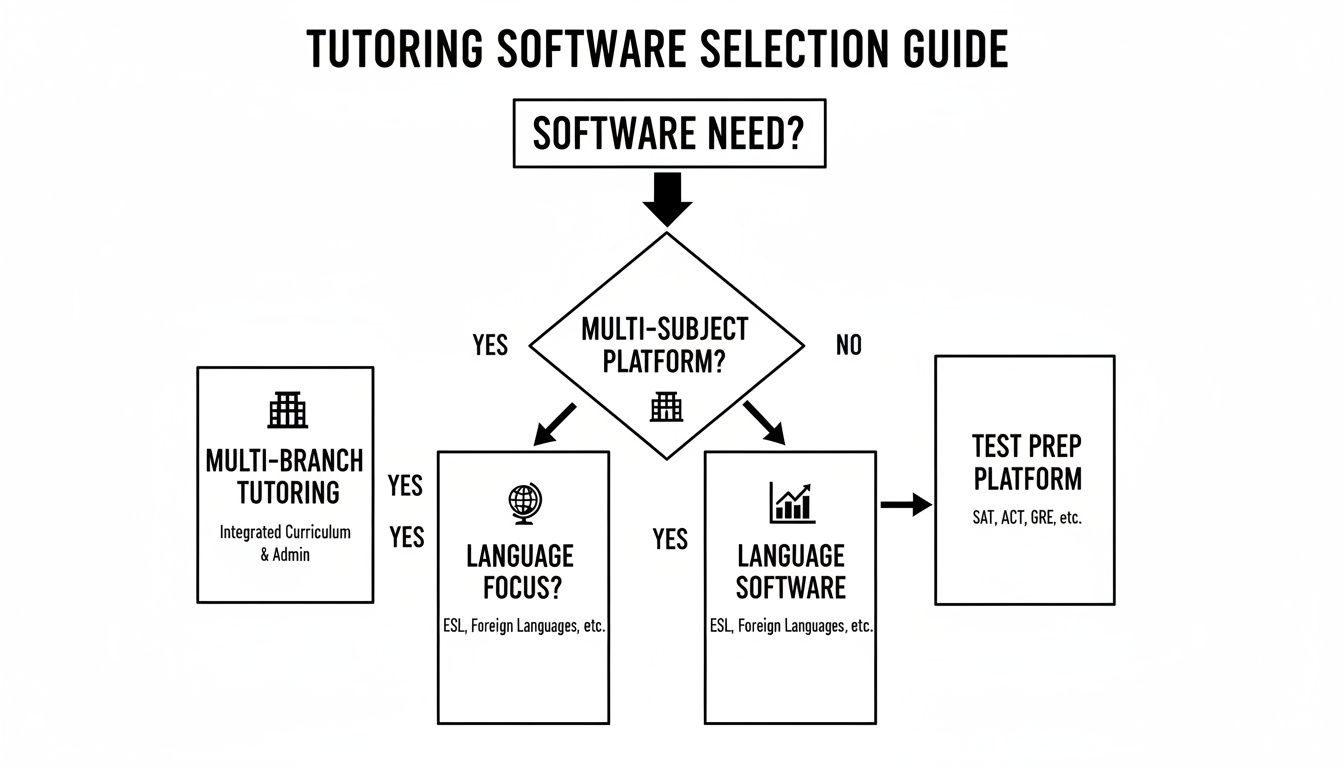
Flowchart guiding selection of tutoring software based on multi-subject, language focus, or test prep.

As you can see, multi-branch centers must focus on unified operations. Specialized programs like language schools or test prep centers zero in on features that solve their unique scheduling and billing puzzles.

A Sample ROI Calculation

Let's walk through a practical example for a mid-sized tutoring center. This calculation combines both cost savings and new revenue to paint a complete picture of the software's financial impact.

1. Quantify Administrative Savings

  • Time Saved: 10 hours/week on manual tasks.

  • Owner's Hourly Rate: $50/hour (a conservative estimate).

  • Monthly Savings: 10 hours/week * 4 weeks * $50/hour = $2,000 per month.

2. Calculate Revenue Gains

  • Increased Renewals: A smoother parent experience (thanks to automated billing and easy scheduling) can seriously boost retention. A 42% increase in renewals on just 10 students (at $200/month) adds another $840 per month.

  • Optimized Scheduling: Eliminating just one double-booking error a week saves the cost of a make-up lesson and preserves client trust.

In this scenario, the software generates $2,840 in monthly value, easily justifying its cost. For a more detailed breakdown, you can learn more about the ROI of tutoring management software and apply these calculations to your own business.

The most critical metric for any software investment is "Time to Value." For tutoring software, this means how quickly the platform starts saving you more money in admin hours than it costs in subscription fees. With modern automation, this breakeven point is often reached within the first month.

Implementation and Our Final Take

Picking the right software for your tutoring business in 2026 is a huge decision. The real magic happens during implementation, a smooth rollout unlocks the value you’re paying for. A solid plan for moving your data, training your team, and keeping clients in the loop is non-negotiable.

Ultimately, this is about more than just software. It’s about adopting a modern, automated platform that fuels sustainable growth. It makes your daily operations ridiculously efficient.

How do you craft an implementation timeline?

Let’s be realistic: switching systems is a project, not an overnight flip of a switch. A structured plan keeps disruptions to a minimum and gets everyone on board. The whole process, from cleaning up your old data to going live, should be a steady, step-by-step progression. Trying to do it all at once is a recipe for chaos.

For a mid-sized center, a full migration typically takes two to four weeks. This gives you enough breathing room to import student data, set up your billing, and train tutors. Rushing this is one of the most common mistakes we see, and it almost always leads to messy data and a frustrated team.

A successful rollout usually follows a clear, four-week path:

  1. Data Prep (Week 1): Start by getting your house in order. Audit and clean up your existing data. Standardize student records, archive old profiles, and double-check every bit of billing info. Clean data is the bedrock of a smooth migration.

  2. System Configuration (Week 2): This is where you work with your software provider to dial in the core functions. You'll define tutor pay rates, build your billing packages, and set up user permissions for your admin staff.

  3. Staff Training (Week 3): Schedule dedicated training sessions for your admins and your tutors. Don't just show them features; walk them through daily tasks like marking attendance and managing schedules.

  4. Launch and Support (Week 4): Time to go live. The most important thing here is to have support channels ready. Your staff and parents will have questions, so make sure they know exactly who to ask.

For a much deeper dive, we’ve put together a complete tutoring software implementation plan with actionable checklists you can use right away.

Our Final Recommendation for 2026

After looking at the entire landscape, our recommendation is simple. To grow in 2026, tutoring centers must get off fragmented spreadsheets and clunky, outdated software. An integrated platform that automates scheduling, billing, and payroll isn't a luxury anymore; it’s a necessity for running a scalable business.

The right software doesn't just solve today's administrative headaches. It builds a scalable foundation that allows your business to grow without exponentially increasing your workload or hiring more admin staff.

Making this shift frees you up to focus on the things that actually matter, like improving teaching quality and finding new students. If you’re ready to finally eliminate operational bottlenecks and build a more profitable, scalable business, see how Tutorbase can help at tutorbase.com/register.

Frequently Asked Questions

What is the best tutoring management software for a large center in 2026?

The best software for a large center in 2026 offers robust multi-branch management, complex payroll automation, and a unified dashboard for real-time visibility. Platforms like Tutorbase are designed to handle the scale of multiple locations, diverse pay structures, and high student volume without sacrificing efficiency.

How long does it take to migrate to a new tutoring management system?

For a mid-sized center with around 20 teachers and 500 students, migration typically takes 2-4 weeks. This timeline allows for proper data cleanup and import, system configuration (like setting up billing rules), and comprehensive staff training to ensure a smooth transition.

Can tutoring management software handle complex payroll with bonuses and different rates?

Yes, modern tutoring software excels at this. A platform like Tutorbase automates complex payroll by allowing you to create custom contracts for each tutor. You can set different rates for subjects, add premiums for weekend work, and apply bonuses, eliminating manual calculations and reducing errors by over 90%.

Is this type of software suitable for a single-location tutoring center?

Absolutely. A single-location center can benefit significantly from automation, often cutting administrative time by up to 60%. Automating scheduling, billing, and payroll frees the owner to focus on student acquisition and curriculum development, building a scalable foundation for future growth.

What is the main advantage of an integrated system over using separate apps?

The primary advantage is eliminating manual data entry and preventing errors. In an integrated system, one action automatically triggers the next. For instance, marking a student as attended can instantly generate an invoice and update the tutor's payroll, a seamless workflow impossible to achieve with separate, disconnected applications.

How does this software improve communication with parents?

Modern platforms improve parent communication through a dedicated parent portal. This portal gives parents 24/7 access to their child's schedule, attendance records, invoices, and progress reports. It centralizes communication and provides transparency, reducing the need for back-and-forth emails and phone calls.

Best Tutoring Management Software 2026

Published: January 5, 2026 by Amy Ashford

The best tutoring management software in 2026 automates core operations like scheduling, billing, and payroll to reduce administrative work by over 60%. Modern platforms provide a unified system to manage everything from student attendance to multi-branch reporting, enabling scalable growth. This guide covers the key automation features to look for and how to choose the right software for your specific business model.

If there's one thing I've learned from working with hundreds of tutoring businesses, it's this: growth exposes every crack in your operations. What worked for 5 students breaks with 50. What worked for one location becomes a nightmare with three.

The best tutoring management software in 2026 is designed to fix those cracks before they appear. It swaps manual chaos for a single, automated platform. This software handles scheduling, billing, and payroll, often cutting admin work by over 60%. This is how you get the control you need to actually scale.

Modern platforms like Tutorbase aren't just a digital calendar. They're the central nervous system for your business. They connect every moving part, from smart scheduling and automated invoicing to multi-location management, all in one place. This is the difference between constantly fighting fires and focusing on growth.

Choosing Your Tutoring Management Software for 2026

A man in a blue shirt uses a laptop displaying a dashboard, next to text 'AUTOMATE OPERATIONS'.

When you're looking at software, the real choice isn't about features, it's about your operational philosophy. Will you keep patching together manual processes, or are you ready to embrace automation? Sticking with spreadsheets or clunky old software creates bottlenecks that don't just waste time; they actively hold your business back.

The market reflects this shift. The global online tutoring software market hit USD 7.42 billion in 2024 and is on track to reach a staggering USD 17.13 billion by 2032. This isn’t just hype. It’s a clear signal that the industry is moving toward smarter, more scalable platforms. You can see these market projections and understand why modern systems are set to dominate in 2026.

How do different operational approaches compare?

So, how do the different options actually stack up for a growing tutoring center? Spreadsheets give you total flexibility but demand endless manual work and are notoriously error-prone. Legacy systems offer some structure but often come with dated interfaces and weak automation, which just trades one set of frustrations for another.

Modern platforms are built differently. They are designed to connect the dots. A tutor marks a student as present, which automatically triggers an invoice, which then updates the tutor's payroll report. It's a seamless flow of information.

The real win with modern tutoring software is how it transforms scattered, time-sucking tasks into a single, automated workflow. This frees you up to work on the business, improving teaching quality, finding new students, instead of being stuck in it.

To put it in perspective, let's break down how each approach handles the daily grind of running a tutoring business. The table below gives you a clear snapshot of the critical differences in efficiency and scalability.

2026 Tutoring Software Evaluation Snapshot

A high-level comparison of software solutions based on core operational needs for a growing tutoring business in 2026.

Operational Need

Spreadsheets

Legacy Software (e.g., Teachworks)

Modern Platform (e.g., Tutorbase)

Lesson Scheduling

Manual entry, high risk of double-booking

Basic calendar, manual conflict resolution

Intelligent slot finding, real-time conflict prevention

Client Billing

Manual invoice creation and tracking

Semi-automated invoicing, manual payment chasing

Fully automated invoicing triggered by attendance

Tutor Payroll

Manual calculations from timesheets

Basic rate calculation, manual adjustments needed

Automated calculation of complex pay structures

Multi-Branch View

Separate files, no consolidated data

Limited support, often requires separate accounts

Unified dashboard with real-time room and teacher data

Looking at this, the choice becomes pretty clear. While spreadsheets and older systems might feel familiar, they simply can't provide the automated, real-time infrastructure needed to support a growing business in 2026. A modern platform isn't just a tool; it's a strategic asset that pays for itself in saved time and reduced errors.

What Is Tutoring Management Software?

In 2026, the best tutoring management software is the central command center for your entire business. Tutoring management software is a platform that pulls together every administrative job you do, from student scheduling and tutor payroll to client billing and parent updates, all managed from a single screen. It's the modern way to run a tutoring business, letting you ditch separate calendars, invoicing apps, and spreadsheets.

This software is the operational backbone for any tutoring center that wants to grow. It is built to solve the most annoying and expensive problems holding you back. By taking over the repetitive, manual tasks, it goes straight to the root of what wastes time and loses money.

What problems does this software solve?

The real value here is how it gets rid of the specific, recurring headaches that plague tutoring businesses. If you're still doing things by hand, you probably just accept these issues as part of the job. But you don't have to. A good platform is designed to fix them for good.

Here are the big ones it solves:

  • Constant Double Bookings: It gives you a live, real-time view of every tutor’s schedule and every room’s availability, so you can stop making embarrassing and costly booking mistakes.

  • Lost Administrative Hours: It automates things like sending invoices and running payroll. This gives owners back the 10+ hours a week they typically lose to admin work.

  • Revenue Leakage: When a lesson is marked complete, an invoice is automatically created. This simple connection makes sure every single lesson gets billed correctly and on time, plugging payment leaks.

  • Lack of Financial Visibility: Instead of guessing, you get a clear dashboard showing revenue, expenses, and profit in real time. This lets you make smart, data-backed decisions about your business.

The whole point of this software is to change your admin work from a reactive, time-sucking mess into a smooth, automated system. This frees you up to focus on what actually matters: the quality of your teaching and growing the business.

How does it replace a patchwork of apps?

Many tutoring centers are held together by a patchwork of different tools. You might be using one app for your calendar, another for invoicing, and spreadsheets to figure out payroll. This setup creates isolated pockets of information. It forces you to enter the same data over and over and is incredibly prone to human error, which costs businesses a fortune in rework.

A unified platform brings all these jobs together. For example, when a tutor marks a student as attended, the system instantly creates an invoice and adds the session to the tutor's timesheet. This kind of seamless workflow is impossible with separate tools. It ensures accuracy, saves time, and gives you one reliable source of truth.

Taking a Closer Look at Core Automation Features

A person's hands holding a tablet displaying 'Core Automations' text and various business icons.

If you're looking at tutoring software in 2026, the conversation boils down to four key pillars of automation. These are smart scheduling, automated billing, hands-off payroll, and multi-branch management. Modern platforms like Tutorbase are built around these features to slash manual work, plug revenue leaks, and create a smooth experience.

Automation isn't just a nice-to-have feature; it's the engine that powers a growing tutoring center. As you scale, so does the admin headache. Patching together different systems leads to lost income from missed payments, overbooked rooms, and hours wasted calculating payroll by hand.

The private tutoring industry is set to grow from USD 91.65 billion in 2022 to nearly USD 154.8 billion by 2030, with online tutoring leading the charge. That growth is fantastic, but it also means operational complexity will increase significantly. Manual methods simply won't cut it anymore in 2026.

What is intelligent scheduling automation?

Intelligent scheduling automation is software that actively helps you find the best lesson slot by analyzing teacher availability, room capacity, and student needs at once. Intelligent scheduling automation is not just a digital calendar. This proactive thinking is a massive dividing line between modern platforms and older software.

Legacy systems like Teachworks or TutorCruncher give you a basic calendar, but you still do the hard work. You must manually cross-reference a tutor’s schedule with room availability. This slow process often leads to mistakes. This is how you end up with embarrassing and costly double-bookings that make your business look disorganized.

In contrast, modern software solves this exact problem. For example, Tutorbase's "Find Slot" feature instantly shows you every viable lesson option based on all your rules. What used to be a five-minute manual search becomes a five-second automated search, making life easier for your admin team.

The real difference is in the mindset. Legacy systems give you a tool to manage your schedule. Modern platforms give you a tool to optimize it. That shift from passive management to active optimization is what lets you serve more students without hiring more admin staff.

This becomes a lifesaver when you're handling a walk-in or a quick text from a parent. Instead of fumbling through calendars, your team can use a feature like "Find Spot". You can instantly filter all group lessons by subject, teacher, and time to find an open seat. It's about giving immediate, accurate answers that turn an inquiry into an enrolled student.

How do you automate tutoring center billing?

You automate tutoring center billing by connecting attendance directly to invoicing. The best systems create an invoice the second a tutor marks a student as "present." This one action completely removes the need for manual invoice creation. It also guarantees you never forget to bill for a session.

This is a common weak spot for older software. They might have invoicing templates, but the process is almost never truly automated. You’ll find yourself running a report at the end of the month, manually reviewing all the lessons, and then generating invoices as a separate step. That delay creates a huge window for errors and slows down your cash flow.

In 2026, parents expect more. They want clear, immediate, and professional billing. Automated systems deliver this by offering:

  • Flexible Billing Models: Easily handle everything from pay-as-you-go and prepaid credit packages to monthly subscriptions and fixed-price courses.

  • Automatic Fee Application: Instantly add charges for materials or late cancellations based on rules you set up once.

  • Integrated Online Payments: Let parents pay right from the invoice through a portal. This drastically improves cash flow and means less time chasing down payments.

The goal is a billing workflow that practically runs itself. When attendance, invoicing, and payments are linked in one automated chain, you stop revenue leaks. You also get back countless admin hours every month. For a deeper look, check out these tips for mastering automation workflows.

Payroll and Compensation Automation

Automating payroll is about much more than just calculating hourly pay. A truly great system can handle the messy, variable pay structures common in tutoring. This includes different rates for different subjects, bonuses for weekend work, or even revenue-sharing deals.

Trying to track this on a spreadsheet is a nightmare. It's tedious, time-consuming, and one bad formula can lead to incorrect paychecks and unhappy tutors. Legacy systems often give you a basic report but still leave you to do the complex calculations offline.

Modern platforms handle all of it for you. In Tutorbase, for instance, you can create a unique contract for every teacher that specifies:

  • Base Pay: Whether it’s hourly, per-lesson, or a percentage of revenue.

  • Premiums: Automatic pay bumps for teaching high-demand subjects or working on weekends.

  • Bonuses: Triggers for performance-based incentives.

  • Deductions: For things like materials or other expenses.

At the end of the pay period, the software automatically creates a detailed payout statement for each tutor based on the lessons they actually taught. You just review and approve. This doesn't just save time; it provides total transparency for your staff, which builds trust and cuts down on payroll disputes.

Multi-Branch and Room Management

Once your tutoring business expands to more than one location, the complexity goes up exponentially. Juggling schedules, rooms, and staff across different branches with separate systems is a fast track to burnout. The best software gives you a single, unified dashboard to see your entire operation at a glance.

This centralized view is essential for making smart decisions. You can instantly spot which rooms are underused at one branch. You can also see where you need more capacity during peak hours at another. This is the kind of data that helps you maximize your revenue per square foot.

A modern, consolidated platform simplifies daily management and gives you the high-level data you need for strategic planning. It turns your physical locations from isolated islands into a connected, optimized network. Learn more in our tutoring software integrations guide.

Detailed Feature Breakdown: Tutorbase vs. Legacy Systems

Here is a side-by-side comparison of modern automation versus older software and manual workarounds.

Feature Area

Legacy System Approach (TutorCruncher/Teachworks)

Tutorbase's Automated Approach

Business Impact

Scheduling

Manual calendar view; you have to find and resolve conflicts yourself.

"Find Slot" AI suggests optimal times based on teacher, room, and student availability.

A 3x faster student onboarding and booking process.

Billing

Manual or batch invoice creation at the end of a billing period.

Invoices are instantly generated when a tutor marks attendance.

Eliminates forgotten invoices and reduces payment delays by up to 80%.

Payroll

Basic hourly rate calculation; complex pay structures require spreadsheets.

Fully automated calculation of rates, premiums, and bonuses per teacher contract.

Reduces payroll processing time by over 90% and eliminates errors.

Room Booking

Separate calendars for rooms; high risk of double-booking.

Real-time, unified view of all rooms across all branches with conflict prevention.

Maximizes facility usage and prevents revenue loss from booking errors.

As you can see, the difference isn't just about saving a few minutes here and there. It's about building a fundamentally more efficient, reliable, and scalable business model.

How to Choose the Right Software for Your Tutoring Center

Choosing the best tutoring management software in 2026 really boils down to your business model. If you run multiple branches, you need rock-solid room management and unified reporting. If you’re a specialized academy, features for complex scheduling and billing are your bread and butter. Pinpoint your single biggest operational headache, then find the software that solves it.

Picking the right software is a strategic move, not just a feature comparison. Your unique business model dictates what truly matters. A multi-branch operation has different pain points than a specialized test prep academy. The goal is to match the software’s strengths to your center’s biggest challenges.

Think about it this way: a large center with multiple locations is probably wrestling with siloed information and inconsistent processes. For them, a unified dashboard isn’t just a nice-to-have; it's essential. A test prep academy might care more about intelligently matching tutors to students based on subject expertise.

How do you tailor software to your tutoring model?

The type of business you run is the single most important factor in this decision. Generic, one-size-fits-all software often misses the mark on the specific headaches that different educational models face. You need a solution built to handle your particular operational knots, whether managing intricate pay structures or optimizing classroom usage.

Let's break down the priorities for three common types of tutoring centers.

  • Multi-Branch Tutoring Centers: Your main challenge is keeping things consistent and transparent across all locations. You need a single source of truth for scheduling, billing, and reporting to prevent operational chaos.

  • Specialized Language Schools: Here, the focus is on student progression through structured levels. Your software must support fixed-course billing, manage student cohorts, and automate scheduling for recurring classes.

  • High-Volume Test Prep Academies: Your business thrives on efficiency and expertise. You need software that can rapidly match students with the perfect tutor and handle complex package billing with prepaid credits.

The right software doesn't just digitize what you're already doing, it fundamentally improves it. The key is to stop looking for a tool that does everything and start looking for the one that excels at solving your most expensive, time-consuming problem.

Decision Matrix for Prioritizing Features

To make this less abstract, use a decision matrix. This simple tool helps you score potential software options based on what actually matters to your business. It forces you to look past the flashy features and focus on tangible impact.

Evaluation Criteria

Multi-Branch Center (Weight)

Language School (Weight)

Test Prep Academy (Weight)

Unified Multi-Branch Dashboard

10

3

4

Advanced Room Management

9

6

5

Fixed-Course & Subscription Billing

5

10

7

Intelligent Tutor-Student Matching

6

7

10

Automated Prepaid Credit Tracking

4

5

9

By weighting each criterion, you create a clear, objective framework for your evaluation. This ensures your final choice is perfectly aligned with your operational priorities.

How do you migrate from your current system?

Switching systems can feel overwhelming, but a solid plan makes all the difference. In the competitive landscape of 2026, where advanced platforms can slash operational costs by up to 60%, a smooth migration is non-negotiable. Research shows that tutors who adopt automation see a 3x faster onboarding speed. Learn more about how automation is shaping the tutoring market and see why a seamless transition is key.

Follow this checklist to pull off a successful migration:

  1. Data Audit and Cleanup: Before you move anything, clean up your existing data. Archive old student profiles, fix errors in contact information, and standardize your records.

  2. Define Your Configuration: Work with your new software provider to set up user roles, billing rules, and payroll contracts before you import any data. This ensures the system works correctly from day one.

  3. Run a Pilot Test: Don't go all-in at once. Migrate a small chunk of your data first and run a few mock billing and payroll cycles. This is your chance to catch any issues before the full rollout.

  4. Schedule Team Training: Ensure your admin staff and tutors are fully trained on the new platform. Confident users are the secret to a smooth launch.

  5. Communicate with Parents: Give parents a heads-up about the upcoming change. Highlight the benefits for them, like a new portal for easy online payments and scheduling.

Calculating the ROI of Modern Tutoring Software

The best tutoring management software for 2026 pays for itself by directly converting saved administrative time into revenue-generating activities. You can calculate your Return on Investment (ROI) by adding up the savings from automated tasks and the revenue gains from better retention and resource use. This simple financial analysis transforms software from an expense into a strategic growth investment.

Switching platforms requires an investment, but thinking of it purely as a "cost" is a mistake. Modern platforms are engineered to deliver a clear financial return. They tackle your most time-consuming and error-prone tasks. This frees you up to reallocate your time toward activities that actually grow the business.

A simple way to start is by calculating the value of reclaimed administrative hours. If you spend 10 hours a week on manual scheduling, invoicing, and payroll, that time has a direct cost. By automating these tasks, you get those hours back. This creates a tangible financial gain you can weigh against the software's fee.

This decision tree shows how different tutoring models prioritize software features to maximize their ROI.

Flowchart guiding selection of tutoring software based on multi-subject, language focus, or test prep.

As you can see, multi-branch centers must focus on unified operations. Specialized programs like language schools or test prep centers zero in on features that solve their unique scheduling and billing puzzles.

A Sample ROI Calculation

Let's walk through a practical example for a mid-sized tutoring center. This calculation combines both cost savings and new revenue to paint a complete picture of the software's financial impact.

1. Quantify Administrative Savings

  • Time Saved: 10 hours/week on manual tasks.

  • Owner's Hourly Rate: $50/hour (a conservative estimate).

  • Monthly Savings: 10 hours/week * 4 weeks * $50/hour = $2,000 per month.

2. Calculate Revenue Gains

  • Increased Renewals: A smoother parent experience (thanks to automated billing and easy scheduling) can seriously boost retention. A 42% increase in renewals on just 10 students (at $200/month) adds another $840 per month.

  • Optimized Scheduling: Eliminating just one double-booking error a week saves the cost of a make-up lesson and preserves client trust.

In this scenario, the software generates $2,840 in monthly value, easily justifying its cost. For a more detailed breakdown, you can learn more about the ROI of tutoring management software and apply these calculations to your own business.

The most critical metric for any software investment is "Time to Value." For tutoring software, this means how quickly the platform starts saving you more money in admin hours than it costs in subscription fees. With modern automation, this breakeven point is often reached within the first month.

Implementation and Our Final Take

Picking the right software for your tutoring business in 2026 is a huge decision. The real magic happens during implementation, a smooth rollout unlocks the value you’re paying for. A solid plan for moving your data, training your team, and keeping clients in the loop is non-negotiable.

Ultimately, this is about more than just software. It’s about adopting a modern, automated platform that fuels sustainable growth. It makes your daily operations ridiculously efficient.

How do you craft an implementation timeline?

Let’s be realistic: switching systems is a project, not an overnight flip of a switch. A structured plan keeps disruptions to a minimum and gets everyone on board. The whole process, from cleaning up your old data to going live, should be a steady, step-by-step progression. Trying to do it all at once is a recipe for chaos.

For a mid-sized center, a full migration typically takes two to four weeks. This gives you enough breathing room to import student data, set up your billing, and train tutors. Rushing this is one of the most common mistakes we see, and it almost always leads to messy data and a frustrated team.

A successful rollout usually follows a clear, four-week path:

  1. Data Prep (Week 1): Start by getting your house in order. Audit and clean up your existing data. Standardize student records, archive old profiles, and double-check every bit of billing info. Clean data is the bedrock of a smooth migration.

  2. System Configuration (Week 2): This is where you work with your software provider to dial in the core functions. You'll define tutor pay rates, build your billing packages, and set up user permissions for your admin staff.

  3. Staff Training (Week 3): Schedule dedicated training sessions for your admins and your tutors. Don't just show them features; walk them through daily tasks like marking attendance and managing schedules.

  4. Launch and Support (Week 4): Time to go live. The most important thing here is to have support channels ready. Your staff and parents will have questions, so make sure they know exactly who to ask.

For a much deeper dive, we’ve put together a complete tutoring software implementation plan with actionable checklists you can use right away.

Our Final Recommendation for 2026

After looking at the entire landscape, our recommendation is simple. To grow in 2026, tutoring centers must get off fragmented spreadsheets and clunky, outdated software. An integrated platform that automates scheduling, billing, and payroll isn't a luxury anymore; it’s a necessity for running a scalable business.

The right software doesn't just solve today's administrative headaches. It builds a scalable foundation that allows your business to grow without exponentially increasing your workload or hiring more admin staff.

Making this shift frees you up to focus on the things that actually matter, like improving teaching quality and finding new students. If you’re ready to finally eliminate operational bottlenecks and build a more profitable, scalable business, see how Tutorbase can help at tutorbase.com/register.

Frequently Asked Questions

What is the best tutoring management software for a large center in 2026?

The best software for a large center in 2026 offers robust multi-branch management, complex payroll automation, and a unified dashboard for real-time visibility. Platforms like Tutorbase are designed to handle the scale of multiple locations, diverse pay structures, and high student volume without sacrificing efficiency.

How long does it take to migrate to a new tutoring management system?

For a mid-sized center with around 20 teachers and 500 students, migration typically takes 2-4 weeks. This timeline allows for proper data cleanup and import, system configuration (like setting up billing rules), and comprehensive staff training to ensure a smooth transition.

Can tutoring management software handle complex payroll with bonuses and different rates?

Yes, modern tutoring software excels at this. A platform like Tutorbase automates complex payroll by allowing you to create custom contracts for each tutor. You can set different rates for subjects, add premiums for weekend work, and apply bonuses, eliminating manual calculations and reducing errors by over 90%.

Is this type of software suitable for a single-location tutoring center?

Absolutely. A single-location center can benefit significantly from automation, often cutting administrative time by up to 60%. Automating scheduling, billing, and payroll frees the owner to focus on student acquisition and curriculum development, building a scalable foundation for future growth.

What is the main advantage of an integrated system over using separate apps?

The primary advantage is eliminating manual data entry and preventing errors. In an integrated system, one action automatically triggers the next. For instance, marking a student as attended can instantly generate an invoice and update the tutor's payroll, a seamless workflow impossible to achieve with separate, disconnected applications.

How does this software improve communication with parents?

Modern platforms improve parent communication through a dedicated parent portal. This portal gives parents 24/7 access to their child's schedule, attendance records, invoices, and progress reports. It centralizes communication and provides transparency, reducing the need for back-and-forth emails and phone calls.