


Online grading for teachers uses digital tools to automate scoring, streamline feedback, and generate powerful learning analytics. Integrating these tools with a tutoring management system creates a seamless workflow, connecting student performance directly to progress reports, parent communications, and operational tasks. This shift saves significant administrative time and enhances the quality of feedback.
What is Online Grading?
Online grading is the practice of using digital software to evaluate student assignments, quizzes, and projects. Unlike traditional paper-based methods, it automates repetitive tasks like scoring multiple-choice tests and provides tools for consistent, detailed feedback. It turns a manual chore into a smart, data-rich process that informs teaching strategies.
For tutoring centers, this shift is more than a convenience; it's a critical upgrade. A 2023 study by the Educator's Institute found that teachers using online grading tools save an average of 5-8 hours per week. This reclaimed time allows your team to focus on teaching, not tedious administration.

Why is Online Grading Transforming Education in 2026?
Online grading transforms education by boosting efficiency, ensuring fairness, and providing data-driven insights. It replaces slow, paper-based workflows with automated, analytical processes. This allows educators to deliver faster, more consistent feedback and identify learning gaps with precision, fundamentally changing how they support student growth.
How Does It Boost Efficiency and Consistency?
Online grading saves significant administrative time through automation. According to a recent survey, 41% of educators now use automated grading systems to reclaim hours from their week. This allows tutors to focus on one-on-one student support and lesson planning instead of manual scoring.
Digital tools also bring a new level of fairness to evaluation. They provide a structured framework that removes subjectivity. Key features include:
Shared Rubrics: You create a single rubric that every tutor uses, ensuring all students are graded against the same standard.
Comment Banks: Tutors save and reuse common feedback for frequent errors, delivering detailed advice with a single click.
Plagiarism Detection: Integrated tools automatically scan submissions for academic integrity issues, a task impossible to do manually at scale.
From Manual Work to Data-Driven Insights
Online grading platforms are powerful data generators. Every graded assignment becomes a data point, revealing where students are excelling and where they are struggling. This gives you a clear map of learning gaps across a class or your entire tutoring center.
When you integrate this data with a tutoring management system, its power multiplies. Grading can automatically trigger progress report updates and parent notifications. You can dig deeper into these digital approaches by reviewing the differences between AI vs. human assessment in educational tools.
How Do You Choose the Right Grading Tool?
Choosing the right online grading tool requires matching its features to your tutoring center's specific needs. For SAT prep, you need an automated quiz grader. For writing support, you need a tool with strong annotation and feedback capabilities. The goal is to find software that fits your teaching model.
The market for online grading for teachers ranges from simple autograders to sophisticated platforms. Don't seek the fanciest tool; find the one that fits your workflow and goals for 2026.
What Core Features Should You Look For?
When comparing platforms, several features are non-negotiable for most tutoring centers. These functionalities save time and integrate smoothly into your existing operations.
Customizable Rubrics: The ability to create and save detailed rubrics is a game-changer for maintaining fair grading across multiple tutors.
Comment Banks: A comment bank lets you build a library of your most-used feedback, so you can give targeted advice with a single click.
Plagiarism Detection: Integrated tools that scan submissions for originality are crucial for upholding academic integrity and teaching good habits.
Multiple Assignment Types: The best tools handle everything from file uploads and quizzes to video or audio submissions for performance-based subjects.
This decision represents a fork in the road. You can stick with old, manual methods or embrace a faster, smarter workflow.
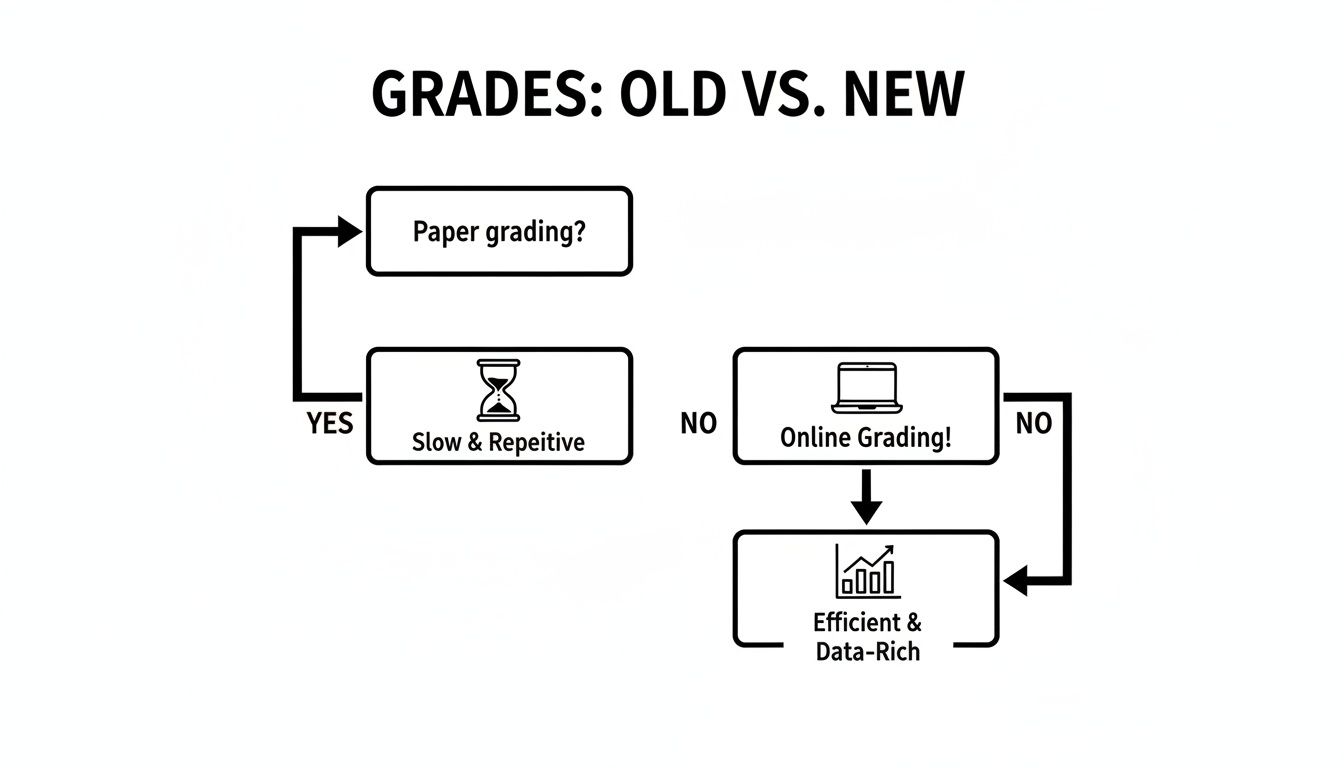
As you can see, paper grading leads to slow, repetitive work. In contrast, online grading opens a path to efficiency and actionable data that helps students improve.
Matching Tools to Your Center's Goals
The best tool aligns with your educational model. A test prep center needs features for timed exams and instant scoring. A writing center requires robust tools for annotating documents and leaving high-quality, qualitative feedback. For more details, see our guide on tutoring software integrations.
Consider how a grading tool connects to your main management system. A standalone app creates data silos, forcing you to manually transfer grades. An integrated solution automatically syncs data, connecting grading directly to progress reports and parent communications.
Comparison of Online Grading Tool Types
Tool Type | Best For | Key Features | Example Integration |
|---|---|---|---|
Automated Quiz Graders | Objective tests (multiple-choice, T/F, fill-in-the-blank) | Instant scoring, question randomization, timed tests | Syncing quiz scores directly to a student's progress report in your TMS. |
Document Annotation Tools | Essays, reports, and written assignments | Inline comments, highlighting, reusable comment banks | Linking annotated feedback to a specific tutoring session for review. |
Rubric-Based Graders | Projects, presentations, and subjective assessments | Customizable rubric builders, criteria-based scoring | Tying rubric scores to learning objectives tracked in your management software. |
Integrated Platform Modules | All-in-one operational efficiency | Automatic grade sync, parent notifications, data analytics | A seamless workflow where grading an assignment can trigger an invoice. |
Ultimately, choosing the right tool depends on your priorities. Whether you need fast quiz results or a platform for detailed feedback, the goal is a system that simplifies your tutors' work and provides more value to students.
The Five Biggest Wins of Digital Grading
Moving your grading online fundamentally upgrades how your tutoring center operates. These tools reduce the administrative burden, sharpen feedback quality, and unlock powerful data that helps students succeed. They provide a clear return on investment by improving both educational outcomes and operational efficiency.

1. Radically Reduced Administrative Workload
The most immediate benefit of online grading for teachers is automation. Software instantly handles tasks like marking dozens of multiple-choice tests. This frees up your tutors to focus on planning engaging lessons and providing one-on-one student attention. By automating objective assessments, you can reclaim hundreds of hours per year.
2. More Consistent and Actionable Feedback
Digital tools ensure every student is measured against the same clear standards. Shared rubrics and comment libraries remove guesswork from grading, making feedback uniform across all tutors. This structured approach turns subjective evaluation into a clear roadmap for student improvement.
Standardized Rubrics: You build one detailed rubric for an assignment, and every tutor uses it for consistent evaluation.
Comment Banks: Tutors save and reuse feedback for common mistakes, delivering rich, specific advice in seconds, not minutes.
Direct Annotation: Tutors leave clean, precise comments directly on a student's digital work, making feedback easy to understand.
3. Access to Powerful Learning Analytics
Online grading platforms are data goldmines. Each graded assignment contributes to a detailed profile of student performance. This reveals learning patterns and knowledge gaps that would be invisible on paper. This data helps you make smart decisions about your curriculum and where to offer extra support.
Imagine you see that 70% of students struggled with a specific concept on a quiz. That’s a teaching opportunity. You can immediately see the trend and adjust your approach. For more on this, see how to create free quizzes online that generate actionable data.
4. Boosted Academic Integrity
Modern grading systems often include powerful, built-in plagiarism detectors. These tools automatically scan every submission against a massive database of web pages and academic papers. This feature instantly flags potential issues, safeguarding academic standards and ensuring the work you grade is genuine.
5. Streamlined Operational Workflow
When your online grading tool integrates with your tutoring management system, you create a seamless operation. A graded assignment can automatically update a student's progress report, notify parents, and trigger the next step in your billing cycle. This connection eliminates hours of manual data entry and keeps everyone informed in real-time.
How Do You Implement an Online Grading System?
Switching to an online grading system is a strategic move, not just a tech upgrade. A successful rollout requires a clear plan that fits your center's needs, gets staff on board, and integrates into daily operations. This guide breaks the process down into five manageable steps.
Step 1: Assess Your Center's Needs
Before looking at software, audit your current grading processes. What types of assignments do your tutors grade most often? Is it multiple-choice quizzes, in-depth essays, or project-based work? Your answers will immediately narrow your search for the right tool. Then, create a "must-have" features list.
Step 2: Choose the Right Tool
With your needs defined, you can evaluate your options. The market for online grading for teachers is broad. While a standalone tool might seem easy, it can create frustrating data silos. An integrated solution is almost always the smarter long-term choice for operational efficiency.
Step 3: Create Standardized Digital Rubrics
Once you have a tool, build your grading frameworks. Standardizing your rubrics is one of the most powerful ways to ensure fairness and consistency. Involve your teaching staff to convert old paper rubrics into new digital templates or build better ones from scratch. This makes expectations clear for students.
Step 4: Train Your Teaching Staff
A new system is only as good as the people using it. Host dedicated training sessions that focus on both the "how" and the "why." Show tutors how the new tool will make their lives easier and help them give more meaningful feedback. Offer ongoing support like cheat sheets or short video tutorials. See our tutoring software implementation plan for a full roadmap.
Step 5: Integrate and Automate
The final step is connecting your new grading system with your other operational software. If you chose an integrated platform, most of this work is already done. Now you can fine-tune settings to automate key tasks, such as rule-based progress report updates. This is where you see the greatest efficiency gains.
Connecting Grading with Tutoring Management Software
Online grading tools unlock their true power when connected to your central tutoring management software. This integration creates an ecosystem where academic data informs your business operations. A graded assignment can instantly update reports, notify parents, and trigger billing without any manual data entry.
This connection breaks down data silos between different systems. Instead of student performance data being trapped in one app, everything communicates. This unified view helps you make smarter decisions for your students and your bottom line.
How Does Integration Create a Seamless Workflow?
When your online grading for teachers tool communicates with your management software, it triggers a chain reaction. A single graded assignment ripples through your entire operation, automating actions that save time and reduce errors. This seamless information flow ensures everyone has the most current data.
For example, when a tutor finalizes a grade, the system can automatically:
Update Student Progress Reports: The score and feedback instantly appear in the student’s digital record.
Trigger Parent Notifications: You can set up automated emails or texts to parents with the grade and comments.
Inform Lesson Planning: Tutors see a student’s entire grading history, making it easy to tailor future sessions.
Streamline Billing Cycles: A completed grade can trigger an invoice if you bill based on milestones or sessions.
Why is a Unified Data System So Powerful?
A single source of truth for all student information is a game-changer. It eliminates the need to cross-reference spreadsheets or manually copy data between apps. A unified system makes your operations simpler and more accurate, reducing human error and saving time.
This centralized data also provides better operational intelligence. You can run comprehensive reports linking academic performance to business metrics. A unified view empowers you to make smarter, data-driven decisions for every student and for your business. For growing centers, a platform like Tutorbase provides the infrastructure to connect these workflows.
Frequently Asked Questions (FAQ)
1. What is the main benefit of online grading for teachers?
The main benefit is a significant reduction in administrative workload. Online tools automate the scoring of objective tests and streamline the feedback process, freeing up an average of 5-8 hours per week for teachers to focus on instruction and student support.
2. Will automated grading replace teachers?
No, automated grading will not replace teachers. These tools act as assistants that handle repetitive tasks like scoring multiple-choice quizzes. This allows educators to dedicate their time and expertise to providing nuanced, qualitative feedback on complex assignments where human insight is essential.
3. How do online grading platforms ensure academic integrity?
Online grading platforms ensure academic integrity using built-in plagiarism detectors that scan submissions against vast online databases. Many also offer secure testing environments that lock down a student's browser and use question randomization to prevent cheating.
4. Can online grading handle different types of assignments?
Yes, modern online grading tools are versatile. They can handle various assignment types, including written essays, project-based submissions (like presentations or videos), and performance assessments via audio or video uploads, not just multiple-choice quizzes.
5. How does online grading improve feedback for students?
Online grading improves feedback by making it more consistent, timely, and specific. Features like shared digital rubrics ensure all students are evaluated against the same criteria, while comment banks allow tutors to provide detailed, reusable feedback for common errors quickly.
6. Is it difficult to train teachers on a new grading system?
No, the learning curve is typically small because most online grading tools are designed to be intuitive. A successful rollout with short training sessions and ongoing support ensures teachers feel confident and see the immediate time-saving benefits.
7. How does online grading connect to a tutoring management system?
When integrated, a grade entered into the online grading tool can automatically update the student's progress report in the management system, trigger notifications to parents, and even link to billing cycles. This creates a seamless, automated workflow.
Ready to eliminate administrative headaches and create a seamless workflow from attendance to payroll? Discover how Tutorbase can automate your tutoring center's operations. Get started today at tutorbase.com/register.


