


Using WhatsApp for your tutoring business streamlines communication, boosts parent engagement with over 90% open rates, and automates administrative tasks like reminders and scheduling. Integrating it with a management system like Tutorbase via the WhatsApp Business API scales these benefits, saving time and reducing no-shows.
Using WhatsApp for your tutoring business is about meeting parents and students where they already are. It shifts communication from slow emails to instant chats, solving problems like missed updates and low engagement. This change is effective due to WhatsApp's high open rates.
Why is WhatsApp a must-have for modern tutors?

Traditional methods like email often get buried in crowded inboxes. A forgotten email can mean a missed appointment, a delayed payment, or a parent left wondering about their child's progress. WhatsApp cuts straight through that noise, giving you a direct line for every critical update.
This immediate connection is more than just a convenience, it builds trust. When parents get a quick answer about a tricky homework problem or easily confirm a session time, they feel more involved and valued. It strengthens the relationship between your tutors and the families you serve.
How can WhatsApp boost engagement and slash no-shows?
One of the biggest wins here is the platform's incredible engagement. While emails might sit unopened for days, WhatsApp messages have an open rate of over 90%, with most read within minutes. For a busy tutoring center, that is a game-changer for reducing no-shows and ensuring timely payments.
Imagine sending an automated lesson reminder via WhatsApp the day before a session. You are far more likely to get a response than with an email reminder. This one simple action can dramatically lift attendance rates and keep your schedule running smoothly.
Streamline Your Admin Workflow
Bringing WhatsApp into your operations creates a single, central hub for nearly all your communications. Instead of juggling emails, phone calls, and texts, you can manage inquiries, bookings, and parent questions in one place. You can save immense time on admin with this approach.
Here’s how it transforms your day-to-day tasks:
Instant Lead Response: When a new parent inquires, you can respond in minutes. That speed shows you are professional and attentive, which increases the chance of converting that lead by up to 70%.
Simplified Scheduling: Confirming a class time or rescheduling a session becomes a quick conversation, not a painful back-and-forth email chain.
Efficient Updates: You can ping entire groups of parents at once using broadcast lists for important news, like holiday closures or a new course.
This structured approach also makes it easier to manage your pipeline of new leads. To really dig into turning initial chats into enrollments, take a look at our guide on how a tutoring CRM can convert inquiries into enrollments. By 2026, this will be a core part of how efficient tutoring businesses operate.
Choosing Your WhatsApp Business Tool
You have two main paths you can take with WhatsApp, and picking the right one is critical. It all boils down to the WhatsApp Business App versus the WhatsApp Business API. Your choice here will define how you talk to parents and how smoothly your business can scale.
What is the WhatsApp Business App?
The WhatsApp Business App is a free application you download for Android or iOS, designed specifically for small business owners. Think of it as a supercharged version of the personal WhatsApp you already use. It allows you to create a business profile, set up quick replies for common questions, and look more professional.
It is a fantastic place to start. You can set up a business profile showing your address, opening hours, and a link to your website. You can also create quick replies for questions you get daily, like "What are your fees?" This is a simple time-saver that keeps your answers consistent.
When should a tutor use the free app?
The free app is your go-to if you're just dipping your toes into using whatsapp for tutoring business communications. It is tailor-made for smaller outfits where one person handles the bulk of the parent chats.
The Business App is probably the right fit if you:
Are a solo tutor or run a small center with fewer than 50 students.
Manage all your communication from one main business phone.
Do not need to connect WhatsApp to other software like a CRM.
Just want basic automation, like greeting messages for new inquiries.
What is the WhatsApp Business API?
The WhatsApp Business API (Application Programming Interface) is not an app you can download. It is a powerful gateway that lets you plug WhatsApp into other business systems, like Tutorbase. This is what unlocks serious automation, multi-user access, and messaging on a much larger scale.
This is the solution for growing or established tutoring centers. It lets multiple staff handle parent chats from a single, unified inbox, all tied to your main business number. It gives you the power to send automated messages triggered by events, like sending a payment reminder when an invoice is overdue.
Is the API right for your tutoring business?
The API is all about scale, automation, and efficiency. It becomes a necessity once your tutoring business grows past what one person can realistically handle on a single phone.
It is time to move to the API when you need to:
Let multiple staff members manage parent conversations simultaneously.
Integrate WhatsApp with your CRM or a tool like our Tutorbase WhatsApp widget.
Send automated notifications for bookings, payments, and reminders.
Handle a high volume of chats without letting inquiries slip through the cracks.
WhatsApp Business App vs API: A Quick Comparison
To make the choice clear, it helps to see the two options side-by-side. The free app is simple and direct, while the API is a powerhouse for automation and team collaboration. Here is a quick breakdown of the key differences:
Feature | WhatsApp Business App | WhatsApp Business API |
|---|---|---|
Best For | Solo tutors, small centers | Growing & multi-branch centers |
Cost | Free | Paid (per conversation) |
User Access | 1 user on 1 phone | Multiple users, one number |
Automation | Basic (greetings, away) | Advanced (CRM integration) |
Broadcasts | Manual, to saved contacts | To opted-in users at scale |
Ultimately, the free App gets you in the game, but the API lets you truly scale your operations and automate the repetitive tasks that eat up your time.
How do you design your tutoring communication workflow?
A messy WhatsApp strategy is just organized chaos. Sending messages randomly without a clear plan is how inquiries get lost and parents get confused. A structured communication workflow is the backbone of using WhatsApp effectively.
By mapping out the entire student journey, from the first inquiry to booking a trial, you build a professional, responsive system. This is about crafting a consistently positive experience for parents that cuts down your manual admin work.
Mapping the Student Communication Journey
Your workflow should mirror the exact path a family takes when they join your center. Think of each stage as a key opportunity to communicate clearly and guide them smoothly to the next step. A practical guide on setting up texting workflows can be a huge help.
Consider these make-or-break interaction points:
Initial Inquiry: The first contact a prospective parent makes.
Trial Lesson Booking: Confirming the date, time, and tutor.
Post-Trial Follow-up: Gathering feedback and encouraging enrollment.
Onboarding & Welcome: Sending essential info to new families.
Ongoing Communication: Sharing progress updates and schedule changes.
Billing & Payments: Sending friendly reminders and confirming payments.
The online tutoring space is projected to hit a massive USD 31 billion by 2033, according to Global Market Insights. This growth runs parallel to WhatsApp's own dominance, where over 200 million businesses already use the platform to connect with customers.
This flowchart breaks down how to choose the right WhatsApp tool for your tutoring business, depending on your size and needs.
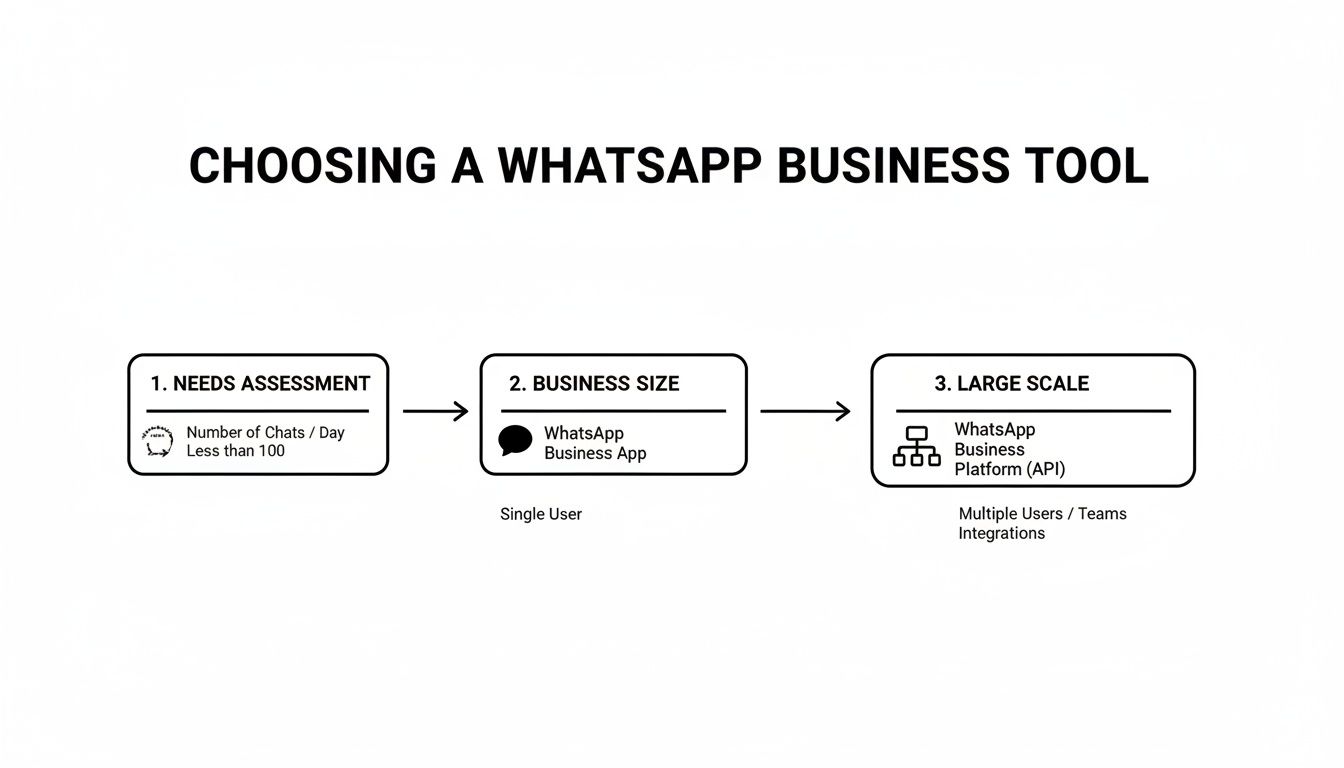
As you can see, the free Business App is perfect when you're starting out. But once you need to handle more complex communications or multiple locations, the API becomes essential.
Crafting Essential Message Templates
Message templates are your best friend for saving time. These are simply pre-written responses for the common questions and scenarios you handle every day. Having a library of these ensures your brand voice stays consistent, no matter which staff member is replying.
Example 1: New Inquiry Quick Reply
"Hi [Parent Name], thanks for your interest in [Your Tutoring Center]! We offer [Subject] tutoring for [Age Group]. Are you looking for group classes or 1:1 sessions? Our trial lesson is a great way to start. Let me know what time works best for you!"
This template gets right to the point. It acknowledges the parent, provides key info, asks a clarifying question, and offers a clear next step. It is friendly, efficient, and sets a professional tone.
Example 2: Trial Lesson Confirmation
"Great news! We've confirmed [Student Name]'s trial lesson for [Subject] with [Tutor Name] on [Date] at [Time]. Please arrive 5 minutes early at our [Location/Online Link]. We're excited to meet you!"
A message like this locks in all the critical details, drastically reducing the chance of mix-ups or no-shows. It builds confidence and shows you are organized from the very first interaction.
Automating Messages to Increase Engagement

Automation helps you scale your personal touch without hiring more people. Done right, it lets you handle routine stuff instantly, freeing you to focus on conversations that matter. It shifts your WhatsApp for tutoring business strategy from reactive to proactive, ensuring no parent feels left hanging.
This is not about sounding like a robot. It is about getting the right information to the right people at exactly the right time. You can set up simple chatbots to handle initial questions or answer common queries after hours, like "What are your weekend hours?"
Practical Automation for Tutors
Effective automation zeroes in on the key moments in a student's journey. You should start with the tasks that eat up the most time. Class reminders are a perfect example; they are simple to set up and can slash your no-show rate by up to 40%.
Here are a few powerful automations you can implement right away:
Automated Class Reminders: Schedule messages to ping families 24 hours before a session. You should include the time, tutor's name, and a direct link for online lessons.
Post-Session Follow-Ups: As soon as a class ends, send a quick message asking for feedback or sharing a link to the next lesson's materials.
Birthday Greetings: A simple, automated "Happy Birthday!" goes a long way. It builds real rapport and shows you care.
By automating these communications, you create a consistent, professional experience. It signals that you are organized and reliable, two things parents look for when choosing a tutor. You can explore innovative WhatsApp automations to reshape how you communicate.
How to Use Broadcast Lists for Targeted Announcements
Think of Broadcast Lists as your tool for sending targeted messages without creating a noisy group chat. When you send a broadcast, the message arrives as an individual chat to each person, so privacy is maintained. This is perfect for announcements relevant only to certain students.
For instance, you could create separate broadcast lists for:
Students currently enrolled in your SAT prep course.
Families with kids in elementary school.
Parents who have shown interest in a summer program.
This targeted approach prevents families from getting message fatigue. It makes sure your announcements actually land with impact.
How to integrate WhatsApp with your management software
The real power of automation is unlocked when you connect WhatsApp to your tutoring management software. By using the WhatsApp Business API, you can link tools like Tutorbase to sync scheduling, billing, and student data directly with your messaging. This is how you create a truly seamless operation.
Over 200 million businesses are on the platform, making WhatsApp a non-negotiable tool. Engagement is unbeatable, with some reports citing 98% message open rates, which lets you handle logistics in real time. This integration makes more advanced automations possible.
For a deeper dive, we have a complete guide on how to set up automated lesson reminders for your tutoring business.
Keeping Your Communication Professional and Compliant
Using WhatsApp in your business is not just about sending messages; it is about building trust and playing by the rules. Getting this right means respecting parent privacy and sticking to platform policies. It is the key to avoiding penalties and building a stellar reputation.
The cornerstone of professional WhatsApp use is explicit user consent. You must get a parent's clear permission (an "opt-in") before you send a single proactive message. Adding a parent to your contact list without permission is a fast track to getting your business number blocked.
How do you secure and manage parent opt-ins?
Getting permission should be a transparent part of your onboarding process. You must ask clearly and show them what is in it for them.
Here is how to handle it properly:
Add a Checkbox on Forms: Put a simple, unchecked checkbox on your online registration form. Something like, "Yes, please send me class reminders via WhatsApp" works perfectly.
Explain the Value: Briefly tell them what kind of messages they will get. For example: "Receive instant lesson reminders and progress notes." This frames it as a benefit.
Keep Good Records: Always log when and how you obtained consent. This shows you are a professional business that takes privacy seriously.
A parent can withdraw their consent at any time. You are required to provide a clear and easy way for them to opt out, like replying with "STOP." Honoring these requests immediately is non-negotiable for compliance.
How do you maintain a consistent brand voice?
When you have multiple staff messaging parents, consistency is everything. A jumbled communication style can confuse parents and make your operation look disorganized. Setting a few clear guidelines for your team can make all the difference.
Think about standardizing these key elements:
Tone of Voice: Decide on your brand's personality. Are you formal and academic, or more friendly and encouraging? Ensure every team member sticks to it.
Greetings and Sign-offs: Simple things like using a consistent opening ("Hi [Parent Name],") and closing ("Best, The [Your Centre Name] Team") make a huge impact.
Response Times: Set an internal goal for replying to messages, like within 2 business hours. This helps manage parent expectations.
By establishing these simple rules, you ensure every family gets the same high-quality, professional experience in 2026, no matter who they talk to.
Frequently Asked Questions (FAQ)
Can I use my personal WhatsApp for my tutoring business?
No, you should use the free WhatsApp Business App. Using a personal account violates WhatsApp's terms and lacks professional tools like a business profile, automated messages, and a service catalog. The Business App helps you manage parent communications professionally.
What is the real cost of the WhatsApp Business API?
The WhatsApp Business API uses a pay-per-conversation model, which is a 24-hour messaging window. The cost varies based on who initiates the chat and their country. You access the API through a provider, who may add platform fees.
How do I get parents to agree to WhatsApp messages?
You should make it part of your official sign-up process. Add a clear checkbox on your enrollment form asking for permission to send updates via WhatsApp. Explain the benefit to them, such as receiving instant class reminders and progress notes on their phone.
Can WhatsApp connect with my tutoring management software?
Yes, the WhatsApp Business API is built for this type of integration. Connecting WhatsApp to a system like Tutorbase allows you to automate messages based on actions in your software, such as sending a payment link when an invoice is generated.
Is WhatsApp secure for sharing student information?
WhatsApp messages are end-to-end encrypted, making them secure for day-to-day communications like scheduling and reminders. However, you should avoid sending highly sensitive personal data over the platform and always comply with local data privacy laws like GDPR.
How many people can use one WhatsApp business number?
With the free WhatsApp Business App, only one person can use the account on a single phone. The WhatsApp Business API, however, is built for teams, allowing multiple users to access the same number through a shared team inbox. This is essential for scaling your business.
Ready to eliminate double-bookings and cut down on admin time? Tutorbase consolidates scheduling, billing, and payroll into one smart platform, helping you run your tutoring center more efficiently. See how it works at tutorbase.com/register.


