


Key Takeaway: Enrichment center software is an all-in-one platform designed to automate your most time-consuming tasks. It integrates scheduling, billing, payroll, and parent communication to reduce administrative work by over 60%. This guide will show you how these features solve daily operational headaches and drive measurable business growth.
What is Enrichment Center Software?
Enrichment center software is the central system for your educational business. Instead of juggling separate tools, it integrates all critical operations into one cohesive platform. This prevents the constant errors and lost time that come from using disconnected data spreadsheets and calendars.
Trying to manage a growing center with spreadsheets is chaotic. You face double-bookings, missed payments, and frustrated parents. A unified platform brings harmony to your operations. When a teacher marks attendance, the system instantly triggers an accurate invoice and calculates the teacher's pay.
This seamless flow gets rid of manual data entry and cuts down on human error. It gives you a real-time, honest look at your business's health. The right software can save owners over 10 hours of administrative work every single week.
The Shift from Manual Methods to Modern Platforms
The move toward integrated software is a massive industry shift. The global online tutoring software market was valued at USD 2.5 billion in 2023. It is projected to reach USD 9.3 billion by 2032, showing a compound annual growth rate (CAGR) of 15.5%. This proves centers need efficient solutions to grow.
This isn’t just about new technology. The benefits are immediate and tangible:
Less Admin Overload: Automating tasks like invoicing and payroll frees up your time.
Fewer Mistakes: You can finally say goodbye to accidental double-bookings and payroll errors.
A Better Parent Experience: Parents get a self-service portal for scheduling and payments.
Smarter Decisions: With all your data in one place, you can spot enrollment trends.
Who Uses This Kind of Software?
Any learning center can benefit, but this software is a game-changer for growing educational businesses. Tutoring centers, after-school programs, music academies, and language schools all depend on these platforms. They help manage complex schedules and billing cycles effectively.
Many centers also operate as nonprofits. It is worth looking into specialized tools like Top Membership Management Software for Nonprofits. These tools cater to their unique financial and reporting needs. By automating core functions, centers can scale their impact without hiring more admin staff.
Core Features That Drive Efficiency and Growth
The best enrichment center software is a single, interconnected system. Five core features work together: smart scheduling, automated billing, integrated payroll, room management, and people management. This tight integration automates your operations, cuts down on mistakes, and clears your path to scale.
Think of it less like a toolbox with separate tools and more like an ecosystem. Each feature feeds into the next, turning operational chaos into a smooth workflow. Let’s break down the five must-have features that make this possible.
What is Smart Scheduling?
Smart scheduling is more than a digital calendar. It is an intelligent system that acts as your operational co-pilot. It prevents booking conflicts by checking teacher availability, room capacity, and student needs simultaneously. You will never double-book a tutor or misplace a student again.
Imagine a parent asks for a "Grade 10 Math class on Tuesday afternoons." The software instantly shows you every viable time slot. This one function alone can cut the time it takes to onboard a new student by up to 3x.
A good smart scheduler handles:
Real-Time Conflict Detection: The system flags conflicts instantly and will not let you book an unavailable teacher.
Intelligent Slot Finding: It generates a list of possible lesson times based on multiple criteria.
Waitlist Management: When a spot opens, it automatically notifies parents on the waitlist.
How do I automate tutoring center billing?
Automated billing links attendance directly to invoicing. This means you can stop creating invoices by hand forever. When a teacher marks a student as present, the software automatically generates the correct charge. This system eliminates guesswork and mistakes.
It manages everything from pay-as-you-go sessions to complex subscription plans. It takes the awkward task of chasing payments completely off your plate. Automated billing ensures you get paid accurately and on time for every class you deliver.
The AI tutoring market is expected to jump from USD 1,422 million in 2025 to USD 5,754 million by 2035. Machine learning, which already has a 52% market share, powers this boom. It's the same tech that drives features like auto-invoicing from attendance.
Integrated Payroll for Complex Contracts
With integrated payroll, your software calculates tutor pay based on the lessons they teach. It pulls data straight from the scheduling and attendance modules. Payroll is always accurate and aligned with your center's activity, which helps manage diverse tutor contracts.
Many centers struggle with varied pay structures. One teacher might get an hourly rate while another gets a percentage of revenue. An integrated system handles all of these variations automatically and without error.
Common payroll models it should support include:
Hourly Rates: The system multiplies hours taught by a set rate.
Revenue Sharing: Tutors earn a percentage of the revenue from their lessons.
Per-Lesson Fees: Tutors receive a flat fee for each class taught.
Hybrid Models: A mix, like a base salary plus a bonus for weekend classes.
How Does Multi-Location Room Management Work?
Multi-location room management gives you a central dashboard. You can see the availability, capacity, and usage of classrooms across all your branches. It provides the bird's-eye view you need to avoid logistical nightmares as you scale your business.
An operations manager can see that Room A downtown is empty on Wednesdays while Room B uptown is overbooked. With that data, they can shift schedules to balance the load. This helps you maximize revenue without leasing more space.
As you improve what happens inside those rooms, consider how software could work with the best AI study tools. These tools can complement your teaching and give students extra resources.
Why Do I Need Centralized People Management?
Centralized people management puts all information about students, parents, and teachers into a single, searchable database. It acts as your center’s smart digital filing cabinet. No more scattered spreadsheets or digging through emails to find a parent's phone number.
This unified view makes communication and admin tasks a breeze. Before a parent-teacher meeting, a tutor can pull up a student's complete profile. They see attendance history, payment status, and performance notes in one spot.
Student Profiles: Track academic progress, lesson history, and specific learning needs.
Parent/Payer Profiles: Manage contact details, billing preferences, and communication logs.
Teacher Profiles: Securely store contracts, qualifications, availability, and payroll info.
How Software Fixes Your Biggest Operational Headaches
Enrichment center software is designed to solve the most persistent, time-sucking problems you face. It automates invoicing and payment chasing. It stops chaotic scheduling conflicts before they start and simplifies payroll. The goal is to get you out of the weeds so you can focus on growth.
The real value of these platforms is in how they solve frustrating, real-world problems. It's about removing entire categories of administrative work from your plate. Let's break down the most common headaches and see how a modern platform provides the cure.
The Endless Cycle of Chasing Payments
For most center owners, billing is the biggest time sink. You spend hours creating invoices, checking who has paid, and sending awkward reminder emails. This process is slow, drains your energy, and can strain relationships with parents.
The Solution: Automated Billing and Online Payments
You will feel an immediate and massive impact here. Imagine a teacher marks attendance, and that action instantly triggers a correct invoice and sends it to the parent. The entire process becomes hands-off for you, saving you valuable time.
Integrated Payments: Parents get a link to a secure online portal where they can pay instantly.
Automatic Reminders: The system sends polite, automated reminders for overdue invoices.
Real-Time Tracking: Your dashboard shows exactly who has paid, giving you a clear view of cash flow.
The Chaos of Scheduling Conflicts
Double-booking a teacher or scheduling two classes in the same room is more than a simple mistake. It panics your staff, frustrates parents, and can damage your center's reputation. These errors are almost inevitable when you juggle disconnected calendars.
According to Afterschool Alliance, for every child enrolled in an after-school program, three more are on a waitlist. This shows just how high demand is. Efficient scheduling is critical to avoid turning families away due to preventable errors.
The Solution: Real-Time Conflict Detection
Modern software acts as a central traffic controller for your schedule. It sees every moving part in real-time and stops collisions before they happen. When you book a lesson, the system instantly cross-references teacher availability, the room's schedule, and class capacity, eliminating double-bookings.
The Nightmare of Manual Payroll
Calculating teacher payroll can be a tangled mess. You likely have teachers on different hourly rates, revenue-sharing agreements, and salaried contracts. Crunching those numbers by hand in a spreadsheet often leads to mistakes and unhappy teachers.
The Solution: Integrated and Automated Payroll
An integrated payroll system pulls data directly from attendance records. It automatically calculates what each teacher is owed based on their specific contract terms for that pay period. Your payroll will be accurate and on time every cycle.
It handles multiple contract types like hourly, revenue share, and per-lesson fees.
It automatically applies any special rates, like weekend premiums or bonuses.
It generates clear payout statements that teachers can review and approve.
If you're ready to automate these headaches, you can get started with a platform like Tutorbase.
Measuring the Real Impact of Automation on Your Business
New software can feel like just another expense. With the right platform, it's an investment that pays for itself, and the proof is in the numbers. Switching to enrichment center software delivers real, measurable improvements in your business operations.
We're talking about a massive drop in administrative hours and faster student sign-ups. The market for this software hit USD 2.3 billion in 2024 and is expected to soar to USD 5 billion by 2033. This growth is because it delivers tangible results.
Centers using modern platforms report a 60% reduction in admin tasks and a 3x faster onboarding speed. These improvements directly impact their bottom line. For a closer look, you can explore the full market analysis on MarketGrowthReports.com.
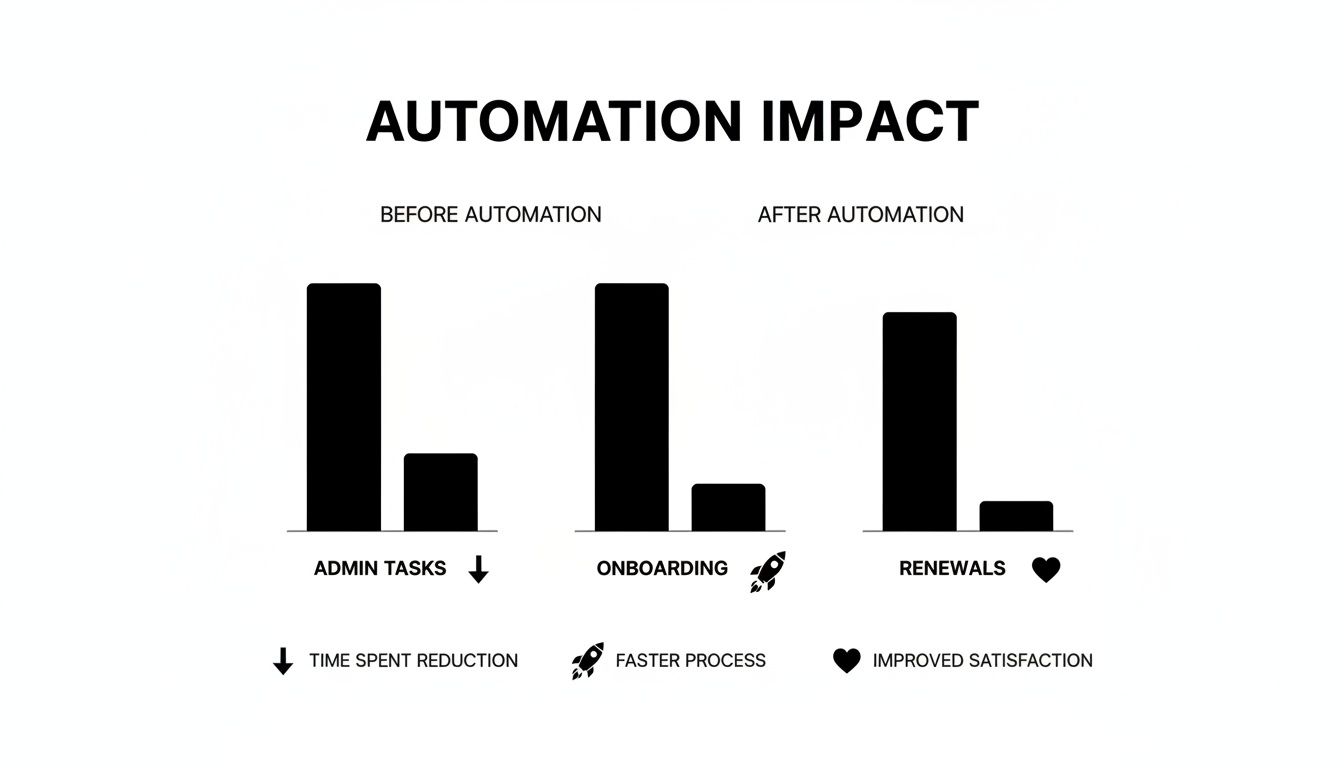
The gains are significant across the board. Saved time becomes a powerful engine for both revenue and customer satisfaction. Let's dig into the specific metrics you should be tracking to measure your success.
Key Performance Indicators (KPIs) to Track
To understand the impact, you must focus on hard numbers. These three KPIs paint a clear picture of how enrichment center software strengthens your business from the inside out. Tracking them proves the software's value.
Admin Hours Saved: Track time spent on scheduling, invoicing, and chasing payments. A 60% reduction is a realistic benchmark, often freeing up more than 10 hours a week.
Student Onboarding Speed: Measure the time from first inquiry to first paid class. With automated registration, this process can become 3x faster.
Monthly Renewal Lift: A smooth parent experience directly impacts retention. Centers often see monthly renewal rates climb by up to 42% with a self-service portal.
Business Impact: Before vs. After Software Comparison Table
This table breaks down the shift from manual processes to an automated platform. It shows the quantifiable improvements you can expect in your enrichment center.
Business Metric | Before Software (Manual) | After Software (Automated) | Percentage Improvement |
|---|---|---|---|
Admin Hours/Week | 20 hours | 8 hours | 60% |
Onboarding Time | 3 days | 1 day | 67% (or 3x faster) |
Monthly Renewals | 65% | 92% | 42% |
Invoice Errors | ~5% | <1% | 80% |
These numbers highlight how automation directly translates into saved time and higher client retention. It also leads to faster revenue collection and fewer costly mistakes.
How Does Room Management Boost Revenue?
The right software helps you squeeze more revenue out of your existing assets. Intelligent room management gives you a bird's-eye view of your facility's utilization. You can instantly spot empty time slots and find opportunities to fill them.
By analyzing usage patterns, you can optimize schedules to pack more classes into your peak hours. This simple adjustment can turn underused space into a consistent source of income. For a deeper dive, check our guide on the ROI of tutoring management software.
Your Checklist for Choosing the Right Software
Choosing enrichment center software is a long-term strategic decision. You must prioritize platforms that can handle your unique rules, scale with your growth, and offer an intuitive experience. This checklist helps you look beyond price to find a true business partner.
Selecting the right software is one of the most critical decisions you will make. It's about finding a platform that becomes the operational backbone of your business. A rushed decision can lead to months of frustration and wasted resources.
Can the software handle my core functions?
This is the most important test. Can the software adapt to how your center operates? A rigid system will force you to change your successful processes. Ask pointed questions that reflect your day-to-day reality during any product demo.
Billing Models: Can it handle prepaid packages, monthly subscriptions, and pay-as-you-go billing?
Scheduling Rules: Does it support complex needs, like booking a specific teacher, room, and subject?
Payroll Complexity: Can it automatically calculate pay for different contracts, like revenue-share vs. hourly?
Will it scale with my future growth?
The software you choose today must support the business you plan to become in 2026 and beyond. A system that works for one location might fail when you expand. Do not pick a solution you will outgrow in a year.
Can it manage schedules and reporting across multiple locations from a single dashboard?
Is the system built to handle a high volume of lessons without slowing down?
Does the platform have a history of releasing new features for growing businesses?
Is the user experience good for everyone?
The platform has to be easy to use for everyone, not just the owner. If your administrators, teachers, and parents find the software confusing, adoption will fail. A smooth, intuitive user experience directly impacts efficiency and client satisfaction.
For a deeper analysis, our guide on tuition management systems reviews offers detailed comparisons. A complicated interface that requires extensive training is a hidden cost that drains productivity.
What kind of support and implementation is offered?
What happens after you sign the contract is critical. A smooth migration and reliable, ongoing support are just as important as the software itself. You are not just buying a tool; you are entering a partnership for your center's future.
What does the data migration process look like, and who is responsible?
Is comprehensive staff training included as part of the onboarding process?
What are the guaranteed response times for technical support inquiries?
How to Ensure a Smooth System Migration
Switching to new enrichment center software does not have to be a headache. With a solid plan, it is a manageable and exciting upgrade for your business. A smooth transition is not about speed; it is about being deliberate.
The process boils down to four key steps. You must get your data ready, set up the system to match your rules, train your team, and launch in phases. Getting this right minimizes disruption and delivers benefits from day one.

Moving to a new platform is a big project. A well-planned migration means you immediately reap the rewards of automation. Each phase builds on the last, ensuring your data is clean, your setup is accurate, and your team feels confident.
Step 1: Prepare and Clean Up Your Data
Your new system is only as good as the data you feed it. Before importing anything, take time to clean up your existing records. This is your chance for a fresh start. You can make sure you do not drag old mistakes into your new software.
This first step is critical. You should:
Archive Old Records: Get rid of inactive student profiles and historical data.
Correct Errors: Fix typos in names, update parent contact details, and standardize addresses.
Consolidate Duplicates: Merge duplicate profiles for students or parents to create one clean record.
Step 2: Configure the System and Train Your Staff
Once your data is clean, you can mold the software to your center’s unique operations. This means setting up your specific billing cycles, tutor payroll contracts, and scheduling rules. Work closely with your software provider’s onboarding team to get every detail right.
At the same time, make staff training a top priority. Rushing this part is a classic mistake that leads to frustration. Your team needs to feel comfortable using the new platform. For a detailed guide, check our post on creating a tutoring software implementation plan.
Step 3: Go Live in Phases
Instead of moving everything over at once, you should use a phased rollout. This approach lowers your risk by letting you test the system in a live environment. You can start with a smaller, more controlled group to ensure everything works as expected.
For example, you could start by running just your billing and payroll through the new system for one cycle. This lets you spot and fix any kinks on a small scale. Once you confirm the core functions run perfectly, you can confidently move everything else over.
Frequently Asked Questions (FAQ)
What is enrichment center software?
Enrichment center software is an all-in-one management platform. It helps educational centers automate operations like student scheduling, automated billing, payroll, and parent communication. This centralizes administrative tasks, reduces errors, and saves time for staff.
How much time will I save with enrichment center software?
Most center owners report saving over 10 hours per week on administrative tasks. The software automates repetitive work like creating invoices, chasing payments, and calculating payroll. This frees up your time to focus on teaching, parent communication, and business growth.
Can this software handle complex payroll for tutors?
Yes, modern enrichment center software is designed to handle complex payroll. It can manage various compensation models simultaneously, including different hourly rates, per-lesson fees, revenue-sharing agreements, and salaries with performance bonuses. This ensures your tutors are paid accurately and on time.
Is it difficult to switch from spreadsheets to a new system?
Switching systems is a project, but it is manageable with the right partner. Software providers have dedicated onboarding teams to guide you. The process involves cleaning your data, configuring the system to your rules, and training your staff for a smooth transition.
How does this software help manage multiple locations?
Multi-location management software provides a single, centralized dashboard. From one screen, you can view schedules, check room availability, monitor enrollment, and pull reports across all your branches. This gives you a bird's-eye view of your entire operation, helping you optimize resources.
What is the difference between a scheduler and a full software platform?
A basic scheduler only solves one problem: booking lessons. A complete enrichment center software platform integrates scheduling with automated billing, payroll, student management, and reporting. This end-to-end connection is what eliminates administrative work and provides a clear view of your business health.
Ready to stop wrestling with admin work and finally get a clear view of your business? Tutorbase is the all-in-one platform built to automate your operations so you can scale with confidence. Start your journey to a more efficient center today at tutorbase.com/register.


