
WhatsApp Booking System for Tutoring Centers: A Complete Guide for 2026

Published: December 25, 2025 by Amy Ashford

A proper WhatsApp booking system automatically captures parent inquiries into your CRM, preventing lost leads and eliminating manual data entry. Unlike simple "click-to-chat" buttons, an integrated system like Tutorbase's native widget works 24/7 to turn conversations into enrollments. This automation is crucial in markets like Hong Kong and Singapore, where WhatsApp is the dominant communication channel.

Think that little WhatsApp button on your website is enough? It’s a good start, but it might be costing you more leads than you realize.

While a simple ‘click-to-chat’ link opens a conversation, it doesn’t actually capture anything. It forces you or your admin staff to manually collect and re-enter every single parent's details, turning a quick inquiry into a tedious data-entry task. A true whatsapp booking system for tutoring centers does the heavy lifting for you.

Why Do You Need More Than a WhatsApp Button?
A modern office reception desk features multiple digital screens, including a tablet displaying a mobile app.

Many tutoring centers stick a basic WhatsApp link on their website and call it a day. They think it’s the easiest way for parents to get in touch. The reality is this common approach creates a massive administrative bottleneck and leads to lost revenue.

Every time a parent clicks that button, a staff member must manually ask for their name, their child’s details, and the nature of their inquiry. Then, they have to copy and paste all of that information into a separate spreadsheet or CRM. This process is slow and error-prone.

The True Cost of Manual WhatsApp Management

A potential lead messaging at 10 PM on a Friday might not hear back until Monday morning. By then, they’ve probably already booked a trial lesson with a competitor who responded faster. In high-volume markets like Hong Kong and Singapore, where WhatsApp is the dominant communication channel, this is a critical failure.

Manually handling each WhatsApp message adds 5–15 minutes of admin time per inquiry. A small center can lose 8–17.5 staff hours per week on chat coordination alone. That cost scales directly with your size, meaning larger centers can lose hundreds of hours just managing conversations.

What is the difference between a Standard WhatsApp Link and an Integrated Booking System?

The difference between a basic link and an integrated tool is night and day for efficiency and lead conversion. A simple 'click-to-chat' button leaves all the work to your staff. In contrast, a native widget like Tutorbase's automates the most critical first steps of the enrollment process.

This frees up your team to focus on building relationships and answering substantive questions rather than just copying and pasting contact details. In 2026, this automation is no longer a luxury; it is a necessity for competitive tutoring centers.

Feature

Standard 'Click-to-Chat' Button

Integrated System (e.g., Tutorbase)

Lead Capture

Manual data entry required. Leads are often lost.

Automatic: Parent details saved to CRM instantly 24/7.

Response Time

Dependent on staff availability (e.g., 9 AM to 6 PM).

Instant: Automated welcome messages sent 24/7.

Error Rate

High risk of typos or missed details.

Minimal, as data is captured directly from WhatsApp.

Workflow

Disconnected; requires multiple tools and manual work.

Seamlessly integrated with your scheduling and billing.

Business Impact

Lost leads after hours, high admin cost.

Increased enrollment, 60% reduction in admin time.

How to Turn an Inquiry into an Enrollment Automatically

A powerful whatsapp booking system for tutoring centers goes beyond just saving a phone number. It kicks off a smart automation sequence. Once a parent's details are in your system, you can trigger follow-up actions, like automatically sending them a link to book a trial lesson based on your tutors' live availability.

This kind of intelligent automation is becoming a must-have for modern service businesses. The principles of automated booking and inquiry management are closely related to the benefits of an AI phone receptionist for tutoring centers. You ensure your center is ready to capture every opportunity, 24/7.

How to Choose Your WhatsApp Integration Strategy

Picking the right WhatsApp approach is a foundational decision that will directly shape your center’s efficiency. Get it right, and you’ll have a lead-capture machine running 24/7. Get it wrong, and you’ll create more admin work for your team. Let's break down the three main paths you can take.

Can I Use the Standard WhatsApp Business App?

The simplest starting point is the WhatsApp Business App. It's free, you can set it up on a single phone in minutes, and it gives you some basic tools like quick replies and a business profile. This free app is fine for a solo tutor or a tiny center with a trickle of inquiries.

The problem? It hits a wall, fast. The app is chained to one phone number and one user, making it impossible for a team to manage inquiries together. More importantly, it offers zero real automation or integration. Every lead still needs to be manually typed into your CRM. It doesn’t scale.

What is the WhatsApp Business API?

This is where things get serious. The WhatsApp Business API is a tool that allows businesses to integrate WhatsApp messaging with their own software systems. Unlike the app, the API connects a platform like Tutorbase directly into WhatsApp's backend, enabling true automation for a high volume of messages.

This is what unlocks the features you actually need:

  • True Automation: Automatically grab a parent's details from a new chat and create a contact record in your CRM.

  • Team Access: Your whole admissions team can manage inquiries from a single, official business number through a shared inbox.

  • Smart Chatbots: Build chatbots to answer common questions, qualify leads, and schedule trial lessons automatically, day or night.

  • Broadcasts and Notifications: Send approved message templates, like class reminders or payment confirmations, to hundreds of parents at once.

The API is the bedrock of a real whatsapp booking system for tutoring centers. It turns WhatsApp from a simple messaging tool into an automated lead generation machine that handles the entire initial inquiry and booking process without human intervention.

Are Third-Party Chatbot Builders a Good Option?

A third route is using a non-native chatbot platform that connects to the WhatsApp API. Tools like these offer a user-friendly interface for building conversational flows. They can be a decent middle ground if you need more than the basic app but aren't ready for a fully integrated system.

The catch is usually the depth of integration. While these builders can automate conversations, they often struggle to sync seamlessly with your center's specific scheduling rules, tutor availability, or billing workflows. You end up with data stuck in different places, which means you’re back to doing manual work.

Choosing an integrated solution is key. For example, the Tutorbase native WhatsApp widget is not just a chatbot; it’s an extension of the core management software, ensuring every interaction is logged and actionable within your CRM.

How to Automate Bookings Directly in WhatsApp

A true WhatsApp booking system does more than just chat. It automates the entire journey from a parent's first question to a confirmed lesson in your calendar. This system turns a 15-minute admin task into a 30-second automated flow that captures new leads 24/7.

It starts the moment a parent messages you. Instead of them waiting for a reply, your system instantly kicks off the conversation. It greets them and gathers the essential details you need without delay.

How Can I Instantly Gather Key Information?

Your first automated message is your best tool for qualifying leads right away. Use WhatsApp's quick reply buttons. This feature makes it effortless for parents to give you what you need without typing long sentences. It speeds everything up and improves user experience.

A typical message flow might look like this:

  1. Automated Welcome: "Hi! Thanks for contacting Bright Sparks Tutoring. To help us find the perfect class for your child, could you please tell us what you're looking for?"

  2. Quick Replies: The parent sees buttons like "Trial Lesson," "Class Timetable," or "Fee Information."

  3. Gathering Details: Once they tap an option, the system follows up. For "Trial Lesson," the next question could be, "Which subject?" with buttons for "Maths," "English," and "Science."

In just a few seconds, you've captured the student's name, their grade, and the subject they're interested in. A smart system like Tutorbase takes this information and automatically creates a new lead profile in your CRM. Your team does zero manual data entry.

How do I move from information gathering to scheduling?

Once you have the basics, connect that parent directly to your live schedule. This is the core of what a real WhatsApp booking system for tutoring centers should do. It must check your tutors' availability, their subject expertise, and classroom capacity in real-time.

For example, a parent requests a "Primary 5 Maths trial lesson." The system immediately cross-references this with your schedule and sends a message back with a direct booking link or a list of available slots. The parent just taps to confirm a time, and the booking is done, all inside the WhatsApp chat.

The entire process from inquiry to a confirmed trial lesson happens in one continuous, automated conversation. The parent never has to leave the app, check their email, or call you back.

What are some must-have WhatsApp Message Templates for 2026?

Having a handful of pre-approved message templates ready to go keeps your communication consistent and efficient. To really make this work, get comfortable with tools for scheduling messages on WhatsApp, which is perfect for sending timely confirmations and reminders without lifting a finger.

Here are a few essential templates you can adapt:

  • New Inquiry Welcome: "Hello! Welcome to [Your Centre Name]. Thanks for your interest! To get started, could you please let us know the student's name and current grade level?"

  • Trial Lesson Confirmation: "Great news! We've booked [Student Name]'s trial lesson for [Subject] on [Date] at [Time] with [Tutor Name]. We look forward to seeing you at our [Location] branch!"

  • Class Reminder (Sent 24 hours before): "Hi [Parent Name], this is a friendly reminder about [Student Name]'s class tomorrow at [Time]. Please let us know if you have any questions. See you soon!"

These simple, automated messages keep parents in the loop, cut down on no-shows, and make your center look incredibly professional. When you automate these small touchpoints, you free up your team to focus on what actually matters: teaching and building relationships.

Connecting Payments and Calendars for a Seamless Workflow

A booking is just a promise until it's paid for and locked into your schedule. Integrating payments and calendars directly into your WhatsApp workflow closes this loop automatically. You eliminate awkward payment chasing and prevent the costly chaos of double-booked tutors or classrooms.

When a parent confirms a lesson slot via WhatsApp, the system should immediately trigger two critical actions. It must generate a payment link and update all relevant schedules automatically.
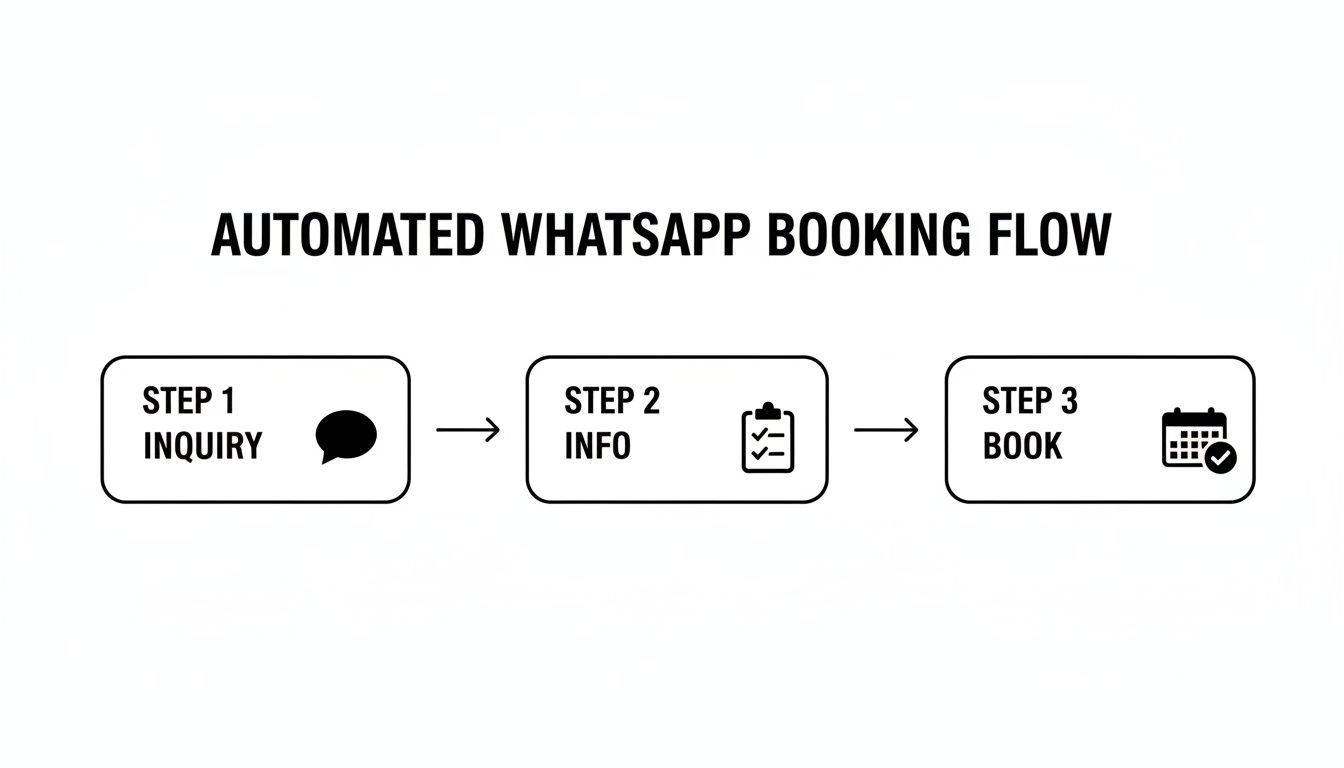
Flowchart illustrating an automated WhatsApp booking system with three steps: inquiry, info, and booking.

This process shows the journey from a parent's first question to a confirmed, paid booking. The system's ability to handle the entire intake and scheduling process without human intervention moves a parent from interest to action in just a few minutes.

How do I automate tutoring center billing?

Automating your billing through WhatsApp transforms payment collection from a manual chore into a seamless transaction. The goal is simple: make paying for a lesson as easy as booking it. Modern systems pull this off by integrating with payment processors like Stripe.

When a parent books a trial lesson or a class package, your system can automatically send a customized payment link directly within the WhatsApp chat. This single action dramatically improves cash flow and cuts down the admin burden of creating and tracking invoices.

Here’s how it works in practice:

  • Instant Payment Links: A parent confirms a booking, and the system immediately replies, "Great! To confirm your slot, please complete the payment here: [secure_payment_link]."

  • Reduced Friction: Parents can pay with a credit card or digital wallet in seconds without leaving the conversation or logging into a separate portal.

  • Automated Receipts: Once payment is complete, the system sends an official receipt back through WhatsApp, finalizing the transaction.

Syncing Bookings with Your Master Calendar

A paid booking is useless if it doesn't appear on your schedule correctly. Real-time calendar synchronization is non-negotiable. It is what stops operational nightmares like assigning two classes to the same room or a tutor to two different students at once.

A properly integrated system updates schedules the moment a booking is confirmed and paid for. This ensures your front desk, tutors, and management always have an accurate, up-to-the-minute view of everything happening at the center. By connecting WhatsApp bookings to your calendar, you create a single source of truth for your entire operation.

For example, when a parent books a lesson, the system automatically does three things:

  • Adds the lesson to the student’s personal schedule.

  • Blocks out that time on the assigned tutor's calendar.

  • Reserves the designated classroom or online meeting link.

This level of automation gives you a crystal-clear, real-time overview of your resources. You can dive deeper into the technical side by reading our guide on syncing with Google Calendar for your tutoring center.

How to Scale Your WhatsApp System Across Multiple Branches

When you expand your tutoring business from one location to several, you're not just adding students; you're adding complexity. How do you make sure a parent in one district gets the same polished, professional service as a parent inquiring about another center?

Without a unified system, each branch quickly becomes its own island with different staff and different WhatsApp numbers. This is not just inefficient, it can actively damage your brand. It creates a fragmented and confusing experience for parents.

Centralize Your Communication Hub

First, ditch the collection of separate WhatsApp numbers. Establish a single, primary business number for all incoming inquiries. Behind the scenes, you can set up intelligent routing rules that automatically direct messages to the right branch manager based on the parent's location or the specific course they're asking about.

This creates a seamless experience for parents while giving you powerful control. Your management team gets a bird's-eye view of all conversations from a unified dashboard. This ensures response times are met and no potential student slips through the cracks.

Here’s how that looks in practice:

  • Standardized Templates: Deploy approved message templates across all locations for greetings, trial confirmations, and payment reminders to keep your brand voice consistent.

  • Intelligent Routing: Set up rules to automatically assign new chats to the right staff member based on keywords (like "Causeway Bay campus") or the parent's initial selection.

  • Performance Monitoring: Track crucial metrics like response times and trial booking rates for each location to see which branches are excelling and which need more support.

Turn Your Dashboard into a Source of Business Intelligence

A unified dashboard is more than just an organized inbox; it’s a goldmine of business intelligence. When you can see all your lead data in one place, you start spotting trends that would be completely invisible when looking at branches individually.

For example, you might realize your latest marketing campaign is driving a ton of inquiries for your Kowloon branch but is falling flat for your Hong Kong Island location. That insight is pure gold. It tells you exactly where to reallocate your advertising budget for maximum impact.

This level of oversight empowers you to make genuinely strategic decisions. You can compare booking volumes, analyze which courses are most popular by location, and monitor staff performance across your entire network. This data-driven approach separates growing chains from struggling ones. Learn more in our guide to multi-location scheduling software.

Frequently Asked Questions (FAQ)

Here are answers to the most common questions we receive from tutoring center owners about implementing a WhatsApp booking system.

Question

Answer

How is this different from a standard WhatsApp link?

A standard link only opens a chat, requiring manual data entry for every inquiry. An integrated system automatically captures the parent's contact information into your CRM, saving time and preventing lost leads 24/7.

Do I need the WhatsApp Business API for this?

Yes, the WhatsApp Business API is essential for automation. The free WhatsApp Business App does not support integration with management software like Tutorbase, which is necessary for automated booking, payments, and scheduling.

Can I take payments directly through WhatsApp?

You can facilitate payments seamlessly. When a parent confirms a booking in the chat, the system sends a secure payment link from a provider like Stripe. The parent can pay instantly without leaving the conversation.

How does this system handle multiple branch locations?

A centralized system uses one main WhatsApp number with intelligent routing rules. It directs parents to the correct branch based on their inquiry, while a unified dashboard allows you to monitor performance and maintain brand consistency across all locations.

Will parents actually use this to book classes?

Yes. In markets like Hong Kong and Singapore, WhatsApp is the primary communication tool. Offering a way to inquire, schedule, and pay within a familiar app reduces friction and significantly increases conversion rates compared to email or web portals.

How much does a WhatsApp booking system cost?

The cost includes your management software platform fee and Meta's conversation fees, which are small charges per 24-hour chat session. The return on investment from captured leads and a 60% reduction in admin time is typically very high.

Can I use my existing business phone number?

In most cases, you can migrate an existing number to the WhatsApp Business API. This process requires verification but allows you to keep the number your parents already know and trust.

Is the system compliant with data privacy laws?

Yes, a professional system using the official WhatsApp Business API is designed for commercial use and security. Ensure your chosen management platform is also compliant with local regulations like GDPR and that you have a clear privacy policy.

Ready to stop losing leads and automate your enrollment process? Tutorbase integrates a native WhatsApp widget that captures every parent inquiry directly into your CRM, 24/7. See how it works by visiting tutorbase.com/register.

WhatsApp Booking System for Tutoring Centers: A Complete Guide for 2026

Published: December 25, 2025 by Amy Ashford

A proper WhatsApp booking system automatically captures parent inquiries into your CRM, preventing lost leads and eliminating manual data entry. Unlike simple "click-to-chat" buttons, an integrated system like Tutorbase's native widget works 24/7 to turn conversations into enrollments. This automation is crucial in markets like Hong Kong and Singapore, where WhatsApp is the dominant communication channel.

Think that little WhatsApp button on your website is enough? It’s a good start, but it might be costing you more leads than you realize.

While a simple ‘click-to-chat’ link opens a conversation, it doesn’t actually capture anything. It forces you or your admin staff to manually collect and re-enter every single parent's details, turning a quick inquiry into a tedious data-entry task. A true whatsapp booking system for tutoring centers does the heavy lifting for you.

Why Do You Need More Than a WhatsApp Button?

A modern office reception desk features multiple digital screens, including a tablet displaying a mobile app.

Many tutoring centers stick a basic WhatsApp link on their website and call it a day. They think it’s the easiest way for parents to get in touch. The reality is this common approach creates a massive administrative bottleneck and leads to lost revenue.

Every time a parent clicks that button, a staff member must manually ask for their name, their child’s details, and the nature of their inquiry. Then, they have to copy and paste all of that information into a separate spreadsheet or CRM. This process is slow and error-prone.

The True Cost of Manual WhatsApp Management

A potential lead messaging at 10 PM on a Friday might not hear back until Monday morning. By then, they’ve probably already booked a trial lesson with a competitor who responded faster. In high-volume markets like Hong Kong and Singapore, where WhatsApp is the dominant communication channel, this is a critical failure.

Manually handling each WhatsApp message adds 5–15 minutes of admin time per inquiry. A small center can lose 8–17.5 staff hours per week on chat coordination alone. That cost scales directly with your size, meaning larger centers can lose hundreds of hours just managing conversations.

What is the difference between a Standard WhatsApp Link and an Integrated Booking System?

The difference between a basic link and an integrated tool is night and day for efficiency and lead conversion. A simple 'click-to-chat' button leaves all the work to your staff. In contrast, a native widget like Tutorbase's automates the most critical first steps of the enrollment process.

This frees up your team to focus on building relationships and answering substantive questions rather than just copying and pasting contact details. In 2026, this automation is no longer a luxury; it is a necessity for competitive tutoring centers.

Feature

Standard 'Click-to-Chat' Button

Integrated System (e.g., Tutorbase)

Lead Capture

Manual data entry required. Leads are often lost.

Automatic: Parent details saved to CRM instantly 24/7.

Response Time

Dependent on staff availability (e.g., 9 AM to 6 PM).

Instant: Automated welcome messages sent 24/7.

Error Rate

High risk of typos or missed details.

Minimal, as data is captured directly from WhatsApp.

Workflow

Disconnected; requires multiple tools and manual work.

Seamlessly integrated with your scheduling and billing.

Business Impact

Lost leads after hours, high admin cost.

Increased enrollment, 60% reduction in admin time.

How to Turn an Inquiry into an Enrollment Automatically

A powerful whatsapp booking system for tutoring centers goes beyond just saving a phone number. It kicks off a smart automation sequence. Once a parent's details are in your system, you can trigger follow-up actions, like automatically sending them a link to book a trial lesson based on your tutors' live availability.

This kind of intelligent automation is becoming a must-have for modern service businesses. The principles of automated booking and inquiry management are closely related to the benefits of an AI phone receptionist for tutoring centers. You ensure your center is ready to capture every opportunity, 24/7.

How to Choose Your WhatsApp Integration Strategy

Picking the right WhatsApp approach is a foundational decision that will directly shape your center’s efficiency. Get it right, and you’ll have a lead-capture machine running 24/7. Get it wrong, and you’ll create more admin work for your team. Let's break down the three main paths you can take.

Can I Use the Standard WhatsApp Business App?

The simplest starting point is the WhatsApp Business App. It's free, you can set it up on a single phone in minutes, and it gives you some basic tools like quick replies and a business profile. This free app is fine for a solo tutor or a tiny center with a trickle of inquiries.

The problem? It hits a wall, fast. The app is chained to one phone number and one user, making it impossible for a team to manage inquiries together. More importantly, it offers zero real automation or integration. Every lead still needs to be manually typed into your CRM. It doesn’t scale.

What is the WhatsApp Business API?

This is where things get serious. The WhatsApp Business API is a tool that allows businesses to integrate WhatsApp messaging with their own software systems. Unlike the app, the API connects a platform like Tutorbase directly into WhatsApp's backend, enabling true automation for a high volume of messages.

This is what unlocks the features you actually need:

  • True Automation: Automatically grab a parent's details from a new chat and create a contact record in your CRM.

  • Team Access: Your whole admissions team can manage inquiries from a single, official business number through a shared inbox.

  • Smart Chatbots: Build chatbots to answer common questions, qualify leads, and schedule trial lessons automatically, day or night.

  • Broadcasts and Notifications: Send approved message templates, like class reminders or payment confirmations, to hundreds of parents at once.

The API is the bedrock of a real whatsapp booking system for tutoring centers. It turns WhatsApp from a simple messaging tool into an automated lead generation machine that handles the entire initial inquiry and booking process without human intervention.

Are Third-Party Chatbot Builders a Good Option?

A third route is using a non-native chatbot platform that connects to the WhatsApp API. Tools like these offer a user-friendly interface for building conversational flows. They can be a decent middle ground if you need more than the basic app but aren't ready for a fully integrated system.

The catch is usually the depth of integration. While these builders can automate conversations, they often struggle to sync seamlessly with your center's specific scheduling rules, tutor availability, or billing workflows. You end up with data stuck in different places, which means you’re back to doing manual work.

Choosing an integrated solution is key. For example, the Tutorbase native WhatsApp widget is not just a chatbot; it’s an extension of the core management software, ensuring every interaction is logged and actionable within your CRM.

How to Automate Bookings Directly in WhatsApp

A true WhatsApp booking system does more than just chat. It automates the entire journey from a parent's first question to a confirmed lesson in your calendar. This system turns a 15-minute admin task into a 30-second automated flow that captures new leads 24/7.

It starts the moment a parent messages you. Instead of them waiting for a reply, your system instantly kicks off the conversation. It greets them and gathers the essential details you need without delay.

How Can I Instantly Gather Key Information?

Your first automated message is your best tool for qualifying leads right away. Use WhatsApp's quick reply buttons. This feature makes it effortless for parents to give you what you need without typing long sentences. It speeds everything up and improves user experience.

A typical message flow might look like this:

  1. Automated Welcome: "Hi! Thanks for contacting Bright Sparks Tutoring. To help us find the perfect class for your child, could you please tell us what you're looking for?"

  2. Quick Replies: The parent sees buttons like "Trial Lesson," "Class Timetable," or "Fee Information."

  3. Gathering Details: Once they tap an option, the system follows up. For "Trial Lesson," the next question could be, "Which subject?" with buttons for "Maths," "English," and "Science."

In just a few seconds, you've captured the student's name, their grade, and the subject they're interested in. A smart system like Tutorbase takes this information and automatically creates a new lead profile in your CRM. Your team does zero manual data entry.

How do I move from information gathering to scheduling?

Once you have the basics, connect that parent directly to your live schedule. This is the core of what a real WhatsApp booking system for tutoring centers should do. It must check your tutors' availability, their subject expertise, and classroom capacity in real-time.

For example, a parent requests a "Primary 5 Maths trial lesson." The system immediately cross-references this with your schedule and sends a message back with a direct booking link or a list of available slots. The parent just taps to confirm a time, and the booking is done, all inside the WhatsApp chat.

The entire process from inquiry to a confirmed trial lesson happens in one continuous, automated conversation. The parent never has to leave the app, check their email, or call you back.

What are some must-have WhatsApp Message Templates for 2026?

Having a handful of pre-approved message templates ready to go keeps your communication consistent and efficient. To really make this work, get comfortable with tools for scheduling messages on WhatsApp, which is perfect for sending timely confirmations and reminders without lifting a finger.

Here are a few essential templates you can adapt:

  • New Inquiry Welcome: "Hello! Welcome to [Your Centre Name]. Thanks for your interest! To get started, could you please let us know the student's name and current grade level?"

  • Trial Lesson Confirmation: "Great news! We've booked [Student Name]'s trial lesson for [Subject] on [Date] at [Time] with [Tutor Name]. We look forward to seeing you at our [Location] branch!"

  • Class Reminder (Sent 24 hours before): "Hi [Parent Name], this is a friendly reminder about [Student Name]'s class tomorrow at [Time]. Please let us know if you have any questions. See you soon!"

These simple, automated messages keep parents in the loop, cut down on no-shows, and make your center look incredibly professional. When you automate these small touchpoints, you free up your team to focus on what actually matters: teaching and building relationships.

Connecting Payments and Calendars for a Seamless Workflow

A booking is just a promise until it's paid for and locked into your schedule. Integrating payments and calendars directly into your WhatsApp workflow closes this loop automatically. You eliminate awkward payment chasing and prevent the costly chaos of double-booked tutors or classrooms.

When a parent confirms a lesson slot via WhatsApp, the system should immediately trigger two critical actions. It must generate a payment link and update all relevant schedules automatically.

Flowchart illustrating an automated WhatsApp booking system with three steps: inquiry, info, and booking.

This process shows the journey from a parent's first question to a confirmed, paid booking. The system's ability to handle the entire intake and scheduling process without human intervention moves a parent from interest to action in just a few minutes.

How do I automate tutoring center billing?

Automating your billing through WhatsApp transforms payment collection from a manual chore into a seamless transaction. The goal is simple: make paying for a lesson as easy as booking it. Modern systems pull this off by integrating with payment processors like Stripe.

When a parent books a trial lesson or a class package, your system can automatically send a customized payment link directly within the WhatsApp chat. This single action dramatically improves cash flow and cuts down the admin burden of creating and tracking invoices.

Here’s how it works in practice:

  • Instant Payment Links: A parent confirms a booking, and the system immediately replies, "Great! To confirm your slot, please complete the payment here: [secure_payment_link]."

  • Reduced Friction: Parents can pay with a credit card or digital wallet in seconds without leaving the conversation or logging into a separate portal.

  • Automated Receipts: Once payment is complete, the system sends an official receipt back through WhatsApp, finalizing the transaction.

Syncing Bookings with Your Master Calendar

A paid booking is useless if it doesn't appear on your schedule correctly. Real-time calendar synchronization is non-negotiable. It is what stops operational nightmares like assigning two classes to the same room or a tutor to two different students at once.

A properly integrated system updates schedules the moment a booking is confirmed and paid for. This ensures your front desk, tutors, and management always have an accurate, up-to-the-minute view of everything happening at the center. By connecting WhatsApp bookings to your calendar, you create a single source of truth for your entire operation.

For example, when a parent books a lesson, the system automatically does three things:

  • Adds the lesson to the student’s personal schedule.

  • Blocks out that time on the assigned tutor's calendar.

  • Reserves the designated classroom or online meeting link.

This level of automation gives you a crystal-clear, real-time overview of your resources. You can dive deeper into the technical side by reading our guide on syncing with Google Calendar for your tutoring center.

How to Scale Your WhatsApp System Across Multiple Branches

When you expand your tutoring business from one location to several, you're not just adding students; you're adding complexity. How do you make sure a parent in one district gets the same polished, professional service as a parent inquiring about another center?

Without a unified system, each branch quickly becomes its own island with different staff and different WhatsApp numbers. This is not just inefficient, it can actively damage your brand. It creates a fragmented and confusing experience for parents.

Centralize Your Communication Hub

First, ditch the collection of separate WhatsApp numbers. Establish a single, primary business number for all incoming inquiries. Behind the scenes, you can set up intelligent routing rules that automatically direct messages to the right branch manager based on the parent's location or the specific course they're asking about.

This creates a seamless experience for parents while giving you powerful control. Your management team gets a bird's-eye view of all conversations from a unified dashboard. This ensures response times are met and no potential student slips through the cracks.

Here’s how that looks in practice:

  • Standardized Templates: Deploy approved message templates across all locations for greetings, trial confirmations, and payment reminders to keep your brand voice consistent.

  • Intelligent Routing: Set up rules to automatically assign new chats to the right staff member based on keywords (like "Causeway Bay campus") or the parent's initial selection.

  • Performance Monitoring: Track crucial metrics like response times and trial booking rates for each location to see which branches are excelling and which need more support.

Turn Your Dashboard into a Source of Business Intelligence

A unified dashboard is more than just an organized inbox; it’s a goldmine of business intelligence. When you can see all your lead data in one place, you start spotting trends that would be completely invisible when looking at branches individually.

For example, you might realize your latest marketing campaign is driving a ton of inquiries for your Kowloon branch but is falling flat for your Hong Kong Island location. That insight is pure gold. It tells you exactly where to reallocate your advertising budget for maximum impact.

This level of oversight empowers you to make genuinely strategic decisions. You can compare booking volumes, analyze which courses are most popular by location, and monitor staff performance across your entire network. This data-driven approach separates growing chains from struggling ones. Learn more in our guide to multi-location scheduling software.

Frequently Asked Questions (FAQ)

Here are answers to the most common questions we receive from tutoring center owners about implementing a WhatsApp booking system.

Question

Answer

How is this different from a standard WhatsApp link?

A standard link only opens a chat, requiring manual data entry for every inquiry. An integrated system automatically captures the parent's contact information into your CRM, saving time and preventing lost leads 24/7.

Do I need the WhatsApp Business API for this?

Yes, the WhatsApp Business API is essential for automation. The free WhatsApp Business App does not support integration with management software like Tutorbase, which is necessary for automated booking, payments, and scheduling.

Can I take payments directly through WhatsApp?

You can facilitate payments seamlessly. When a parent confirms a booking in the chat, the system sends a secure payment link from a provider like Stripe. The parent can pay instantly without leaving the conversation.

How does this system handle multiple branch locations?

A centralized system uses one main WhatsApp number with intelligent routing rules. It directs parents to the correct branch based on their inquiry, while a unified dashboard allows you to monitor performance and maintain brand consistency across all locations.

Will parents actually use this to book classes?

Yes. In markets like Hong Kong and Singapore, WhatsApp is the primary communication tool. Offering a way to inquire, schedule, and pay within a familiar app reduces friction and significantly increases conversion rates compared to email or web portals.

How much does a WhatsApp booking system cost?

The cost includes your management software platform fee and Meta's conversation fees, which are small charges per 24-hour chat session. The return on investment from captured leads and a 60% reduction in admin time is typically very high.

Can I use my existing business phone number?

In most cases, you can migrate an existing number to the WhatsApp Business API. This process requires verification but allows you to keep the number your parents already know and trust.

Is the system compliant with data privacy laws?

Yes, a professional system using the official WhatsApp Business API is designed for commercial use and security. Ensure your chosen management platform is also compliant with local regulations like GDPR and that you have a clear privacy policy.

Ready to stop losing leads and automate your enrollment process? Tutorbase integrates a native WhatsApp widget that captures every parent inquiry directly into your CRM, 24/7. See how it works by visiting tutorbase.com/register.