


Search for AI and tutoring and you'll get the same three recommendations. Let AI plan the lessons, let it mark the homework, let a chatbot answer student questions at 9pm. None of that helps the owner reconciling attendance against invoices on a Tuesday night.
The useful question is narrower and far more practical. Which parts of running the business can AI prepare, check or chase, and where does a person have to sign? For most tutoring businesses the answer sits in administration. The enquiry that went unanswered for two days. The make-up lesson booked over a group class. The balance that needs a second reminder. The tutor asking why this month's pay is lower than last month's.
AI for tutoring business operations is a drafting and checking layer on top of records you already keep. Get that right and the evenings come back. Get it wrong and you've sent student data somewhere you can't map.
Table of Contents
- Where AI Fits in Tutoring Operations
- Permission Levels That Keep Student Data Safe
- Leads, Schedules and Open Places Staff Can Trust
- How to Run Invoices and Payment Follow-Ups With AI
- Explaining Teacher Pay Without Losing Control
- Parent Messages AI Can Draft and Staff Should Send
- Choose a System and Start With One Workflow
Where AI Fits in Tutoring Operations
AI works best in a tutoring business as a drafter and a checker. It prepares the paperwork, catches the mismatch, suggests the next step, then hands the result to a person who decides. Anything that charges money, moves a lesson or speaks to a family in the school's name gets human sign-off before it leaves the building.
The mental model that holds up is a sharp front-desk assistant who reads every record overnight. That assistant is at your desk before you are, with the invoices drafted, the double-booking circled and the three enquiries that never got a reply listed oldest first. It has done the reading and the typing. It hasn't signed anything, and it doesn't get to.
That division matches where the policy guidance already sits. The U.S. Department of Education's 2025 guidance on AI in education describes intelligent tutoring systems, hybrid models combining human tutors with AI, and diagnostic or scheduling tools that match learners with tutoring services, and it says AI use must stay aligned with applicable statutory and regulatory requirements (U.S. Department of Education guidance). The same guidance keeps professional judgement, student relationships and operational decisions with people, which is exactly the split an operator needs.
Research makes the same case from the assessment side. A 2025 paper in the ACL Anthology on AI in education assessment argues that AI-driven assessment needs safeguards for privacy, fairness and accessibility, including protection of student work and learning data (ACL Anthology paper on AI assessment). Safeguards are a design requirement, not a reason to avoid the work.
What AI Prepares and What a Person Decides
This table is the working version of that split for the seven workflows that eat most of a tutoring business's admin time.
| Workflow | What AI prepares | Who approves | Risk if wrong |
|---|---|---|---|
| Lead follow-up | Draft reply to a new enquiry and suggest a trial lesson slot | Staff member before sending | Low |
| Scheduling conflicts and open places | Flag double-bookings and list open places by subject and level | Scheduler before any lesson moves | Low to medium |
| Attendance and no-show flags | Spot missing attendance records and repeated no-shows | Teacher or admin confirms the record | Low |
| Invoice preparation | Draft invoices from completed lessons, plans and packages | Staff publishes each invoice | Medium |
| Payment follow-up | Draft reminders for overdue balances in agreed tiers | Staff approves each batch | Medium |
| Teacher pay explanation | Summarise payable hours, rates and adjustments | Admin approves before payout | High |
| Parent messages | Draft schedule updates and shared lesson notes | Staff reviews every message | Medium |
Notice which rows sit at the top of the risk column. Money and pay, because an error there is a dispute you have to unpick, not a sentence you can correct in the next message. The low-risk rows aren't unimportant; they're low risk because the human check catches a mistake in seconds.
For parents who ask about revision between lessons, AI Powered Revision from MasteryMind is a resource worth knowing by name. It doesn't change how you run the office, but it tells you what families are already comparing you against.
Start with one workflow. Pick the place where your staff lose the most evenings, usually invoicing or enquiry follow-up, and leave everything else manual for a month. The tools that automate tutoring operations only pay off once one workflow runs cleanly from record to send.
Permission Levels That Keep Student Data Safe
The permission model is the rule set that applies to every workflow in this guide. It answers one question before anything else happens: what is this system allowed to do on its own, and who signs when it isn't?
Most owners assume the data risk begins when they buy a tool. It usually begins earlier, with staff already pasting lesson notes into a general chatbot to save time. Staff adoption is running ahead of policy almost everywhere. In 2024, 56.8% of surveyed U.K. secondary teachers reported using generative AI, compared with 30.9% of primary teachers, according to Gaugius's summary of teaching-industry research. Assume some of your tutors already do this, and write the rule accordingly.
UNESCO states that using generative AI almost always involves users sharing data with the AI provider, which is why it calls for legal protection of personal information and controls against unlawful storage, profiling and sharing (UNESCO guidance on generative AI in education). The risk isn't only what the model writes back. It's the transfer and reuse of the record itself.
Before you enable anything, build a data inventory. For each AI workflow, list what enters it (names, contact details, attendance, lesson notes, payer and card-holder details), whether the student's identity is needed at all, who can see the output, and how long it's kept.
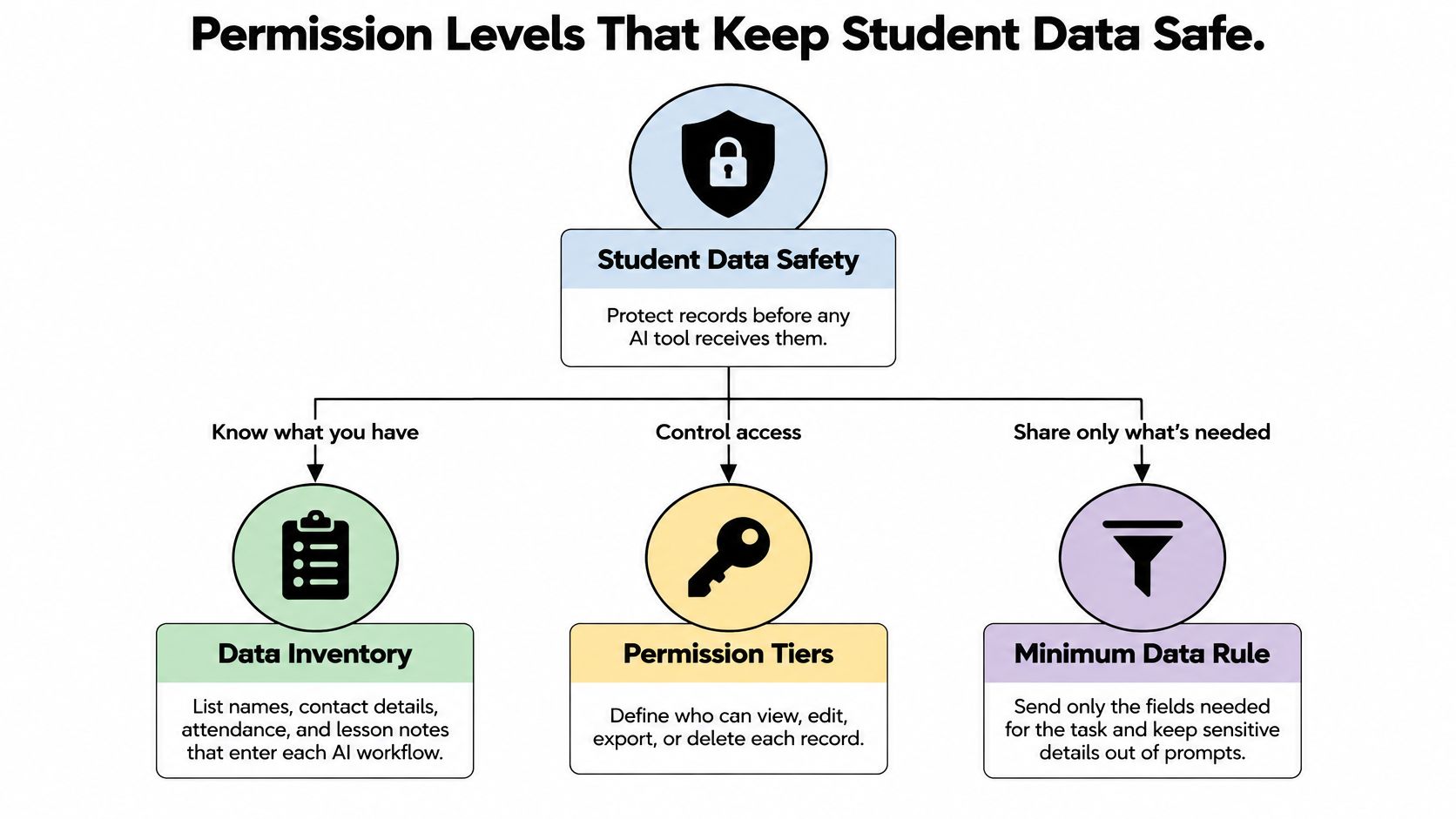
Then assign permission levels. Four are enough for most centres.
| Permission level | Example task | Human approval | Audit record |
|---|---|---|---|
| Suggest | Recommend a reschedule slot for a clash | Scheduler decides | Suggestion and the choice made |
| Draft | Write a payment reminder or invoice note | Staff reviews before sending | Draft and final version kept |
| Act within template | Send a routine lesson confirmation from an approved template | Template approved in advance | Full send log with timestamp |
| Restricted | Change pay, issue refunds, credit balances or edit student records | Named manager approves | Approver, reason and before-and-after values |
One boundary matters more than the rest. UNESCO's guidance recommends a minimum age threshold of 13 for independent use of generative-AI tools in education (UNESCO guidance on AI in education). That's a student-facing concern, which is why this guide keeps AI in the staff-facing lane, where the data still needs protecting but a child is never the one operating the tool.
What the Audit Trail Has to Record
Every suggestion, draft and automated send gets logged with who approved it and when. That log is what turns a family complaint into a five-minute answer instead of an argument. Export a sample before you commit to any system.
When something does go wrong, four steps, in this order: stop the send, notify the family and the owner, correct the record, log the event. Do it the same way every time, because the second incident is judged on how you handled the first.
Put the whole thing on one page. Data inventory, four permission levels, the named approver for restricted actions, the incident steps. Every staff member signs it, and you review it each term. Privacy rules differ by country and state, so confirm your specifics with counsel rather than with a vendor's sales page.
Leads, Schedules and Open Places Staff Can Trust
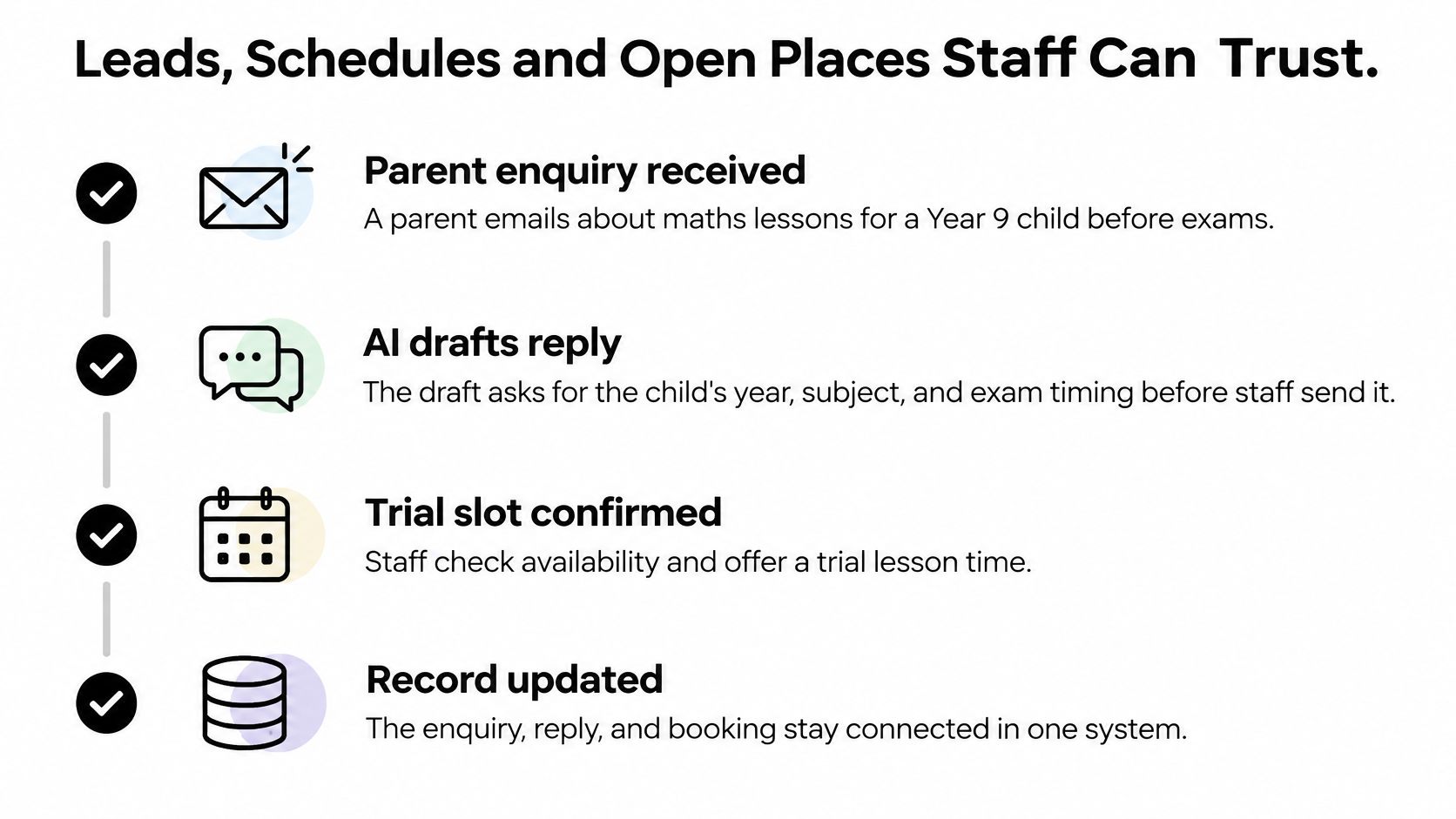
Take one enquiry and follow it. A parent emails on a Monday asking about maths lessons for a Year 9 child before exams. AI drafts a reply that asks for the exam board, the topics the child is weakest on and two preferred days, and offers a trial lesson slot with a subject-qualified tutor who is free at that time.
Staff read the draft, fix the tutor choice if the level is wrong, and send. The trial gets booked, and the lead, the reply and the booking stay attached to the same student record. That's the whole value: the enquiry doesn't become a sticky note on someone's monitor.
Scheduling is where AI saves the most time and causes the most damage if it's given the keys. It's good at spotting a tutor booked into two rooms at 4pm, a make-up lesson that overlaps a group class, and a group two levels below a student who's ready to move up. Listing those is useful. Moving the lesson is not its call, because a change touches the family, the teacher's hours and the invoice that follows.
The rule that holds up: a person confirms every schedule change. AI can rank the options and show the consequences. It doesn't press the button.
The List That Should Be Ready Each Morning
A useful assistant produces the same four flags every morning, before anyone opens a spreadsheet:
- Clashes: two lessons in one room, or one tutor in two places.
- Unfilled places: group classes with spare seats at a level you're actively enrolling.
- Stale leads: enquiries with no reply in 48 hours.
- Trial follow-ups: trial lessons that happened and never got a next-step message.
None of this works if enquiries live in an inbox, lessons live in a shared calendar and students live in a spreadsheet. The flags depend on students, teachers, rooms and levels sitting in one record. That's what tutoring scheduling software has to give you before you ask AI to reason over it.
Run a test this week. Write down the three clashes that happened last term, then ask whether your current setup would have caught them. If the answer is no, no amount of AI on top will help until the underlying records are connected.
How to Run Invoices and Payment Follow-Ups With AI
Invoicing is the workflow most owners name when asked where the evenings go, so it's the right one to automate first. The sequence below is the order that survives contact with real families.
- Lessons complete and attendance is recorded. An invoice can only be as accurate as the attendance behind it.
- Package and plan usage updates. A 10-lesson package moves to seven used without anyone counting.
- A draft is written per payer. Siblings sit under one family account, so the family gets one invoice, not two arguments.
- Staff review the exceptions. A no-show that may be billable, a cancellation inside the notice period, a credit, a refund.
- The invoice is published and delivered with its due date, and it lands as a draft for staff to approve, never as a silent charge.
- Overdue invoices get tiered reminders. Gentle at three days past due, firmer at 14, in wording the business has agreed.
- Partial payments are recorded and the balance updates, so nobody chases a number that's already been paid.
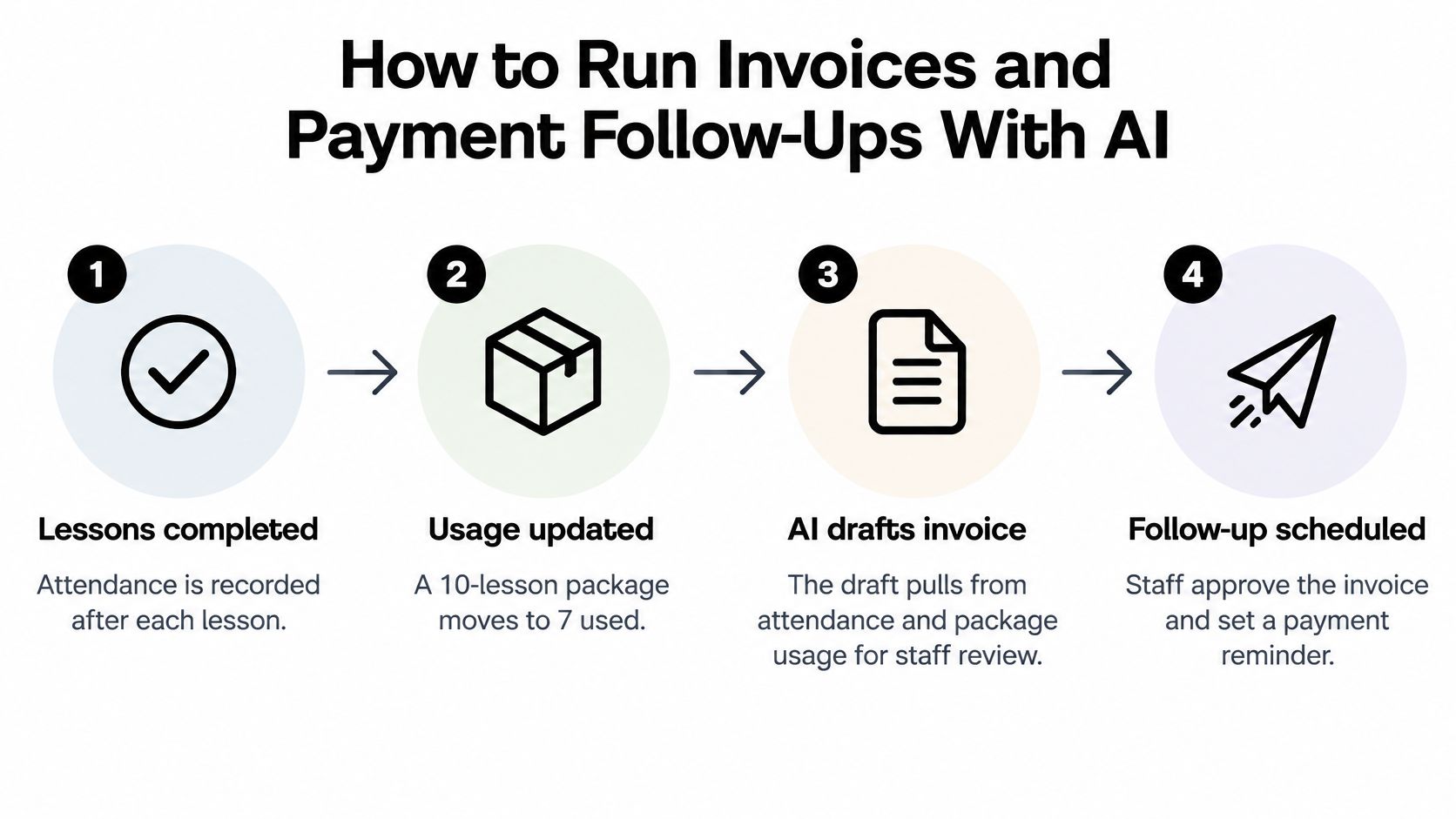
Here's the flow in practice before you switch anything on.
A worked example. A family pays for two siblings, each taking three lessons a week, one in maths and one in English. At month end the system groups every completed lesson by payer, bills the maths package and the English lessons as two line items on a single invoice, and applies the family's agreed rate for each. Staff check the exceptions, approve, and the reminder schedule starts if the balance sits unpaid.
If you're still building the paperwork, a tutoring invoice generator gets a template in place, and how to automate tutoring invoices covers the connected version where lesson records drive the bill.
Where the Tax Line Sits
The business decides whether prices are tax-inclusive or tax-exclusive and which rates apply. AI drafts the invoice; it doesn't give tax or accounting advice, and it shouldn't be asked to. Document processing tools that turn invoices and remittances into structured data are worth reading about at Up North Media's document automation guide if your office still retypes supplier paperwork.
Three checks before you trust any invoice run: which lessons the draft counted, who approved it, and whether the reminder wording matched your own policy. If any of the three is unclear, the automation isn't ready.
Explaining Teacher Pay Without Losing Control
The question every teacher asks eventually arrives in your inbox: why is my pay lower this month? The answer lives in the lesson record, not in memory.
Say a teacher covered a colleague's Tuesday group lesson, a 60-minute session, and two of their own sessions were cancelled while one student was a no-show charged at the agreed rate. Payable hours come from completed lesson records and the configured terms: the cover counts, the cancellations don't count unless the policy says otherwise, and the charged no-show counts only if the business pays for it. AI drafts that explanation in plain language, listing lessons paid, the rate used for each, the adjustments and the gross total before deductions.

The scope line is firm. Gross teacher pay and payout documents are operational records. Statutory payroll, tax withholding and employment classification sit outside any tutoring system and belong with your accountant or payroll provider. Confusing the two is how a centre ends up with a confident AI summary attached to a filing it never made.
Where the sign-off goes: an admin reviews the payout batch before anything is released, every correction is logged, and one named person owns pay disputes.
That single rule prevents most of the damage. A centre with freelance, part-time and full-time tutors can have three different arrangements running in the same month, and a multi-subject centre may pay different rates per subject. If your system can't hold those separately, AI will average them into a number nobody recognises.
The approval step is where the trust gets built. A teacher who can see the lessons behind their pay, the rate applied and the adjustments stops escalating to the owner. The dashboard itself does the reassuring.
Before you turn on explanations for teachers, recompute one teacher's last month by hand from the lesson records and compare it with what the draft says. If those two differ, fix the rate configuration before you fix the wording. Systems that calculate instructor pay correctly start from attendance, which is why the attendance flag in the first section earns its place.
Parent Messages AI Can Draft and Staff Should Send
Not all parent messages carry the same risk, so don't treat them as one category. Sort them first.
Safe to draft from the record: lesson confirmations, schedule changes, upcoming-lesson reminders, shared lesson notes and enquiry replies. These restate facts you already hold, so the draft only has to get the name, time and room right.
Draft then review hard: payment reminders and anything touching a package running out or a plan renewal.
Never drafted: complaints, safeguarding concerns and fee disputes. Those go to a person immediately, and the rule should be written where staff can see it.
The drafting rules are short. Keep messages factual, keep them brief, don't editorialise about a child's ability, and never make a progress claim that isn't already in the teacher's notes.
Take the awkward example. A parent writes that their child's score dropped and asks what you're doing about it. AI drafts a reply that summarises the teacher's last note, names the two topics in the next three lessons and offers a call with the tutor. Staff read it, soften the second sentence, add a time, and send. Without the draft, that message sits unanswered for a day and a half.
Multi-brand operators have a second job. The facts stay the same across brands, but tone doesn't: the same schedule change reads differently from a test-prep academy and from a music school. Approve one set of templates per brand, not one per business.
Self-service removes the easiest messages entirely. When families can see their own lessons, balances and shared notes, a good share of the routine "when is my next lesson" traffic disappears before AI ever gets involved. More on how that connects to student and family records.
Keep five approved templates with fill-in fields: confirmation, reschedule, reminder, payment, and a general enquiry reply. Review them each quarter. The goal is that staff edit a decent draft rather than write from a blank page at 8pm.
Choose a System and Start With One Workflow
Pick the one workflow where the business loses the most time, and choose a system where records stay connected and every AI action leaves a trace. That single decision matters more than any feature comparison.
The criteria below are the ones worth asking about in a demo, because each maps to a failure you would otherwise discover in month three.
| Criterion | What to check | Why it matters | Question to ask the vendor |
|---|---|---|---|
| Data use | Where data is stored and whether it trains models | Controls who sees student and payer data | Will you put the data-use terms in writing? |
| Connected records | Whether lessons, attendance, invoices and pay share one record | Stops duplicate entry and mismatched balances | Show one lesson moving through every stage |
| Approvals and logs | Who approves each AI action and what the log records | Lets you trace any family or pay complaint | Export a sample audit log |
| Migration | Whether student, payer and billing history can be imported | Avoids losing history when leaving spreadsheets | What is imported, and what is checked after import? |
| Fit by business size | Whether the setup suits solo tutors, centres or multi-location brands | Prevents paying for features you will not use | Which plan and setup fit a team of our size? |
Generic CRM or Tutoring-Specific System
A generic CRM with an AI add-on suits a team that mainly tracks leads and wants a shared inbox. It gets thin the moment lessons have to drive invoices and teacher pay, because nobody built it for a 10-lesson package, a make-up credit or a charged no-show.
Tutoring-specific software carries that logic already. Teachworks, TutorCruncher and TutorBird are all established options; compare them on current features and plans directly with each vendor, because plan details change faster than reviews do. Fit depends on your workflow and team size, not on a single feature list.
Tutorbase is an operating system for tutoring businesses that connects students, scheduling, billing and teacher pay in one record. Intelligent scheduling helps staff find suitable lesson times and open places, and because the record is shared, an automated draft draws on the same lesson, invoice and pay data staff already check. More than 500 tutoring businesses have switched to it, and more than 2,000 independent tutors use it. It suits tutoring centres, language schools, test prep centres, music schools, after-school programs and solo tutors, and it is not a marketplace, a learning management system or a payroll filing service.
Businesses moving off spreadsheets or another tutoring tool import their students and payers with migration support covering student records, lesson history and billing data. You can create a free account and start with the essentials.
Run one workflow in parallel for two weeks, record every error the drafts produce, then decide. Compare plans on Tutorbase pricing and get started free.
Tutorbase connects students, scheduling, billing and teacher pay in one operating system, so an AI draft is built from the lesson record rather than a fresh prompt. Start with invoicing or enquiry follow-up, keep a person on every approval, and watch one evening a week come back. Visit Tutorbase to see how the connected record works.


