


The best CRM for piano teachers combines specialized lesson scheduling with integrated billing and parent communication tools. A dedicated platform like Tutorbase is built to handle the unique workflows of a growing music school, from recurring lessons and room management to automated invoicing and complex teacher payroll, reducing admin time by up to 60%.
Why Piano Teachers Need More Than a Spreadsheet
Running a piano studio is about more than just teaching music; it’s about managing a business. For many instructors, that means leaning on a patchwork of spreadsheets, calendars, and a chaotic email inbox.
This system might work when you're just starting, but it quickly becomes a source of administrative headaches as your studio grows. You end up chasing missed payments, untangling scheduling conflicts, and sinking over 10 hours per week into unpaid admin work. Moving from manual methods to a real system is a critical step, a journey we break down in our guide on moving from spreadsheets to tutoring software.
A Customer Relationship Management (CRM) system is the answer. For a piano teacher, a CRM isn't just a digital address book. It's the central command center for your entire studio. It organizes every piece of the student journey, from a parent's first inquiry about a trial lesson to tracking progress for the annual recital.
The Shift to Specialized Software
The global CRM software market is massive, valued at USD 44.82 billion in 2024 and projected to hit USD 107.07 billion by 2032. This growth highlights a key trend: businesses, including music schools, are ditching generic tools for specialized software that solves their industry-specific problems.
A CRM built for music education is designed to handle challenges that general-purpose software and spreadsheets just can't touch. It turns administrative burdens into a smooth, professional operation that makes life easier for you, your students, and their parents.
A great CRM doesn't just store information; it automates your workflows. It connects a new lead from your website to a trial lesson booking, then to a recurring weekly slot, and finally to an automated monthly invoice. This seamless process separates a thriving studio from one just struggling to keep up.
From Chaos to Command Center
Imagine a system where every student detail is in one place: contact info, lesson history, attendance records, and payment status. No more hunting through old emails or cross-referencing three different spreadsheets. That’s what a modern CRM delivers.
This streamlined dashboard replaces cluttered spreadsheets, giving you a clear, immediate overview of your studio’s operations. When all your data is in one place, you gain instant visibility into your business. You can make smarter decisions about scheduling, pricing, and when it’s the right time to grow. Adopting the right system isn't just a purchase; it's a foundational investment in your studio's future.
Essential Features Your Piano Studio CRM Must Have
Picking the right CRM for your piano studio goes beyond a simple contact list. The best software acts as the operational backbone for your business, automating the time-consuming tasks that keep you buried in admin instead of teaching. It’s not about finding a tool with the most features, but one with the right features that all talk to each other.
A truly great system connects every part of your studio. A new student inquiry comes in from your website, the system guides the parent through booking a trial, and once they sign up, their recurring schedule and billing are set up automatically. That integrated workflow is the blueprint for a modern, efficient piano studio.
Automated Lead and Inquiry Management
Your studio’s growth starts with how you handle that first spark of interest. Potential students find you everywhere, from your website to social media or a friend’s recommendation. A quality CRM captures these leads without you manually typing in a single name or email.
This process should be on autopilot from the moment a parent clicks "submit." For example, a parent fills out an inquiry form on your website. The CRM should instantly:
- Create a new lead profile in your system.
- Tag where they came from (e.g., "Website Form" or "WhatsApp Widget") so you know what’s working.
- Send an automated welcome email with the next steps, like a direct link to book a trial lesson.
That immediate, professional response catches a family’s interest while it’s high. It kicks off the relationship on the right foot and makes your studio look organized.
Intelligent Scheduling and Lesson Management
Let's be real: scheduling is the biggest headache for most music teachers. A solid CRM has to handle the unique quirks of music lessons, especially recurring appointments and the constant dance of makeup sessions. Trying to manage this manually is a recipe for double-bookings and lost income.
Look for a system that automates the whole scheduling process. This means setting up a student's weekly lesson slot with a single click and having it repeat automatically. It must have built-in conflict detection to stop you from accidentally booking two students at the same time or with the same teacher.
The real game-changer is a system that intelligently suggests open slots. Instead of you manually cross-referencing teacher availability, room schedules, and parent requests, an AI-powered CRM can generate the best time-and-teacher combos in seconds. This turns a 10+ minute task into one that takes under 2 minutes.
Dedicated Parent and Payer Portal
Modern parents expect self-service options. A dedicated parent portal is a non-negotiable feature that empowers families and drastically cuts down your admin time. It should be their one-stop shop for everything related to their child's lessons.
Through a secure login, parents should be able to:
- View the upcoming lesson schedule for all their kids.
- Pay invoices online with a credit card or bank transfer.
- Update their payment details securely.
- Report an absence or request a makeup lesson.
- Check teacher notes and see progress updates.
This level of transparency builds trust and gives parents the control they crave. More importantly, you spend less time answering emails about schedules and payments and more time focused on teaching. When weighing your options, look for CRMs that offer seamless integrations with other tools you might already use, like payment processors, to make this portal even more powerful.
Comparing the Top CRM Solutions for Music Teachers
Choosing the right software for your piano studio isn't about picking the one with the longest feature list. Different tools are built for wildly different purposes, and you only discover their real strengths and weaknesses when you test them in real-world situations.
Let's compare three main options: general-purpose CRMs like Zoho, music-specific tools like My Music Staff, and fully integrated platforms like Tutorbase. Instead of just talking features, we're going to run them through the daily scenarios every piano teacher juggles. This is where you see which tool actually fits how you work.
Scenario 1: Onboarding a New Family
The journey from a curious parent to an enrolled student is the lifeblood of your studio. The way your software handles this first impression says everything about its value and sets the tone for the entire relationship.
General-Purpose CRM (e.g., Zoho): You can build a web form to capture a new lead, which creates a new contact. But from there, it's almost entirely manual. You will be emailing back and forth to find a trial lesson time, then switching to another system like QuickBooks to create an invoice. It's powerful, but it demands significant setup and hands-on work for every inquiry.
Music-Specific Tool (e.g., My Music Staff): These are a clear step up. A new inquiry can be logged, and parents can often see a calendar of available trial slots. Once the trial is done, you can convert them to a full-time student and set up recurring billing. The workflow is more connected, but you'll likely still find yourself manually checking calendars.
Integrated Platform (Tutorbase): This is where automation really works for you. A parent fills out a custom form on your website, which instantly creates a lead in your CRM pipeline and triggers a welcome email. When you’re ready to schedule a trial, Tutorbase’s Find Slot feature automatically suggests the best teacher, room, and time combinations, turning a 10+ minute hunt into a few seconds. Enrolling them into recurring lessons with automated invoices takes a single click.
The core difference is the leap from manual coordination to intelligent automation. While other systems can store your information, an integrated platform like Tutorbase actively manages the workflow, cutting admin time by up to 60%.
Scenario 2: Managing Complex Scheduling
Picture this common request: a family with two kids, Sarah and Tom. Sarah needs a 45-minute lesson on Tuesday in Room A (the one with the grand piano). Tom needs a 30-minute lesson on Thursday, but only with a specific teacher. This is the kind of scheduling puzzle that can eat up an afternoon.
This is where the rubber meets the road. A CRM's ability to handle leads and scheduling is what separates a simple database from a true business partner.
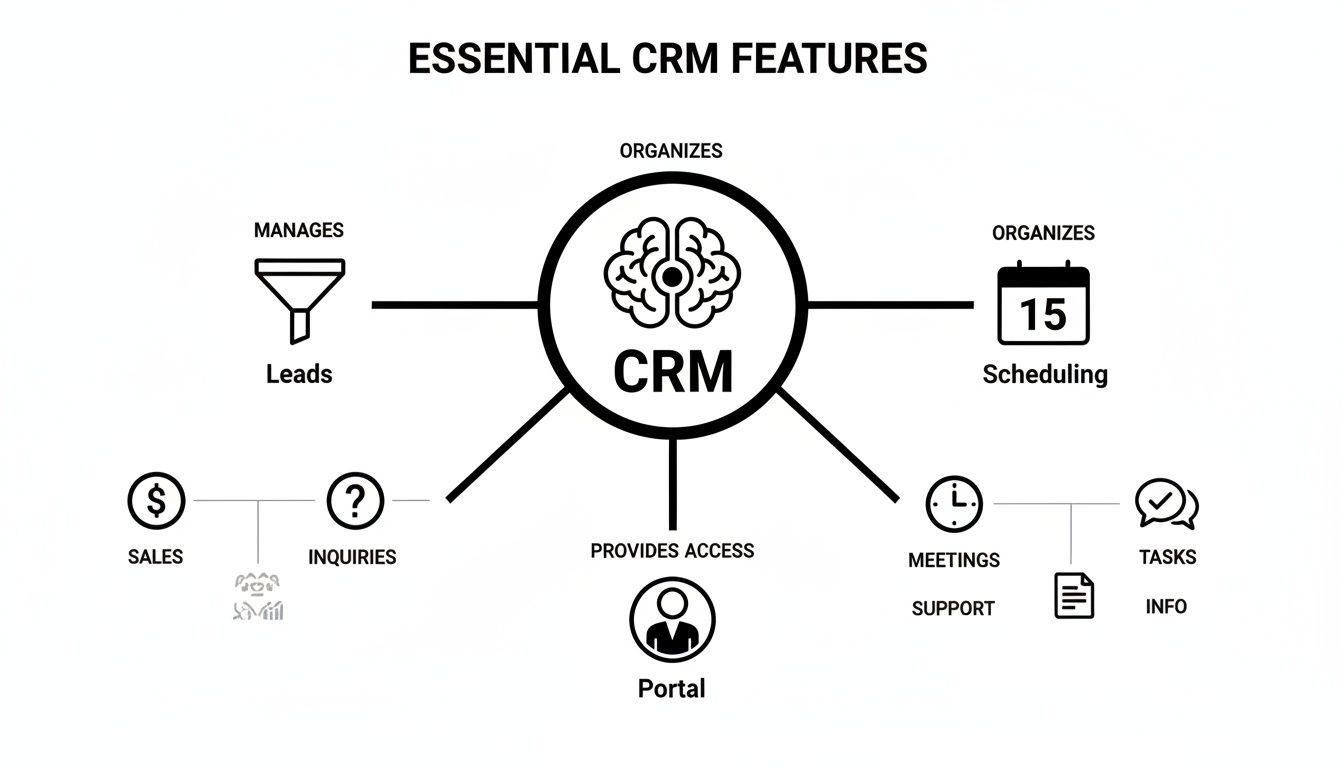
As the diagram shows, a powerful scheduling engine is the central hub connecting all the critical parts of your studio's operations.
How Different CRMs Handle Scheduling Puzzles
With a general CRM, you would have to manually cross-reference multiple calendars for the teacher, the room, and the family. It's a process begging for mistakes, with no built-in way to stop you from double-booking that grand piano.
A music-specific tool does a better job. You can view teacher schedules and handle basic room booking. But finding that one perfect slot that lines up the teacher, room, instrument, and family's availability still means you're clicking around, hunting through different calendar views.
An integrated platform is built for this. In Tutorbase, you can filter by teacher, subject, location, and even specific room features. The system’s conflict detection won't let you double-book the teacher or the specific room. It turns a frustrating coordination headache into a simple, error-free task, guaranteeing zero double-bookings.
How Different CRMs Handle Key Piano Studio Tasks
To make these differences crystal clear, let's break down how each type of software handles the core tasks you deal with every single week.
The right tool for you really depends on how much of your day is spent on admin and how complex your studio is.
| Core Task | General-Purpose CRM (e.g., Zoho) | Music-Specific Tool (e.g., My Music Staff) | Integrated Platform (Tutorbase) |
|---|---|---|---|
| New Student Onboarding | Manual patchwork. Requires connecting forms, emails, and separate billing tools yourself. | Semi-automated. You get basic lead forms and can convert inquiries to students. | Fully automated. AI-powered slot finding, automatic welcome emails, and one-click conversion to recurring billing. |
| Recurring Lessons | Not a native feature. You’re stuck with clunky workarounds or third-party calendar integrations. | This is a core feature. It’s easy to set up weekly or bi-weekly lessons. | Core feature, but smarter. One-click setup for an entire series with advanced conflict detection. |
| Room & Resource Booking | Can’t do it. There's no way to track specific rooms or instruments like a grand piano. | Basic support. You can book rooms but lack advanced filters for room features or associated fees. | Advanced management. Tracks rooms, capacity, and features, and can automatically add room fees to invoices. |
| Billing & Invoicing | Requires a separate integration with accounting software like QuickBooks. | Integrated. Generates invoices from lesson schedules but often requires a manual final check. | Fully automated. Invoices are auto-generated from attendance records, with support for packages and prepaid credits. |
There's a clear progression here. General CRMs offer flexibility but demand technical skill and manual effort. Music-specific tools solve the most common problems but can lack the deep automation a growing studio needs.
Ultimately, integrated platforms like Tutorbase are designed to automate the entire business logic of a music school, from the first inquiry to the final payment.
How to Automate Scheduling and Room Bookings
Scheduling is the logistical heartbeat of any piano studio. When it runs smoothly, your business grows. When it doesn't, you spend hours wrestling with a stressful puzzle of teacher availability, parent requests, and practice room bookings, often leading to costly double-bookings.
Automating this process is the single most impactful step you can take to reclaim your time. The right CRM for piano teachers moves beyond a simple digital calendar. It acts as an intelligent assistant, handling recurring lessons, preventing conflicts, and even managing room-specific details without your constant oversight.

This shift from manual coordination to automated management is where modern studios gain a serious edge. It lets you focus on teaching quality and student relationships, not administrative tangles.
Eliminating Double Bookings with Conflict Detection
The most basic yet critical function of scheduling automation is conflict detection. A simple mistake, like booking two students with the same teacher or assigning two lessons to the same practice room, creates a frustrating experience for everyone.
Modern CRMs make this error impossible. If you try to create a booking that overlaps with an existing lesson, the system instantly flags it and prevents the action. This simple guardrail guarantees zero double-bookings, protecting your studio’s reputation and saving you from awkward apologies.
The Power of AI in Finding the Perfect Slot
For growing studios, the challenge isn't just avoiding conflicts but actively finding the best possible lesson time. Imagine a parent requests a 45-minute lesson for their child on a Tuesday afternoon. Manually, you would have to:
- Check which teachers are available.
- See which practice rooms are free.
- Make sure the available room has the right piano (e.g., grand vs. upright).
- Go back and forth with the parent to confirm.
This tedious process can easily take over 10 minutes. An advanced CRM with AI-powered tools, like Tutorbase’s Find Slot feature, cuts this down to under two minutes. You just input the student's needs (subject, duration, desired day) and the system instantly generates a list of optimal teacher, room, and time combinations.
This isn't just about saving time; it's about delivering a faster, more professional onboarding experience that impresses new families from their very first interaction.
AI is becoming an active partner in running music studios, with routine tasks like follow-ups and scheduling happening automatically. Music schools using this kind of management software experience a 3x faster student onboarding compared to manual methods.
Managing Rooms and Resources with Precision
For studios with multiple practice rooms, managing physical space is just as important as managing teacher time. A robust CRM should allow you to treat each room as a distinct, bookable resource with its own unique attributes.
Effective room management goes beyond just marking a room as "busy" or "free." Your system should let you define specific properties for each space. For example, you can track:
- Room Name: "Studio A (Grand Piano)" vs. "Practice Room 3 (Upright)"
- Capacity: How many people can fit for a group lesson or recital practice.
- Features: Specific equipment available, like recording gear or a particular piano model.
- Associated Fees: Automatically add a small rental fee for lessons in the room with the concert grand.
This level of detail ensures the right student is always in the right room with the right instrument. By connecting these details directly to the scheduling and billing system, you automate another complex administrative task. You can explore a deeper dive into these capabilities with our guide on advanced room management features.
Streamlining Your Studio's Billing and Payroll
Let's be honest: the financial side of running a piano studio is rarely the fun part. Chasing late payments, manually creating invoices, and calculating teacher pay can quickly suck the joy out of teaching. A great CRM automates this entire financial cycle, turning hours of tedious work into minutes.
This all starts by connecting attendance directly to billing. When a teacher marks a student as "Attended," the system knows to generate an invoice charge. This single step eliminates manual data entry and ensures every lesson you deliver gets billed accurately and on time, plugging revenue leaks from forgotten charges.
From Lesson Attendance to Paid Invoice
A powerful CRM should handle any pricing structure you can dream up. Whether you bill per lesson, run a monthly subscription, or sell lesson packages, the software has to bend to your studio's needs. This flexibility lets you craft different offerings that appeal to different families.
For example, many studios have found success with a prepaid credit system for lesson bundles. Parents buy a package of 10 or 20 lessons upfront, and the CRM deducts one credit after each completed session. It’s a fantastic model for improving cash flow and boosting student commitment.
The system should even send automated low-balance alerts to parents when their credits are running low, prompting them to top up. This proactive communication cuts down on payment gaps and keeps students enrolled without you having to lift a finger.
Integrating with a payment processor like Stripe is also non-negotiable. This lets parents pay invoices online straight from a parent portal or email link, which dramatically cuts down on late payments. The system can also send automated reminders for overdue invoices, taking the uncomfortable task of chasing money off your plate. You can find more strategies for improving your financial operations in our detailed tutoring billing software guide.
Automating Complex Teacher Payroll
As your studio grows and you bring on more teachers, payroll can get messy fast. You might have instructors paid by the hour, some who earn a percentage of lesson revenue, and others with a base salary plus bonuses. Trying to calculate these varied pay structures manually is a recipe for errors and frustration.
An integrated CRM solves this by tying payroll directly to the same attendance data you use for billing. This guarantees accuracy. The system can handle multiple pay models at the same time, including:
- Per-hour or per-lesson rates for straightforward compensation.
- Revenue share percentages for partnership-style agreements.
- Per-student rates for group classes or workshops.
- Premiums for lessons taught on weekends or for advanced subjects.
This automation makes sure every teacher is paid correctly and on time, every single pay period. It removes the stress of manual calculations and builds a foundation of trust with your team. As you manage a growing studio, handling staff payments efficiently is critical. It might be helpful to explore the best payroll software for small businesses to complement your CRM's capabilities.
Ultimately, a CRM that gets billing and payroll right does more than just save time. It professionalizes your operation, improves cash flow, and frees you up to focus on what truly matters: teaching music and building strong relationships with your students and their families.
How to Choose the Right CRM for Your Studio
Picking the right software is a huge decision that will shape how your studio runs for years to come. The best CRM for piano teachers isn’t just a list of features; it's a partner that grows with you. Let's walk through a practical way to move from comparing options to making a confident choice.
Making the right call starts with asking the right questions. When you’re sitting through a software demo, you need to push past the sales pitch and get into the nitty-gritty details that actually matter. Your goal isn't just to see how the platform works on day one, but how it will hold up on day 365.
Critical Questions for Your Software Demo
Before you even think about committing, you need a list of questions that uncover a platform’s real-world performance. A good salesperson can show you flashy features, but you need to understand what it’s really like to use the software every single day.
Here’s a checklist of questions to bring to your next demo:
- Data Migration: "What's the process for importing all my existing student and family data? Is there a fee, and how much of that work does your team actually handle for me?"
- Support: "If I have a critical issue during our busiest registration week, what's your guaranteed response time? Is support handled over the phone, or am I stuck waiting for an email reply?"
- Scalability: "As my studio grows from 20 to 100 students, how does your pricing change? Will the system start to lag as we add more users and data?"
- User Experience: "Can you show me the exact workflow a parent will go through to book a trial lesson, pay their first invoice, and report an absence using the parent portal?"
These questions shift the conversation from what the software can do to how it will actually work for you. The answers you get will tell you a lot about the quality of their support and how invested they are in your studio's success.
Prioritizing Features for Your Unique Studio
Not every piano studio is built the same. A feature that’s a lifesaver for a multi-teacher school might just be unnecessary clutter for a solo instructor. You need to prioritize what solves your biggest headaches right now, while still leaving a little room to grow.
For the Solo Teacher: Your main goal is automation. Focus on things like recurring lesson scheduling, automated invoicing, and a parent portal where families can handle payments themselves. The whole point is to win back your admin time.
For the Multi-Teacher Studio: Your world is all about coordination and managing complexity. You should prioritize features like multi-teacher calendars, room booking that prevents double-booking, and automated payroll that can handle different pay structures (like hourly vs. revenue share).
The key is to map software features directly to your biggest operational pain points. If you spend five hours a week wrestling with payroll spreadsheets, then advanced payroll automation is a non-negotiable for you.
How to Run an Effective Trial Period
A free trial is your chance to really put the software through its paces in a real-world setting. Don't just click around a demo account filled with fake data. To run a truly effective trial, you need to simulate your daily operations with a small, controlled group.
Pick three to five of your most tech-savvy families and ask them to be your test group. Onboard them into the trial system just like they were brand-new students. Have them book a few lessons, make a test payment, and use the parent portal to report an absence. Their feedback on how easy (or difficult) it was is pure gold.
This simple process gives you a complete, 360-degree view of the system, from your admin dashboard to what parents will see on their end. It’s the best way to spot any friction points before you roll it out to your entire studio. This practical test is the final, crucial step in choosing a CRM that truly fits.
FAQ: Finding the Best CRM for Piano Teachers
Sorting through software options can feel overwhelming. Here are straight answers to the questions we hear most often from piano teachers trying to find the right studio management tool.
What’s the best CRM for a piano teacher?
The best CRM for piano teachers is a dedicated studio management platform, not a generic sales tool. You need software that handles the specific chaos of running a music school: recurring weekly lessons, integrated billing, parent portals, and multi-teacher payroll. General-purpose CRMs are built for tracking sales leads, not for managing a student who has a lesson every Tuesday at 4 PM. A specialized platform like Tutorbase is built from the ground up for exactly these workflows.
Can I just use a free CRM for my piano studio?
While tempting, free CRMs almost always create more work than they save. You'll quickly discover they can't handle the basics a music studio needs, like automated invoicing from attendance, recurring lesson schedules, or a parent portal for payments. You’ll end up patching the gaps with spreadsheets and calendar invites, which defeats the entire purpose of having a central system. A small investment in the right software pays for itself by saving you hours of admin work every week.
How much does a piano teacher CRM actually cost?
CRM pricing for music studios is all over the map. Some platforms charge a flat monthly fee, while others bill you per student or per teacher. You can expect to pay anywhere from $40 to over $200 per month, depending on how big your studio is and what features you need. Don't just compare the monthly sticker price. Think about the value of your time. If a system cuts your admin work by 60% and prevents costly double-bookings, it often pays for itself by freeing you up to teach more lessons.
What's the difference between a CRM and "studio management software"?
These terms overlap. A classic CRM is all about managing relationships: tracking new inquiries, logging communications, and moving prospective students through your pipeline. Studio management software does all that plus the operational heavy lifting: scheduling, billing, and payroll. For a piano studio, you absolutely need both. The best platforms combine lead management with the day-to-day tools needed to actually run the school, giving you a seamless flow from inquiry to invoice in one place.
How can a CRM help me get more piano students?
A good CRM helps you grow by automating your lead management. Features like embeddable website forms and a WhatsApp widget capture inquiries 24/7. Automated email follow-ups and a streamlined trial booking process convert interested parents into paying students 3x faster, all while making your studio look more professional and organized.
Ready to stop wrestling with spreadsheets and give your piano studio the professional operating system it deserves? Tutorbase consolidates your scheduling, billing, and parent communication into one powerful, easy-to-use platform. Start your free trial today and see how much time you can save.


