


Using a paper sign-in sheet or a basic spreadsheet seems harmless, but for growing tutoring centers, these outdated methods are the root of major operational problems. A manual student attendance tracker isn't just clunky; it's a direct leak in your time, revenue, and ability to scale.
A modern attendance tracker does more than log who showed up. It integrates directly with billing and payroll, automating your entire operation from a single click. This guide explains how to leverage a smart tracking system to plug revenue leaks, reduce admin time by over 60%, and make data-driven decisions that boost profitability.
The Hidden Costs of Manual Attendance Tracking
Picture a typical Tuesday. A parent is on the phone questioning an invoice, a teacher is asking about their paycheck, and you’re stuck digging through spreadsheets to confirm who attended which class. For many tutoring centers and language schools, this is a daily reality.
These small fires consume your day, pulling you away from what really matters: teaching great lessons and growing your business.
The chaos usually starts with fragmented tools. You might use Google Calendar for scheduling, Excel for attendance logs, and QuickBooks for billing. Because these tools don't communicate, every action requires manual data entry, which creates a cascade of expensive mistakes.
The True Price of Inefficiency
When your attendance data is disconnected from your billing and payroll systems, every administrative task becomes a multi-step, error-prone chore. A single missed checkmark on a paper sheet can easily lead to an incorrect invoice, a confused parent, and a time-sucking mission to fix the error.
This inefficiency costs you in several ways:
- Revenue Leakage: Manually enforcing cancellation and no-show policies is nearly impossible. A "Late Cancelled" lesson that should have been billed gets overlooked, and that lost income adds up week after week.
- Billing Disputes: When a parent questions a charge, you're left scrambling to cross-reference calendars and paper records. This lack of a single source of truth erodes trust and eats up your valuable time.
- Payroll Errors: Calculating teacher pay from attendance sheets is a messy puzzle. Did the teacher sub for another class? Was it a premium weekend session? Manual calculations often lead to overpayments or underpayments, which is a killer for team morale.
- Wasted Administrative Hours: Owners and managers burn 10+ hours per week just chasing information. That’s time spent patching up spreadsheets and double-checking logs instead of focusing on growth.
The real problem with manual tracking is that it forces you to be reactive. You're always putting out yesterday's fires instead of building a more profitable tomorrow.
A Domino Effect on Operations
The fallout from a poor student attendance tracker extends beyond billing. Without accurate, real-time data, you're flying blind. You can't easily spot which classes are under-enrolled or which teachers are stretched too thin. This makes it incredibly hard to make smart decisions about your schedule, staff, and service offerings.
Ultimately, these hidden costs pile up. The lost revenue from missed billings, the hours wasted on administrative firefighting, and the inability to make data-driven decisions create a serious drag on your business. It's an operational bottleneck that directly hits your profitability and your potential to scale.
What is a Modern Student Attendance Tracker?
A modern student attendance tracker is not just a digital checklist; it's the central nervous system of your entire tutoring operation. It's software that connects every critical function, turning a single action—like marking a student present—into a cascade of automated, error-free tasks.
Think of your manual process as a team of runners carrying messages between departments. One person runs attendance sheets to billing, another takes payroll notes to admin, and a third tries to update the master schedule. It’s slow, disconnected, and full of opportunities for information to get lost.
An integrated tracker replaces that entire team with a single, instant command center. It becomes the undisputed source of truth for every single lesson taught.
From Manual Clicks to Automated Workflow
The core concept is simple but powerful. When a teacher marks a student as "Attended," that single click sets off a chain reaction. Instead of piling up paper for manual data entry, the system instantly knows exactly what to do next.
A modern student attendance tracker ensures that the moment a lesson’s status is updated, every related administrative task is automatically triggered and completed without human intervention. This shift moves your team from reactive problem-solvers to proactive managers of an efficient system.
This deep integration eliminates the gaps where errors and wasted time thrive. You no longer reconcile attendance sheets with invoices or manually calculate teacher pay. The basic principles build on general concepts of time and attendance software but are applied specifically to the unique needs of an education business.
The Power of a Single Source of Truth
With an integrated system, every piece of data lives in one place and updates in real-time. This creates a reliable "single source of truth" that benefits your entire business.
- For Billing: An "Attended" status can automatically add a charge to the family's invoice. A "Late Cancelled" status can instantly apply your cancellation fee based on pre-set policies.
- For Payroll: The system logs the completed lesson and calculates the teacher's pay based on their specific contract, whether it's hourly, per-student, or a revenue share.
- For Operations: Administrators get a live, up-to-the-minute view of class fill rates, teacher workloads, and student attendance patterns, allowing for smarter scheduling and resource allocation.
This diagram shows how the hidden costs of manual tracking—lost revenue, billing errors, and wasted time—are all directly solved by an integrated system.
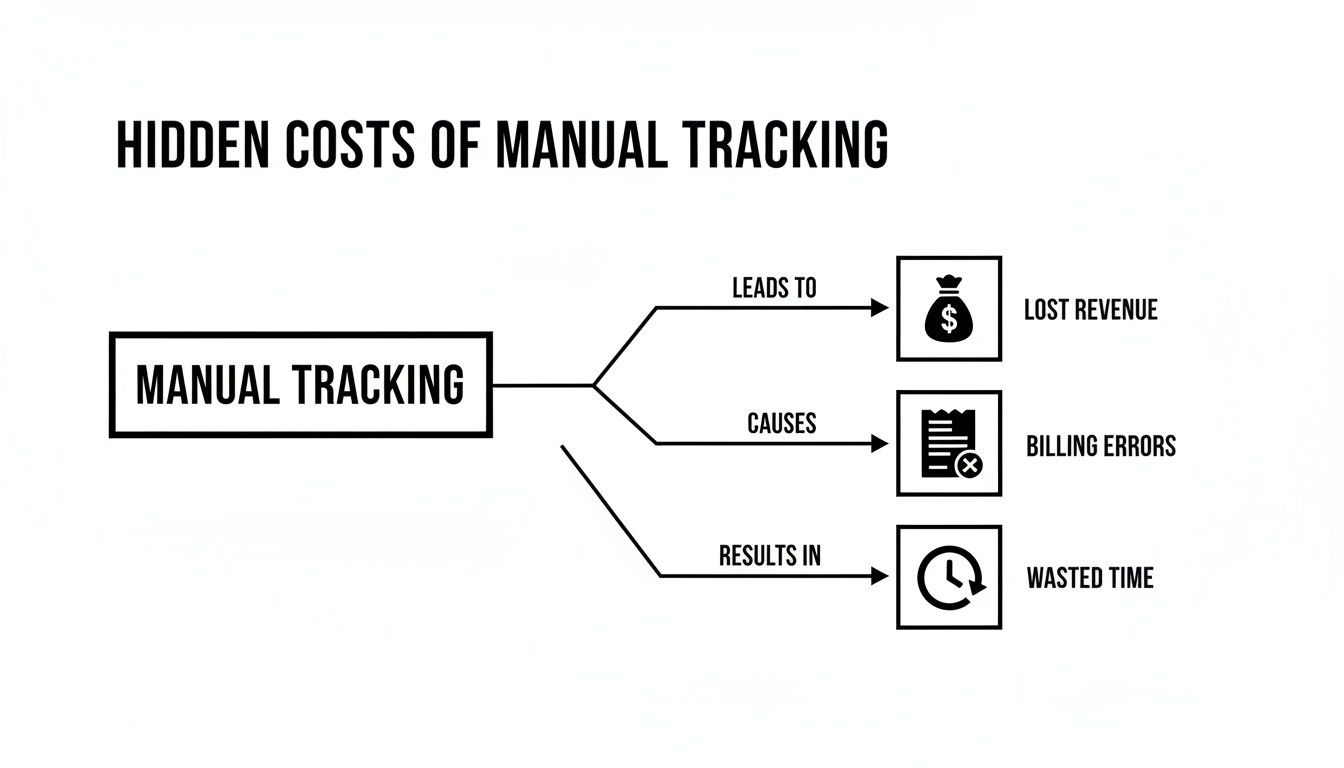
As the visual makes clear, these are interconnected consequences of a disconnected workflow. By centralizing attendance data, a modern tracker automates the entire operational lifecycle, from lesson delivery to financial reconciliation. Platforms like Tutorbase combine all these components into one seamless system.
Key Features Your Attendance Tracker Must Have

When you're evaluating a student attendance tracker, it’s easy to get stuck on a simple "present" or "absent" mindset. But a tool that just digitizes your spreadsheet won’t transform your business. A powerful platform becomes the engine of your daily operations.
The right features don't just record what happened; they automate entire workflows, saving you hours of admin and preventing lost revenue. Generic systems crumble when they meet last-minute cancellations, hybrid classes, or complicated teacher pay rates. You need features built specifically for your business model.
Granular Attendance Statuses
Your day-to-day reality is more complex than just "here" or "not here." A good attendance tracker must reflect that with statuses that automatically trigger your business rules.
Look for these essential statuses:
- Attended: The basic "they showed up" status that confirms the lesson happened.
- Scheduled: The default for any future booking before attendance is taken.
- No-Show: For when a student doesn't show up. This should automatically prevent a lesson credit from being returned to their account.
- Cancelled: For when a student cancels with enough notice, correctly returning their credit or ensuring it's not invoiced.
- Late Cancelled: This is crucial. It’s for cancellations that miss your policy window. This status should automatically apply your cancellation fee.
These statuses are the foundation of automation. When a tutor marks a student as "Late Cancelled," the system should instantly know to generate an invoice for that fee. No more manual tracking, no more awkward conversations.
Direct Integration with Billing and Payroll
This is the single most important feature. An attendance tracker that can't automatically create invoices and calculate payroll is just a digital checklist. Manually moving data from attendance logs to your accounting software is where most administrative errors happen.
A fully integrated system ensures that when attendance is marked, the right financial action happens instantly.
For example, marking a one-hour lesson as "Attended" should automatically add the correct charge to the family's next invoice. At the same time, it should log the right pay amount for the tutor based on their specific contract. A single click replaces multiple manual steps.
This connection eliminates hours spent cross-referencing spreadsheets, cuts down on billing disputes caused by human error, and ensures your teachers get paid accurately and on time, every time.
Real-Time Reporting and Analytics
You can't fix what you can't see. A modern attendance tracker must provide instant, actionable insights into your center's performance. Analyzing this with manual spreadsheets is too slow and you’ll miss trends that are quietly costing you money.
Your system should generate reports that answer key business questions:
- Class Fill Rates: Which group classes are always full and which are under-enrolled? This data helps you decide which classes to promote and which to combine or cancel.
- Teacher Utilization: Which teachers are in highest demand? Who has open slots you could fill with new students?
- Attendance Trends: Do no-shows spike on certain days or for specific subjects? This can point to needed changes in your scheduling or policies.
This is the data that drives smart decisions. Without it, you're just guessing about your operational health. In a system like Tutorbase, this information is managed within comprehensive student profiles, centralizing everything from attendance history to payment status in one accessible place.
How Smart Attendance Tracking Boosts Your Profit and Efficiency

A powerful student attendance tracker does more than log who showed up. It directly plugs revenue leaks, unlocks hidden capacity in your schedule, and gives you back your most valuable asset: time.
The link between accurate attendance data and your bottom line is immediate. By automating the entire attendance-to-invoice workflow, tutoring centers can slash administrative time by as much as 60%. This isn't just a small tweak; it’s a fundamental change that frees up hours every week for growth, not grunt work.
Automate Billing and Plug Revenue Leaks
The biggest financial win comes from ditching manual billing. As soon as a teacher marks a student as 'Attended,' the system should instantly and automatically trigger the right financial action. This direct link is where your efficiency skyrockets.
Consider the common scenarios that eat into your profits:
- No-Shows: A student doesn't show up. An integrated system can automatically consume their pre-paid lesson credit or add the charge to their next invoice. No awkward follow-ups, no lost revenue.
- Late Cancellations: A parent cancels two hours before a lesson, breaking your 24-hour policy. The system automatically applies your "Late Cancellation" fee, enforcing your policies consistently.
- Billing Accuracy: With automation, every "Attended" lesson is billed perfectly based on the service and duration. This ends human errors that lead to under-billing and frustrating disputes with parents.
This level of automation transforms your attendance tracker from a record-keeping tool into an active revenue management system. It ensures you get paid for every service you deliver.
Optimize Your Schedule for Maximum Profitability
Beyond billing, your attendance data is a goldmine of insights for making smarter scheduling decisions. With clean and accessible data, you can stop guessing and start building a data-driven strategy for managing your resources.
An integrated attendance tracker provides the hard data needed to optimize class fill rates and teacher utilization, directly increasing your earning potential per classroom and per instructor.
You can instantly see which group classes are consistently full and which are struggling. This helps you give your best teachers and prime time slots to your most profitable services. It also lets you analyze teacher workloads, revealing who has room to take on new students, helping you balance assignments and prevent burnout.
This is essential for growth. By spotting popular times, subjects, and instructors, you can refine your offerings to meet demand. The result is higher class fill rates and a serious boost in monthly renewals. Centers using this data can increase renewals by up to 42%.
From Hours to Minutes
Ultimately, the goal is to create a seamless loop where attendance data flows into every other part of your business. This doesn’t just save a few minutes; it reclaims entire chunks of your administrative team's day.
Tasks that once took hours—like manually creating invoices at the end of the month—are cut down to minutes of oversight. Chasing payments, reconciling attendance logs, and calculating complex teacher payroll are no longer primary job functions. They become automated background processes.
This is a massive shift. It allows you and your team to focus on what really matters: student experience and business development.
How to Implement Your New Attendance System
Switching to a new student attendance tracker can feel like a huge undertaking, but a clear plan simplifies the process. A smooth transition comes down to smart planning and good communication. The goal is to get from messy spreadsheets to a clean, automated system without disrupting your daily operations.
Get Your Data Ready to Move
First, you need to prepare your data for migration. Before the new system can work, you must feed it your existing information. This means pulling together all your student contacts, parent details, and upcoming schedules from wherever they currently live.
Most modern platforms make this painless. You can usually export scattered data into a single, clean CSV file and import it directly. In one move, you transfer months or even years of records into your new command center, giving you a solid foundation.
Teach the System Your Business Rules
Once your data is in, it's time for configuration. This is where you teach the software how your business actually works. A good attendance tracker lets you customize its rules to match your policies, turning it into an automated member of your admin team.
Key configuration steps include:
- Setting Up Services: Define every class, one-on-one session, or workshop you offer, including its name, subject, duration, and pricing model (per hour, per lesson, or package).
- Defining Cancellation Policies: Program your exact rules into the system, such as requiring 24-hour notice for cancellations. You can then set up automatic fees for late cancellations and no-shows.
- Building Payroll Models: Tell the system how to pay your teachers. Assign the correct rate to each tutor for each service, whether it’s a simple hourly wage, a percentage of revenue, or a more complex model.
This configuration stage is where the magic happens. Taking the time to dial in your business logic ensures the system will handle billing, enforce your rules, and calculate payroll with pinpoint accuracy from the start.
Train Your Team and Get Parents On Board
With the system configured, the next step is bringing your team into the loop. Good training shows them an easier way to do their jobs. Focus on the wins—like how they can now mark attendance in two clicks on a tablet instead of wrestling with paper sign-in sheets.
Just like with any new process, clear communication is everything. You can find solid general advice on managing attendance in the workplace, and the core principles of setting expectations and communicating benefits apply here.
Bringing parents along is just as crucial. Frame the change positively, focusing on how it benefits them. Explain that the new system means more accurate billing, easier scheduling, and better transparency. A simple email explaining the improvements can get everyone excited.
For a more detailed breakdown, check out our guide on creating a tutoring software implementation plan. It walks you through every step to ensure your launch is a success.
Choosing the Right Tracker for Your Tutoring Business
Picking a student attendance tracker is about finding an operational partner for your business. Generic tools often crumble under the specific pressures of a growing tutoring center. You must ask questions that dig deeper than simple check-in features and get to the heart of your financial and operational workflows.
Before you commit, throw your real-world scenarios at any system you evaluate. Can it automate your complex processes, or will it just create new administrative work? That’s the real difference between a digital checklist and a genuine business management platform.
Questions to Separate the Contenders from the Pretenders
Many software platforms can log attendance, but very few are built to handle the unique financial models and multi-branch complexity that tutoring businesses face. Use these questions to spot a system designed for growth.
- Does it handle complex payroll? Don’t just ask if it does hourly rates. Can it process revenue sharing, per-student pay models, and weekend lesson premiums? A platform like Tutorbase is built to automate these tricky calculations, which eliminates payroll errors.
- Can it manage multiple branches seamlessly? If you run more than one location, you need a single dashboard to see everything. Make sure the tracker can manage rooms, teachers, and reports across all branches without forcing you to log in and out of different accounts.
- Does it integrate with modern lead-capture tools? Can the system connect to a WhatsApp widget to pull new leads directly into your CRM? This connection is crucial for smoothing out student onboarding, a workflow that generic tools almost always ignore.
Choosing a tracker that can't handle your specific payroll, multi-location, and lead management needs is like buying a sedan to do a delivery truck's job. It will quickly become the biggest bottleneck to your growth.
By asking these tough questions, you filter out generic software and find a solution built for a real-world tutoring business. While education technology market data can be broad, focusing on these capabilities ensures you select a platform that solves your biggest headaches. For related trends, you can explore detailed findings on global student data. Learn more about recent enrollment findings.
Frequently Asked Questions (FAQ)
What is a student attendance tracker?
A student attendance tracker is software used by tutoring centers and schools to log whether students were present, absent, or late for lessons. A modern tracker integrates this data with billing and payroll systems to automate administrative tasks, reduce errors, and provide operational insights.
Why is tracking student attendance important for tutoring centers?
Tracking student attendance is critical for accurate billing, teacher payroll, and operational planning. It ensures families are invoiced correctly, prevents revenue loss from unbilled no-shows or late cancellations, and provides data to optimize class schedules and teacher utilization for maximum profitability.
How does an automated tracker reduce administrative time?
An automated student attendance tracker reduces administrative time by eliminating manual data entry. When a teacher marks attendance, the system automatically generates the correct invoice, calculates teacher pay, and updates student records. This can reduce admin workload by over 60%.
Can this software handle different types of lessons like group and private?
Yes, a robust student attendance tracker is designed to manage various service types. You can configure different rules, pricing, and payroll models for private (one-on-one) lessons, group classes, workshops, and even hybrid classes with both in-person and online students.
How long does it take to switch from spreadsheets to a new system?
For most tutoring centers, a full transition from spreadsheets to a fully operational system like Tutorbase takes about 2-4 weeks. This includes data migration, system configuration, and team training. A good provider will offer support to ensure the process is smooth.
Can an attendance tracker manage multiple locations?
Yes, top-tier tutoring management software is built for multi-branch operations. It allows you to manage schedules, rooms, teachers, and reporting for all locations from a single, centralized dashboard, providing a complete overview of your entire business.
Will parents need special training to use a new system?
No, parents typically do not require any training. From their perspective, the changes are positive and behind-the-scenes. They will simply experience more accurate invoicing, clearer communication, and often gain access to a parent portal for easier booking and payment.
Ready to stop chasing down attendance data and get a crystal-clear view of your business? Tutorbase brings scheduling, attendance, billing, and payroll into one smart platform, giving you back hours every single week. Start your free trial today!


