


Stop wasting time with manual data entry. Our free working hours invoice template, available in XLSX, PDF, and Google Sheets, is the perfect starting point for any tutoring center needing a fast, professional way to bill for lessons and get paid on time.
Download Your Free Working Hours Invoice Template
For most tutoring center owners, creating invoices from scratch is a massive time sink. Fragmented tools, like using Google Calendar for scheduling and QuickBooks for billing, lead to hours of manual work. A standardized template is the first step toward reclaiming that lost time.
A good template makes every bill you send clear, professional, and complete. This simple change reduces parent confusion and the endless email chains chasing missing information, ensuring you get paid faster.
Why a Standardized Template Matters
Using the same format for every invoice builds trust. It shows parents your operations are organized and gives them confidence in your services, from K-12 academic tutoring to specialized test prep for the SAT or IELTS.
More importantly, it creates a reliable internal process, which means you stop reinventing the wheel every billing cycle. The goal is to make invoicing a predictable, error-free task, not a creative writing exercise.
Key Takeaway: A standardized invoice template is an operational tool that slashes admin tasks, reduces payment delays, and frees you to focus on growing your tutoring business. It is the first step in moving away from manual processes that cost owners 10+ hours per week.
Essential Fields for Your Template
Your working hours invoice is a detailed record of the services you provided. Getting the fields right is crucial for preventing payment disputes and ensuring everyone is on the same page.
For anyone looking to sharpen their existing system, our free tutoring invoice generator can also create customized documents in seconds.
Before customizing, let's break down the must-have fields in our templates. Think of these as the non-negotiables for a clear, effective invoice.
| Essential Fields for Your Tutoring Invoice | | :--- | :--- | :--- | | Field Name | Description | Why It Matters for Your Business | | Your Business Information | Your tutoring center's name, logo, address, and contact details. | Instantly identifies you as the sender and reinforces your brand. | | Client & Student Details | The payer's name and contact info, plus the student's name. | Crucial for households with multiple kids or different payers, avoiding confusion. | | Invoice Number & Dates | A unique invoice number, the date of issue, and the payment due date. | Prevents duplicate payments, simplifies record-keeping, and sets clear payment expectations. | | Itemized Lesson Breakdown | A line-by-line list of each lesson date, teacher, subject, duration, and hourly rate. | This provides total transparency and justifies the charges, preventing disputes. | | Subtotal, Taxes, and Total | A clear calculation showing the total cost before tax, the tax amount, and the final amount due. | Breaks down the final cost so parents see exactly what they're paying for. |
Getting these core elements right makes the entire billing process smoother for both you and your clients. It lays a solid foundation before you add complexities like package billing or room fees.
How to Use Your Working Hours Invoice Template
You have the template. Now, let's walk through filling it out to look professional and get paid on time. A clear, well-made invoice reinforces your brand's reliability and prevents the kind of confusion that leads to frustrating payment delays.
First, add your business logo and contact information at the top. This simple step makes your invoice instantly recognizable. Next, fill in your client's details, making sure to include both the payer's and the student's names, a small detail that parents with multiple children appreciate.

Assigning Invoice Numbers and Dates
Every invoice you send needs a unique ID. A simple sequential invoice number (like INV-001, INV-002) is perfect. It keeps your records clean, prevents duplicate billing, and makes it easy to find a specific invoice if a parent has a question.
You also need two critical dates:
- Invoice Date: The day you create and send the invoice.
- Due Date: The payment deadline. Be specific (e.g., Net 15 or Net 30).
A clear due date manages expectations and gives you a firm point to follow up from if a payment is late. Without one, payments can drag on for weeks, which is a killer for your cash flow.
Itemizing Each Tutoring Session
This section is the heart of your invoice. A vague line item like "Tutoring Services" is a recipe for payment disputes. You must break down every session you’re billing for. Total transparency builds trust and shows parents exactly where their money is going.
Create a separate line for each lesson and include these details:
- Date: The exact date the session took place.
- Student Name: Essential if you're tutoring siblings.
- Service: Be specific. "Grade 10 SAT Prep" is better than "Tutoring."
- Teacher Name: Helps parents track sessions with different instructors.
- Duration: List the time in hours (e.g., 1.5 hours).
- Hourly Rate: The rate you charge for that specific service.
- Line Total: The final amount for that one session (Duration x Rate).
This level of detail answers most questions before they’re even asked, which speeds up the payment process dramatically.
Calculating the Final Totals
Once you’ve listed all the sessions, it’s time to add everything up. If you're using a spreadsheet template, it will probably do the math for you, but it’s always smart to double-check the formulas.
Your final totals section should clearly show:
- Subtotal: The sum of all your line items.
- Discounts: If you offered a package deal, show it here as a negative amount.
- Taxes/Fees: Add any applicable sales tax or extra charges (like room booking fees).
- Total Amount Due: The final, bolded number the client owes you.
Lastly, include your payment instructions. Clearly state how you accept payments (bank transfer, Stripe, etc.) and provide all necessary details. A well-structured invoice makes it easy for clients to pay you.
Adapting Invoices for Complex Tutoring Scenarios
Simple lessons with a flat hourly rate are easy. But that's rarely how a tutoring business actually works.
Your working hours invoice template needs to handle the real-world complexities you deal with every week. This is where a static spreadsheet becomes clunky, forcing you to make manual tweaks that invite mistakes.
A classic headache is juggling different services with different prices. You can't bill a high-stakes SAT Prep session at the same rate as Grade 3 Math help. On a spreadsheet, this means manually applying the right rate for each service, a process begging for errors.
Handling Variable Rates and Add-On Fees
A good template needs to bend without breaking. But when you're manually adding rows for every little thing, your invoice can quickly become a cluttered, confusing mess for parents.
Just think about these common situations:
- Group vs. Private Lessons: A group class usually has a lower per-student rate. You have to remember to apply the correct rate for each student, every time.
- Travel and Room Fees: If a tutor travels to a student's home or you charge for a premium room, those fees need to be added as separate line items. Forgetting them is leaving money on the table.
- Package Discounts: Selling lesson bundles is smart, but tracking them on a spreadsheet is a pain. You have to manually apply the discount and then keep a separate ledger to track usage.
This constant manual effort is a major operational drag. Tutoring businesses with 5-100 teachers often burn over 10 hours a week just creating invoices and chasing payments by hand.
This admin burden comes when the private tutoring market is exploding, projected to hit $192.09 billion by 2029. With that growth, efficient operations aren't just a nice-to-have; they're essential for survival.
Managing Taxes and Multi-Teacher Scenarios
Beyond pricing, you have to deal with financial rules and unique class setups. If your business needs to charge sales tax, you’ll need a dedicated line item that correctly calculates the tax based on the subtotal. One wrong cell reference and your numbers are off.
Another curveball? Team-taught workshops. How do you split billing when two tutors are involved? Your invoice template won't figure that out. You're stuck creating manual notes to ensure payroll is calculated correctly later, adding another step to your billing cycle.
While a template is a decent starting point, these scenarios show how fast it becomes a bottleneck. The goal for any growing business should be to move past manual entry. That's the relief offered by Tutorbase for tutoring centers, which builds these rules right into your billing workflow.
The Hidden Costs of Manual Invoicing
A free working hours invoice template feels like a smart choice. But what we’ve seen from working with hundreds of tutoring businesses is that this "free" solution carries serious hidden costs that drain your resources.
The real price isn't the template. It's paid in lost hours, missed revenue, and strained client relationships.
Relying on manual invoicing opens the door to human error. A single mistyped formula in Excel or a forgotten lesson from an attendance sheet can lead to under-billing a client, directly costing you money. Worse, you could accidentally double-bill for a session, damaging the trust you’ve worked so hard to build.
The True Administrative Burden
The time you spend on manual invoicing adds up fast. Each billing cycle, your team has to meticulously cross-reference multiple documents: teacher attendance, student enrollments, and individual pricing plans. This isn't just data entry; it's a slow detective process where one slip-up can throw everything off.
This manual nightmare costs the industry dearly. Picture operations managers at multi-branch test prep academies, drowning in spreadsheets to create working hours invoices for over 10,000 weekly lessons.
It's no surprise that fragmented billing tools lead to an estimated 20-25% capacity underutilization. Without automation, we see owners lose 10+ hours per week chasing payments. You can dig into this growing market trend with analysis from Future Market Insights.
This is where a dedicated system flips the script. Instead of digging through files, all billing information is presented in one clean interface, eliminating cross-referencing.
Instead of hunting through spreadsheets, you get an immediate, accurate overview of what’s been billed, what’s paid, and what’s overdue. It's all right there.
The Financial and Relational Fallout
These operational headaches have direct financial consequences. Delayed invoicing means delayed payments, which can seriously disrupt your cash flow. When parents receive confusing invoices, they hesitate to pay. That kicks off a frustrating chain of follow-up emails that eats up even more of your time.
Key Takeaway: The time spent fixing invoice errors and chasing late payments is time you can’t spend on marketing, teacher training, or curriculum development. The real cost of a "free" manual template is the growth you're sacrificing.
Ultimately, inconsistent and error-prone billing looks unprofessional. It creates friction with parents and makes your business appear disorganized. The inability to get a clear, real-time snapshot of your revenue means you're flying blind, unable to make informed decisions about hiring or expansion.
How Automation Reduces Admin Time by Over 60%
After wrestling with templates, you eventually hit a wall. Spreadsheets are a great start, but they don't scale. The next logical step isn’t a better template, it's a fundamentally different approach that removes the manual work entirely.
This is where tutoring management software like Tutorbase comes in. It transforms invoicing from an error-prone chore into a seamless, automated workflow.
The system automates invoice creation. Instead of you piecing together data from attendance sheets and rate cards, the system does it for you. When a teacher marks a lesson "Attended," the software generates an accurate invoice line item. It’s automatically priced based on that student’s specific plan, whether it's an hourly SAT prep rate, part of a prepaid package, or a discounted trial. No more manual math.
This infographic breaks down the hidden costs of the old, manual process.
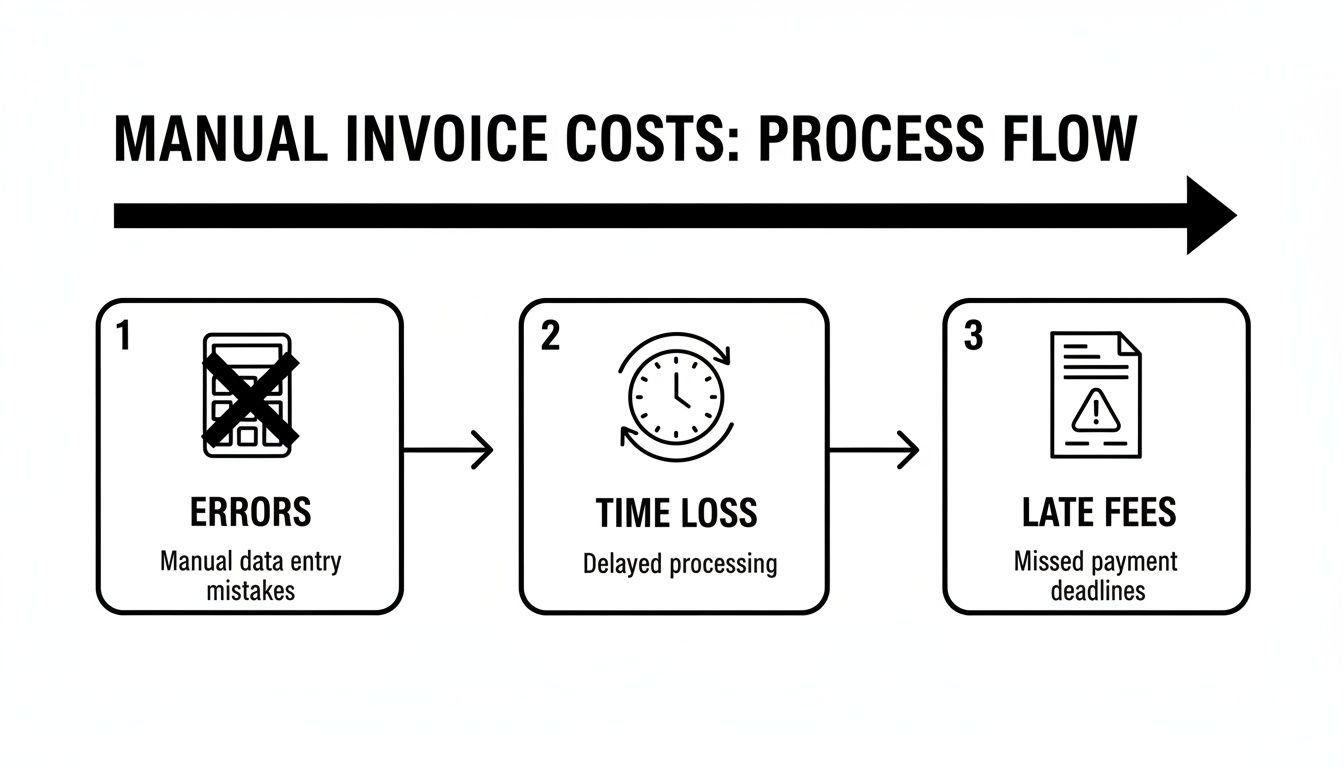
As you can see, every manual step introduces a new risk, turning a simple task into a major source of operational drag.
The Power of an Automated Workflow
This kind of automation replaces hours of weekly admin with a few clicks. The system is built to handle the tricky scenarios that make manual invoicing a headache.
- Automated Invoice Runs: Set your schedule—weekly, bi-weekly, or monthly—and the system generates and sends all your invoices at once. It pulls in every billable lesson, so nothing is missed.
- Prepaid Credit Management: The software tracks "wallet" balances for parents. It automatically deducts lesson costs and sends low-balance alerts when they need to top up.
- Package Tracking: When a student uses a lesson from a bundle, their remaining balance is automatically updated, and expiration dates are tracked for you.
Suddenly, all that time spent checking spreadsheets, calculating totals, and creating documents disappears. This is how you can reclaim over 60% of the time you used to lose to billing admin.
Scaling Your Billing for a Growing Market
This automation isn't just a "nice-to-have"; it's critical for growth. Manual templates are a bottleneck for multi-location businesses, especially when teachers bill per-lesson, per-hour, or on a revenue share, with premiums for weekend SAT sessions.
This is a daily reality in the Asia-Pacific region, which holds the largest market share. Centers in exam-focused cultures like China and India can’t afford billing errors. With the global online tutoring market projected to grow at a 14.5% CAGR to 2030 and on-demand sessions commanding a 73.88% revenue share, the need for instant, accurate invoicing is urgent. You can read more about these trends on Stellar Market Research.
By connecting attendance directly to billing, Tutorbase automates invoices and eliminates human error. Every completed lesson is invoiced correctly the first time, every time. This ensures accurate revenue capture and stronger cash flow.
Smart automation goes beyond just creating the invoice. By embracing modern tools for automating your invoice follow-ups, you can stop chasing payments. This final step closes the loop, turning your billing process into a hands-off, efficient machine.
Frequently Asked Questions (FAQ)
What is a working hours invoice template?
A working hours invoice template is a pre-formatted document that allows tutoring centers to bill clients for services based on time. It includes essential fields like student details, lesson dates, durations, hourly rates, and total amounts due, ensuring a professional and consistent billing process.
How do I handle credits for canceled lessons on a template?
On a manual template, add a negative line item on the student's next invoice. Label it clearly, for example "Credit: Canceled Lesson on [Date]," with a negative value equal to the lesson cost. This reduces the total amount due but requires separate, manual tracking of all available credits.
What is the best way to invoice for lesson packages?
For lesson packages (e.g., 10 lessons for a set price), the best practice is to invoice for the full package amount upfront. This secures revenue immediately. However, with a manual template, you must then track lesson usage separately in another spreadsheet, which creates extra administrative work.
How can I reduce invoice errors in my tutoring center?
To reduce invoice errors, you should adopt a standardized template, double-check all calculations before sending, and clearly itemize every single lesson. The most effective way to eliminate errors is to use tutoring management software that automates invoice creation directly from attendance records.
Why does manual invoicing slow down payments?
Manual invoicing slows down payments because it is prone to errors, inconsistencies, and delays. Incorrect calculations or vague descriptions lead to parent confusion and disputes, while the time it takes to manually create and send each invoice means you start the payment cycle later, impacting your cash flow.
Can a template manage different teacher payroll rates?
No, a working hours invoice template cannot manage different teacher payroll rates on its own. While the invoice details the service provided, you will need a separate, manual system (like another spreadsheet) to calculate teacher pay based on their specific contract, whether it's hourly, per-student, or a revenue share.
How does Tutorbase solve these invoicing problems?
Tutorbase is a tutoring management software that automates the entire billing process. It connects scheduling and attendance directly to invoicing, so every completed lesson is automatically and accurately billed based on predefined pricing rules. It also manages prepaid credits, tracks lesson packages, and automates payroll calculations, reducing admin time by over 60%.
Your working hours invoice template is a start, but it can't run your business for you. When you’re ready to stop juggling spreadsheets and reclaim over 60% of your admin time, Tutorbase can help. Automate your invoicing, payroll, and scheduling in one platform.
See how it works at tutorbase.com/register


