


If you're still building invoices on Sunday night by checking teacher messages, comparing attendance against Google Calendar, and fixing parent billing one line at a time, your billing process isn't just annoying. It's blocking growth. For multi-teacher tutoring centers, billing software systems work when they connect scheduling, attendance, invoicing, payments, and payroll in one workflow, so every taught lesson becomes revenue without double entry.
The Sunday Night Invoice Problem
Most tutoring center owners don't notice how broken billing is at first. You add a few teachers, then a second branch, then group classes, then sibling discounts, then package credits, then make-up lessons. Suddenly billing turns into detective work.
Sunday night often looks like this:
- Attendance lives in too many places: A teacher updated one lesson in WhatsApp, another in a spreadsheet, and a third by email.
- Invoices need manual cleanup: You check who attended, who cancelled late, who used package credits, and who still owes last month.
- Parents get inconsistent bills: One family gets charged correctly, another gets a missing lesson, and someone else asks why a trial was billed at the regular rate.
That mess isn't unusual. It's what happens when scheduling, attendance, billing, and payments all live in separate systems.
For smaller operators, a template can help for a while. If you need to send one-off bills quickly, a free tutoring invoice generator is better than building every invoice from scratch. But once you have multiple teachers and recurring lessons, templates stop solving the underlying problem. They still depend on someone remembering what happened in class.
Where the real cost shows up
The obvious cost is time. The less obvious cost is missed revenue.
When your team builds invoices manually, small gaps appear everywhere:
- Unlogged sessions never make it onto invoices.
- Cancellation rules get applied differently by different staff.
- Partial payments get recorded, but not matched cleanly.
- Payroll disputes start because the billed lesson record doesn't match the paid-teacher record.
Practical rule: If your invoice depends on memory, screenshots, or end-of-week cleanup, you'll lose money somewhere.
Billing software systems fix this at the process level. They turn billing from a separate admin task into the result of normal operations. A lesson happens, attendance gets marked, the charge follows the rule, the invoice updates, the payment gets tracked, and payroll has a clean record to work from.
That's the difference between surviving admin and running a business.
What Are Billing Software Systems Really
For a tutoring center, billing software systems aren't just tools that create invoices. They're the financial engine that connects the work your school does every day to the money your school should collect.
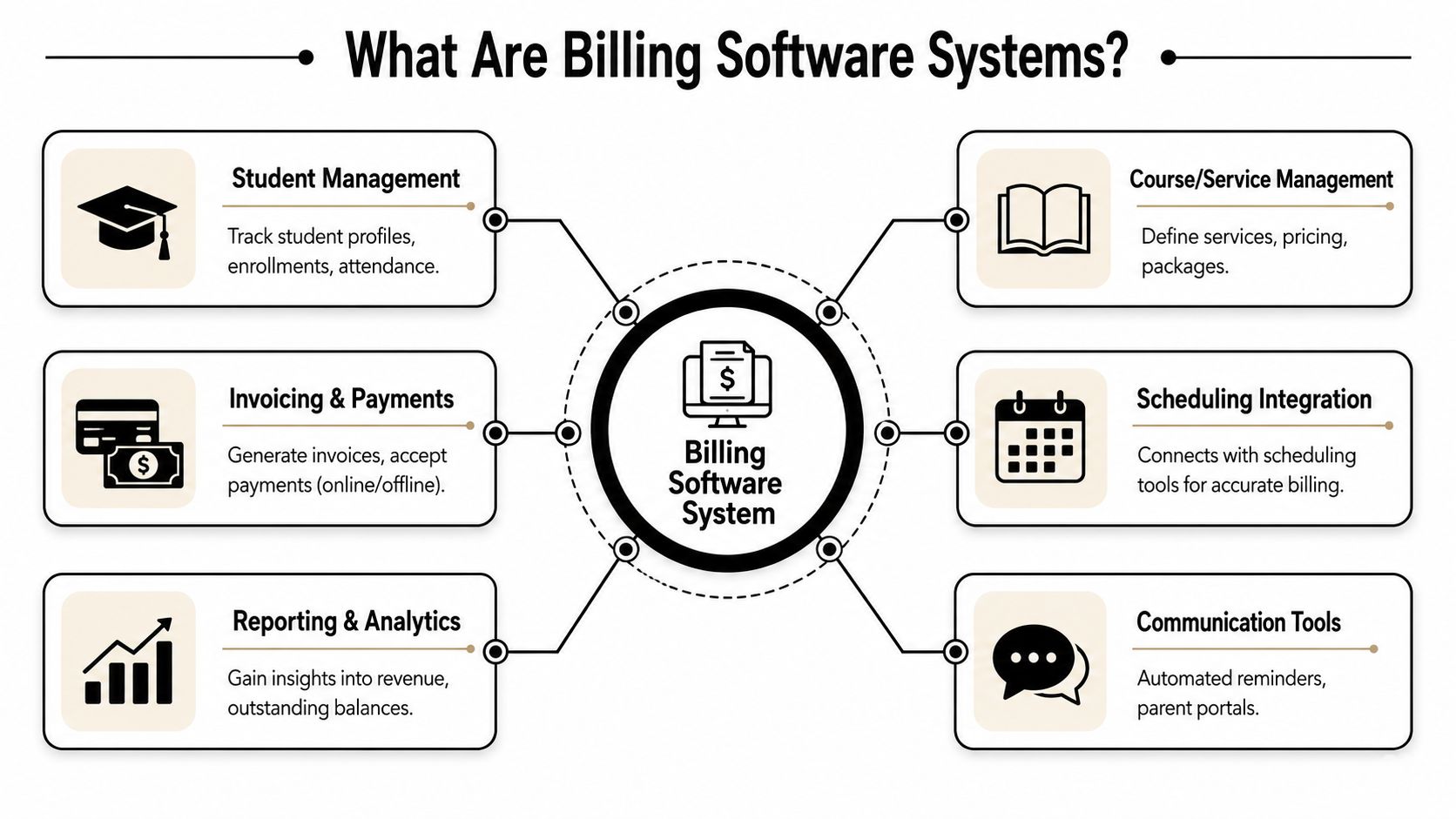
A generic accounting tool starts at the invoice. A real education billing system starts earlier, at the booking and attendance level.
The useful definition
In practice, a billing system for a tutoring business should connect:
- Student records: Who is enrolled, who pays, what service they take
- Scheduling: Which lesson was booked, where, with which teacher
- Attendance: Attended, no-show, cancelled, late-cancelled, trial, catch-up
- Pricing rules: Per-hour, per-lesson, package, subscription, branch-level pricing, student-specific exceptions
- Payments: Stripe, bank transfer, cash, FPS, partial allocation, credits
- Payroll inputs: What the teacher taught, under which pay rule
If those pieces don't talk to each other, staff end up acting as the integration layer. That's where errors start.
The broader market is moving in this direction too. The global billing and invoicing software market was valued at USD 5.43 billion in 2025 and is projected to reach USD 15.7 billion by 2034, driven by cloud software adoption and billing automation that reduces human error and improves operational efficiency, according to Straits Research's billing and invoicing software market report.
What a good system actually does
Think of it as your center's financial control layer.
A good setup doesn't ask your operations manager to recreate reality at the end of the week. It records reality once, at the point where work happens, then carries that data through the rest of the workflow.
That means:
- A recurring lesson gets scheduled once.
- The teacher marks attendance after class.
- The pricing rule already knows whether it's standard, discounted, package-based, or subscription-based.
- The payer record already knows which parent or guardian should receive the charge.
- The payment record updates the invoice status without staff retyping anything.
When billing works well, your team stops "making invoices" and starts reviewing exceptions.
That's especially important in multi-branch centers and language schools. You may run K-12 tutoring, IELTS prep, piano lessons, and after-school programs under one roof, but each service can have its own cadence, package rules, room fees, and teacher compensation model.
Why email and security still matter
Even with strong automation, billing still touches email constantly. Invoices, receipts, reminders, failed payment notices, and parent communication all move through inboxes. If those messages don't land reliably or safely, collections get harder. That's why it's worth reviewing mailX's email security guide when you're tightening the operational side of billing.
Modern systems also need to support integrations with CRM and accounting tools, align with revenue recognition standards such as ASC 606 and IFRS 15, and support secure payment handling and audit readiness, as outlined in Maxio's guide to billing systems. In a tutoring business, that matters less as finance jargon and more as day-to-day control. You need one dependable record of what happened, what was billed, what was paid, and what still needs attention.
Why Your Current Tools Are Costing You Money
The problem isn't that Google Calendar, QuickBooks, and Excel are bad tools. The problem is that they were never built to run one connected tutoring workflow.

One tool stores bookings. Another stores invoices. A third tracks payroll. Staff spend their time moving data between them and checking whether one system agrees with another.
Fragmentation creates hidden labor
Many centers face a common challenge. The owner thinks, "We already have software," but in reality, they have software and manual reconciliation.
Tutoring centers with 5–100+ teachers and 1–10+ branches typically spend 10+ hours per week on administrative tasks like scheduling, billing, and payroll when using fragmented tools, and that time directly reduces revenue capacity while increasing operational errors, according to Tutorbase's Capterra profile.
That admin time usually gets buried in small jobs:
| Task | What staff actually do |
|---|---|
| Attendance checking | Compare teacher notes, chat messages, and calendars |
| Billing cleanup | Add missed lessons, remove invalid charges, apply credits |
| Payment tracking | Match transfers and cash payments to open invoices |
| Payroll prep | Rebuild taught lessons by teacher and pay rule |
None of those tasks creates value for families. They only exist because your systems don't share the same record.
The financial leak is bigger than it looks
The damage doesn't come only from slow admin. It comes from inconsistency.
A fragmented setup makes these problems common:
- Revenue leakage: A class happened, but nobody billed it.
- Disputes: Parents challenge invoices because line items don't match what they expected.
- Slow collections: Staff hesitate to send invoices when they're not confident the data is right.
- Teacher friction: Payroll takes longer because attendance and billing don't line up.
If you're running group classes, hybrid lessons, make-up sessions, or multiple branches, the cost compounds because every exception needs human review.
The moment your center depends on "someone will fix it later," you've already accepted preventable loss.
Generic accounting software also misses tutoring-specific realities. It doesn't understand open seats in an existing class, parent payer structures, trial conversions, package consumption, room fees, or cancellation windows that should trigger different billing outcomes.
That gap matters because your business isn't just invoicing. You're translating hundreds or thousands of lesson events into charges, payments, credits, and teacher compensation. When the tool doesn't match the workflow, your team ends up doing the missing logic by hand.
The Automated Billing Workflow From Lesson to Paid
The cleanest billing systems make one thing happen reliably. Attendance becomes revenue without double entry.
Start with one lesson. A student attends a Tuesday 4:00 p.m. English class. The teacher opens the system and marks that student as Attended.
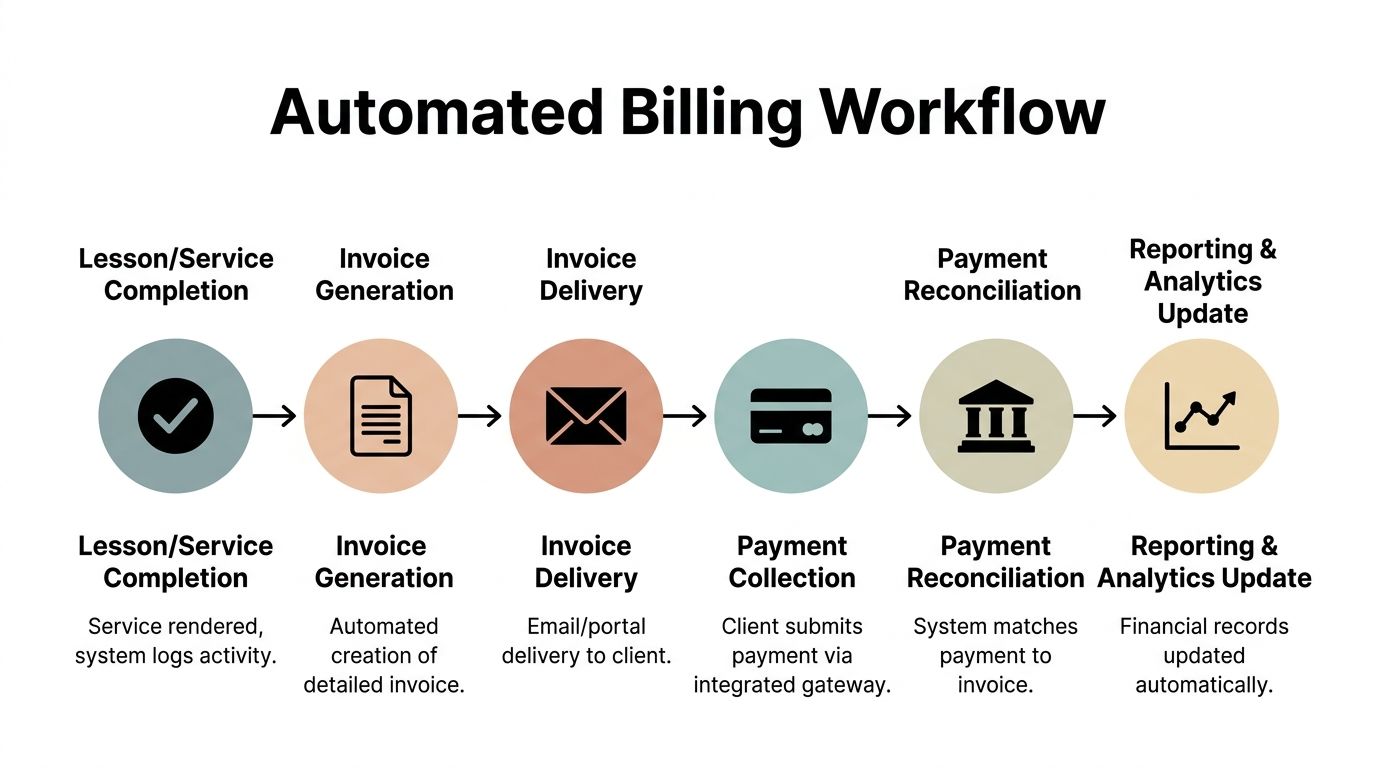
From that point, the billing workflow should move forward on its own.
How the data should flow
Attendance confirms the billable event
The lesson record now tells the system that the service happened. If the student was absent, cancelled, or late-cancelled, the next action should depend on your policy pack, not on staff memory.The pricing rule applies automatically
The system checks whether this student pays per lesson, from a package, through prepaid wallet credit, or on a subscription. If the family has a branch-specific rate or sibling arrangement, that rule should already exist.The invoice updates on the correct cadence
Some centers bill per lesson. Others publish weekly, bi-weekly, or monthly. The lesson charge should drop into a draft invoice without anyone retyping the session details.The payer receives the right document
In tutoring, the student isn't always the payer. A parent, guardian, or sponsor may cover one or several students. The invoice should go to the linked payer with the right balance, prior credits, and payment history.
A practical walkthrough helps:
What happens next
Once the invoice is published, the parent pays online through Stripe or uses bank transfer, cash, or FPS. The system records whether the payment is full, partial, or split across invoices. It then updates the invoice lifecycle from Draft to Published, Paid, or Overdue.
If you're using prepaid credits, the process should feel even simpler:
- Wallet balance deducts automatically
- Low-balance alerts go out before lessons stop
- Package lessons get consumed in order
- Expiration rules apply without staff review
Automation changes the economics, as systems that automate invoice generation from attendance data reduce manual processing costs from $15 per invoice to $3 or less, achieving an 80% cost reduction and cutting error rates by up to 80% compared with manual handling, according to Factura's invoice processing benchmark statistics.
What works and what doesn't
What works is invoicing connected to lesson scheduling, where the schedule, attendance, billing, and payment logic all come from the same record. That's the only setup that reliably prevents missed charges and invoice cleanup later. If you want to see what that looks like in practice, this overview of invoicing connected to lesson scheduling shows the workflow clearly.
What doesn't work is "semi-automation." That's the setup where software creates a draft, but your staff still has to inspect every lesson, adjust every exception, and build payroll separately. It feels better than spreadsheets, but it keeps the expensive part of the work.
Operator's test: If a teacher marks attendance and your team still has to rebuild the invoice later, the workflow isn't automated.
The same lesson record should also feed payroll. If a teacher is paid per hour, per lesson, per student, revenue share, base plus variable, or overtime, their pay should come from the same attendance event that created the charge. That's how you keep billed revenue and teacher cost aligned.
How to Choose a Billing System for Your School
Most software demos look good for the first ten minutes. The screen is clean, the invoice button works, and the sales team says it supports education businesses. That isn't enough.
A key consideration is whether the system can handle the messy middle of a tutoring operation, where lessons change, parents pay in different ways, and teachers don't all work under the same rules.
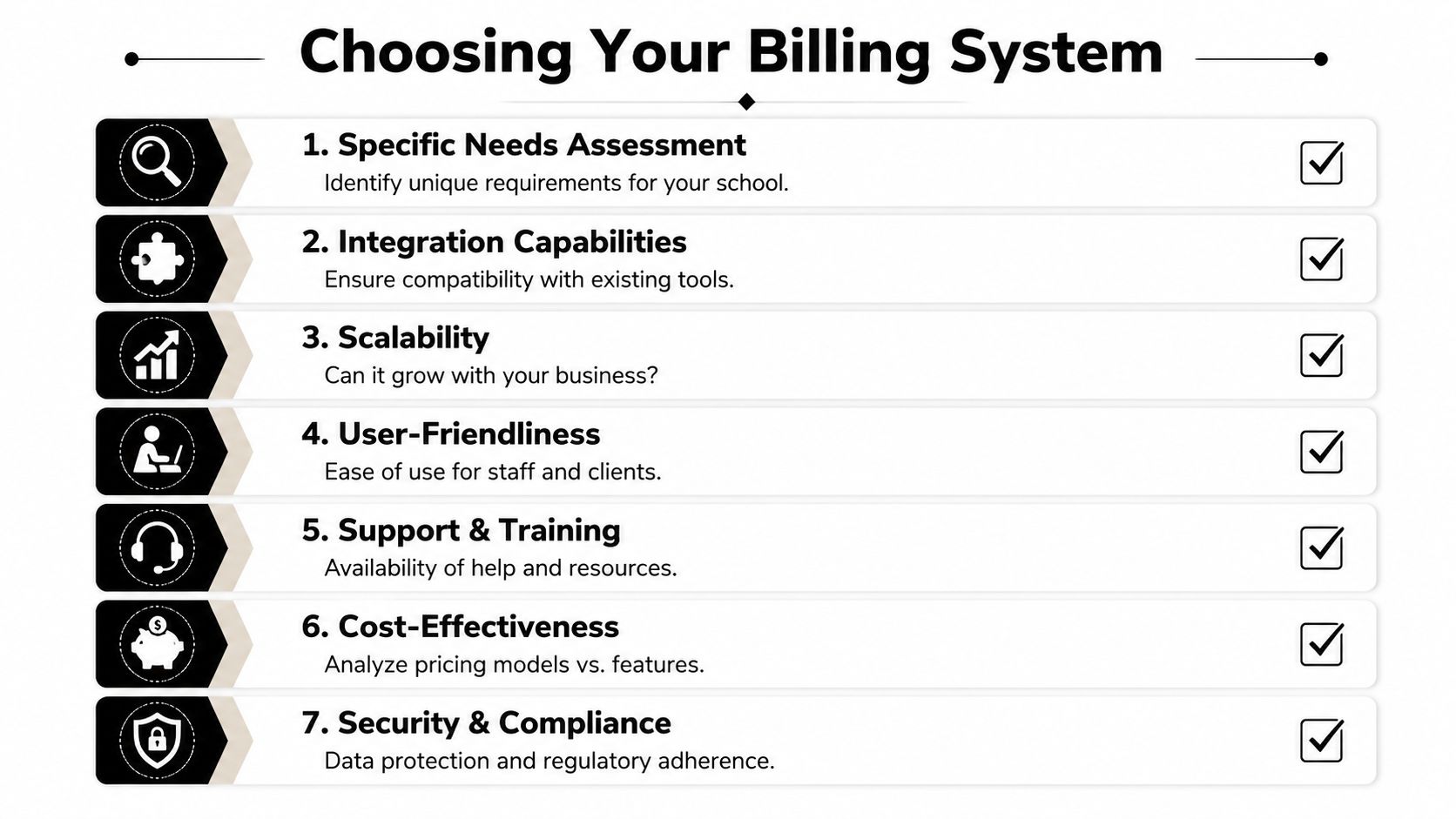
A useful buying process starts with questions that force vendors to show the workflow, not just the feature list.
Ask how attendance becomes billing
This is the first filter because it's where many systems break.
Existing content often misses the attendance-to-billing gap, yet 68% of tutoring centers report revenue leakage from unlogged sessions or invoice errors, and a 2025 audit found 42% of centers using fragmented tools lose 5–10 hours per week reconciling mismatched data, according to Cloud Tutoring Manager's review of tutoring billing software.
Ask the vendor:
- Show me a late cancellation: Does the system apply the correct fee automatically?
- Show me a package student in a group class: Does it consume the right credit without staff adjustment?
- Show me one payer linked to multiple students: Can the family receive one clean invoice?
- Show me a make-up lesson: Does it bill correctly without duplicate charges?
If the answer involves exports, manual edits, or "you can handle that in accounting later," keep looking.
Check pricing and payroll complexity
Tutoring centers rarely stay on one pricing model.
You may need:
- Per-hour billing for private tutoring
- Per-lesson billing for language programs
- Packages for test prep blocks
- Subscriptions for after-school memberships
- Trial rules with automatic conversion
- Cancellation windows with different outcomes
Your payroll needs the same flexibility. Some teachers are hourly. Some are paid per student in a group class. Some get weekend premiums or revenue share.
A billing system that can't model both pricing and payroll will create workarounds. Workarounds become policy exceptions. Policy exceptions become admin debt.
Review operations beyond billing
A strong system also needs to solve the surrounding workflow. That's where many schools outgrow generic tools.
Use this quick evaluation table:
| Question | Why it matters |
|---|---|
| Can it manage multiple branches and rooms? | Billing breaks when scheduling data is unreliable |
| Can it prevent double-bookings? | You can't bill cleanly for chaotic schedules |
| Does it support parent portals and self-service payments? | Collections improve when payers can act immediately |
| Can it track leads to trials to active students? | Enrollment and billing should connect cleanly |
| Can it handle hybrid classes? | In-person and online attendance often need different handling |
If you're also comparing finance tools at a broader level, this guide to compare small business accounting solutions is a useful companion. It helps clarify where accounting software ends and education operations software needs to begin.
Watch for these red flags in demos
These signs usually predict pain after implementation:
"We support it with custom fields"
Custom fields are fine for notes. They aren't a substitute for actual billing logic."Export to payroll"
Exports often mean the core workflow isn't connected."Our users handle attendance separately"
Separate attendance usually means separate reconciliation later."It works well for tutors"
A solo tutor workflow isn't the same as a center with multiple branches, rooms, classes, and payers.
One option in this category is Tutorbase, which combines scheduling, billing, payroll, room management, student tracking, lead management, attendance, multi-brand operations, and WhatsApp intake in one platform for tutoring centers and language schools. If you're making a shortlist, review what to look for in tutoring software against your actual weekly workflow, not just the product brochure.
Buy for exceptions, not for the happy path. Every system can send an invoice. Fewer systems can handle cancellations, credits, mixed payer setups, room fees, and teacher pay without manual repair.
Getting Started and Measuring Your ROI
Switching systems feels heavy when your current process already runs, even if it runs badly. The easiest way to make the move manageable is to treat it as an operations project, not a software project.
Cloud deployment helps here. Cloud-based billing systems dominate the market, with the cloud billing segment projected to grow from USD 7.89 billion to USD 16.57 billion, driven by lower IT resource needs and the removal of expensive hardware costs, according to Market Research Future's billing and invoicing software market analysis.
Start with a narrow rollout
Don't begin with every policy edge case. Start with the records that define your revenue.
A practical rollout checklist:
Clean your student and payer data
Make sure each student is linked to the correct parent or guardian, with current billing details and service enrollment.Standardize pricing rules
Document your per-hour, per-lesson, package, subscription, and trial policies before migration. If your current team applies rules from memory, fix that first.Map attendance statuses clearly
Scheduled, Attended, No-show, Cancelled, Late Cancelled, Trial, and Catch-up should each have a billing consequence.Set payroll logic early
If teachers are paid under different models, define those rules before the first billing cycle.Train staff on exceptions Staff members typically learn the basics quickly. Essential training covers how to handle reschedules, refunds, credits, and late cancellations consistently.
Measure the right outcomes
You don't need a complicated ROI model. You need a before-and-after scorecard that shows whether the new process removed labor, errors, and leakage.
Track these KPIs before implementation, then review them after your first full billing cycle and again after a few cycles:
| KPI | What to look for |
|---|---|
| Admin hours per week | Whether billing, scheduling, and payment chasing take less staff time |
| Invoice error frequency | Whether fewer invoices need manual correction or parent explanation |
| Time to payment | Whether parents pay faster once invoices are accurate and easier to settle |
| Revenue leakage | Whether fewer taught lessons go unbilled |
| Payroll reconciliation effort | Whether your team spends less time validating teacher pay |
What good adoption looks like
The first sign of success isn't fancy reporting. It's operational calm.
You know the system is working when:
- Staff stop keeping private side spreadsheets
- Parents ask fewer invoice clarification questions
- Teachers trust the attendance record
- Owners can review balances without rebuilding them
- Payroll and billing come from the same source of truth
That's when billing software systems stop feeling like software and start acting like infrastructure.
If you're ready to replace spreadsheet billing, disconnected calendars, and end-of-week reconciliation with one operating workflow, Tutorbase is built for tutoring centers and language schools that need scheduling, attendance, billing, payments, and payroll to work together.
FAQ
What are billing software systems for tutoring centers?
Billing software systems for tutoring centers connect lesson scheduling, attendance, pricing rules, invoicing, payments, and often payroll. The goal isn't just to send invoices. The goal is to make sure every taught lesson is billed correctly and every payment is tracked against the right family account.
Why doesn't QuickBooks alone solve tutoring center billing?
QuickBooks handles accounting well, but it doesn't run tutoring operations. It doesn't natively manage lesson attendance, package consumption, parent payer structures, room booking, teacher allocation, or tutoring-specific cancellation logic. Staff usually end up filling those gaps manually.
How do automated invoicing systems reduce billing errors?
They reduce errors by using operational data directly instead of requiring staff to re-enter it. When attendance feeds billing automatically, the system has fewer chances to lose lessons, apply the wrong rule, or send an incomplete invoice.
Can billing software systems handle packages and prepaid credits?
Yes, if the system is designed for service businesses with recurring lessons. A good setup tracks lesson bundles, expiration rules, wallet-style prepaid balances, and automatic deduction when a student attends class.
What should multi-location tutoring centers look for first?
Start with attendance-to-billing automation, then check multi-branch scheduling, room management, parent payer setup, and payroll flexibility. If the system can't keep one clean record across locations, billing problems usually show up later.
Do billing software systems help with teacher payroll too?
They can, and they should. The strongest setups use the same attendance record for both invoicing and payroll, which keeps teacher pay aligned with the lessons that were delivered.
Is cloud-based billing better for tutoring businesses?
For most centers, yes. Cloud systems reduce IT overhead, remove the need for on-site hardware, and make it easier for staff across branches to work from one shared platform.


