


Your iPhone keeps buzzing. You swipe left, tap delete, feel relieved, and then the same group thread pops right back up the moment someone sends another meme, plan change, or accidental thumbs-up.
That's the part most guides miss. If you want how to delete group messages on iPhone to mean “gone for good,” you need to know the difference between hiding a chat, leaving a chat, and deleting a chat.
Reclaiming Your iPhone from Unwanted Group Chats
You're likely in a familiar situation: A family thread won't stop talking, a school parent chat has turned into a full-time notification stream, or an old project group is still alive long after the project died.

The frustrating part is that iPhone gives you a trash icon, so it feels like the problem should be simple. In practice, it often isn't. A basic delete can remove the thread from your list, but that doesn't always remove you from the conversation itself. If messages keep coming, the chat can return.
That confusion gets worse when you're already trying to cut noise from your phone. If your device feels unusually busy or off in other ways, it can also help to review practical signs of detecting phone spyware, especially if unexplained activity extends beyond Messages.
A returning group chat usually doesn't mean your iPhone is broken. It means the conversation still exists and other people are still posting in it.
I've found that readers usually want one of three outcomes:
- Silence it: You still need the thread, but you don't want alerts.
- Exit it: You want to stop being part of the conversation.
- Erase it: You want it off your device.
Those are different actions, and iOS treats them differently.
What people expect versus what iPhone actually does
The expectation is simple. Delete should mean delete.
The actual behavior depends on the kind of group, the number of participants, and your iOS version. That's why two people can follow the same steps and get different results.
If you're juggling communication across devices and channels, that same “one tool behaves differently than another” problem shows up in business too. Teams that use a whatsapp widget for tutoring often run into similar workflow questions when messages, lead capture, and follow-up live in separate places.
The Real Way to Permanently Delete a Group Chat
Here's the key rule. If the group chat supports leaving, leave it first. Then delete it. If you skip that first step, the thread may come back.
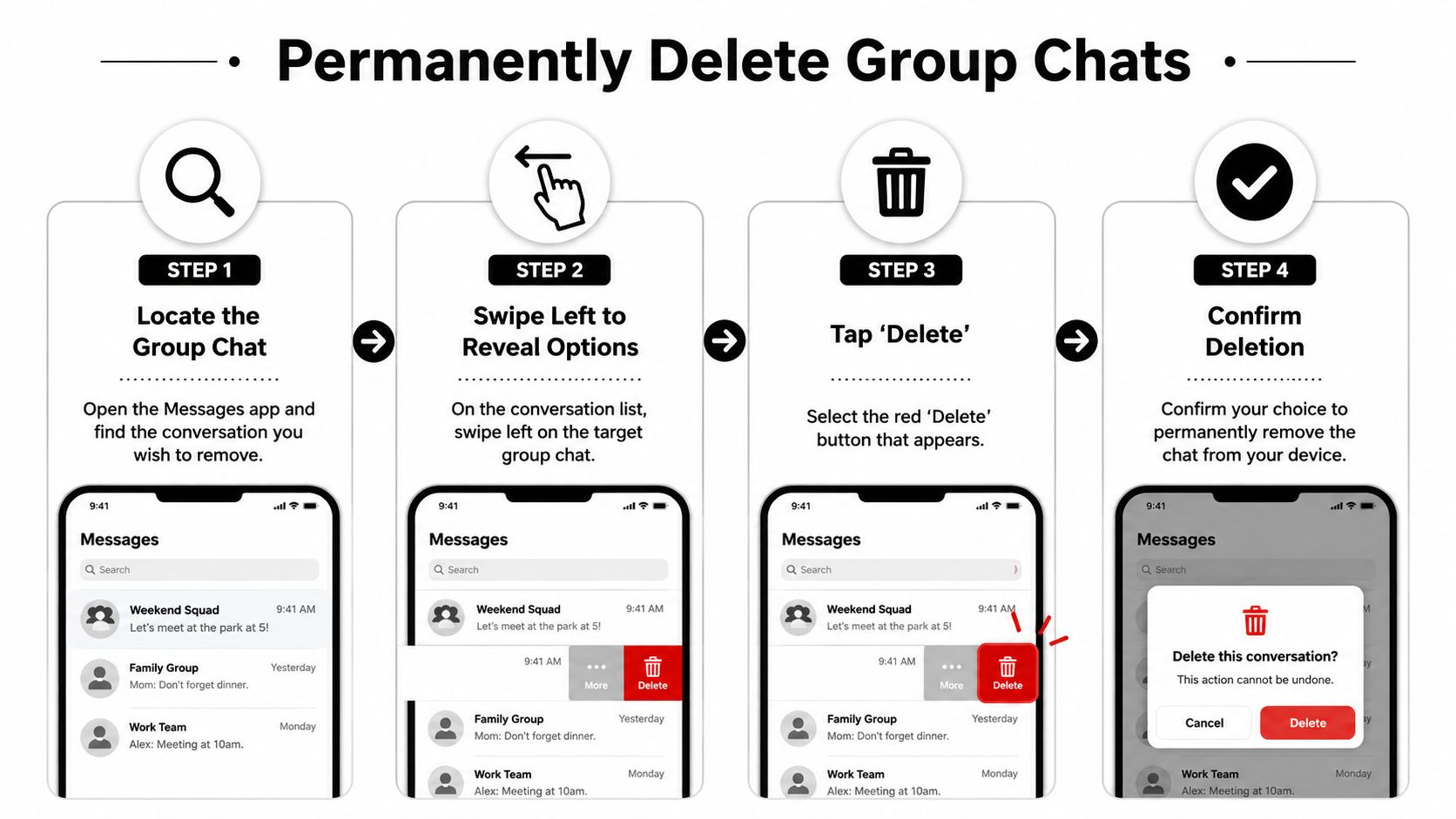
A lot of tutorial content still teaches only the swipe-delete move. But as noted in this YouTube walkthrough on group chat deletion, that method is often temporary because a new incoming message can make the thread reappear unless you first leave the conversation.
Use the right action for the result you want
Before touching anything, decide what outcome you want:
| Action | What it does | What it does not do |
|---|---|---|
| Hide Alerts | Mutes notifications from that thread | Doesn't remove the chat |
| Leave This Conversation | Removes you from a supported iMessage group | Doesn't instantly erase the local thread |
| Delete | Removes the thread from your Messages list | Doesn't always stop it from returning if you never left |
That middle step is the one that matters most.
The leave then delete workflow
Use this when the group gives you the option to leave.
- Open Messages.
- Tap the group conversation.
- Tap the group icons or header at the top.
- Look for Leave This Conversation or the newer delete-and-block option if your version shows it.
- Confirm that action.
- Return to your messages list.
- Swipe left on the thread and tap Delete.
This is the process that stops the familiar cycle where the chat disappears, then comes back the next time someone replies.
Later in iOS, Apple expanded group chat control. The ability to permanently delete and block group chats was introduced as a feature update in iOS 16, according to BGR's coverage of the update.
Here's a visual walkthrough if you want to see the screens in action.
What works and what doesn't
Some methods feel similar, but they solve different problems.
- Swiping left only: Good for quick cleanup. Bad for permanent escape if the thread is still active.
- Muting first: Good when you can't leave. Bad if your goal is full removal.
- Leaving first, deleting second: Best option when the conversation supports it.
Practical rule: If the chat has a real exit option, use that before you touch the trash icon.
Why You Can't Leave Some Group Chats iMessage vs SMS
The most common complaint is simple. You open the group details, and Leave This Conversation is grayed out or missing.
That usually comes down to the type of group thread. Some are full iMessage groups with blue bubbles. Others are SMS or MMS groups with green bubbles because at least one participant isn't using an Apple device.
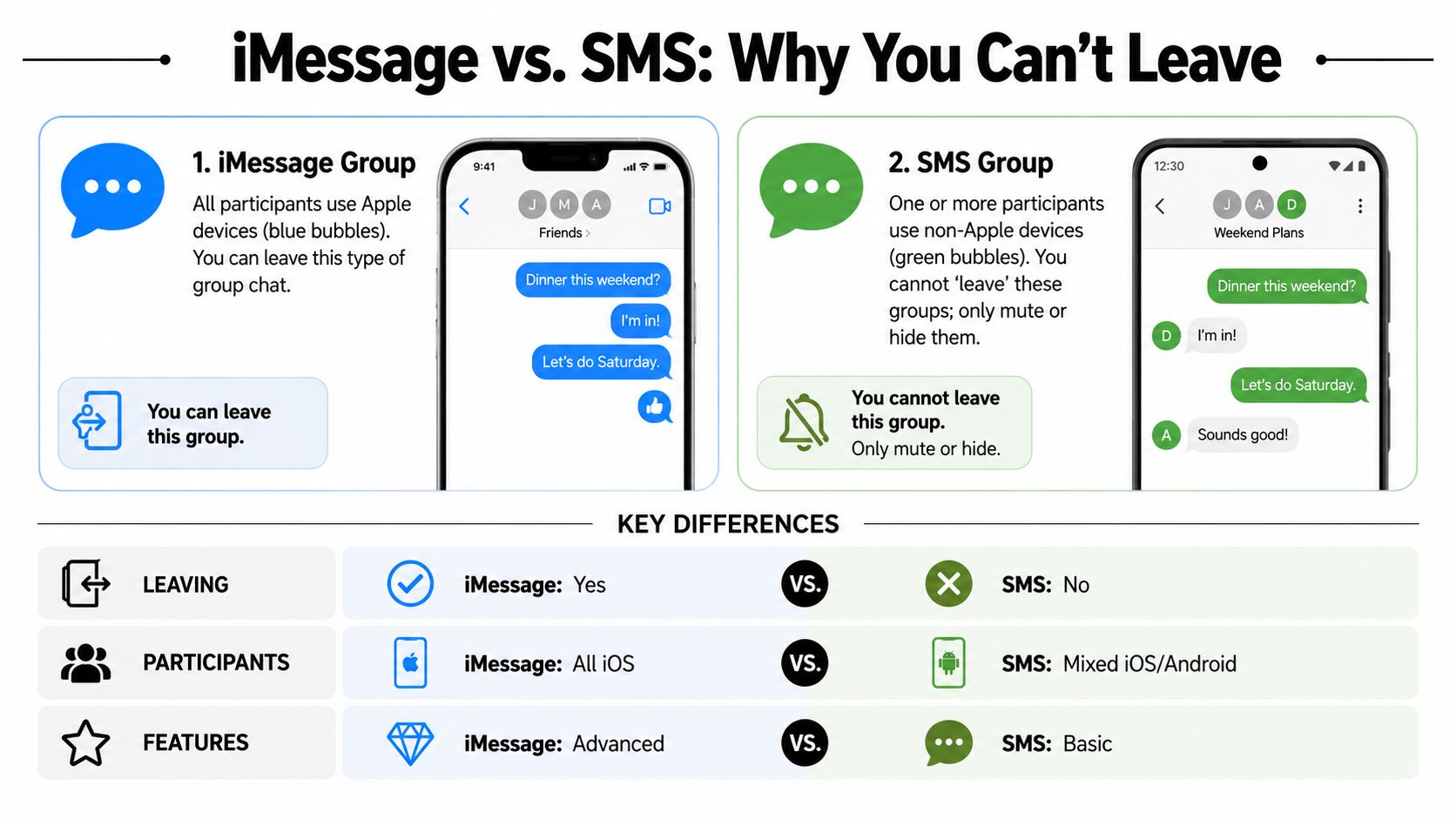
Blue bubbles and green bubbles matter
Apple's native leave feature depends on the conversation format.
According to CNET's explanation of escaping group chats, “Leave this Conversation” is only available when the thread has at least four participants and every participant uses an Apple device. The same report notes that mixed-platform chats become un-leavable through native iPhone controls, affecting an estimated 15-20% of global group chats.
That means you can't judge the option by what your friend sees on their phone. Their group may meet the requirements while yours doesn't.
When leave disappears
Here are the usual reasons:
- Too few people: You need at least four participants total, including you.
- One Android user joined: The thread switches to a format that doesn't support leaving.
- The button is grayed out: iPhone is showing the option area, but the conversation doesn't qualify.
In those cases, the practical fallback is usually Hide Alerts. It isn't elegant, but it's the built-in way to stop the noise without deleting a thread that can still reappear.
| Group type | Can you leave | Best fallback |
|---|---|---|
| All Apple devices, enough participants | Yes | Leave, then delete |
| Mixed Apple and Android | No | Hide Alerts |
| Small group that doesn't qualify | Often no | Hide Alerts |
If you manage communication across many devices and mixed user setups, that same compatibility issue shows up in education operations too. A strong guide for smooth online tutoring operations matters for the same reason. Features only work cleanly when the device environment supports them.
If the group has green bubbles, assume your options are more limited.
Beyond Deletion Unsend, Edit, and iCloud Sync
Sometimes you don't want to remove the whole conversation. You just want tighter control over what stays visible, what disappears, and what syncs across your Apple devices.
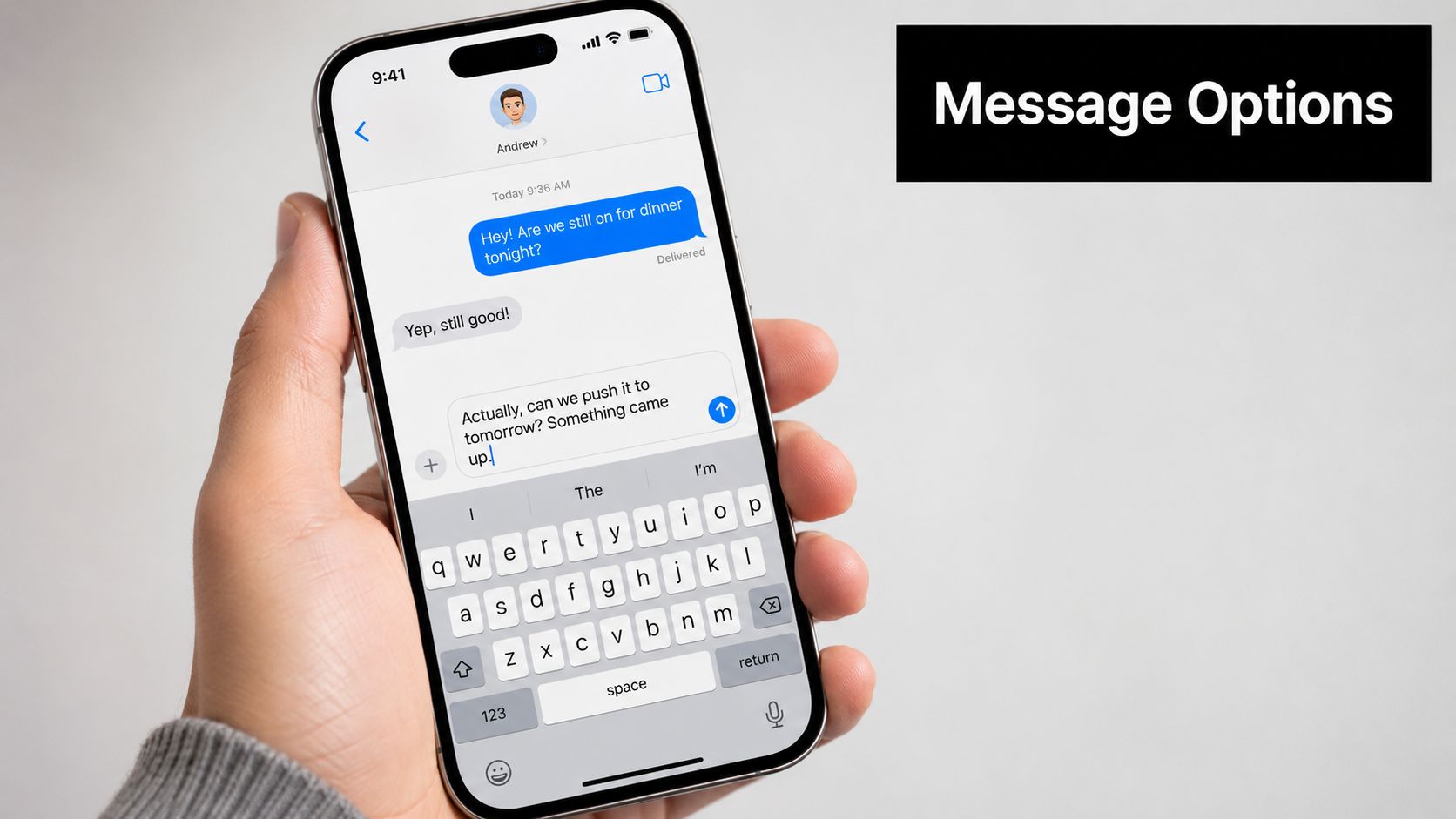
Unsend and edit are different from deleting a thread
Deleting a conversation removes the thread from your device. It doesn't work like unsend or edit, which target individual messages.
That matters because people often expect one feature to do the job of another. If you sent the wrong message to a group, deleting the thread from your phone doesn't retract what others already received. You need the message-level controls available in your version of iOS and in the conversation type that supports them.
iCloud can make deletion feel bigger than expected
If you use Messages in iCloud, changes can appear across your Apple devices. Delete on your iPhone, and you may also stop seeing that thread on your iPad or Mac.
That's usually helpful, but it can surprise people who expected a single-device cleanup. The same general lesson applies to any system with synced data. Before removing something important, make sure you don't need it elsewhere. This Tutorbase guide to backup and recovery systems covers that mindset well in a broader operations context.
Apple's group chat controls also changed meaningfully over time. As covered by BGR earlier in this article, iOS 16 marked the point where Apple turned the older leave-only behavior into a stronger delete-and-block workflow.
Delete clears visibility on your side. Unsend and edit change specific message behavior. Sync determines where those changes show up.
Troubleshooting Common Group Message Problems
Most group message problems come down to one of a few repeat issues. If you know which one you're facing, the fix is usually quick.
Why did the chat come back
You probably deleted the thread without fully exiting the conversation.
A standard swipe-to-delete can send the conversation to Recently Deleted instead of removing it immediately. To permanently delete a group message right away, you need the two-step process shown in this video on clearing group messages: delete the thread, then go into Recently Deleted and remove it there. Without that second step, the conversation can sit recoverable for up to 30 days.
Can I recover a deleted group chat
Yes, sometimes.
If you deleted it recently and haven't cleared Recently Deleted, you may still be able to restore it. That's useful when you remove the wrong thread by accident.
If you want immediate removal instead, use this path:
- Open Messages list
- Tap Edit or Filters
- Choose Show Recently Deleted
- Select the conversation
- Tap Delete
What's the difference between delete and mute
They solve different problems.
- Delete: Removes the thread from view, at least locally.
- Mute with Hide Alerts: Keeps the conversation but stops the notification flood.
- Leave or block options: End your participation when the group supports that feature.
Why is Leave This Conversation gray
That usually means the thread doesn't meet the technical requirements. It may be too small, or it may include a non-Apple participant.
When that happens, stop chasing the missing button. Use Hide Alerts instead and move on.
Quick fixes at a glance
| Problem | Most likely cause | Best fix |
|---|---|---|
| Chat reappears after delete | You didn't exit first | Leave first if available, then delete |
| Leave button is gray | Group doesn't qualify | Hide Alerts |
| Deleted by mistake | Thread still recoverable | Check Recently Deleted |
| Want it gone now | Only first delete step completed | Clear Recently Deleted too |
If you run a tutoring center, language school, or multi-branch education business, operational clutter feels a lot like message clutter. Teams using separate tools for scheduling, billing, payroll, and room management can lose 10+ hours weekly on admin, while centers running 50-10,000+ lessons per week across 1-10+ branches often need one system instead of disconnected workflows, as described on Tutorbase's software overview. Tutorbase brings scheduling, billing, payroll, room management, CRM, attendance, payments, and student tracking into one platform, and its AI scheduling tools can cut booking from 10+ minutes to under 2 minutes according to Tutorbase's scheduling article. If you want a simpler operation, you can explore Tutorbase.


