


Your weekly schedule probably lives in three places right now. One spreadsheet tracks classes, a calendar tracks teacher availability, and someone's memory fills the gaps when a room change happens at the last minute.
That setup works until it doesn't. A good class scheduling template can absolutely clean up the first layer of chaos, but it only works if the data underneath it is solid, the rules are clear, and you know where spreadsheets stop being helpful.
Why Your Manual Schedule Is Costing You Money
Most tutoring centers don't break because of one dramatic mistake. They leak time through small, repeated failures. A teacher gets booked into two lessons. A room change doesn't reach billing. A recurring class shifts by one week, and someone updates one tab but forgets the other.
That's why manual scheduling feels exhausting. You're not just building a timetable. You're constantly reconciling exceptions.
For tutoring centers and language schools with 5 to 100+ teachers across 1 to 10+ branches, manual admin is rarely a side task. According to Tutorbase on Capterra, these businesses lose an average of 10+ hours per week on manual admin like hand-created invoices and spreadsheet-based payroll, and that can reduce operational capacity and profitability by 15–25% in mid-sized operations.
Why the spreadsheet gets messy so fast
A basic class scheduling template usually starts with good intentions:
- One master tab: You try to keep every lesson in a single place
- Color coding: Teachers, subjects, rooms, and branch locations each get a color
- Manual checks: Someone scans the sheet for overlaps before confirming a booking
- Separate follow-up: Billing, payroll, and attendance happen somewhere else
That works for a small center with a stable timetable. It starts failing when you add trial lessons, hybrid classes, makeup sessions, multiple payers, teacher substitutions, and room capacity limits.
Operational rule: If your team has to “just remember” a scheduling exception, your process already has a hole in it.
If you use website booking tools, it's worth reading Baslon Digital insights for Wix booking. The practical takeaway is familiar to most operators. front-end booking can look organized while the back office stays fragmented.
That's why many growing centers start looking for tools that replace spreadsheets for tutors. The issue usually isn't effort. It's that manual systems force your staff to do work a proper scheduling system should handle automatically.
The Data Foundation of a Flawless Schedule
A strong class scheduling template starts long before you format a calendar view. It starts with clean inputs. If the underlying data is inconsistent, the template will keep producing conflicts, blind spots, and last-minute fixes.
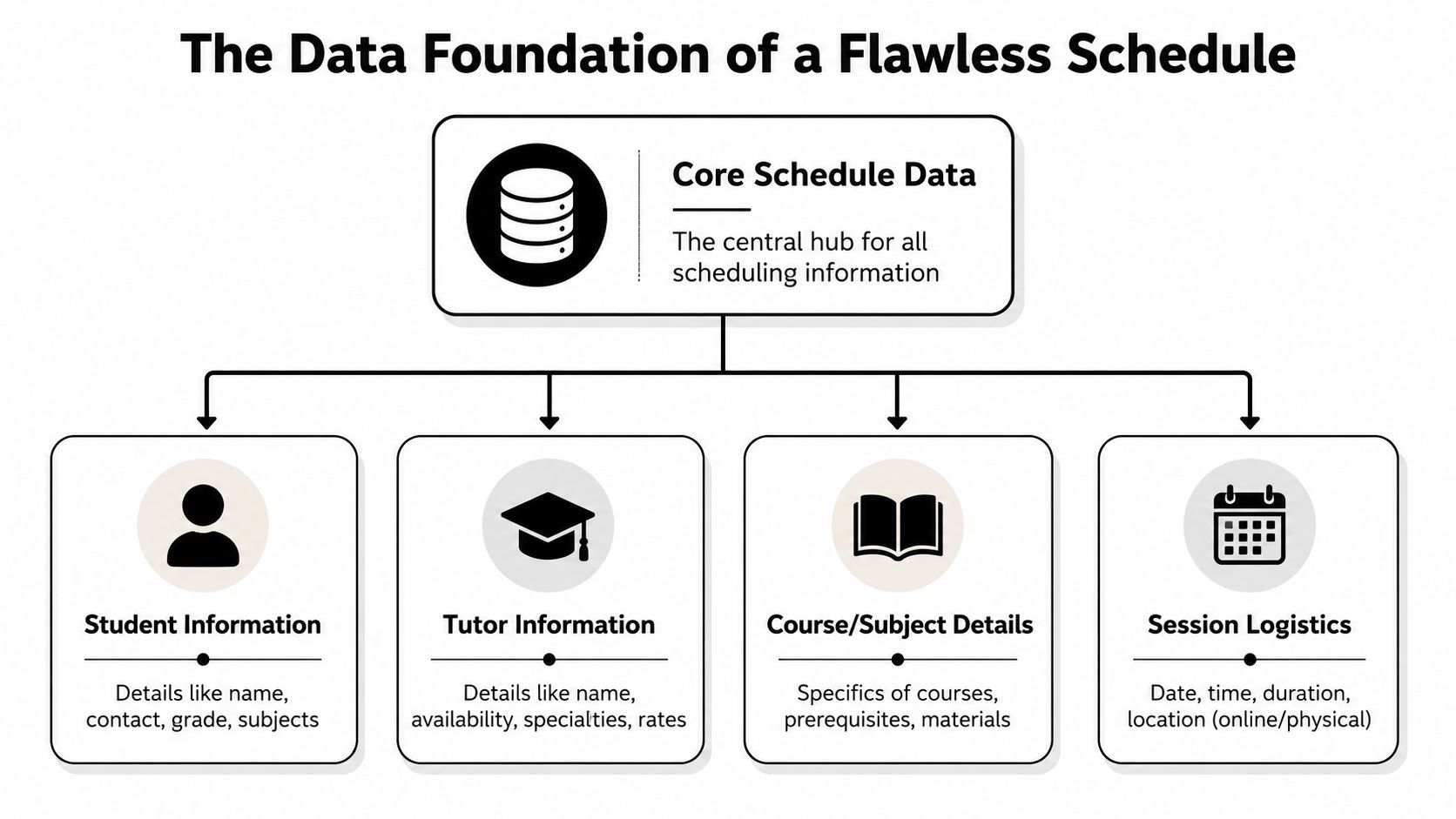
Start with people data
The biggest scheduling failures usually come from incomplete people records.
For teachers, track:
- Subjects and levels: Math isn't enough. You need Algebra, IB Math, SAT Math, or A1 Spanish
- Availability windows: Include day, start time, end time, and recurring unavailable periods
- Employment details: Contractor vs employee often affects how you assign loads
- Locations: Some teachers can float, others can't
- Rate logic: If you pay differently by subject or time slot, note it early
For students, capture:
- Current subject and level: This affects matching and grouping
- Preferred branch or online mode: It changes the booking options you can offer
- Attendance pattern: Weekly, bi-weekly, trial-only, catch-up, or flexible
- Linked payer: The person receiving invoices may not be the student
- Special constraints: Exam timelines, sibling scheduling, or support needs
Add rooms and curriculum as first-class data
Most spreadsheet schedules treat rooms as an afterthought. That's a mistake.
Your room sheet should include:
- Branch
- Room name
- Capacity
- Features, such as piano, whiteboard, projector, or exam setup
- Blocked periods
- Fees, if room cost affects pricing
Your curriculum sheet should define:
- Subject
- Level
- Service type, such as group class, one-to-one, hybrid, or online
- Default capacity
- Default duration
- Pricing category
A schedule doesn't fail because the calendar is ugly. It fails because the teacher record, room record, and service record don't agree with each other.
Build one source of truth
The cleanest class scheduling template has separate tabs for Teachers, Students, Rooms, Services, and the Master Schedule. Each tab feeds the next one.
A useful way to think about it is this:
| Data area | What it answers |
|---|---|
| Teachers | Who can teach this lesson, where, and when |
| Students | Who needs the lesson, at what level, and under which payer |
| Rooms | Where the lesson can happen, and how many seats exist |
| Services | What is being sold, delivered, and staffed |
| Master Schedule | What is actually happening this week |
If you want a model for storing rich student records before they hit the timetable, a structured system like Tutorbase CRM shows the level of detail that prevents downstream scheduling errors.
How to Build Your Starter Scheduling Template
You don't need an advanced system to build version one. You need a layout that people can read quickly, update consistently, and audit when something goes wrong.
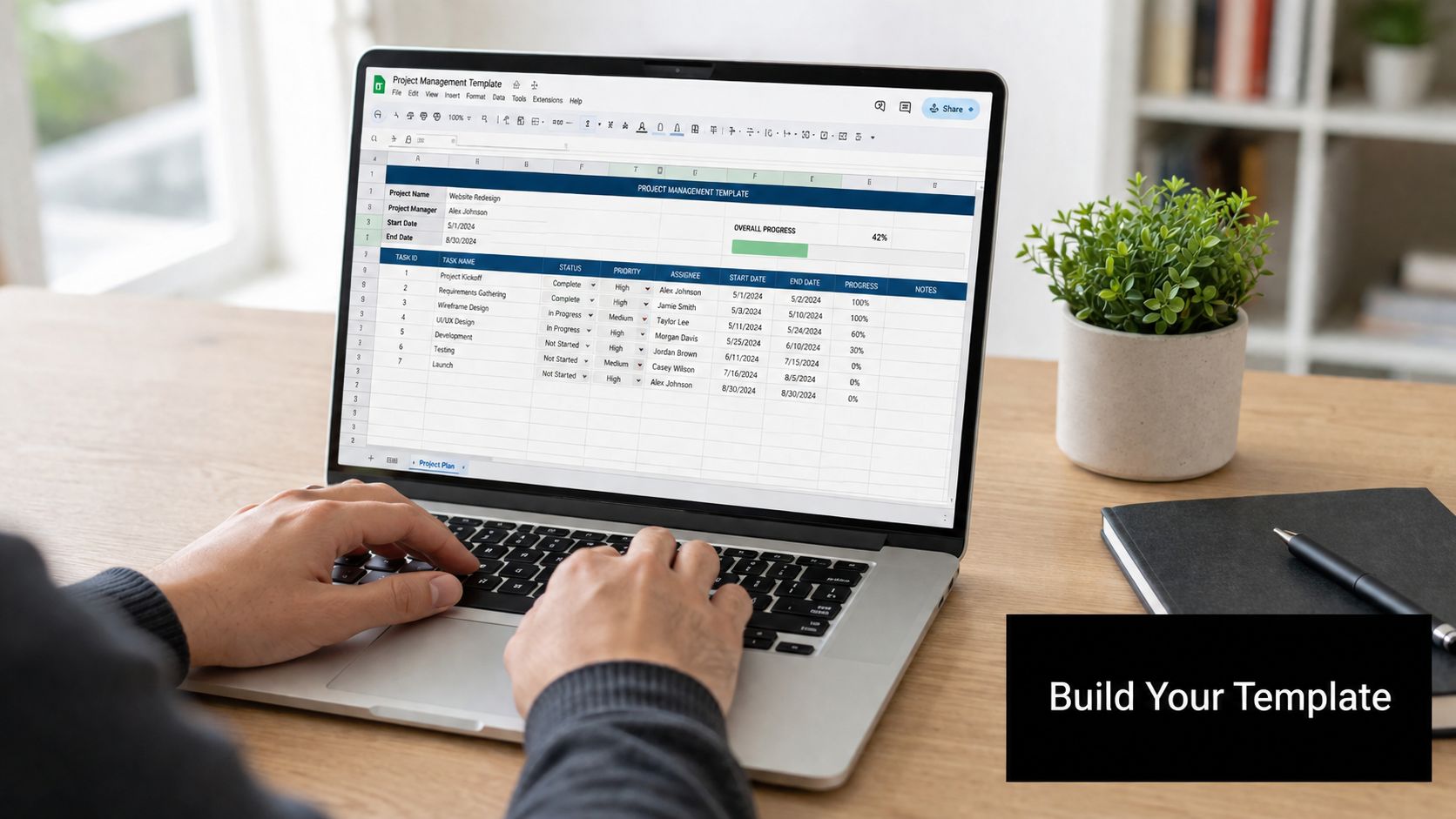
A practical starter template in Google Sheets or Excel usually needs five tabs:
- Teachers
- Students
- Rooms
- Services
- Master Schedule
Build the master sheet first
The Master Schedule is the working surface. Keep it boring. Fancy layouts slow people down.
Use columns like these:
| Column | Purpose |
|---|---|
| Date | The actual lesson date |
| Start time | Scheduling anchor |
| End time | Helps detect overlap |
| Branch | Needed for multi-location visibility |
| Room | Physical or virtual room |
| Subject | Core academic category |
| Level | Matching and grouping |
| Teacher | Assigned instructor |
| Student or group | Who attends |
| Lesson type | Regular, trial, catch-up |
| Status | Scheduled, attended, cancelled |
| Notes | Exceptions and logistics |
Leave room for future fields even if you don't use them on day one. A class scheduling template that has no place for status, delivery mode, or linked payer usually gets rebuilt within weeks.
Use a seven-step build order
A useful framework comes from Koalendar's guide to school scheduling. It outlines a seven-step method: inventory facilities and requests, define essential requirements, design the master blueprint, embed intervention blocks, integrate electives, conduct a conflict analysis, and export the schedule (Koalendar).
For tutoring centers, that translates well:
List your real constraints
Rooms, teacher availability, class formats, and branch operating hours come first.Lock the rules early
Decide what can't move. For example, fixed teacher prep time, premium rooms, or exam groups that need the same weekly slot.Place anchor classes first
Long-running groups, high-demand exam prep, and senior teachers usually set the frame.Add support blocks
Trial lessons, catch-ups, and intervention sessions need dedicated space or they'll wreck the rest of the week.
Keep the template readable
Readable beats clever. Use drop-downs where possible, not free text. “B1 English” should appear one way, not five different ways.
Practical habit: If staff can type over a controlled field, they eventually will.
Here's a quick walkthrough if you want to see another scheduling build process in action:
What to include in your starter file
Your downloadable starter file should have:
- A clean weekly schedule tab for day-to-day operations
- A raw data tab for controlled lists and lookups
- A teacher load view so you can spot imbalance
- A room utilization view for branch managers
- A change log so staff can see what moved and why
That gives you a class scheduling template that's usable, trainable, and much easier to maintain than a single chaotic sheet.
Adding Smarter Logic for Conflicts and Recurring Lessons
Once the basic template works, the next upgrade is logic. With logic, most spreadsheet schedules either become useful or become fragile.
Flag teacher and room conflicts
The simplest conflict checks use formulas like COUNTIFS. In plain terms, you're asking the sheet, “How many rows match this teacher, this date, and this time block?”
A common pattern is:
- Match teacher name
- Match date
- Match start time
- Return a warning if the count is greater than one
You can build the same logic for rooms. Conditional formatting then highlights duplicates in red so staff can catch them before confirming the class.
You can also use lookup logic to pull supporting details into the schedule:
VLOOKUPorXLOOKUPto pull teacher specializationVLOOKUPorXLOOKUPto pull room capacity- dropdown validation to stop free-text variations
Handle recurring lessons without duplicating mistakes
Recurring lessons are where a simple class scheduling template starts showing strain. Weekly and bi-weekly classes look easy until one holiday, one teacher absence, or one room closure forces a change.
A practical way to structure recurring lessons is to separate:
- Series ID, which ties all related lessons together
- Recurrence pattern, such as weekly or bi-weekly
- Instance date, which stores the actual scheduled occurrence
- Exception note, for changes to one occurrence only
That setup prevents a common spreadsheet problem. someone updates one row and assumes the whole series changed.
If you don't create a clear difference between the recurring rule and the actual booked lesson, staff will edit the wrong row.
Where spreadsheet logic starts breaking
Spreadsheets can do a lot, but the logic gets brittle fast.
Watch for these warning signs:
- Formulas depend on exact text matching: One typo breaks downstream logic
- Recurring classes need manual duplication: Staff copy the previous week and miss exceptions
- Conflict rules only work on visible tabs: Hidden or archived data creates false confidence
- Multiple users edit at once: Someone overwrites a formula with pasted values
At that point, your class scheduling template still looks organized on the surface, but it stops being a reliable operational tool. That's the ceiling most growing centers run into.
The Hidden Breakpoints in Every Spreadsheet Schedule
The spreadsheet isn't the enemy. It's just honest about what it can't do. It can list classes. It can even flag some collisions. It can't run a growing center cleanly when scheduling starts affecting billing, payroll, room fees, and seat utilization at the same time.
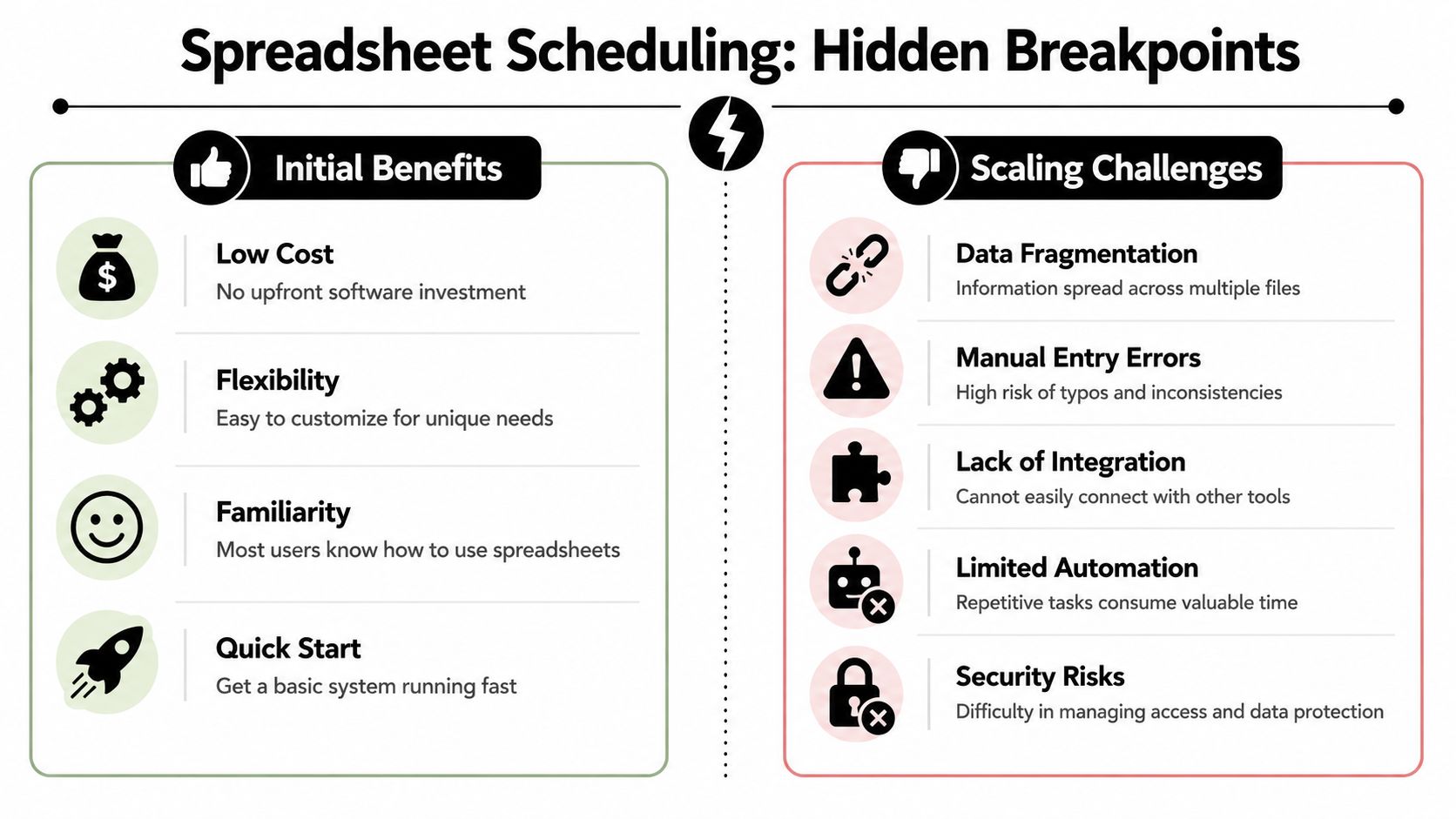
The first break happens in coordination
A spreadsheet is usually owned by one careful person. The moment three people need to rely on it in real time, tension starts.
One branch updates a teacher switch. Another team member invoices from yesterday's version. Payroll reads a different tab. Nobody is malicious. The system just doesn't maintain one dependable operational state.
The second break happens in integration
Static templates fall short when scheduling, billing, and payroll often live in separate tools, and existing template guides don't solve that fragmented setup. According to Veracross schedule template coverage, this fragmentation causes 42% of tutoring centers to lose revenue through double-booked rooms and untracked capacity, and a static Excel template can't resolve that gap.
Here's what that looks like in practice:
- Attendance is separate from billing: Staff re-enter lesson data into invoices
- Teacher pay is separate from schedule changes: Cancellations and substitutions need manual payroll fixes
- Room fees are invisible: A premium room gets used, but the charge never reaches the invoice
- Capacity goes unmeasured: You can't easily see which classes are full, thin, or badly timed
Centralization changes the economics
The strongest argument against spreadsheet dependence isn't style. It's efficiency.
Expert data shows that centralizing the scheduling process and using data-driven tools yields a 30–45% improvement in schedule efficiency, a 20% reduction in double-bookings, and a 60% reduction in scheduling time (Coursedog best practices).
The best spreadsheet schedule is still a workaround. It helps until the business needs live coordination, not just organized cells.
If your team spends more time checking whether the schedule is correct than using it, the template has reached its limit.
Scaling Beyond Spreadsheets When to Upgrade Your System
The right time to upgrade isn't when the spreadsheet becomes ugly. It's when your staff starts building side systems to support it.
Signs you've outgrown a class scheduling template
You've probably hit the upgrade point if any of these are true:
- Bookings require calendar hunting: Staff check multiple tools before confirming one lesson
- Recurring lessons create admin debt: Every exception triggers manual fixes
- Invoices depend on attendance re-entry: The same lesson gets typed twice
- Payroll takes detective work: Substitutions, rates, and premiums live in separate files
- Branches can't share one live schedule: Each location works from its own version
At that stage, the problem isn't the template design. The problem is system fragmentation.
What integrated software fixes
A proper scheduling platform replaces manual cross-checking with operational rules. Instead of searching calendars for an available teacher, room, and time, the system can surface valid combinations. Instead of scanning for seat availability, it can show classes with open capacity. Instead of creating invoices by hand, attendance can feed billing directly.
For centers comparing options in this category, dedicated tutoring scheduling software usually solves four failures at once:
| Spreadsheet pain | Software response |
|---|---|
| Manual teacher and room checks | Conflict detection with alternatives |
| Rebuilding weekly repeats | Recurring lesson creation |
| No view across branches | Centralized multi-location scheduling |
| Schedule disconnected from finance | Attendance-linked billing and payroll workflows |
This matters most for operators managing multiple branches, hybrid classes, room fees, trial conversion, and teacher pay structures that go beyond basic hourly rates.
A spreadsheet can be an excellent starting point. It just isn't a long-term operating system.
Frequently Asked Questions About Class Scheduling
Is Google Sheets or Excel better for a class scheduling template
Google Sheets is easier for shared access and quick updates. Excel gives you more power if one experienced operator manages the file locally. If multiple people need live access across branches, Sheets usually creates fewer version-control problems.
What should a class scheduling template include at minimum
You need date, start time, end time, branch, room, subject, level, teacher, student or group, lesson type, and status. If you leave out status or room capacity, the schedule becomes harder to trust.
How do I manage multiple branches in one template
Use one master data structure with a branch field on every relevant tab. Don't create totally separate logic for each location unless the businesses operate differently. Shared structure with branch filters is usually easier to maintain.
How should I handle last-minute cancellations
Track the lesson status on the original booking row instead of deleting the class. That preserves history and helps with attendance, billing, and teacher pay decisions later.
Can a spreadsheet prevent double-bookings
It can flag some conflicts if you build the logic carefully. It can't reliably prevent booking errors when multiple staff members are editing, copying, and adjusting recurring classes at the same time.
When should I stop improving the spreadsheet and switch systems
Switch when the schedule starts driving too many downstream tasks. If your class scheduling template now affects attendance, invoices, prepaid balances, payroll, room usage, and branch coordination, you need a connected system more than a smarter sheet.
What kind of business benefits most from upgrading early
Tutoring centers and language schools with multiple teachers, recurring lessons, grouped classes, room constraints, and several admin staff usually benefit first. The more moving parts you have, the faster manual scheduling becomes expensive.
If you're ready to move beyond disconnected calendars, invoices, and payroll sheets, Tutorbase gives tutoring centers and language schools one platform for scheduling, billing, payroll, room management, student tracking, and lead management. It's built for operators who are tired of patching together Teachworks, TutorCruncher, TutorBird, and spreadsheets.


