


A well-run studio should operate like a perfectly choreographed routine, even without your constant supervision. That’s the core promise of dance studio manager software. This software acts as the digital brain for your operation, replacing chaotic spreadsheets, overflowing inboxes, and late-night invoicing sessions with a single command center.
This kind of software consolidates all the moving parts of your business. It connects class scheduling, parent communications, tuition payments, teacher payroll, and recital planning into one platform.
From Back-Office Burden to Business Growth
For most studio owners, a passion for dance gets buried under a mountain of administrative work. You become a scheduler, an accountant, and a receptionist all rolled into one. This is the exact problem dance studio manager software solves. It's an integrated system designed to automate repetitive, time-consuming tasks.
Think of it as your digital studio manager. Instead of manually tracking who paid, the software automatically generates and sends invoices from class registrations. Instead of juggling a spreadsheet to avoid double-booking Studio A, the system manages room availability and prevents conflicts.
It frees you from the back office so you can focus on teaching, growing your community, and enjoying the business you built. This isn't a niche trend. The rapid growth of the global market for this software shows how essential these tools have become for studios serious about growth.
The global Dance Studio Management Software market was valued at USD 1.2 billion in 2024 and is projected to reach USD 2.5 billion by 2033. This growth highlights how essential these digital tools have become for modern studios. You can review more details about these market projections and their drivers.
How does automated studio management compare to manual methods?
What does this change actually look like day-to-day? The difference is clear when you compare the old way of doing things with an automated approach. One path leads to constant headaches, while the other provides consistent relief and opens up time for growth.
| Administrative Task | Manual Method (The Headache) | Automated Software Solution (The Relief) |
|---|---|---|
| Class Scheduling | Using spreadsheets or paper calendars, leading to double-bookings and confusion. | A visual, drag-and-drop calendar with conflict detection that prevents errors. |
| Student Registration | Handling paper forms and manually typing student data into multiple lists. | Parents self-register through an online portal that automatically updates all your records. |
| Tuition & Invoicing | Manually creating invoices one by one and chasing parents for late payments. | Invoices are auto-generated from attendance and sent with easy online payment links. |
| Parent Communication | Sending mass emails that get lost in spam and fielding constant phone calls for simple updates. | A central portal and app for announcements, schedules, and direct messages—all in one place. |
Ultimately, the choice is between spending your time on your business (teaching, creating, growing) or in your business (endless paperwork). The right software lets you do more of the former.
The Core Features That Run Your Studio
Great dance studio software is built around a handful of core features designed to solve your biggest operational headaches. The best systems bring scheduling, payments, and communication under one roof, turning scattered spreadsheets and email chains into a single, automated workflow that keeps your studio humming.
This is how it all connects. A central hub ensures every part of your studio is talking to the others.
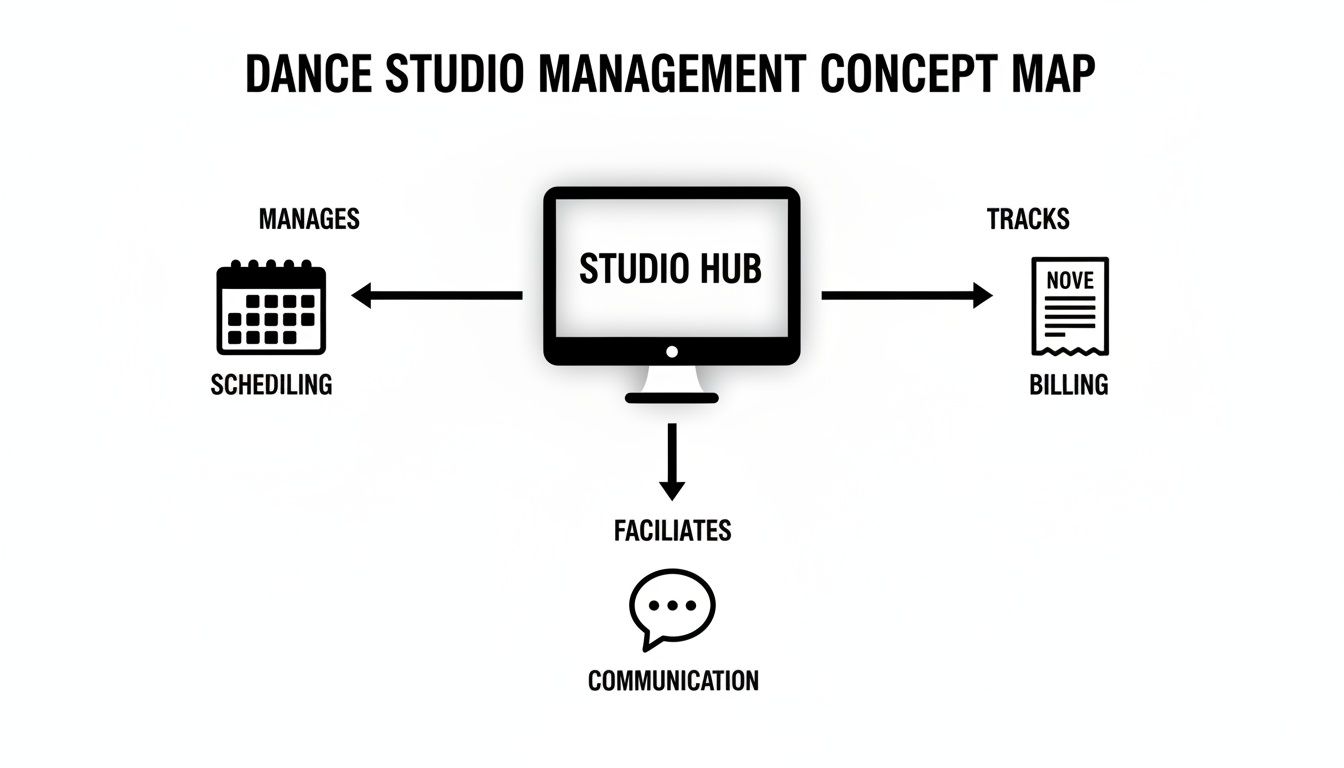
When a student's attendance is marked, the billing system instantly knows. This single source of truth eliminates manual cross-referencing and reduces errors to zero.
What is smart scheduling and class management?
At its heart, dance studio manager software is a powerful scheduling engine. It acts as an intelligent traffic controller for your studio spaces, instructors, and classes. This prevents the costly and embarrassing mistake of double-booking a room or a teacher.
A solid platform lets you:
- Set Recurring Classes: Schedule the entire "Beginner Ballet" season for every Tuesday at 4 PM with just a few clicks.
- Manage Room Availability: Block out Studio B for a private rehearsal, making it instantly unavailable for class bookings.
- Track Capacity: Cap your hip-hop class at 12 students and let the software automatically manage a waitlist.
AI-powered scheduling tools can even auto-suggest available time slots based on instructor, room, and student availability. This turns a 10-minute booking puzzle into a task that takes seconds.
How do I automate billing and payments?
Chasing down tuition payments is easily one of the most dreaded parts of running a studio. Automated billing is the financial engine that finally ends that exhausting cycle. The software generates invoices for you based on registration and attendance records. This single feature can give you back dozens of hours every month.
Key billing features include auto-generating invoices from attendance, offering prepaid credit wallets for drop-ins, and managing class packs with set expiration dates. This level of automation isn't a luxury; it's critical for growth.
The market for Dance Studio Software is booming, with some estimating a size of USD 14,250.75 million in 2024. North America makes up 38.6% of this market. This is driven by studios with high class volumes that can no longer afford manual errors from fragmented tools. You can learn more about the dance studio software market's rapid expansion on 360iresearch.com.
What is a parent and student portal?
A parent portal is your digital front desk, open 24/7. It gives parents one central, secure place to manage everything related to their child’s dance education. A self-service hub like this dramatically cuts down on phone calls and emails to your admin team.
Through the portal, parents can:
- Check their child’s schedule and see attendance history.
- Make secure online payments for tuition, recital fees, or costumes.
- Update their own contact and payment information without help.
- Register for new classes or sign up for summer workshops.
Many modern systems also build in robust loyalty applications for service-based businesses, which are fantastic for keeping students enrolled. By giving families this control, you deliver the professional, modern experience they expect.
Turning Administrative Chaos Into Measurable Growth
Bringing in management software isn't just about making your life easier. It's a direct investment in your studio's financial health and long-term success. The real value is turning administrative efficiency into tangible growth. This shift moves your focus from managing chaos to building your business.
Reclaiming the 10+ administrative hours you lose each week unlocks time for activities that truly move the needle. You can dedicate those hours to developing new choreography, mentoring instructors, or launching a marketing campaign for your summer intensive.

From Time Saved to Revenue Gained
The business case for dance studio manager software becomes clear when you connect its features to your bottom line. Eliminating scheduling conflicts and optimizing class capacity boosts revenue without adding a single square foot of studio space. Just imagine automatically filling that last open spot in your advanced contemporary class instead of letting it go empty.
For studios managing anywhere from 50 to 10,000+ weekly sessions, the right software can eliminate over 10 admin hours every week. This is achieved through features like conflict detection and recurring bookings, leading to a 60% reduction in admin time. More importantly, it prevents revenue leaks and has helped studios see a 42% boost in monthly renewals. You can explore more data on how software drives efficiency and growth on cognitivemarketresearch.com.
How Automation Sharpens Your KPIs
Key Performance Indicators (KPIs) are the vital signs of your studio's health, and the right software actively improves them. Automated payment reminders and easy online payment options drastically increase on-time tuition collection. This directly improves your cash flow and reduces financial stress.
By automating routine tasks, you're not just saving time. You're creating a more professional and reliable experience for parents, which directly impacts student retention and your studio's reputation.
The table below shows the impact you can expect on your most important metrics. This is a realistic look at how automation can transform your numbers.
Expected ROI from Implementing Dance Studio Software
| Key Performance Indicator (KPI) | Typical Result with Manual Methods | Potential Improvement with Software |
|---|---|---|
| Administrative Time | 10-15 hours per week on scheduling, billing, and follow-ups. | 2-4 hours per week, freeing up time for growth activities. |
| Student Retention | Fluctuates due to inconsistent communication and billing issues. | Increased retention through better parent communication and easy payments. |
| Class Fill Rate | Averages 70-80% capacity with missed opportunities for drop-ins. | Optimized to 90-95% capacity with automated waitlists and spot-finding. |
| On-Time Payments | 65-75% on-time, requiring significant time for chasing payments. | Over 95% on-time payments with automated invoicing and reminders. |
When you look at the numbers, the ROI becomes undeniable. Moving from a manual system to an automated one doesn't just make your studio run smoother. It makes it more profitable and sustainable.
Your Checklist for Choosing the Right Software
Picking the right dance studio software is a huge decision. To make a smart investment, you have to look past slick sales demos and ask the tough questions that show how a platform performs when things get busy.
This checklist is your guide for demos and free trials. It's designed to help you find a true partner for your studio, not just another monthly subscription. First, ask the vendor point-blank: can this software scale with my studio? A system that’s perfect for 50 students might completely fall apart when you hit 500.
How do I evaluate core functionality?
Next, dig into the features that actually matter for a dance studio. Plenty of generic business tools say they can handle scheduling, but your needs are unique. Don't get stuck with a clunky system that forces you to create awkward workarounds.
The right software should solve your specific operational headaches. During your evaluation, make sure you see these dance-specific features in action:
- Recital and Performance Planning: Does the software have a dedicated module for organizing recitals? You’ll want features for managing act lists, creating stage flows, tracking music files, and even handling costume measurements and orders.
- Complex Payroll and Instructor Rates: Can it handle your studio's pay structure? Look for a system that supports varied rates (like per-student, flat hourly, or revenue share) and calculates payroll for you.
- Multi-Location Management: If you have dreams of expanding, can you manage multiple studio branches from one central dashboard? This means overseeing schedules, staff, and finances across every location.
- Hybrid Class Support: In 2024 and beyond, offering hybrid classes is a must. Make sure the platform can seamlessly track attendance and bill for both in-person and online students in the same class.
How should I assess support and implementation?
Finally, remember you’re not just buying software; you’re entering a partnership. The quality of a company’s customer support and how they handle your initial setup are just as important as the features themselves. A fantastic platform with terrible support will only lead to frustration.
Before you commit, ask detailed questions about their data migration process. Getting your existing student lists, payment histories, and schedules moved over cleanly is critical for a smooth launch. A vendor that offers dedicated onboarding support is a great sign.
Also, look at the total cost of ownership. The monthly subscription fee is obvious, but what about hidden costs? Ask about setup charges, data migration fees, or their payment processing rates. Understanding the full financial picture is the only way to compare your options honestly. You can check out a transparent Tutorbase pricing model, for example, to see how plans should align with a studio's size.
Making the Switch: Your Step-by-Step Transition Plan
The thought of switching software can be daunting, which is why so many studio owners keep wrestling with clunky spreadsheets. But moving to a real dance studio manager software doesn't have to be a chaotic mess. With a clear roadmap, the switch can feel like the game-changing upgrade it is.
It all begins with your most important asset: your data.

Step 1: What is data cleanup and migration?
Think of this part like packing up your old studio before a move. Your goal is to get all those student lists, class schedules, and payment records out of scattered files and into a single, clean format. Most software providers give you import templates. Use them.
- Student Data: Pull together all student names, parent contact info, birthdays, and current enrollments. This is the perfect opportunity to merge duplicate parent accounts and get updated email addresses.
- Financial History: Export every outstanding balance and any prepaid class credits. Getting this right from day one is critical for preventing billing nightmares and keeping parents happy.
- Class Schedules: Make a clean list of every recurring class, private lesson, and upcoming workshop. This will become the backbone of your new, interactive studio calendar.
A clean data migration is the single most important part of a successful launch. A few extra hours spent here will save you weeks of headaches down the road.
Step 2: How do I configure my studio's rules?
Once your data is loaded, it’s time to teach the software how your studio actually runs. A purpose-built dance studio manager software really proves its worth here. You’re setting up the rules that the system will enforce for you, automatically.
This stage is about translating your studio’s policies into the software. You’re building the digital framework for everything from how you handle no-shows to what you charge for recital costumes.
Here are the key settings to dial in:
- Cancellation Policies: Define how you handle cancellations. For example, you can set a rule that a cancel within 24 hours of class time forfeits the fee, while earlier ones give the student a credit.
- Recital and Costume Fees: Create specific charges for your big performances. You can automatically apply a recital fee to every participating student and add costume fees based on their enrolled classes.
- Pricing and Discounts: Set up your tuition rates, sibling discounts, multi-class deals, and any other special packages you offer. The software will apply these rules instantly at invoicing.
Step 3: Train Your Team and Go Live
The final piece of the puzzle is your people. The best software is useless if your staff doesn't know how to use it. Set aside dedicated time to train your instructors and front-desk team.
One of the best strategies is to run the new system alongside your old methods for a week or two. This "soft launch" gives everyone a low-stakes environment to practice. For a deeper look at building a solid rollout, check out our guide on crafting a successful software implementation plan.
Finally, announce the change to your families. Frame it as what it is: an upgrade that gives them more convenience, with a new online portal for easy payments and booking. A smooth transition is as much about managing people as it is about managing data.
Common Questions from Studio Owners
When you're running a studio, you have a million things on your mind. Here are the straight answers to the questions we hear most often from owners exploring a switch to management software.
How much does dance studio manager software cost?
Most platforms use a monthly subscription, and the price usually depends on your number of active students. For a smaller studio, you can expect to pay somewhere between $50 to $150 per month. Larger studios or those with multiple locations might see costs in the $200 to $500+ range. Always ask about one-time setup fees, data migration costs, and the payment processing fees from their integrated partners like Stripe. This gives you the real cost.
Is my studio and parent data secure?
Yes, any reputable provider takes security incredibly seriously. They use the same kind of cloud infrastructure and SSL encryption that online banks use to protect financial data. Look for platforms that are compliant with privacy laws like GDPR and CCPA. A non-negotiable feature should be role-based permissions, which means your staff, teachers, and managers can only access the information they need to do their jobs.
Can I take online payments through the software?
Yes. This is one of the most valuable features of any modern dance studio platform. The software integrates directly with trusted payment processors like Stripe to handle credit cards, debit cards, and bank transfers automatically. This is a game-changer for collecting tuition. It gives parents a secure online portal where they can check their invoices and pay fees 24/7, which saves your admin team from hours of chasing payments.
How long will it take to get set up?
This depends on the size of your studio and how organized your records are. If you're a small-to-medium studio and your data is fairly organized in spreadsheets, you can be completely up and running in just a few weeks. That timeline usually covers importing your data, setting up the software with your studio's specific rules (like your cancellation policy), and training your staff. Having an onboarding specialist from the software company can make this process much faster.
What are common mistakes when choosing software?
The most common mistakes are picking a generic scheduler that can't handle a dance studio's needs, rushing the data migration process, and not properly training your staff. Another pitfall is choosing a vendor with poor customer support. Always test their support before you buy. If they are slow to answer a sales question, imagine how they will respond to a real problem.
Tutorbase delivers a complete, AI-powered solution that scales with your ambitions, from small studios to multi-branch enterprises. Stop wasting time on admin and start growing your studio by visiting tutorbase.com/register to see how it works.


