


Key Takeaway: Tutoring centers are abandoning fragmented spreadsheets and legacy systems for integrated management software. Modern platforms like Tutorbase reduce admin time by over 60% and boost renewals by 42% by automating scheduling, billing, and payroll, turning operational chaos into profitable growth.
The whole world of tutoring shifted online seemingly overnight, and while that created a ton of opportunity, it also put a giant spotlight on a painful truth: running a growing business on spreadsheets just doesn't work. Tutoring centers are ditching disconnected tools because they leak money, turn scheduling into a nightmare, and bury managers under a mountain of admin work. That kind of operational drag will stop your growth cold.
Why Tutoring Businesses Are Leaving Spreadsheets Behind

The global online tutoring market is exploding, valued at USD 16.86 billion in 2026 and on track to hit USD 34.49 billion by 2030. This boom, kicked off by the huge shift to remote learning, is a massive chance for growth. But for centers managing anywhere from 50 to over 10,000 lessons a week, that growth just magnifies the pain of using outdated tools. You can discover more about this market surge and its implications and what it means for businesses like yours.
For years, spreadsheets, Google Calendar, and a separate billing app were the go-to toolkit. That system might work fine for a solo tutor, but it completely falls apart the moment you start to scale. Trying to manage multiple teachers, different locations, and hundreds of students this way creates a tangled mess of operational chaos.
What is the problem with fragmented tools?
The real issue is that there's no single source of truth. Your data is stuck in little islands, a schedule here, attendance records there, and invoices somewhere else. This forces managers to constantly piece things together manually, trying to connect scheduling to attendance, attendance to billing, and billing to payroll.
This manual work isn't just a time sink; it's a breeding ground for expensive mistakes that hurt your bottom line and erode parent trust.
Think about these all-too-common scenarios for a growing tutoring center:
- Booking Errors: A manager accidentally double-books your most popular tutor because their availability was not updated across three different spreadsheets. Chaos ensues.
- Revenue Leakage: A student’s attendance gets marked in Google Calendar, but the admin forgets to add it to the QuickBooks invoice. You just gave away a free lesson without even knowing it.
- Payroll Errors: A tutor's overtime hours are miscalculated because they were tracked in a separate Excel file. Now you have a frustrated teacher and a payroll dispute to resolve.
The real cost of using spreadsheets is the hidden tax of administrative overload. When owners and managers spend over 10 hours a week on tasks that should be automated, they are losing precious time that ought to be spent on growing the business, developing teachers, and keeping students happy.
This admin burden is a major roadblock to growth. Instead of figuring out how to open a new branch or launch that summer program you have been dreaming of, your key people are stuck chasing payments, untangling schedules, and manually checking payroll numbers. This is where online tutoring platforms for teachers come in, they pull all of these operations into one dashboard.
This integration is exactly why modern tutoring businesses are moving on from manual methods. In a competitive market, the risk of human error, lost revenue, and a damaged reputation is just too high. A proper platform automates these connections, ensuring that a single action, like marking a lesson "Attended", automatically triggers accurate billing and payroll, with zero extra work.
How do you evaluate tutoring center software?

Choosing the right software is not about ticking off feature boxes from a marketing brochure. It is about finding a genuine solution to your biggest operational headaches. A good evaluation cuts through the noise and helps you spot the platform that will actually reduce your manual workload.
For tutoring center owners, this means zeroing in on the capabilities that fix booking errors, plug financial leaks, and eliminate the daily admin grind that keeps you from growing.
The key is to prioritize features based on your specific business. A multi-branch language school juggling complex room bookings has very different needs than a test prep academy focused on filling group classes. Your goal is to find software that actively supports your growth, not just one that lists features you will never touch.
What are the four pillars of evaluation?
A solid evaluation is built on four core pillars. These are the non-negotiable areas where smart automation delivers the biggest impact on your efficiency and bottom line. Judge every potential platform against these standards.
- Intelligent Scheduling: Does the platform do more than just show you a calendar? You need tools that can proactively find the best lesson times, automatically prevent double-bookings, and handle recurring appointments without you having to intervene every week.
- Automated Finance: How deep does the automation go? The best software generates invoices directly from attendance records, manages complex payroll with different pay rates, and handles prepaid lesson credits without needing a separate system.
- Centralized Operations: Does the platform bring everything together? A single dashboard should let you manage students, teachers, multiple locations, and even new leads coming in from your website or WhatsApp. No more jumping between spreadsheets and different apps.
- Growth and Scalability: Will the software grow with you? It must be able to handle more lessons, more teachers, and more branches without slowing down or forcing you into expensive, clunky workarounds.
A critical mistake is judging platforms on a simple feature checklist. Instead, ask: "How does this feature solve a specific, expensive problem for my business?" A "scheduling tool" is a given. But an AI-powered "Find Slot" feature that saves your admin 10 minutes per booking? That is a strategic asset.
This problem-solving focus is essential, especially in a booming market. The U.S. online private tutoring sector was valued at USD 4,325.9 million in 2024 and is on track to hit USD 8,087.9 million by 2030. A huge chunk of this, a striking 57.41%, comes from subject-specific tutoring like STEM, language exams (IELTS/DELF), and test prep, where matching the right student with the right teacher is make-or-break. You can explore detailed market analysis insights on grandviewresearch.com to see the full picture.
A Practical Evaluation Checklist
To help you compare platforms beyond their marketing fluff, we have put together a checklist of must-have capabilities. Think of this as your guide to assessing the real-world value of each feature for your center.
Core Capabilities For Tutoring Platform Evaluation
Use this checklist to assess the essential functionalities that are critical for efficient tutoring center management.
| Core Area | Must-Have Feature | Why It's Critical |
|---|---|---|
| Scheduling | AI-Powered Slot Finder | Slashes booking time from over 10 minutes to under 2 by eliminating manual calendar hunts. |
| Billing | Automated Invoicing from Attendance | Stops revenue leakage from unbilled lessons and cuts invoice prep time from hours to minutes. |
| Payroll | Multi-Rate & Variable Models | Handles complex pay structures (per-student, revenue share, overtime) automatically, preventing costly errors. |
| Operations | Multi-Branch Room Management | Gives a unified view of room availability across all locations to prevent overbookings and chaos. |
| Growth | Integrated CRM & Lead Capture | Turns website and WhatsApp inquiries directly into your student pipeline, speeding up onboarding by 3x. |
Focusing on these core areas ensures you are investing in a system that does not just manage your business but actively helps it run more profitably. It is the difference between buying a simple tool and adopting a true operational partner.
Platform Showdown: Tutorbase vs. Teachworks & TutorCruncher
Choosing a platform is not just about comparing feature lists. It is about the real-world impact on your daily operations. While many online tutoring platforms look similar on the surface, the gap between a modern, AI-powered system and a legacy one is the difference between true automation and just another digital to-do list.
This becomes crystal clear when you put Tutorbase head-to-head with alternatives like Teachworks and TutorCruncher, or the full-blown manual chaos of spreadsheets. The global tutoring market is booming, with forecasts showing an expansion from USD 10.42 billion in 2024 to USD 12.8 billion in 2025, a 14.5% annual growth rate. Centers handling high lesson volumes in test prep or language programs need efficiency that older systems just can't deliver. You can read more about these online tutoring trends on myengineeringbuddy.com.
Let’s break down the critical differences in the areas that matter most to your bottom line.
How does AI scheduling beat manual searching?
The single biggest time-drain for any tutoring center is scheduling. Legacy platforms give you a digital calendar, but the actual work of finding a suitable slot still falls on your admin team. They are stuck manually cross-referencing teacher availability, student preferences, and room schedules, a process that easily takes 10+ minutes and is packed with opportunities for human error.
Tutorbase tackles this completely differently with its AI-powered Find Slot feature. Instead of searching, you simply tell the system what you need (e.g., "Grade 10 Math, Tuesday afternoon, in-person"). The AI instantly analyzes all variables, teacher skills, student conflicts, room availability, and generates a list of optimized teacher, room, and time combinations. This one feature alone shrinks the booking process to under two minutes.
Billing and Payments: What is the difference between semi-manual and auto-billing?
"Automated billing" is a promise many platforms make, but how they deliver varies wildly. "Semi-manual" systems, common in older software, might generate a batch of draft invoices, but they still require an admin to review, approve, and send each one individually. It is time-consuming and still leaves the door wide open for mistakes.
Tutorbase delivers true end-to-end automation. The moment a teacher marks a lesson "Attended," the system automatically generates the right line item on the correct invoice, applies the pricing from your policy packs, and, if applicable, deducts a lesson from a prepaid credit package. This direct link between attendance and billing kills manual entry, stops revenue leakage, and turns hours of invoicing work into minutes.
A key differentiator here is native prepaid credits. While some platforms offer clunky add-ons or workarounds, Tutorbase’s credit system is built-in. It tracks balances, sends low-balance alerts, and auto-deducts lessons, dramatically improving cash flow and boosting monthly renewals by up to 42%.
How can software handle complex teacher payroll?
Basic hourly payroll is simple, but growing tutoring centers rarely operate that way. You probably have teachers on different rates per subject, premiums for weekend hours, per-student bonuses for group classes, or even complex revenue-share models. This is where legacy systems and spreadsheets completely fall apart, forcing you into a nightmare of error-prone manual calculations.
This is a core strength of a modern platform. Tutorbase is built to handle this complexity from the ground up. You can configure multiple pay models with ease:
- Per-hour or per-lesson rates
- Per-student fees for group classes
- Revenue sharing percentages
- Base salary plus variable bonuses and overtime
The system calculates every tutor's pay automatically based on their confirmed attendance records. This ensures your team is paid accurately and on time, every time, without you lifting a finger. For a deeper dive into the specific feature differences, see our full Tutorbase vs Teachworks comparison.
Why do you need multi-brand management?
As you grow, managing multiple locations or even separate brands from a single account becomes critical. Legacy platforms often stumble here. Their limited multi-branch support cannot properly manage room availability across different sites, leading to embarrassing double-bookings. And if you want to run a separate brand (like a new test prep service), you are often told to buy a whole new software subscription.
Tutorbase was designed for scale. You can manage all your branches from a single dashboard with a unified, real-time view of room utilization. Better yet, its multi-brand feature allows you to operate distinct business lines, each with its own branding, portal, and pricing, while sharing resources like teachers and rooms in the background. This is a level of operational flexibility that older software simply can't match.
To see the day-to-day difference in action, let's look at how these platforms handle common operational tasks.
Competitive Comparison: Tutorbase vs. Legacy Platforms
The table below contrasts the real-world impact on daily tasks across different systems. It shows the practical difference in features and the time you save.
| Feature | Tutorbase | Teachworks | TutorCruncher |
|---|---|---|---|
| Find Slot/Spot | ✅ AI-powered | ❌ Manual | ❌ Manual |
| Auto billing | ✅ | Semi-manual | Semi-manual |
| Prepaid credits | ✅ Native | Limited | Add-on |
| Complex payroll | ✅ | Basic hourly | Basic hourly |
| Multi-branch rooms | ✅ | Limited | Limited |
| Multi-brand | ✅ | ❌ | ❌ |
| ✅ | ❌ | ❌ | |
| Scale (10k+/week) | ✅ | Slows | Slows |
As you can see, the difference is not just a matter of convenience, it is about reclaiming dozens of hours each month. This is time you can reinvest in teaching, marketing, and actually growing your business instead of getting bogged down in administrative quicksand.
Which Platform Fits Your Tutoring Business Model
Picking the right online tutoring platform is not about finding the one with the most bells and whistles. It is about finding the one with the right features, the ones that solve your most expensive and time-consuming problems. The best choice for a high-volume test prep academy will be completely different from what a growing K-12 center needs.
To help you decide, let's start with the first and most critical question: are you looking for full automation, semi-manual help, or are you okay with sticking to manual processes for now? This decision tree maps out the initial choice.
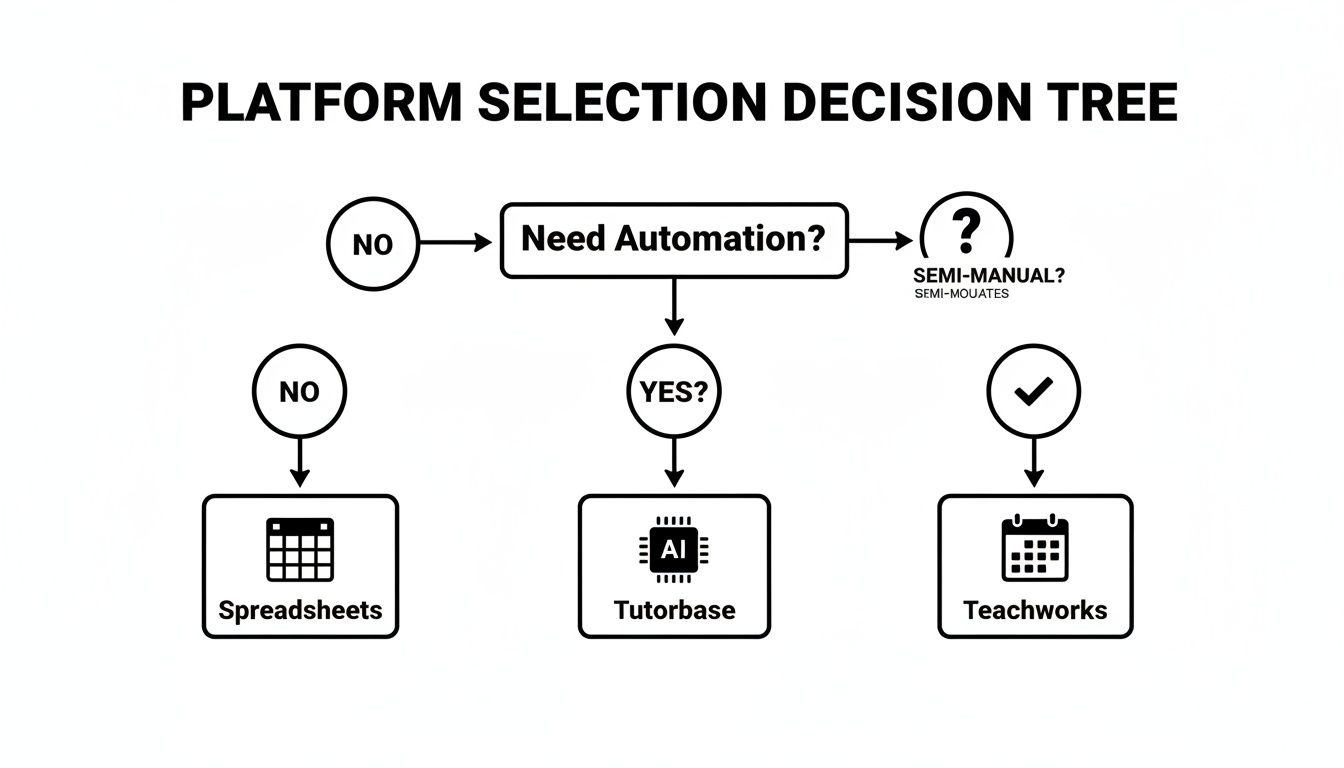
The key takeaway here is that your tolerance for admin work is the biggest filter. If your main goal is to eliminate administrative tasks almost completely, you should focus your search on platforms built from the ground up for end-to-end automation.
Scenario 1: The Growing K-12 Center
Imagine you run a K-12 center with 15 teachers. Your biggest headache is scheduling. Parents are always requesting specific times, your teachers' availability keeps changing, and your admin spends hours trying to piece it all together. This often leads to double-bookings and frustrated clients.
For this business, the feature you desperately need is not just a calendar; it's an intelligent scheduling assistant.
Solution: A platform with an AI-powered Find Slot feature. Instead of your admin manually cross-referencing three different schedules, they just input the student's needs (e.g., "Grade 5 Math, after 4 PM"). The system instantly generates all viable teacher, room, and time combinations. This one feature can cut booking time by over 80% and get rid of those costly conflicts.
Scenario 2: The Multi-Branch Language School
Now, picture a language school with three branches, 40 teachers, and a payroll system that gives you nightmares. You offer different pay rates for DELF prep versus conversational French, you have weekend premiums, and you offer per-student bonuses for group classes. Your current process forces you into a monthly spreadsheet marathon just to pay your team correctly.
This kind of school needs a robust, flexible financial engine that unifies operations across all locations. And for tutoring businesses in specific niches, looking into a specialized ESL platform for teachers can also be a game-changer.
- Unified Room Management: Your team needs a single dashboard to see room availability across all branches. This stops an admin in one location from booking a room that is already being used at another.
- Complex Payroll Automation: The platform has to handle variable pay rules automatically. When a teacher logs attendance for a DELF B2 class on a Saturday, the system should apply the correct subject premium and weekend rate without anyone having to lift a finger.
In this scenario, the ability to create layered pricing and payroll rules is not a "nice-to-have," it is non-negotiable. It is the only way to scale without drowning in financial admin.
Scenario 3: The High-Volume Test Prep Academy
Finally, let's consider a test prep academy focused on SAT and ACT group classes. Your number one goal is maximizing class fill rates. Every empty seat is lost revenue, and you are constantly scrambling to fill last-minute openings. On top of that, leads from WhatsApp and your website are getting lost in the shuffle.
This business needs tools built for two things: utilization and lead conversion.
- Find Spot Feature: This tool is the flip side of "Find Slot." It lets your admin filter all existing classes by subject, level, and remaining seats. When a parent calls asking for an "SAT Math group class," your team can instantly see and sell an open spot in a class that is already running, immediately boosting revenue.
- Integrated CRM: You need a platform that captures leads from a WhatsApp widget or website form and drops them directly into a sales pipeline. This ensures every single inquiry is tracked from "New" to "Trial Scheduled" to "Converted," which dramatically speeds up your onboarding process.
While some tutors might start with simpler tools, anyone aiming to build a team or school will eventually need a more powerful system. For those just starting out on their own, options like Tutorbase for solo tutors can provide an organized foundation to build on for future growth.
Migrating Your Tutoring Business To A New Platform

The idea of switching systems can feel overwhelming. But moving from chaotic spreadsheets or a clunky old platform to a modern system is one of the most powerful moves you can make for your business.
With a structured approach, it is not a monumental task, it is a smooth, predictable process. The goal is to manage the change with confidence, so you see results like a 60% drop in admin time and an end to double-booking errors from day one.
A Step-by-Step Migration Plan
A successful migration is not one giant leap; it is a series of clear, manageable stages. Most top online tutoring platforms for teachers provide guided onboarding, but knowing the steps helps you get your data and team ready for the switch.
- Data Preparation and Export: This is the most critical phase. You will need to gather and clean up your existing data, which usually means exporting key information like student lists, schedules, and billing history into formatted CSV files.
- Guided Data Import: Once your files are ready, the platform’s support team will help you map and import everything. They make sure student profiles, teacher schedules, and past payments are all transferred accurately.
- System Configuration: This is where you dial in the platform to match your business rules. You will set up your services, pricing, cancellation policies, and any complex teacher payroll rates.
- Staff Training: A new system is only as good as the team using it. Block out dedicated time to train your admins and teachers on the new workflows, especially high-impact features like scheduling and taking attendance.
- Go-Live and Support: Pick a "go-live" date, often at the start of a new billing cycle or term. Make sure the platform offers solid post-launch support to handle any questions that pop up.
Exposing Common Contractual Pitfalls
When you are choosing a platform, the contract details matter just as much as the features. Too many tutoring centers get locked into agreements that slowly drain their profitability. Here are the common traps to watch for.
A huge red flag is slow or non-existent support during your trial. If a company will not invest time in helping you before you have paid, their support is unlikely to get better after you are a customer.
Be vigilant and scrutinize these contractual details:
- Hidden Per-User Fees: Some platforms lure you in with a low base price but then charge extra for every teacher, admin, or even student you add. As you grow, these costs can spiral out of control.
- Long-Term Lock-Ins: Steer clear of contracts that trap you in a 12 or 24-month commitment without a performance guarantee. A provider who is confident in their product will offer flexible monthly plans.
- Data Ownership and Export: Make sure you can easily export your data if you decide to leave. Your student and financial data is your most valuable asset, do not let a software company hold it hostage.
- Feature Tiers: Look closely at what’s included in each pricing tier. Critical tools like automated billing or advanced payroll might be locked behind a pricey "Enterprise" plan you don't really need.
By following a clear migration plan and carefully reviewing your contract, you can make the switch a powerful driver for your business, not a source of frustration. This transition is your chance to leave operational chaos behind and build a more efficient, scalable future.
Using Your Platform To Drive Business Growth
The right software does more than just keep you organized. It should be an engine for growth. Once you move past basic administration, you can use the more advanced features to actively bring in more revenue, keep clients around longer, and make smart, data-driven decisions that fuel your expansion.
This is where your operational hub transforms into a strategic asset. It is about making every part of your system work to not just manage your business, but to grow it intelligently.
How to use lead capture for faster onboarding?
A huge opportunity for growth lies in how you handle new leads. An integrated CRM that connects directly to your website and WhatsApp can lead to 3x faster student onboarding. Think about it: when a parent inquiry from your website form or a WhatsApp message is automatically captured and dropped into a sales pipeline, your team can respond almost instantly.
This completely eliminates lost leads and the soul-crushing task of manual data entry. Your admin team can track every new family from "New" to "Trial Scheduled" and finally to "Converted," making for a smooth and professional first impression. Knowing how to get tutoring clients is half the battle; having a system to manage them efficiently is the other half.
The connection between a fast response and conversion is undeniable. Businesses that follow up with an online lead within five minutes are nine times more likely to convert them. An integrated CRM makes this speed possible.
When this is automated, your team is freed up to focus on building relationships instead of wrestling with spreadsheets, a shift that directly impacts your bottom line.
How do you boost revenue and retention with automated finance?
Frictionless finances are key to both client satisfaction and predictable cash flow. When billing and payments are simple for parents, they are far more likely to stick with your services. This is why automated billing and prepaid credit systems can lead to a 42% increase in monthly renewals.
Here’s how this creates real growth:
- Prepaid Credits: A built-in wallet system encourages parents to commit to more lessons upfront. Low-balance alerts can then nudge them to top up before their credit runs out, locking in consistent cash flow and cutting down on churn.
- Automated Billing: When invoices are generated automatically from attendance records, it gets rid of payment disputes and the time parents spend trying to figure out what they are paying for. This builds trust and makes staying with your center the path of least resistance.
- Frictionless Payments: Integrating with payment gateways like Stripe allows parents to pay invoices with a single click. The easier you make it to pay, the faster you get paid, and the happier your clients are.
These financial tools turn billing from a monthly chore into a powerful retention strategy. They create a seamless client experience that makes your tutoring center look far more professional and organized than competitors still stuck with manual methods. That polish is what turns one-time clients into long-term advocates for your business.
Frequently Asked Questions (FAQ)
Moving from spreadsheets and texts to a single, integrated system is a big step. It’s natural to have questions. Here are the answers to the ones we hear most often from tutoring center owners just like you.
What is tutoring management software?
Tutoring management software is a platform designed to automate and centralize the administrative tasks of a tutoring business. This includes scheduling lessons, automating client billing, processing teacher payroll, managing multiple locations, and tracking student progress, replacing fragmented tools like spreadsheets and calendar apps.
How can I automate billing for my tutoring center?
You can automate billing by using a platform that links attendance directly to invoicing. When a teacher marks a lesson as "Attended," the system automatically generates an accurate invoice based on pre-set pricing rules. This eliminates manual data entry, prevents revenue leakage from unbilled lessons, and reduces invoice processing time from hours to minutes.
How do these platforms handle complex teacher payroll?
Advanced platforms like Tutorbase do not just track hours; they use a rules-based engine to manage pay rates. You can set unique rates for each teacher, for different subjects, or even for premium time slots like weekends or exam prep seasons. The system then calculates payroll directly from logged attendance, preventing manual errors.
Can we manage hybrid (in-person and online) lessons in one place?
Yes, modern tutoring software is designed for hybrid lessons. You schedule a single class and simply mark whether each student is attending "in-person" or "online." This provides a unified attendance record for every lesson, ensuring accurate tracking for both room capacity and virtual participants, which then feeds into correct billing and payroll.
What does migrating our data actually involve?
Most reputable platforms offer guided data migration. The process starts with you exporting your current data, such as student lists and schedules, into CSV files. The new platform's support team then helps you map and import this data correctly, ensuring a smooth transition without disrupting your business operations.
How much time does automated scheduling really save?
An AI-powered feature like "Find Slot" can significantly reduce admin work. Instead of manually cross-referencing multiple calendars, your admin simply enters the lesson requirements. The system instantly generates a list of conflict-free options, cutting a 10-minute booking process down to under two minutes.
What is the best alternative to Teachworks or TutorCruncher?
The best alternative depends on your needs for automation and scale. For tutoring centers looking to eliminate manual work, a platform like Tutorbase is a strong Teachworks alternative because its AI-powered scheduling, fully automated billing, and complex payroll features go beyond the semi-manual capabilities of older systems.
Can this software help me manage multiple tutoring center locations?
Yes, robust tutoring center software includes multi-branch management. It provides a centralized dashboard to view room and teacher availability across all locations in real-time. This prevents double-bookings between branches and allows you to manage resources efficiently as you scale your business.
Tutorbase consolidates all your operations into one AI-powered platform, reducing admin time by 60% and boosting your revenue. To see how it can transform your tutoring business, get started for free.


