


Key Takeaway: The right playgroup management software for a Hong Kong centre automates daily chaos. It streamlines scheduling for trial classes, simplifies complex billing for packages, and centralizes parent communication, freeing you from manual tasks to focus on growth and education.
Running a playgroup in Hong Kong involves more than just teaching. You juggle complex schedules, parent WhatsApp messages, varied payment packages, and local safety regulations.
Trying to manage all that with spreadsheets and paper forms is inefficient and leads to costly mistakes. We have all been there.
This is where finding the right playgroup management software in Hong Kong becomes a competitive edge. It acts as a central hub connecting every part of your business, from a parent's first trial class inquiry to monthly billing and teacher payroll. It turns chaos into a smooth system.
Why is specialized software crucial for Hong Kong playgroups?
Moving away from manual methods is essential for survival and growth in 2026. The market reflects this shift. Hong Kong's IT services sector, which includes education technology, is set for significant growth. This boom is fueled by parents and operators embracing digital tools. You can find more insights on the expanding HK IT market and its impact on EdTech here.
When you automate repetitive tasks, you get your time back. You can reinvest precious hours into what grows your business: delivering an amazing educational experience, connecting with families, and planning your next move. Instead of chasing payments, you can analyze enrollment trends.
A dedicated software solution can cut your administrative workload by up to 60%. It practically eliminates double-bookings and makes the student onboarding process, from initial enquiry to their first paid class, dramatically faster.
How does automation compare to manual operations?
The difference between running your playgroup with manual tools versus a dedicated system is significant. Below is a look at how daily tasks transform when you move from traditional methods to a dedicated software solution.
| Task | Manual Method (Spreadsheets & WhatsApp) | Automated Method (Management Software) |
|---|---|---|
| Scheduling & Trials | Prone to double-bookings. Hours spent manually confirming trial class times with parents and teachers. | Real-time calendar with conflict alerts. Parents can book trial classes online, and the system manages capacity. |
| Attendance | Paper sign-in sheets. Someone must manually transfer that data into a spreadsheet for billing. | Digital check-in via tablet or phone. Attendance automatically links to invoicing and payroll calculations. |
| Billing (Packages & Monthly) | Manually creating invoices for per-session or monthly plans. Chasing late payments with phone calls or emails. | Invoices are generated and sent automatically based on packages or subscriptions. Parents pay easily online. |
| Parent Communication | Sending updates or getting lost in chaotic, oversized WhatsApp group chats. | A secure parent portal with progress reports, photos, and direct, organized messaging via a dedicated app. |
This shift moves you from being buried in process to being focused on progress. Automation creates a more professional, reliable experience for parents and staff, which builds a stellar reputation in a competitive market like Hong Kong.
What is playgroup management software?
Playgroup management software is the central command hub for your education centre. It is a specialized tool designed for the unique rhythm of Hong Kong playgroups, connecting and automating all core operations like scheduling, attendance, parent communication, and billing in one place.
This software replaces that chaotic mix of spreadsheets, appointment books, and endless WhatsApp chats. Instead of manually coordinating teachers, students, classrooms, and payments, the software acts as the air traffic control system for your playgroup.
From Chaos to Coordinated Operations
Without a dedicated system, you likely juggle disconnected tools: a calendar for scheduling, a spreadsheet for attendance, and WhatsApp for parent chats. Moving information between these tools opens the door to human error, like a double-booked teacher or a missed message. It is stressful and inefficient.
Playgroup management software pulls all those jobs into a single, unified workflow. When a teacher marks a student as present, the system can automatically trigger an invoice, calculate the teacher’s pay, and update the parent's portal. It creates a seamless flow of information.
What is Business Process Automation?
At its heart, playgroup software is a form of business process automation. Business process automation means using technology to handle the recurring, predictable tasks that currently consume your team’s time. The goal is to cut manual work, increase efficiency, and build a streamlined operation.
To see the power here, it helps to look at some common business process automation examples. For a Hong Kong playgroup, this translates to automating tasks such as:
- Sending class reminders to parents through a dedicated app.
- Generating invoices automatically at the end of each month.
- Calculating complex teacher payroll based on exact hours taught.
- Updating your online schedule in real-time as parents book trial classes.
What are the core functions of a playgroup management platform?
While features vary, any high-quality platform should give you a core set of tools to manage the entire student journey. This creates a "single source of truth" for your business, ensuring everyone works with the same up-to-date information.
By 2026, education centres that adopt automation are projected to reduce administrative tasks by over 60%. This frees your team to focus on the student experience and growing the business, not paperwork.
Key functions you should expect include:
- Student Information System (SIS): A central database holding all student and parent details, enrollment history, and billing information.
- Scheduling & Calendaring: A real-time grid of your classes, teachers, and room availability with conflict detection to prevent booking errors.
- Billing & Payments: Automates invoicing for all your different packages (per-session, monthly, or bundles) and integrates with local payment gateways.
- Communication Hub: A secure portal for messaging parents, sharing updates, and broadcasting announcements about typhoon warnings or holiday closures.
By integrating these functions, the software transforms your daily administrative grind into a smooth, professional operation.
What are the must-have features for Hong Kong playgroups?
When you start looking for software, the sheer number of options can be overwhelming. You need a platform that solves the real-world problems your Hong Kong playgroup faces every day.
A generic tool built for another market will not understand the local need to manage trial classes, juggle multi-class packages, or ensure safety compliance in compact spaces.
The educational technology market is growing fast, with the Asia Pacific region holding a 28% market share, according to a 2024 report. This highlights how crucial it is for Hong Kong centres to adopt tools that can keep up. For a deeper dive, check out the impressive growth of the EdTech market on Coherent Market Insights.
This boom makes choosing software with the right features more important than ever.
How do you handle flexible class scheduling?
In Hong Kong, parents almost always want to "try before they buy." This makes a flexible scheduling system an absolute must. You need a system that can seamlessly handle one-off trial sessions.
Your software must let a parent book a trial without you manually checking teacher schedules and room availability. The system should do the heavy lifting by confirming the teacher is free, reserving the room, and sending a confirmation to the parent.
Good playgroup management software in Hong Kong turns this coordination nightmare into a simple, automated task. You can learn more in our guide on the benefits of dedicated playgroup scheduling software.
Can you automate billing and invoicing?
Chasing payments and manually creating invoices is a huge time sink. Automated billing is the feature that gives you those hours back.
Hong Kong playgroups deal with all sorts of payment structures, like monthly fees, 10-class packages, and pay-as-you-go sessions. Your system must handle all of them without breaking a sweat.
A solid billing module should offer:
- Varied Package Support: Create and sell different payment plans, like termly fees or class packs, with a few clicks.
- Automatic Invoicing: Generate an invoice when a student's attendance is marked, killing manual entry.
- Online Payment Integration: Connect to gateways like Stripe so parents can pay with a credit card online, which improves cash flow.
- Late Payment Reminders: Automatically send polite follow-ups to parents with overdue fees, saving you awkward conversations.
This isn't a minor feature; this is what frees you up to focus on the kids.
How to improve parent communication?
Are you tired of managing a dozen different WhatsApp groups? Integrated parent communication is the answer. It moves all your conversations with families into a single, secure portal within the software.
This gives you a professional channel to share photos, progress updates, and critical announcements like typhoon warnings or public holiday closures.
Instead of messages getting buried in chat threads, a dedicated portal ensures every parent sees the right information at the right time. It builds trust and makes your centre look more professional.
Plus, it creates a permanent, organized record of all your communications, which is incredibly useful for accountability.
What about room capacity management?
In a city as dense as Hong Kong, classroom space is precious and regulated. Room capacity management is a safety-critical tool that tracks student numbers in real time, ensuring you never exceed the legal limit for a space.
The software should prevent you from overbooking a class, protecting both the children and your license.
A good capacity management tool gives you:
- Real-time Occupancy Tracking: A quick glance tells you exactly how many children are scheduled for each room.
- Automated Booking Limits: The system physically blocks new bookings once a room hits its preset capacity.
- Multi-branch Support: If you run more than one centre, you can manage the capacity for every room across all locations from one dashboard.
This feature is about safety and compliance. When you evaluate playgroup management software in Hong Kong, make this a top priority.
Essential Feature Checklist for Playgroup Software
To help you compare different options, use this practical checklist. Score potential software vendors based on what a Hong Kong playgroup truly needs.
| Feature Category | Must-Have Functionality | Importance (High/Medium/Low) |
|---|---|---|
| Scheduling | Trial class booking, recurring sessions, teacher conflict alerts. | High |
| Billing & Invoicing | Monthly, per-session, and package invoicing automation. | High |
| Parent Communication | Secure parent portal (app-based) for messaging, photos, and announcements. | High |
| Room Management | Real-time capacity tracking and multi-branch support. | High |
| Attendance Tracking | Digital check-in that links directly to billing and payroll. | Medium |
By focusing on these Hong Kong-specific features, you can choose a software partner that understands your operational headaches and is built to solve them.
How do you choose the right software partner?
Choosing a software vendor is about finding a long-term partner. The right one gives you a system that grows with you, offers reliable local support, and integrates with other apps you already use.
A boutique playgroup in Sheung Wan has different needs than a chain with centres across Kowloon. But the principles of picking a solid technology partner are the same. We’ll look past feature lists to focus on what truly matters.
When you evaluate options, remember you are not just buying software; you are choosing the best software for your business as a whole. This means thinking about growth and security from day one.
Can the system scale with your centre?
Scalability is a simple question with big consequences: can this software handle your business when it gets bigger? A platform that works for 20 students in one location must perform just as flawlessly for 200 students across three branches.
When you investigate scalability, ask these questions:
- Multi-Location Management: Does it have a central dashboard to manage schedules, billing, and reporting for all branches?
- Performance Under Load: Ask vendors for case studies from centres larger than yours to see proof the system won't slow down.
- Feature Tiers: Look for providers with clear pricing tiers that let you start with essentials and add advanced tools as you grow.
Does the vendor offer local support?
Imagine it is a busy Monday morning and your billing system goes down. This is when you need immediate help from someone who understands your urgency and works in your time zone.
Evaluating the quality and availability of customer support is non-negotiable. A vendor without a strong local or regional presence might leave you stranded during critical business hours.
Hong Kong's technological readiness is world-class. In 2025, the city ranked fourth globally in digital competitiveness and first in 'Technological framework'. This robust infrastructure means you have access to cutting-edge, locally supported management solutions. Learn more about Hong Kong's digital leadership on info.gov.hk.
Ask direct questions. Is support handled over email, phone, or live chat? What are their guaranteed response times? A partner committed to the Hong Kong market will have a team available when you need them.
How well does it integrate with other tools?
Your playgroup management software must connect smoothly with other tools you depend on. If it doesn't, you're signing up for hours of manual data entry.
Look for these essential integrations:
- Accounting Software: A direct link to platforms like Xero automates financial reconciliation, saving your bookkeeper hours.
- Payment Gateways: Connections to local favorites like Stripe or FPS make it easy for parents to pay online, improving cash flow.
- Calendar Sync: A two-way sync with Google Calendar or Outlook ensures teachers' schedules are aligned, preventing double-bookings.
Is your data secure?
You are the guardian of sensitive information about children and families. A close look at a vendor's security protocols is essential for maintaining trust and complying with privacy laws.
Make sure any potential partner has robust security measures. This should include data encryption, regular security audits, and secure hosting on reputable cloud platforms like Amazon Web Services (AWS). Ask where their servers are located and what their data backup plans are.
How do you make the switch to a new system?
Moving to a new playgroup management software doesn't have to disrupt your centre. A smooth rollout comes down to cleaning your data, training your staff, and clearly communicating with parents. A little planning ensures your launch is a success.
Changing systems can feel like a massive undertaking, but breaking it down into a structured plan makes the process manageable. By tackling the transition in phases, you can sidestep frustrations and ensure everyone feels confident from the start.
This visual guide breaks down the essential steps for choosing and rolling out your new system.
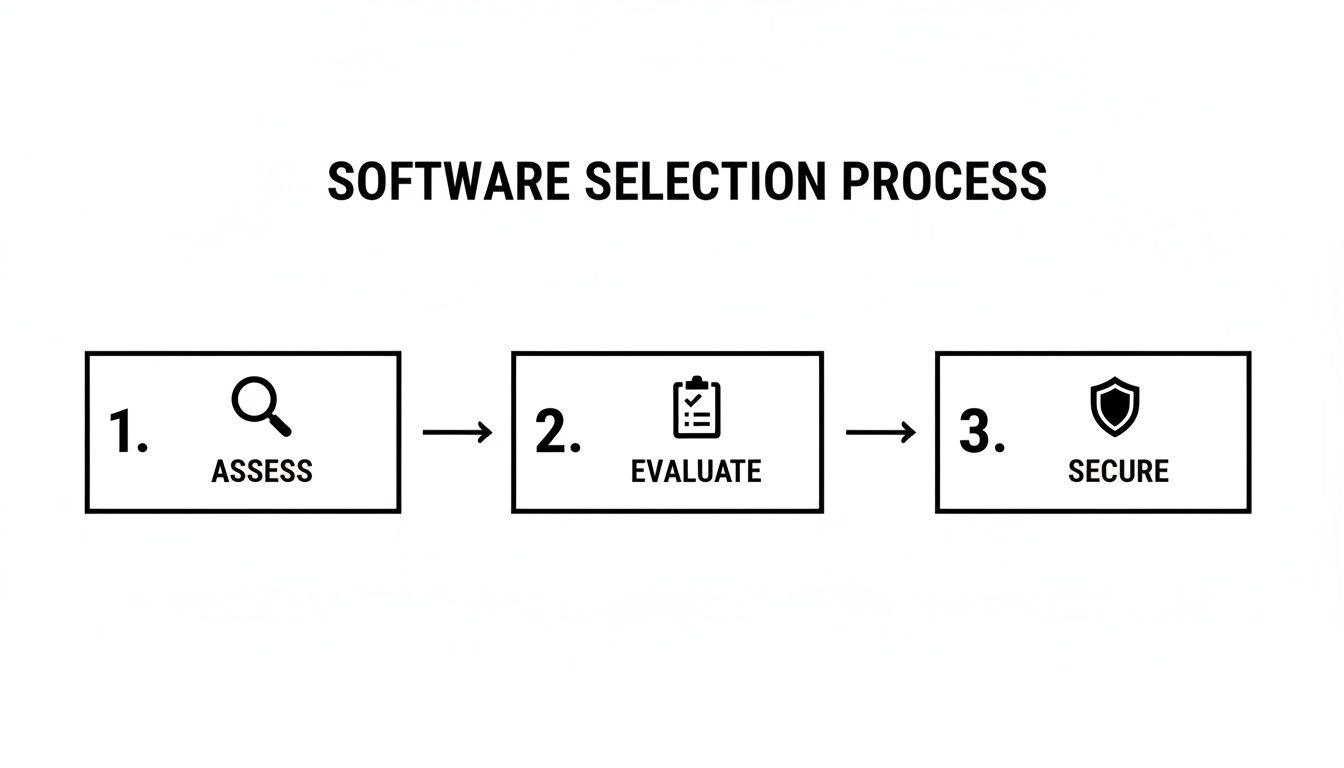
As you can see, a successful launch starts with careful assessment and evaluation.
Phase 1: Data Migration and Cleanup
The first hands-on step is moving your existing information into the new system. This is the perfect chance for a digital spring clean. Before you import anything, clean up your student and parent contact details and fix incorrect information.
Most modern software providers offer tools or support for this. They can usually import data from standard formats like CSV files. Chat with your chosen vendor to understand their requirements to make the import process painless.
A clean data migration is the bedrock of a successful software launch. Organizing your records beforehand prevents frustrating errors in billing and scheduling, saving countless hours later.
For a more detailed walkthrough, check out our guide on creating a comprehensive tutoring software implementation plan.
Phase 2: Staff Training and Adoption
Your team’s confidence in the new system is crucial. Schedule dedicated training sessions before the official launch day. Focus on the features they will use daily, like digital attendance tracking and parent communication tools.
Explain why the change is happening. Frame it as a tool that will cut down on their admin work and let them focus more on teaching.
- Role-Specific Training: Your admin staff need to master billing and reporting, while teachers should focus on attendance and messaging.
- Create Champions: Pick one or two tech-savvy team members to be your internal "champions" who can offer immediate help to colleagues.
- Practice Makes Perfect: Ask your vendor for a test environment where staff can practice with dummy data, building confidence.
Phase 3: Parent Communication and Onboarding
Finally, introduce the new system to parents. Announce the change at least two to four weeks in advance. Highlight the benefits they will get, like easier online payments or a dedicated portal for updates.
Prepare a simple guide or a short video tutorial showing them how to log in, see their child’s schedule, and make a payment. When you make it easy for parents, they are far more likely to embrace the new technology.
How can you measure the real-world impact on your business?
So, you have invested in new software. How do you know it is making a difference? Shifting your mindset from features to measurable results is the only way to know for sure.
To justify the cost, you need to track key performance indicators (KPIs) that show a tangible impact on your playgroup's operations and finances. This data-driven approach moves the conversation from "the software feels easier" to "the software saved us 25 hours of admin work this month."
Those concrete numbers prove its worth and guide your future decisions. They turn the software from an expense into an engine for growth.
What are the key performance indicators to track?
Focus on a few core metrics that directly reflect the health of your Hong Kong playgroup. These numbers will tell a clear story.
- Reduction in Administrative Hours: Before you switch, track how much time staff spend on manual scheduling and invoicing. A 50% drop is a realistic goal.
- Trial Class Conversion Rate: What percentage of families sign up for a paid package after their trial class? With automated follow-ups, this number should climb.
- Parent Engagement Metrics: See how often parents log into the portal or open your messages. Higher engagement links to better retention.
For many education centres, the most compelling metric is Return on Investment (ROI). It is a straightforward calculation that shows exactly how the software pays for itself through saved time and stronger revenue.
How do you calculate your return on investment?
Calculating ROI does not require a finance degree. It is about comparing the value you have gained against what you have spent. A basic formula can clearly show the financial benefits, making it easy to justify the subscription.
By focusing on these real-world outcomes, your playgroup management software becomes a strategic asset. For a detailed look, you can explore frameworks for calculating the ROI of tutoring management software.
Ready to see how automation can impact your numbers? Explore how Tutorbase can help you track these KPIs and drive growth at tutorbase.com/register.
Frequently Asked Questions
1. How much does playgroup management software cost in Hong Kong?
For smaller centres in Hong Kong, plans typically start around HKD 400 per month. Larger, multi-branch operations needing advanced features might see costs range from HKD 1,500 to over HKD 4,000 monthly, often based on student numbers.
2. Can this software handle different billing types like trial classes and packages?
Yes, a key feature is flexibility. Good software for Hong Kong playgroups easily manages and automates invoicing for one-off trial classes, recurring monthly fees, and pre-paid class packages (e.g., a 10-lesson bundle).
3. Is my centre's data secure on a cloud-based platform?
Reputable providers use industry-standard security like data encryption and host on secure cloud platforms such as Amazon Web Services (AWS). Always ask a vendor about their data backup, recovery plans, and server locations before committing.
4. How long does it take to implement new playgroup software?
Most centres can be fully set up and running within a few days to a week. The main tasks are importing your student data and configuring your class schedules. Staff typically feel comfortable with the new system within one to three weeks.
5. Can the software manage multiple playgroup locations?
Yes, a crucial feature for growing businesses is multi-location management. Good software provides a central dashboard to manage schedules, billing, room capacity, and reporting for all your branches from a single account.
6. Will the software help manage room capacity for safety compliance?
Absolutely. A key safety feature is real-time room capacity tracking. The system automatically prevents you from overbooking a class by blocking new enrollments once the preset capacity limit for a specific room is reached.
7. Does this software replace WhatsApp for parent communication?
Yes, it is designed to. The software provides a secure, professional parent portal or mobile app for all communications. This centralizes messages, photo sharing, and important announcements, moving conversations out of chaotic WhatsApp groups.
Ready to eliminate administrative errors and get hours back every week? Discover how Tutorbase can automate your scheduling, billing, and parent communication. Get started at tutorbase.com/register.


