


At 4 PM, the front desk usually gets hit all at once. One parent wants to move a missed lesson to tonight. Another asks for a trial class tomorrow. A teacher messages that she needs a projector room, not the small speaking room she was assigned. You open Google Calendar, then a spreadsheet, then a second tab for branch schedules, and you still can't answer with confidence.
That mess isn't just annoying. It creates double bookings, leaves rooms idle when they should be earning, and forces your team to spend energy on calendar cleanup instead of student service. For centers with multiple branches, shared teachers, hybrid classes, and room-based fees, manual scheduling breaks down fast.
A proper room booking system fixes that by turning room scheduling into an operational control layer, not a guessing game. If you're looking at how tutoring centers streamline operations, room management is one of the first places where the admin load and revenue leakage become obvious.
Stop the Scheduling Chaos Introduction
Most tutoring centers don't start with broken processes. They start with whatever works at the beginning. One Google Calendar per branch. A spreadsheet for classrooms. Sticky notes for temporary blocks. Staff memory for the rest.
Then the business grows.
Weekly recurring lessons pile up. Teachers work across branches. Some classes need a piano room, some need whiteboards, some need hybrid setup. Parents reschedule with short notice. Trial lessons need to fit around existing groups. At that point, a shared calendar stops being enough.
Why the problem gets expensive fast
Manual room management creates two kinds of damage at the same time:
- Visible damage: Double-booked classrooms, confused teachers, delayed starts, and upset parents.
- Hidden damage: Empty rooms that looked booked, missed room fees, weak capacity planning, and admin teams stuck doing detective work.
A room booking system helps because it doesn't just show time slots. It controls who can book, what can be booked, where a class fits, and whether the room matches the class.
Practical rule: If your team has to check more than one tool before confirming a lesson, your booking process is already too fragile.
What tutoring centers need that generic tools often miss
A language school or tutoring center doesn't run like a standard office. You don't just reserve meeting rooms. You place students, teachers, levels, class formats, and physical constraints into a timetable that changes every day.
That means the room booking system has to support things like:
- Branch-aware scheduling so staff can see availability across locations
- Capacity matching so a larger group doesn't end up in the wrong room
- Teacher coordination so the room and instructor are free at the same time
- Hybrid delivery so in-person and online students can sit in the same lesson structure
- Billing connections so room use can flow into invoicing when needed
When those pieces work together, the room schedule stops being a source of daily chaos and starts acting like infrastructure.
What Is a Room Booking System Really
A lot of owners think a room booking system is just a prettier calendar. It isn't.
A shared calendar tells you whether someone marked a room as busy. A real room booking system decides whether that booking should happen at all. That's a big difference when you're managing classrooms, trial lessons, makeup sessions, teacher availability, and room-specific equipment.
The difference between visibility and control
The core of a serious room booking system is an availability engine. That engine checks whether the room is free right now, not whether one person updated one calendar a few minutes ago.
It also needs two-way calendar synchronization, so every booking, cancellation, or time change updates both the room system and connected calendars immediately. That's one of the core mechanics behind conflict prevention, as described in Anny's breakdown of meeting room booking features.
A basic calendar gives you visibility. A room booking system gives you control.
Why constraints matter in education
Tutoring centers don't book empty boxes. They book rooms with requirements.
A pronunciation class may need a quieter room. A test prep class may need more seats. A hybrid IELTS lesson may need camera equipment. A music lesson may need a piano room. If the booking tool only checks free or busy status, it misses the core problem.
A stronger setup evaluates several constraints at once:
| Need | What the system should check |
|---|---|
| Group size | Room capacity |
| Lesson format | In-person, online, or hybrid suitability |
| Equipment | Whiteboard, projector, piano, devices |
| Branch | Correct location and local availability |
| Permissions | Who can book which room types |
That turns scheduling from a free or busy check into placement logic.
What works in practice
The most useful systems let staff search by what matters operationally, not just by time. They can filter by branch, room size, equipment, and lesson type. They also enforce rules before the booking gets confirmed.
If you're comparing vertical-specific workflows with other reservation categories, this 2026 online tour booking software review is a useful reminder that booking tools only work well when they reflect the constraints of the business using them. The same principle applies in education. A tutoring center needs scheduling logic built around teaching operations, not generic room reservations.
A room booking system is only reliable when everyone sees the same availability and the software checks fit before it confirms the reservation.
The Hidden Costs of Manual Room Management
The obvious cost of manual booking is the occasional clash. Two classes arrive for one room. Staff scramble. A teacher starts late. Parents notice.
The bigger cost is the waste you don't see.
Booked does not always mean used
Industry data shows that scheduled use and actual use often don't match. MySeat reports that 38% of rooms were over-used relative to booking records, which highlights how incomplete booking data can be when used alone for capacity planning, as explained in this comparison of utilization data and room booking software.
That gap matters in tutoring centers because your calendar can say a room is occupied while the class never happened, started late, moved online, or got shifted to another room. On paper, the branch looks full. In reality, you may still have teachable capacity.
Where the losses show up day to day
Manual room management usually fails in small moments:
- Reschedules create holes: Staff move one lesson but forget to release the original room.
- No-shows distort demand: A room stays blocked even when nobody arrives.
- Walk-ins bypass records: Staff place a makeup lesson in an unused room without updating the schedule.
- Teacher changes break fit: A replacement teacher needs a different setup, but the room assignment stays the same.
Each one feels minor. Together, they damage planning, staffing, and billing.
Why spreadsheets make the problem worse
Spreadsheets create the illusion of order. They look organized because every room is listed in rows and columns. But they depend on staff discipline at every single step.
If one person forgets to update a cancellation, everyone else is now making decisions on stale information. If one branch manager tracks temporary room blocks in a private sheet, the central team no longer has a complete picture.
The worst booking errors don't happen because staff don't care. They happen because the system asks people to remember too much.
That is why centers often feel busy while still underperforming on room usage. The issue isn't only demand. It's bad visibility into what space was used.
Must-Have Booking Features for Tutoring Centers
A generic office scheduler won't solve tutoring operations on its own. You need room controls tied to teaching reality, not just reservation slots.
Capacity and room fit
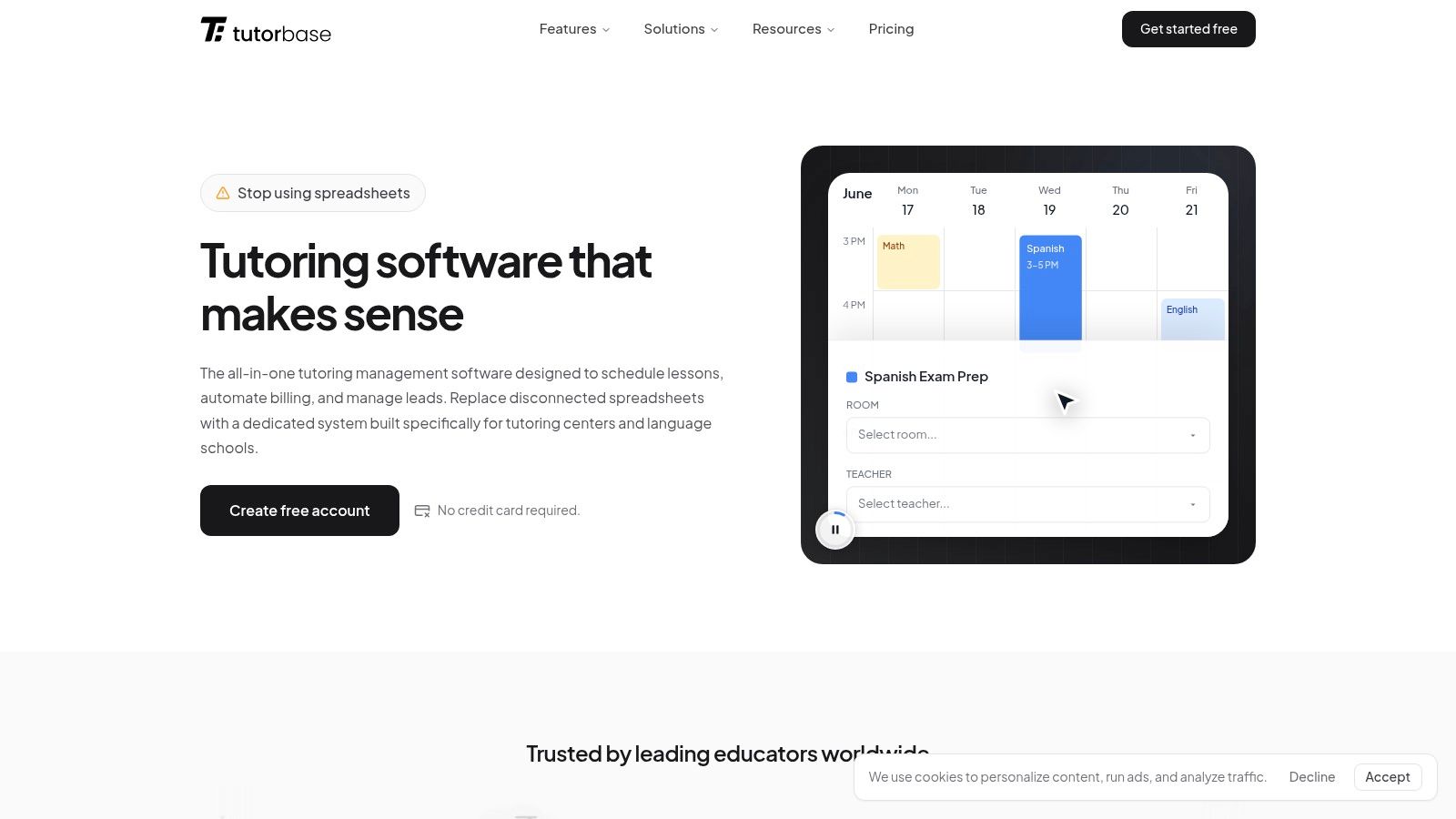
The system should store room attributes clearly. Capacity, branch, floor, equipment, delivery mode, and any room-specific notes should all be searchable.
That matters because room choice affects service quality. A small speaking class might fit almost anywhere. A larger group class, exam workshop, or hybrid lesson won't. If the software can't filter by room suitability, staff will either waste time checking manually or make rushed compromises.
Teacher and room conflict detection
A room conflict is bad. A room and teacher conflict together is worse.
For tutoring centers, booking logic has to evaluate more than one resource at the same time. If a teacher is already teaching at Branch A, the software shouldn't let staff book that teacher into a room at Branch B in the same slot. If the room is free but the teacher isn't, the slot isn't real.
how tutors book sessions automatically serves as a helpful external example of what operators want. They don't want more calendar entries. They want bookings that hold together operationally.
Multi-branch visibility and availability controls
Once you run more than one site, branch-level room management becomes a daily coordination problem. The room booking system should let your team:
- View all branches in one place so central ops can make decisions quickly
- Block rooms by date or time for maintenance, exams, events, or holidays
- Apply local rules because not every branch uses rooms the same way
- Shift lessons between sites when parent preference or teacher availability changes
Without that visibility, staff end up calling other branches or messaging screenshots back and forth.
Billing linkage and operational follow-through
Many room tools for education businesses often fall short when handling room fees. If your room has a fee, the system should carry that fee into the lesson or invoice flow automatically. Otherwise, your team either forgets to bill it or spends extra time checking every booking manually.
One example is this booking system, which includes scheduling, room tracking, availability logic, and related operational workflows in the same platform. That's the kind of setup that makes room data usable beyond the calendar itself.
A short checklist before you buy
Use this list in vendor demos:
- Can it search by room attributes? Capacity and equipment filters should be standard.
- Can it prevent teacher and room conflicts together? Separate checks aren't enough.
- Can it handle recurring classes cleanly? Weekly lesson series should not require manual duplication.
- Can it block temporary unavailability? You need fast controls for repairs, events, and closures.
- Can room usage connect to billing or reporting? If not, you'll still have admin leakage.
If a vendor can only show a color-coded calendar, keep looking.
Your Implementation and Migration Plan
Switching from spreadsheets and scattered calendars feels risky mostly because people imagine one giant cutover. That usually isn't necessary. The cleanest implementations happen in stages.
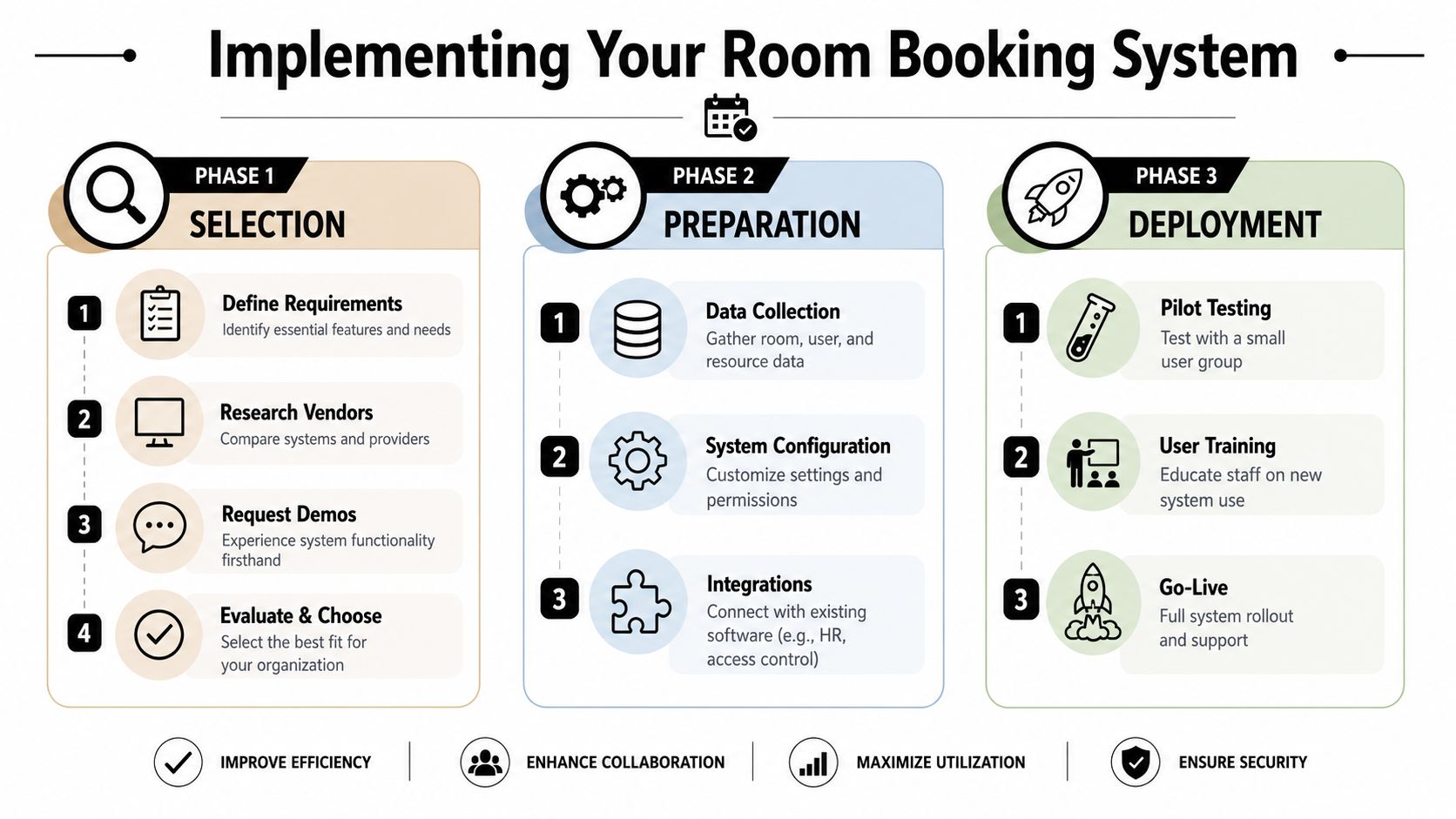
Start with operational rules, not software features
Before you migrate anything, write down your real booking rules.
Not the ideal version. The actual one your staff uses every day.
That includes:
- Who can book rooms
- Which rooms fit which class types
- How recurring lessons should behave
- When rooms should be blocked
- What happens after a no-show
- Whether room fees should attach to bookings
If you skip this step, you'll just digitize confusion.
Clean your room data before import
Most centers already have room data. It's just messy.
One room might be called "Rm 2" in a spreadsheet, "Classroom 2" in Google Calendar, and "Blue Room" in staff chat. Fix that before migration. Standardize room names, capacities, features, branch assignments, and any restrictions. Also decide which historical calendar clutter doesn't need to come over.
For a more structured rollout sequence, the Tutorbase implementation guide gives a useful reference point for how operators can stage setup and adoption without overwhelming staff.
A quick video can also help teams picture the rollout process before they start.
Fix false occupancy early
A common implementation mistake is focusing only on successful booking and ignoring unused reservations.
Leading workplace vendors recommend auto-releasing a booking if nobody checks in. Envoy specifically highlights this approach in its guidance on meeting room booking systems and no-show handling. For a tutoring center, that means a room can return to available status when a trial student doesn't arrive or a canceled lesson never gets formally cleared.
Operations note: If your system can't distinguish between reserved space and actually used space, your utilization reports will drift away from reality.
Roll out in one branch first
A pilot branch gives you the fastest feedback. Pick a location with enough complexity to test real scenarios, but not your most chaotic site.
During the pilot, watch for:
- Missed room attributes such as equipment or seating notes
- Permission errors where staff can book rooms they shouldn't
- Calendar sync issues that create trust problems
- Weak check-in habits that keep false occupancy alive
When the pilot branch runs cleanly, copy the working rules to the rest of the organization instead of reinventing them branch by branch.
How to Measure Your Booking System ROI
If you only ask whether staff like the new system, you'll get soft feedback and weak decisions. A room booking system should be judged by operational outcomes.
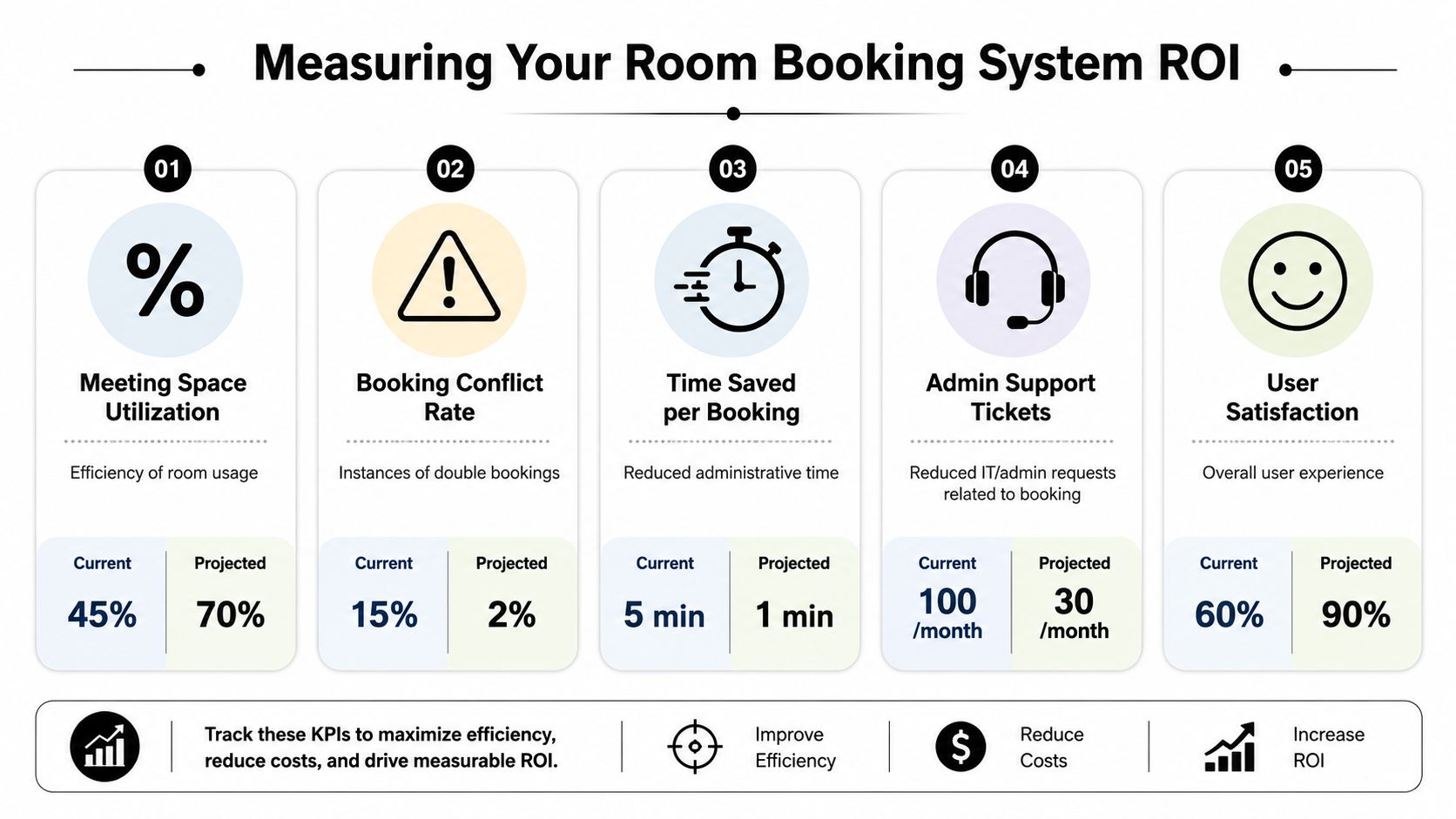
Track fewer metrics, but track the right ones
For tutoring centers, the most useful ROI measures are usually these:
| KPI | Why it matters |
|---|---|
| Scheduling admin time | Shows whether staff are spending less time hunting for rooms |
| Booking conflicts | Reveals whether the system is actually preventing collisions |
| Room utilization quality | Tells you whether rooms are both booked and used |
| Speed to place a new student | Shows whether enrollment can move faster |
| Revenue leakage from missed room charges | Highlights whether billing and room data connect properly |
You don't need a complicated BI setup to start. A basic weekly dashboard is enough if the definitions are clear.
Compare before and after behavior
The cleanest ROI comparison uses your own operating baseline.
Measure how your team worked before implementation, then review the same workflow after the new system is fully adopted. Don't just look at one busy week. Look at recurring patterns such as reschedules, trial lesson placement, branch transfers, and group class allocation.
A system that reduces friction in those workflows earns its place quickly because it affects enrollment, service consistency, and staff confidence all at once.
Why this category matters more now
This is not a niche admin tool category anymore. Stratview Research estimated the global meeting room booking system software market at USD 74.34 million in 2021 and projected it to reach USD 173.73 million by 2028, implying a 12.81% CAGR, according to its market report on meeting room booking system software.
That doesn't tell you what your own center will save. It does show that organizations across industries are treating centralized scheduling and utilization control as a real operating function, not a convenience feature.
When room scheduling becomes measurable, expansion decisions get better. You can see whether you need more rooms, better rules, or cleaner usage discipline.
A simple ROI review habit
Review your booking system monthly with three questions:
- Did staff spend less time on scheduling issues?
- Did room assignment become more reliable across branches?
- Did your availability data become trustworthy enough to plan from?
If the answer is yes to all three, the system is doing real work.
Frequently Asked Questions
Can a room booking system handle hybrid classes
Yes, if it's built for education workflows rather than generic office use.
The system should let you schedule one lesson that includes a physical room for in-person students and a virtual component for online participants. It should also track attendance accurately by student, because hybrid classes affect billing, teacher payroll, and follow-up.
How does it connect with invoicing and payroll
The useful setup is simple. The booking should become the source record for the lesson.
When staff assign a teacher, room, lesson type, and attendance outcome in one workflow, that data can flow into invoicing and payroll without duplicate entry. If your center charges room-related fees or uses different pay rules by lesson type, disconnected tools create mistakes fast.
Can I restrict certain rooms to specific staff or class types
Yes. A serious room booking system should support booking rules and permissions.
That means you can reserve specialist rooms for certain programs, keep premium classrooms limited to senior staff, or prevent unsuitable room assignments for classes with equipment needs. This matters more in tutoring than in many office environments because room mismatch directly affects delivery quality.
What is false occupancy
False occupancy happens when a room appears used in the schedule but isn't being used.
The common causes are no-shows, unrecorded cancellations, and rooms being held without check-in. In tutoring centers, false occupancy creates bad utilization reports and can make a branch look full when you still have usable capacity.
Is Google Calendar enough for a small center
It can be enough at the very beginning, but it usually stops being enough once you add multiple teachers, more than one branch, recurring classes, room-specific equipment, or billing rules tied to lessons.
Google Calendar is good at showing events. It isn't built to enforce complex booking logic across rooms, teachers, and operational policies.
How do I know if I need a dedicated room booking system now
You probably need one if any of these are already happening:
- Staff check more than one tool before confirming a lesson
- Teachers arrive and switch rooms manually
- Parents get delayed confirmations because front desk staff need to verify availability
- Branch managers keep private workarounds outside the main schedule
- You can't trust utilization reports when making expansion decisions
Should I roll it out to every branch at once
Usually no.
A pilot branch is safer because it lets you test room data, booking permissions, check-in habits, and calendar sync before you scale. Once the model works in one location, rollout gets easier because staff can copy a proven process instead of debating setup details from scratch.
If you're replacing spreadsheets, disconnected calendars, and manual admin across scheduling, billing, payroll, and room management, Tutorbase is one option to evaluate. It combines lesson scheduling, locations and rooms, attendance, invoicing, and teacher payroll in one platform, which is useful for tutoring centers and language schools that need room bookings to connect to the rest of operations.


