


You're probably here because your center is at that awkward stage. Too many students for spreadsheets, too many classes for WhatsApp threads, and not enough margin to commit blindly to another monthly subscription. That's exactly when “school management system free” looks like the smart answer.
It can be a smart starting point. But for a tutoring center or language school, free software usually isn't free in the way operators need it to be. Its cost shows up in staff time, billing gaps, payroll workarounds, room conflicts, and the painful moment when your center grows faster than your tools.
Key takeaway: Free school systems can help with basic records and attendance, but growing tutoring businesses need scheduling, billing, payroll, and branch operations to work together. If your team is still stitching together calendars, invoices, and payroll sheets, the time cost usually outweighs the price savings.
| Operational need | Generic free school system | Specialized tutoring management software |
|---|---|---|
| Student records | Usually included | Included |
| Basic attendance | Usually included | Included with lesson status workflows |
| Class timetable | Basic | Built for 1:1, group, recurring, hybrid |
| Billing from attendance | Often missing or manual | Automated |
| Teacher payroll logic | Usually basic or absent | Supports tutoring pay structures |
| Multi-branch room tracking | Limited | Centralized |
| Prepaid packages and credits | Rare | Native |
| Lead intake and conversion tracking | Rare | Built in for tutoring sales flow |
The Alluring Promise of a Free School Management System
A lot of operators start the same way. One calendar for classes, another for teacher availability, invoices built by hand, attendance tracked somewhere else, and payment reminders sent as the day concludes when everyone is already tired. Then one staff member searches for a school management system free option and hopes it can pull the mess together without adding another bill.
That instinct makes sense. Newer tutoring centers protect cash carefully. Even established centers feel the pressure when they open a second location, add more part-time teachers, or launch a new program like IELTS, SAT prep, or beginner Mandarin classes. The software decision often gets delayed because owners think they can absorb the admin burden a little longer.
They usually can't.
Digital administration has moved well past “nice to have.” The global school management system market was valued at USD 21.94 billion in 2024 and is projected to reach USD 77.57 billion by 2032, growing at a 17.1% CAGR, according to Data Bridge Market Research on the school management system market. That matters because it reflects what operators already feel on the ground. Admin software is now standard operating infrastructure.
Why the free option feels right at first
Free systems appeal to three real concerns:
- Budget pressure: You want to avoid locking into software before your processes are stable.
- Team hesitation: Staff already know spreadsheets, so changing tools feels risky.
- Low-friction testing: A free setup feels safer than a full implementation.
Those are valid reasons to explore free tools. I'd never tell a small center to ignore them.
A free tool can be a useful test. It becomes a problem when you expect it to handle a business model it was never designed for.
Where operators get stuck
Traditional schools and tutoring centers don't run the same way. A standard school can work with fixed classes, standard fee structures, and simple timetables. A tutoring center usually can't. You're dealing with lesson packs, subject-specific pay rates, room constraints, trial lessons, rolling admissions, branch transfers, and families paying for multiple students under one account.
That's why the search phrase itself can be misleading. You think you're shopping by price. In reality, you're shopping for operational fit.
If you run a single-site center with a small team and simple workflows, free software may be enough for a while. If you run multiple branches, mixed lesson formats, or different billing models, the fundamental question isn't whether the software is free. It's whether it removes admin work or creates more of it.
What Standard Free Systems Actually Provide
Most free or open-source school platforms aren't useless. They usually cover the administrative basics well enough for a conventional academic setup. If you evaluate them fairly, they tend to offer a decent foundation for record keeping and routine communication.
The usual feature baseline
Most standard free systems include some combination of:
- Student profiles: Contact details, enrollment records, guardians, and basic history
- Attendance logs: Daily attendance, sometimes by class or subject
- Timetable management: Fixed class schedules and staff assignments
- Fee records: Basic fee tracking and outstanding balances
- Staff records: Teacher or staff profile management
- Academic tracking: Grades, exams, results, or progress records
- Parent communication: Notices, alerts, and simple portals
For a traditional school model, that can be enough. If your operation runs on fixed terms, stable classrooms, and straightforward payment cycles, these modules solve real problems.
What they're built for
The design logic matters. Most free school ERPs assume:
- one main campus, or at least a simple campus structure
- academic classes that don't shift constantly
- limited variation in pricing rules
- staff who aren't paid under mixed compensation models
- administration centered on records, not commercial operations
That last point matters most. Tutoring centers don't just manage students. They manage sales, conversions, attendance-linked billing, room turnover, teacher utilization, makeup classes, and parent payment behavior.
Free school systems usually handle administration. Tutoring businesses need operations.
Where they still help
There are cases where a free platform remains useful:
- Early-stage centers: You need one place for student and teacher records.
- Academic programs with simple fees: Everyone pays on the same monthly cycle.
- Low scheduling complexity: Few rooms, few teachers, minimal change requests.
If that's your setup, a free system may buy you time. It may even reduce some spreadsheet chaos.
But “school management system free” results often make an implicit promise that the feature set is broad enough for tutoring centers and language schools. That's where many operators get caught. The baseline modules sound complete on paper, but they usually stop short of the workflows that consume time in a tutoring business.
A student database isn't the problem. The problem arises when someone books, attends, reschedules, upgrades, joins a package, changes branch, or needs a teacher whose rate structure doesn't match everyone else's.
Critical Feature Gaps for Modern Tutoring Centers
The biggest mistake I see is treating tutoring centers like small schools. They aren't. A tutoring business is part academic operation, part scheduling engine, part billing system, and part sales pipeline. Generic free systems rarely cover that combination well.
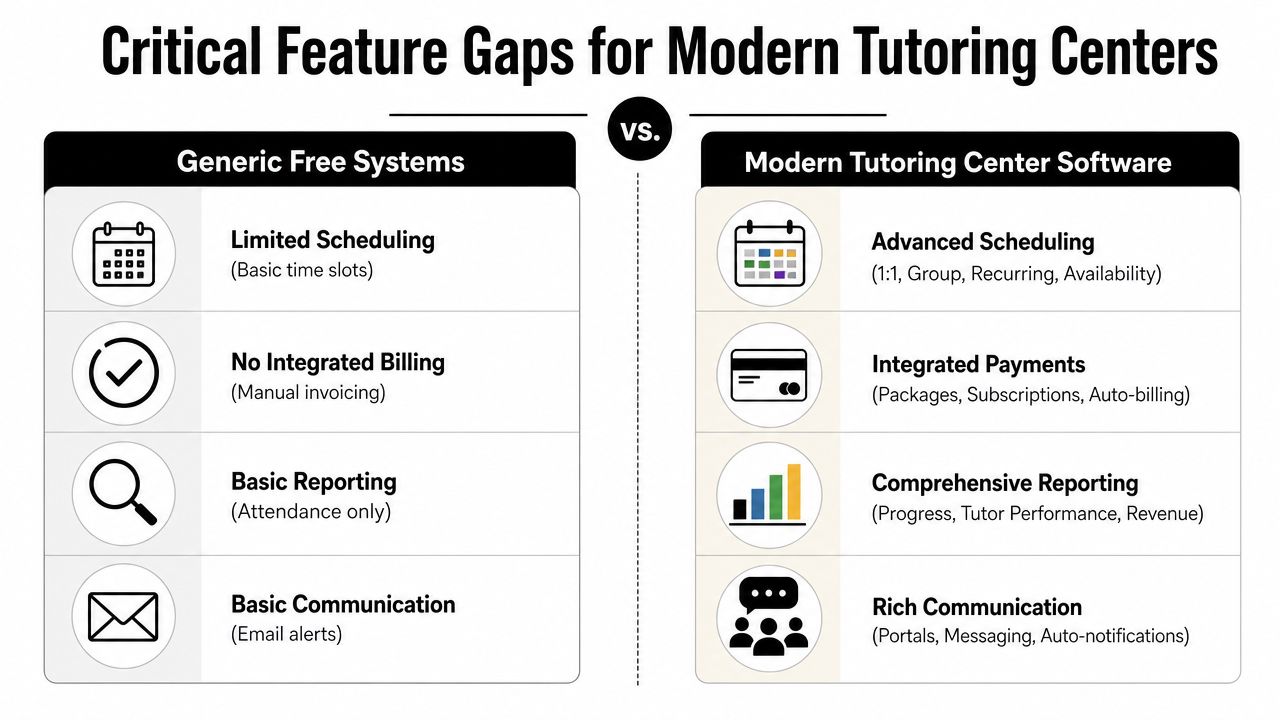
Data shows 90% of free systems lack native auto-billing from attendance, multi-branch room tracking, and complex teacher payroll, which are critical for tutoring centers. The same data notes that 60% of users report fragmented tools as their top revenue loss driver, based on GetApp's review of free school management software options.
Scheduling is where generic systems break first
Tutoring scheduling isn't just putting a class on a calendar. You need to match:
- subject and level
- teacher availability
- room availability
- branch location
- class capacity
- delivery mode
- recurring patterns
A generic system may let you create a timetable. It usually won't help you find the best slot for a new booking or the best spot in an existing class.
That's why operators end up checking multiple calendars manually, or trying to share events across platforms just to avoid collisions. Calendar syncing helps, but it doesn't solve the deeper issue. It still doesn't understand lesson type, room fees, teacher suitability, or seat availability in a class.
Billing and attendance need to connect
In many free systems, attendance and billing live in separate worlds. Staff marks a lesson attended. Then someone else creates the invoice manually. Then someone follows up for payment. Then someone checks whether the package balance is still correct.
That process leaks time and causes billing mistakes.
A tutoring center usually needs billing that can handle:
- per-lesson charging
- weekly or monthly cadences
- package consumption
- prepaid credit balances
- trial lesson rules
- automatic status changes from draft to published to paid or overdue
When billing doesn't flow from attendance, admin teams create duplicate work. That's also why the most useful features tutoring businesses actually need are operational, not cosmetic. The winning system is the one that makes attended lessons turn into accurate financial records without staff rebuilding the same data in another screen.
Before looking at software names, it helps to see the gap visually.
Payroll, rooms, and prepaid credits expose the real mismatch
At this point, free systems usually stop being viable for a growing center.
| Need in a tutoring center | What generic free systems often do | What a tutoring operation actually needs |
|---|---|---|
| Teacher payroll | Basic hourly record, or no payroll at all | Per-hour, per-lesson, revenue share, base plus variable, overtime |
| Room management | Basic timetable view | Room capacity, branch-level availability, room fees, conflict prevention |
| Parent payments | Static fee entry | Stripe, bank transfer, cash, FPS, partial allocation, receipts |
| Packages | Manual notes or spreadsheets | Auto-deduction, expiration tracking, low-balance alerts |
| Leads | External forms and inboxes | Website, WhatsApp, phone, walk-in pipeline tracking |
Operator test: If your admin team has to ask, “Did we invoice that attended lesson yet?” the software isn't integrated enough.
Tutoring and language centers also need curriculum structures that schools often don't. Subjects and levels don't just sit in a gradebook. They drive pricing, teacher assignment, and class matching. Spanish A1, IELTS Writing, Grade 3 Math, AP Chemistry, and Piano beginner all behave differently operationally.
That's why platforms built for tutoring look different. Tutorbase, for example, consolidates scheduling, billing, payroll, room management, and student tracking in one platform for tutoring centers and language schools. That's a very different job from a generic school ERP trying to track attendance and report cards.
The Hidden Operational Costs and Risks of Free Software
The obvious appeal of free software is price. The less obvious problem is that price isn't the main cost. The main cost is what your team has to keep doing because the system doesn't carry the workload.
Operational data shows school staff spend 30% to 40% of their work week on manual tasks like data entry and report generation, and 40% of implementation failures are tied to training and adoption difficulties, according to Clast's analysis of school management system operations. Unsupported free systems make both problems worse, not better.
Time is the first hidden bill
A free platform often requires more setup discipline than paid software. You need to define your own workarounds, train your team without much guidance, and keep fixing edge cases as your center grows.
That usually looks like this:
- Staff re-enter data: Attendance sits in one place, invoices in another.
- Managers become system interpreters: Every unusual case comes back to one experienced admin person.
- Onboarding slows down: New staff learn your workaround, not a clean process.
If you're already comparing add-on tools, it's worth looking beyond education software too. For example, teams trying to patch together lead handling and follow-up may also discover the best free CRM tools before they realize they're building a stack of disconnected fixes.
Support gaps become business risks
The absence of support doesn't matter on a quiet day. It matters when:
- your billing cycle is due
- a teacher can't see their timetable
- a room conflict affects multiple classes
- your finance staff can't reconcile parent payments
- you need to migrate old records into a new structure
Those moments expose the difference between software that exists and software that supports operations.
Free software often asks your team to become the implementation partner, support desk, and process designer at the same time.
Migration pain gets worse the longer you wait
A center can survive an imperfect system for a while. What hurts is waiting until your records, packages, teacher rates, and branch operations become too tangled to move cleanly.
The operators who switch late usually face three cleanup jobs at once:
- correcting inconsistent data
- retraining staff who don't trust the new process
- rebuilding billing logic that should have existed from the start
If invoicing is one of your biggest bottlenecks, it helps to review a practical example of how to automate tutoring invoices before choosing another patchwork workflow. The more manual your billing process is now, the more expensive “free” becomes over time.
Your Evaluation Checklist for Tutoring Management Software
Most buyers ask the wrong opening question. They ask, “How much does it cost?” before they ask, “What work will this remove from my team next week?” For a tutoring center, that second question matters more.
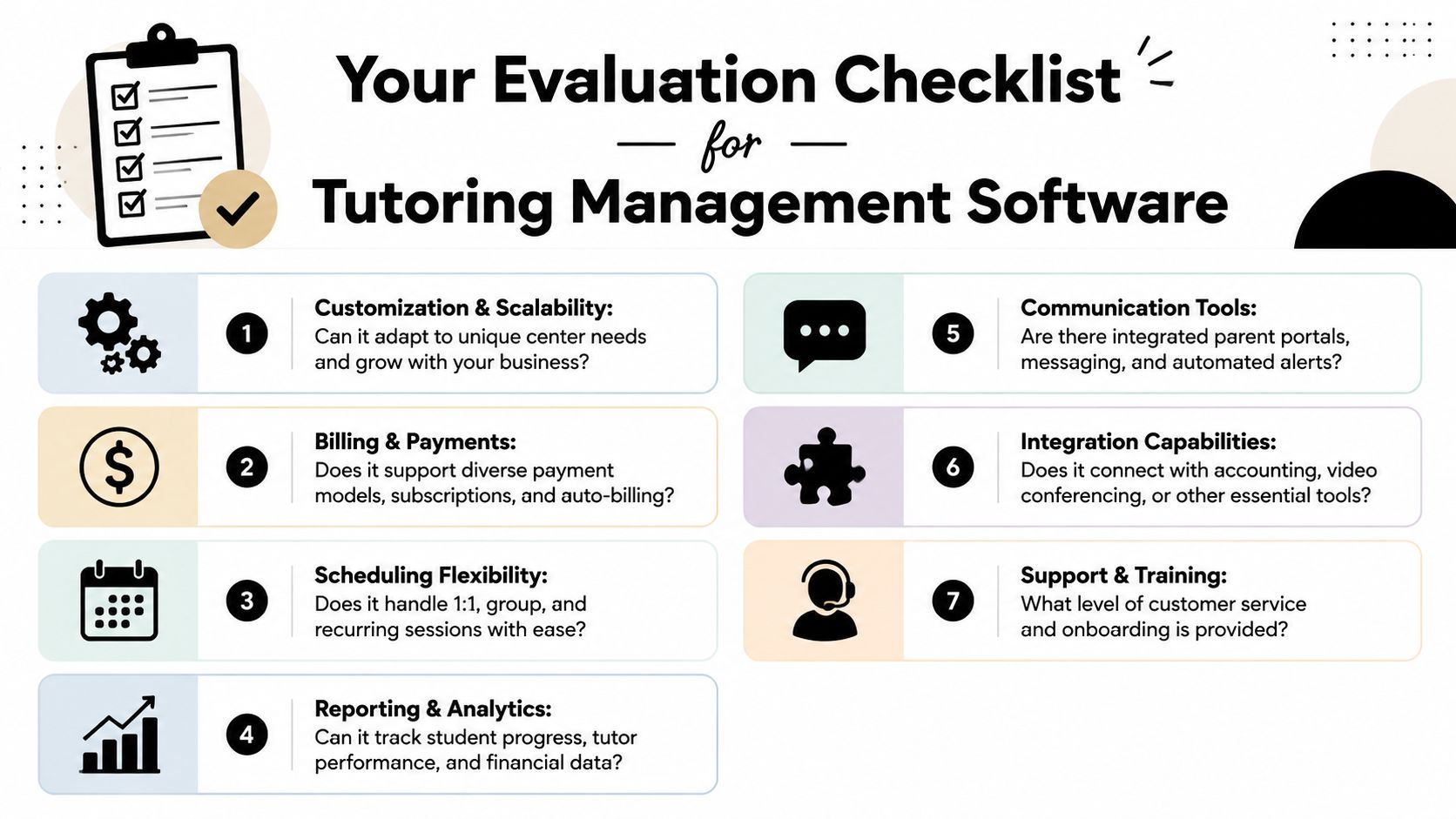
Use this checklist whether you're reviewing a school management system free option, a spreadsheet upgrade, or a specialized tutoring platform.
Ask scheduling questions that reflect real operations
Start with the daily friction points.
- Can it handle 1:1, group, and recurring lessons? A fixed timetable isn't enough if students reschedule often.
- Can you search by teacher, room, subject, level, and branch in one place? If not, your team will still hunt manually.
- Does it prevent double-bookings before they happen? A warning after the conflict is less useful than prevention.
- Can it support hybrid classes? Some centers now teach online and in-person students in the same lesson.
A good schedule doesn't just display information. It helps your staff make decisions fast.
Test the money flow, not just the invoice screen
A lot of demos make billing look better than it works. Don't stop at “Can it create an invoice?” Ask how the invoice gets created.
Check for:
- attendance-linked billing
- per-lesson, package, subscription, and custom pricing models
- prepaid credits with auto-deduction
- payment allocation across full and partial payments
- automatic receipts
- overdue tracking and reminders
If your center has siblings under one payer or multiple services under different policies, ask for that workflow specifically. General claims about “flexible billing” aren't enough.
If the vendor can't explain how a late-cancelled lesson affects attendance, invoicing, credits, and payroll in one workflow, the system probably isn't built for tutoring operations.
Probe payroll and branch complexity early
Many shortlists tend to collapse here.
Ask direct questions such as:
- How does the system pay a teacher who teaches SAT on one rate and general math on another?
- Can it handle base plus variable pay?
- What happens with weekend premiums or overtime?
- Can one teacher work across several branches with different room setups?
- Can room fees flow into invoices automatically?
These questions surface whether the software understands real centers or just classroom administration.
Look at the full student journey
Tutoring businesses don't start at enrollment. They start at inquiry.
Use this quick checklist:
| Evaluation area | What to ask |
|---|---|
| Lead management | Can leads come from website forms, WhatsApp, phone, and walk-ins? |
| Conversion tracking | Can you see New, Contacted, Trial Scheduled, Converted, and Lost stages? |
| Student records | Can you track subjects, levels, attendance, payment status, and lesson history together? |
| Parent or payer records | Can one payer manage multiple students and balances? |
| Notes and communication | Can teachers leave lesson notes that stay attached to the student record? |
Don't ignore training and support
Even strong software fails if your team can't adopt it. Ask who handles onboarding, how staff training works, and what happens when finance or operations teams hit a problem mid-cycle.
A tool that looks cheaper on paper can cost more if your staff never use it properly.
From Free Tools to a Scalable Operations Platform
The switch usually starts with a missed handoff.
One branch changes a teacher, another branch moves the room, finance still has the old lesson count, and payroll closes two days later with three different versions of the truth. That is the point where "free" stops meaning low-cost. It starts costing admin hours, manager attention, and trust in the numbers.
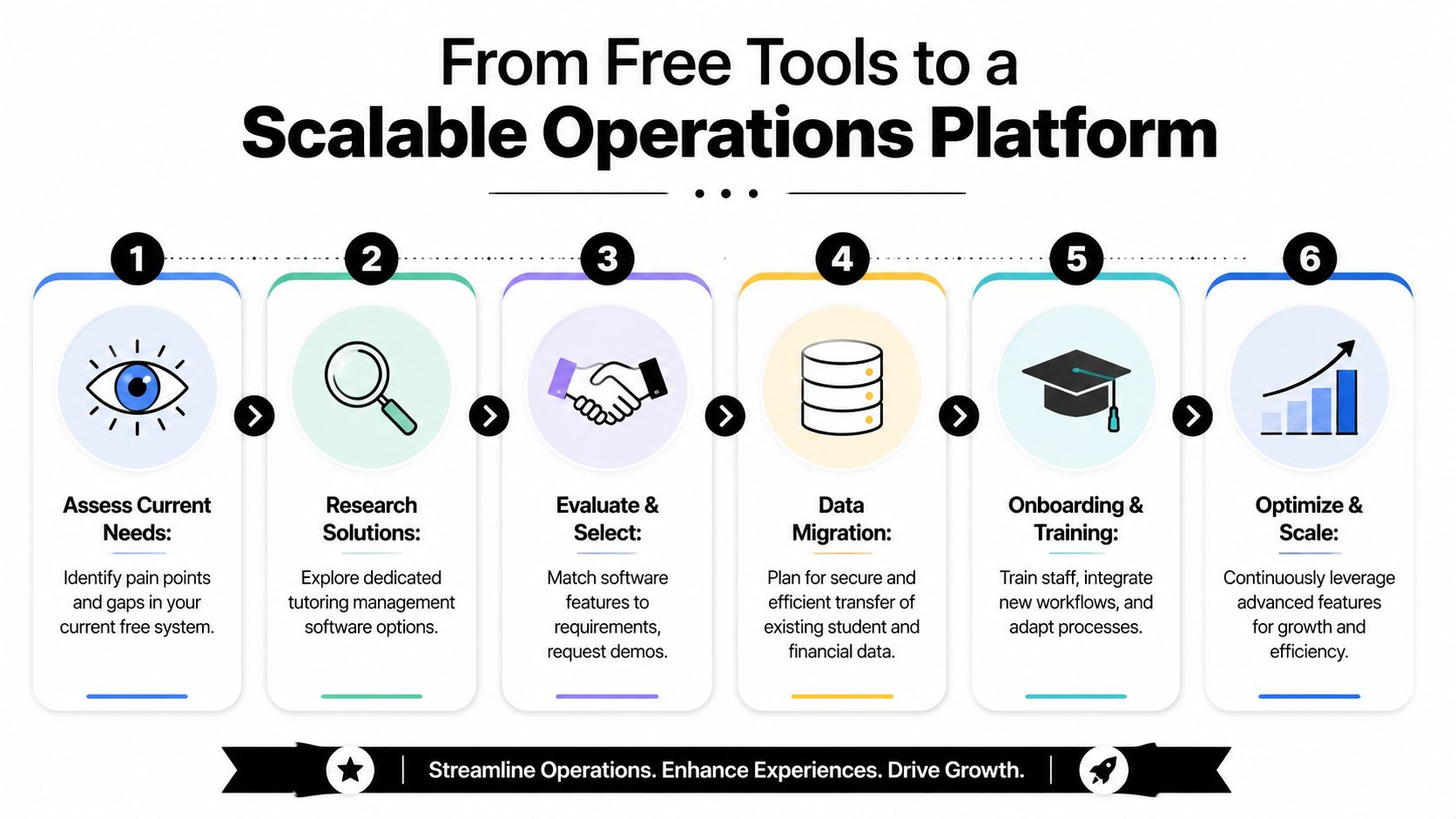
In tutoring centers, the goal is not to replace one app with another. The goal is to remove manual reconciliation from the workflows that keep breaking first: class changes across branches, prepaid package tracking, room assignment, and teacher pay tied to actual lesson delivery. A paid platform earns its place when it cuts those repeat fixes out of the week.
A transition works better when it follows the order of operational risk, not the order of the software menu.
Clean student and payer records
Merge duplicate families, standardize subject names, and fix old contact details before import. Bad data carried into a new system stays expensive.Build the operating structure
Set up branches, rooms, capacities, lesson types, calendars, and teacher availability. Tutoring centers with shared rooms and rotating teachers need these rules defined early.Configure commercial rules
Add packages, expiry rules, trials, make-up lessons, cancellations, and invoicing logic. Prepaid credits are where free tools often break down, so this setup needs real attention.Set payroll logic before launch
Map hourly rates, subject-based rates, incentives, weekend premiums, and cross-branch teaching scenarios. If payroll stays outside the system, your team will keep reconciling classes by hand.Train teams by role
Front desk needs booking and parent communication. Finance needs billing, credit tracking, and collections. Teachers need attendance, notes, and schedule visibility. Training is faster when each group learns only the workflows they touch.
Good migrations also clean up the paperwork around enrollment and compliance. Parent agreements, waiver forms, ID documents, and internal approvals often sit in email threads and shared drives long after a center has outgrown that setup. Reviewing examples of automating document collection workflows helps tighten that side of operations while the core system is being rolled out.
A scalable setup is easy to recognize in daily use.
Managers can see room usage without calling another branch. Finance can trust attendance-linked billing. Teachers are paid from approved lesson activity instead of spreadsheet edits. Parents can use credits without the front desk checking two systems first.
That is the business case. You are buying back time and reducing avoidable errors.
If you are comparing tools that replace spreadsheets for tutors, judge them on one standard: how much manual checking disappears from scheduling, billing, credits, payroll, and branch coordination after the first month of real use.
FAQ
What is a school management system free option usually good for?
It's usually good for basic student records, attendance, simple fee logs, and timetable management. It can work for small academic setups with limited scheduling and straightforward billing.
Why do free school systems struggle with tutoring centers?
Tutoring centers need more than academic administration. They need attendance-linked billing, package tracking, room allocation, complex teacher payroll, and lead-to-enrollment workflows. Generic school systems often don't cover that mix well.
Can a free system work for a single-location tutoring center?
Yes, sometimes. If your pricing is simple, your class structure is stable, and your team can tolerate some manual work, a free system may be enough for a period of time.
What features matter most for tutoring center software?
Look closely at scheduling, billing, payments, payroll, multi-branch room management, prepaid credits, lead tracking, and staff training support.
How do I know when I've outgrown spreadsheets and free tools?
You've likely outgrown them when your team keeps re-entering the same information, billing takes too long, classes get double-booked, or one admin person becomes the bottleneck for everything.
Should I choose a general school ERP or tutoring management software?
Choose based on operating model, not label. If you run a tutoring center, language school, music school, or test prep business with dynamic scheduling and billing, specialized tutoring management software is usually a better fit.
Is migration from free tools difficult?
It can be if your data is inconsistent. It gets much easier when you clean student, payer, scheduling, and billing records before rollout and train staff by role.
If your center has reached the point where free tools save cash but waste staff time, it's worth reviewing whether a purpose-built platform fits better. Tutorbase is one option for tutoring centers and language schools that need scheduling, billing, payroll, room management, and student tracking in one system.


