


Your student records live in one spreadsheet. Teacher availability sits in another. Room bookings sit in Google Calendar. Invoices get built in QuickBooks after someone manually checks attendance, and payroll gets patched together in Excel late on Friday. That setup works for a while, then growth turns it into a weekly cleanup exercise.
The problem isn't that you need more software. It's that you need a better operating model. Good student management system requirements force you to define how bookings, attendance, billing, payroll, rooms, and communication should work together so your team stops fixing preventable mistakes.
Your Guide to Choosing the Right Tutoring Software
Sunday evening is when many tutoring businesses feel the cracks.
A parent changed a lesson time on WhatsApp. A teacher marked attendance in a notebook. Someone moved a class from Branch A to Branch B, but the room change never reached billing. On Monday, your front desk team is already behind, and nobody is fully sure whether the invoice, payroll entry, and schedule all match.
I've seen this pattern enough times to say it plainly. Operational chaos is usually a systems problem, not a staff problem. Your team isn't careless. They're working across disconnected tools that were never designed to share context.
That matters because a student management system isn't just a digital filing cabinet. It becomes the control layer for your business. If it handles intake badly, leads slip. If it handles scheduling badly, you get double-bookings. If attendance doesn't feed billing and payroll correctly, you lose money in small amounts that stack up.
A practical setup starts earlier than many owners expect. If your intake still relies on ad hoc forms and manual re-entry, it's worth looking at ways to improve your education application process before you even touch scheduling logic. Bad input creates bad operations downstream.
What works: defining requirements around real incidents, missed invoices, teacher clashes, room conflicts, and unpaid lessons.
What doesn't work is buying software because the demo looked clean, then trying to bend your business around missing workflows.
The right requirements document should answer a simple question. When a student books, attends, cancels, changes branch, prepays, or joins a group class, what happens next, automatically and reliably?
If you can't answer that today, that's where your software search should start.
Why Spreadsheets and Generic Tools Are Costing You Money
A spreadsheet can store data. It can't run operations.
That's the mistake many centers make. They treat scheduling, billing, payroll, and attendance as separate admin tasks instead of one connected workflow. The result is familiar. Staff enter the same lesson details multiple times, managers chase exceptions manually, and nobody trusts the numbers without checking them twice.
Student management systems changed because schools outgrew simple digital record keeping. Current guidance describes that shift clearly. Student management systems expanded from administrative record tools into operational platforms with analytics and workflow automation. Earlier systems mainly focused on enrollment and grades, but current systems are full student-lifecycle platforms that support scheduling, communication, and financial workflows according to school management system requirements guidance.
The hidden cost isn't just admin time
Most owners notice the visible pain first. Invoices take too long. Payroll takes too long. Finding an open room takes too long.
The bigger loss sits underneath:
- Unfilled capacity: a class has open seats, but staff can't quickly see where to place the next student.
- Billing leakage: a no-show gets invoiced incorrectly, or a late cancellation never triggers the right fee.
- Payroll disputes: teachers challenge hours because lesson status and pay rules live in separate places.
- Weak decision-making: you can't easily tell which branch, teacher, subject, or time slot is overloaded.
Generic tools make this worse because each tool is locally useful and globally messy. Google Calendar helps with timing. QuickBooks helps with accounting. Excel helps with patching gaps. None of them understands the full lesson lifecycle.
Think in workflows, not feature checklists
A better buying question is not, “Does it have attendance?”
Ask this instead. “When attendance changes, what else changes automatically?”
That one question exposes whether a system is operationally mature or just a nicer database. For tutoring centers, the answer needs to include scheduling visibility, financial consequences, staff notifications, and reporting consistency.
If your team has to retype the same lesson into multiple systems, you don't have a process. You have a relay race.
The best student management system requirements don't start with modules. They start with failure points.
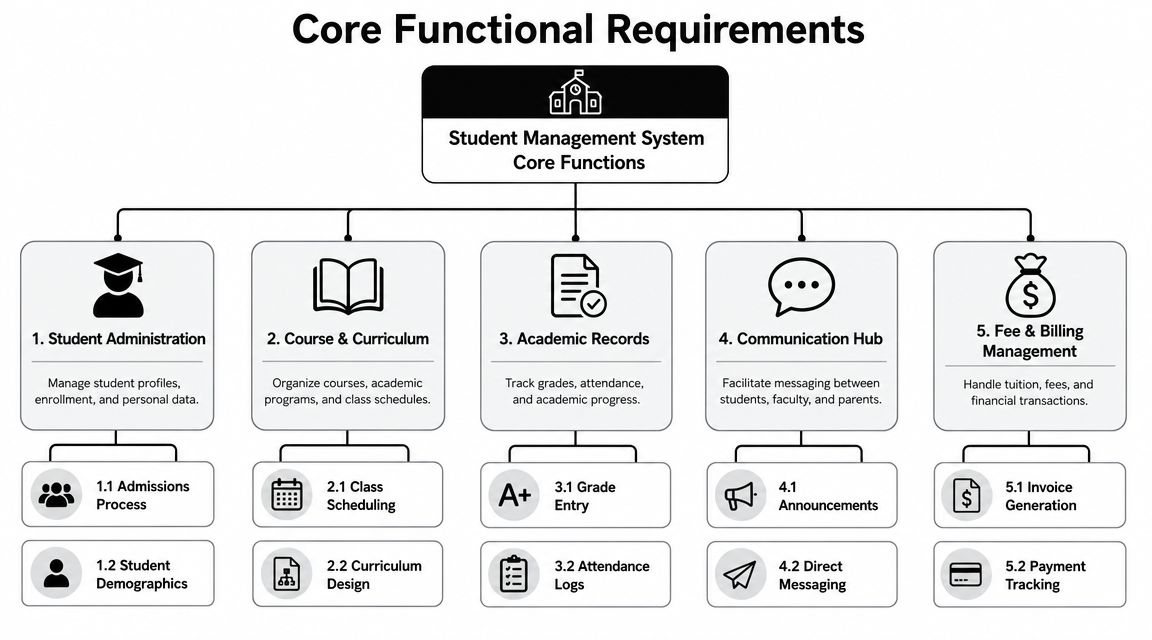
Core Functional Requirements for Daily Operations
The baseline requirement is simple. You need one source of truth.
Modern guidance on student management systems describes the foundation as centralized, real-time student data, with one database replacing separate spreadsheets and disconnected tools so personal details, attendance, performance, and timetables update across modules in real time, as outlined in this student management system overview. For tutoring centers, that same principle applies to students, teachers, rooms, billing, and attendance.
People records that carry operational context
A student profile shouldn't just hold a name and phone number.
It should show the student's subjects, level, branch, lesson history, attendance record, payment status, notes, and linked payer. If staff need to open three tabs and ask a colleague before rebooking one lesson, your system is too thin.
At minimum, define separate records for:
- Students: academic level, service type, attendance history, scheduling constraints
- Payers: billing contact, payment method, balances, linked family members
- Teachers: subjects, locations, rates, availability, contract type
- Rooms: capacity, features, availability, branch assignment
A good test is whether one staff member can answer a parent's scheduling and billing question from one screen.
Lead capture and conversion flow
Many centers ignore lead management when writing student management system requirements. That's a mistake. Intake is where data quality starts.
You need:
- Structured lead sources: website forms, calls, walk-ins, WhatsApp
- Pipeline stages: new, contacted, trial scheduled, converted, lost
- Custom fields: subject, level, preferred branch, preferred time
- Handover clarity: sales notes should become operational notes when the student enrolls
If your curriculum planning is still informal, it also helps to review how AI lesson planning features can standardize teaching inputs before they hit the timetable. Clean academic structure makes scheduling cleaner too.
Scheduling and conflict control
Under these conditions, weak systems fail fastest.
You need scheduling logic that understands teacher availability, room availability, subject fit, branch, lesson mode, and recurrence. A calendar view alone isn't enough. Staff must be able to find valid options without mentally cross-checking five constraints.
Look for functions such as:
- Conflict detection: blocks double-booked teachers and rooms
- Recurring bookings: creates weekly or bi-weekly series cleanly
- Group class visibility: shows open seats before you create a new class
- Filtering: by teacher, room, subject, branch, and status
Practical rule: if a booking can be created that later requires manual apology, the scheduling logic is too weak.
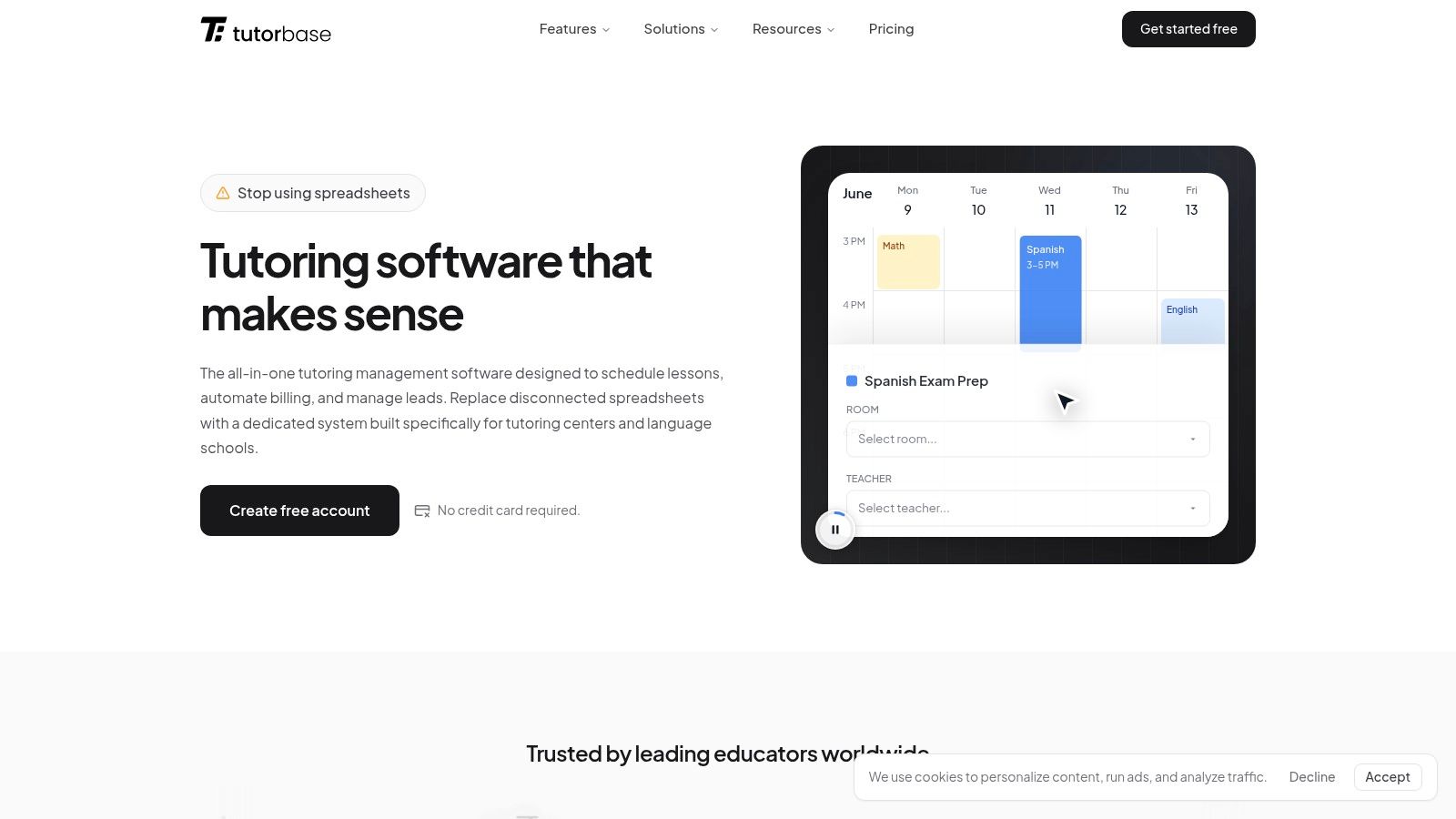
For a concrete example of what this looks like in software, review their student management feature, especially how student records connect to attendance and scheduling history. The key requirement isn't the interface. It's whether daily tasks stay connected.
Advanced Requirements for Automation and Growth
Once your core records are solid, the next question is whether the system can run the business without multiplying admin headcount.
The fastest way to judge that is to look at what happens after attendance gets marked. Requirements guidance for school systems is clear here. An effective student management system should support real-time attendance capture because attendance is the trigger for many finance and reporting workflows. Attendance states like attended, no-show, and late cancellation must deterministically feed invoice generation, cancellation fees, prepaid-credit deduction, and teacher payroll settlement, as explained in this school management requirements article.
Attendance-driven billing
In tutoring operations, attendance is not a reporting detail. It's a financial event.
If a student attends, you may need to invoice. If they used prepaid credit, you may need to deduct it. If they late-cancelled, you may need to charge a fee. If they no-showed, you may need a different rule. If the teacher delivered the lesson, payroll may still apply even when revenue treatment changes.
That means your requirements should specify:
- Attendance states: scheduled, attended, cancelled, no-show, late cancelled
- Financial consequences: each state maps to one billing and payroll outcome
- Timing: staff record attendance immediately after the lesson
- Auditability: managers can see who changed a status and when
When this is configured properly, invoicing stops being a manual end-of-week task. It becomes a controlled output of lesson delivery. If you want a product example of that workflow, this invoicing system shows the kind of attendance-to-billing connection you should ask every vendor to demonstrate live.
Teacher payroll that matches real contracts
Payroll is where “simple” software often becomes expensive.
Many tutoring businesses don't pay on one flat hourly rate. They use per-lesson rules, per-student group rates, revenue share, subject premiums, weekend premiums, base-plus-variable models, or different terms by branch. If your system can't reflect those realities, staff build shadow payroll files outside the platform. Once that happens, trust in the system drops.
Ask whether the software can handle:
| Payroll need | Why it matters |
|---|---|
| Different pay models | Contractors and employees often need separate logic |
| Rate overrides | Subjects, time slots, or branches may pay differently |
| Settlement cycles | Weekly and monthly staff may coexist |
| Attendance dependency | Payroll should only settle from valid lesson outcomes |
A payroll module that can't explain each line item will create disputes.
Here is a walkthrough worth reviewing before vendor calls:
Multi-branch and mixed delivery operations
Growth usually breaks systems at the edges. One center becomes two. In-person classes mix with online sessions. Teachers rotate across locations. Rooms have different capacities and fees.
Your student management system requirements should cover:
- Branch-level scheduling controls
- Room assignment and room-specific constraints
- Shared teacher pools across locations
- Hybrid lesson support
- Standardized pricing rules with local overrides
One platform that handles scheduling, billing, payroll, room management, and student tracking together is Tutorbase. That's relevant here because these advanced requirements only matter if they stay connected. A multi-branch schedule that doesn't flow into billing and payroll still leaves you doing reconciliation by hand.
Essential Non-Functional Requirements You Cannot Ignore
A system can have every feature you asked for and still fail in practice.
That usually happens because buyers focus on screens and skip the invisible requirements. Security, permissions, uptime, performance, and integration quality decide whether staff trust the platform enough to use it for critical work.

Security and access control
Tutoring businesses hold student details, family contact data, billing information, lesson history, and internal staff notes. That is sensitive operational data, even if you're not running a university-scale system.
You should ask for specifics, not reassurance.
Look for:
- Role-based access: teachers shouldn't see everything finance sees
- Segmentation: branch managers should only access what they manage
- Audit trails: changes to attendance, billing, or records should be traceable
- Compliance readiness: vendors should explain how they support privacy expectations such as GDPR or FERPA
A vendor saying “we take security seriously” tells you nothing. Ask how access is restricted by role, branch, and function.
Performance and reliability
Slow software creates manual work because staff stop waiting for it. They jot notes on paper, keep side spreadsheets, and promise to “update it later.” That's how data drift starts.
What you need is boring reliability:
- Fast search: student, payer, and teacher records should open quickly
- Stable calendar views: heavy schedule pages shouldn't choke during busy hours
- Reliable recurring jobs: invoice runs, reminders, and payroll prep should complete consistently
- Low-friction mobile use: teachers should be able to mark attendance without fighting the interface
A platform doesn't need to feel flashy. It needs to stay dependable at the exact moment your front desk is busiest.
Integration and export flexibility
No tutoring business runs in total isolation. You may still need accounting software, website forms, payment processors, or communication tools.
Ask vendors these practical questions:
- Can data move in cleanly? Migration matters as much as integrations.
- Can data move out cleanly? You need exports that aren't a mess.
- Can the system connect to payments and communication tools?
- Can you preserve one source of truth instead of syncing duplicates everywhere?
The best setup isn't always the one with the most integrations. It's the one that prevents duplicate data ownership.
How to Evaluate Vendors and Create Your RFP
Most demos go wrong because the buyer lets the vendor control the story.
The vendor shows a polished dashboard, clicks through a clean student profile, and everyone leaves with a good feeling. Then implementation starts, and key questions appear. Can the system handle mixed calendars, recurring cohorts, multiple branches, and students moving between trial lessons, packages, and locations without creating scheduling or billing errors? That implementation gap is often missing from generic requirements guides, and it's exactly the gap highlighted in this discussion of non-traditional learning complexity.
Use scenario-based questions
Don't ask, “Does it support scheduling?”
Ask questions the way your business behaves:
- New student scenario: A parent wants a trial this week, then moves into a package next month. Show the full workflow.
- Branch transfer scenario: Move a student from one location to another without losing history or breaking billing.
- Late cancellation scenario: Show what happens to attendance, invoice treatment, and teacher pay.
- Group class scenario: Add a student to an existing class with one seat left, then show capacity and billing impact.
- Teacher absence scenario: Reassign the lesson and preserve the correct financial record.
These questions force real answers.
Build your RFP around failure points
A useful RFP is short and sharp. It should expose operational fit, not collect marketing copy.
Include questions like:
| RFP question | What you're testing |
|---|---|
| How do you migrate student, payer, lesson, and balance data? | Data quality risk |
| How do permissions work by role and branch? | Security realism |
| Can attendance trigger billing and payroll automatically? | Workflow maturity |
| How do recurring lessons behave when calendars change? | Scheduling resilience |
| What happens when a student changes package or branch mid-cycle? | Edge-case handling |
Vendor test: if they answer abstractly, ask them to show the workflow with your exact scenario.
Evaluate implementation, not just software
Software selection is only half the decision. The rest is rollout.
Before signing, ask:
- Who handles data migration?
- How is staff training delivered?
- How long does parallel running typically last?
- What support exists during the first invoice and payroll cycle?
- What configuration work falls on your team?
If you're still comparing categories and vendors, it helps to compare tutoring management software before you lock your shortlist. The key is to compare operational fit, not feature count alone.
Putting It All Together A Sample System Evaluation
A requirements checklist only becomes useful when you test it against real workflows.
Here are four examples of what a practical evaluation looks like in a tutoring business.
Requirement one, booking without clashes
You need staff to place a student with the right teacher, room, branch, and time slot without checking separate calendars manually.
A weak system gives you calendar views and leaves the conflict checking to humans. A stronger system actively proposes valid combinations and blocks overlaps before the booking is saved.
Requirement two, attendance that drives money movement
You need lesson status to determine invoicing, package consumption, cancellation handling, and payroll treatment.
If the system records attendance but doesn't carry that outcome into finance, your staff will still run shadow processes outside the platform. That usually means slower invoicing and more reconciliation.
Requirement three, payroll that reflects actual contracts
A center with mixed employment models needs rate rules that match reality. Hourly, per-lesson, group-based, premium time slots, and revenue-linked models shouldn't require separate spreadsheets.
Requirement four, branch and room control
A multi-location operator needs one view across teachers, rooms, and services, while still preserving branch-level rules and permissions.
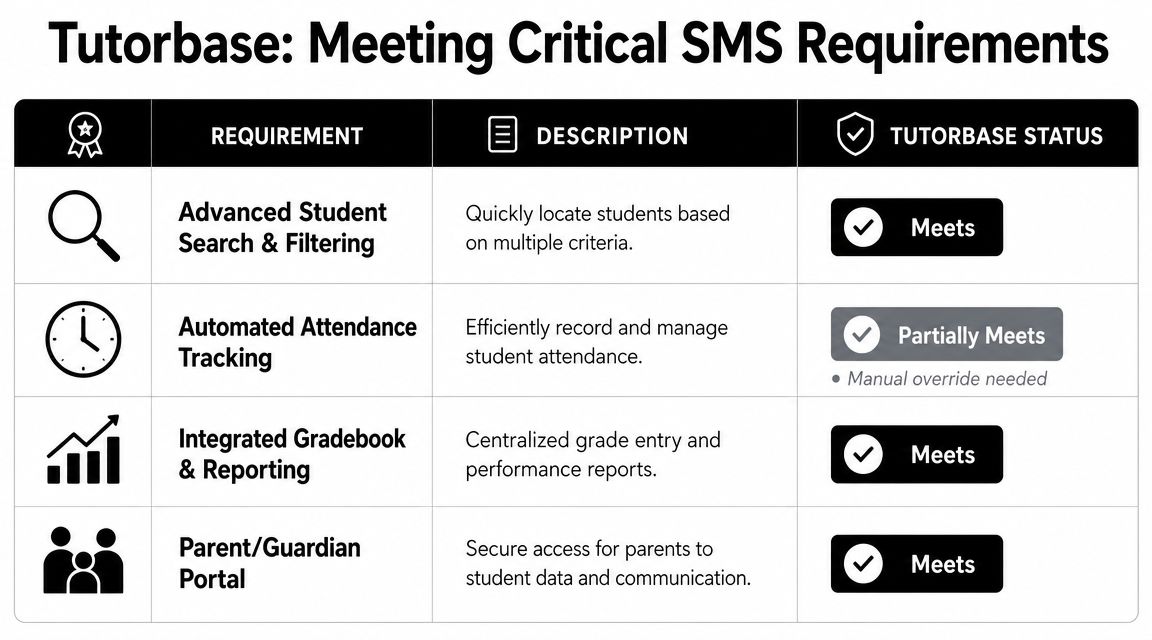
A simple side-by-side review helps expose trade-offs fast:
| Requirement | Older or generic setup | Stronger operational setup |
|---|---|---|
| New booking | Manual calendar checking | Valid options surfaced quickly |
| Attendance | Standalone record | Connected to billing and payroll |
| Payroll | Separate spreadsheet logic | Rules handled inside the system |
| Multi-branch visibility | Split views and manual coordination | Shared operational control |
This is the standard to use when reviewing any platform. If the product reduces clicks but doesn't reduce exceptions, it hasn't solved the actual problem.
Frequently Asked Questions
How long does it take to switch from spreadsheets?
It depends on your data quality and how many custom rules you've built outside your current tools. Clean student, lesson, and billing data makes migration much easier.
What's the hardest part of implementation?
Usually it's not importing records. It's agreeing on rules. Attendance states, cancellation treatment, pricing exceptions, and payroll logic need to be defined clearly.
Should teachers use the system directly?
Yes, when the interface is simple enough for attendance, notes, and schedule checks. If teachers avoid it, your office team will end up doing double entry.
Do small centers need all these requirements?
Not all on day one. But if you expect to grow, define the workflows early so you don't rebuild operations later.
What should I ask for in a demo?
Ask vendors to run your real scenarios, especially reschedules, cancellations, package changes, and branch transfers.
If you're replacing spreadsheets, patchwork calendars, and manual billing, Tutorbase is built for tutoring centers and language schools that need scheduling, billing, payroll, rooms, and student records to work in one system. Start with your workflows, test them against the product, and make sure the software fits the way your operation runs.


