


You probably know this problem without calling it “teacher observation.” One tutor gets strong parent feedback, students stay enrolled, and classes run smoothly. Another tutor covers the same subject, with the same curriculum, but families don't renew, students drift, and your team can't clearly explain why.
For most tutoring centers, teacher quality isn't an abstract academic issue. It's a revenue issue, a retention issue, and an operations issue. If you run a center with multiple teachers, multiple levels, or multiple branches, you need a repeatable way to see what good teaching looks like and help more of your team reach it.
Introduction Why Teacher Quality is Your Biggest Growth Lever
A tutoring business usually grows until inconsistency shows up.
At first, the owner teaches many of the classes. Quality stays high because the standard lives in one person's head. Then the business adds more teachers, more time slots, more rooms, more branches, and more subjects. That's when uneven delivery starts to hurt. One SAT tutor handles pacing well and keeps students engaged. Another rushes. One Spanish teacher manages mixed levels smoothly. Another loses the room halfway through class.
Parents rarely describe the issue as “instructional inconsistency.” They say things like:
- “My child likes the old teacher more.”
- “The lesson felt disorganized.”
- “We're not sure the class is the right fit anymore.”
- “Can we switch tutors?”
Those comments affect renewals long before they become a staffing conversation.
This is why teacher observation software exists. It turns vague impressions into a structured process for seeing lessons, recording evidence, and giving coaching that teachers can act on. The category has moved well beyond school districts using clipboards. The teacher observation and coaching tools market reached USD 2.14 billion in 2024, which shows how widely education organizations have shifted from paper-based observation to software-driven systems.
Good centers don't scale by hiring more teachers alone. They scale by making quality visible.
For tutoring centers and language schools, that visibility matters in practical ways. You need to know whether your IELTS teachers follow the same speaking correction standard. You need to know whether your after-school math instructors manage transitions well. You need to know whether your strongest teachers are using habits you can train into the rest of the team.
That's the promise behind teacher observation software. But for many private learning businesses, a dedicated tool isn't always the best answer. The core question is simpler. How do you improve teaching quality without creating another system your team has to feed?
What Is Teacher Observation Software
Teacher observation software is a digital system for recording, organizing, and acting on feedback about how someone teaches. Instead of handwritten notes, scattered Google Docs, or memory-based conversations after class, the software gives you a structured workflow.
A simple way to think about it is this. It's game film for teaching.
A manager, academic director, or lead teacher watches a lesson. They capture what happened, align those notes to a rubric or checklist, and turn that evidence into coaching. The point isn't only evaluation. The point is making teaching quality easier to see and easier to improve.
What the software replaces
In many centers, observation still looks like this:
- A clipboard or notebook: The observer writes fast, misses moments, and later struggles to organize notes.
- A generic form: Every subject gets judged the same way, even when Piano, IELTS, and Grade 3 Math need different lenses.
- A delayed conversation: Feedback comes days later, after details are blurry.
- A dead-end record: Notes get stored somewhere, but nothing links them to coaching goals or follow-up.
That process creates friction. People still “observe,” but the business doesn't build a usable quality system.
What a digital system actually does
Teacher observation software usually handles a few core jobs:
| Function | What it means in practice |
|---|---|
| Observation capture | Managers record notes during a class on a tablet or phone |
| Rubric alignment | Feedback follows the same standards across teachers |
| Evidence storage | Notes, scores, and sometimes video stay in one record |
| Coaching follow-up | Action steps connect to future development conversations |
| Trend analysis | Leaders can see patterns across teachers, subjects, or sites |
Many platforms also support video. That matters because some teaching moves are hard to describe accurately in text. Wait time after a question, room scanning, transitions, and how a tutor corrects mistakes all become easier to review when the teacher can watch the moment back.
Why centers look at it in 2026
In 2026, the appeal is less about compliance and more about consistency. Private learning businesses want to reduce guesswork.
If you're comparing systems, don't confuse “a place to write comments” with observation software. A true observation tool supports a repeatable workflow. It helps your team define what effective teaching looks like, document it consistently, and use that record to improve future lessons.
That's also why a dedicated platform can feel attractive at first. It promises structure. The catch is that structure only helps if it fits your actual operating model. A district-style evaluation system can be too heavy for a tutoring center that needs speed, flexibility, and clean connection to scheduling, attendance, billing, and parent communication.
Core Features and Digital Workflows
The best teacher observation software doesn't stop at note-taking. It creates a closed loop from classroom visit to coaching action.
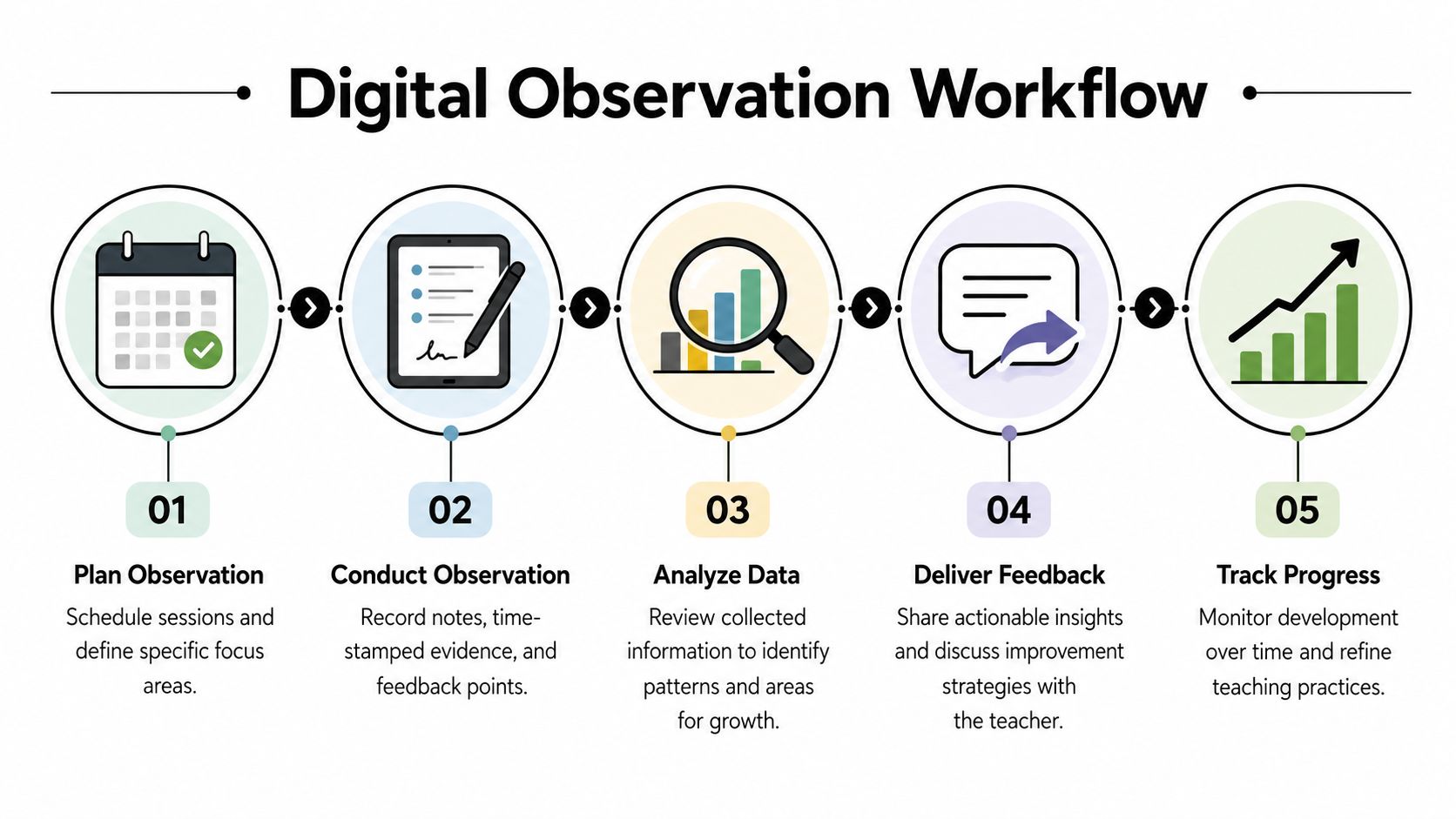
A typical workflow from class visit to coaching
Most systems follow the same basic sequence.
Plan the observation
The manager sets the lesson, teacher, subject, and focus area. In a tutoring center, that focus might be pacing in SAT Reading, error correction in A2 French, or behavior management in a group homework class.Capture evidence live
The observer uses a phone or tablet during the session. Strong tools make it easy to tag moments, add notes quickly, and avoid writing long summaries after the fact.Review the lesson record
The observer looks for patterns instead of isolated moments. Did the teacher check understanding consistently? Did they spend too long lecturing? Did they manage transitions well?Give coaching feedback
This is the difference between a useful system and an expensive filing cabinet. Modern teacher observation software links observation data directly to professional development plans and can use integrated video for self-reflection.Track whether improvement happened
The next observation should connect to the last one. Otherwise, every lesson review starts from zero.
The features that matter most
In practice, these are the capabilities that carry the most value:
- Custom rubrics: You need different criteria for one-to-one tutoring, group language classes, and music instruction.
- Mobile observation forms: Managers should be able to walk class to class and record clean notes without juggling paper.
- Time-stamped comments: Specific feedback is easier to discuss when it ties to a clear moment in the lesson.
- Video support: Video makes self-review far more concrete than written commentary alone.
- Coaching logs: Feedback should lead to action items, not sit in a PDF.
- Analytics: Leaders should be able to spot recurring issues across teachers or branches.
Practical rule: If the system helps you collect notes but doesn't help you coach better next week, it's incomplete.
Where workflows usually break
The software itself often isn't the actual problem. The process is.
Common failure points include:
- Overbuilt rubrics: Managers create a giant form nobody wants to complete.
- Inconsistent observers: Two leaders watch the same class and judge it differently.
- Slow follow-up: Feedback lands too late to change behavior.
- No operational connection: Observation records live in one system, while attendance, renewals, and parent complaints live somewhere else.
If you review online lessons, recordings can also become more usable when you improve accessibility with transcription. Searchable transcripts make it easier to revisit specific teacher moves, especially in language instruction where wording matters.
For tutoring operators, this is also where software selection often goes wrong. They buy an observation tool in isolation, then realize they still need scheduling, attendance, room tracking, and teacher records somewhere else. That's why many buyers eventually shift their attention toward what to look for in tutoring software, not just observation forms on their own.
The ROI of Observation for Tutoring Centers and Language Schools
Observation only matters if it improves business outcomes.
That sounds blunt, but it's the right test for a tutoring center. If lesson reviews don't help you keep students longer, onboard teachers faster, and reduce management chaos, you're adding work without changing results.
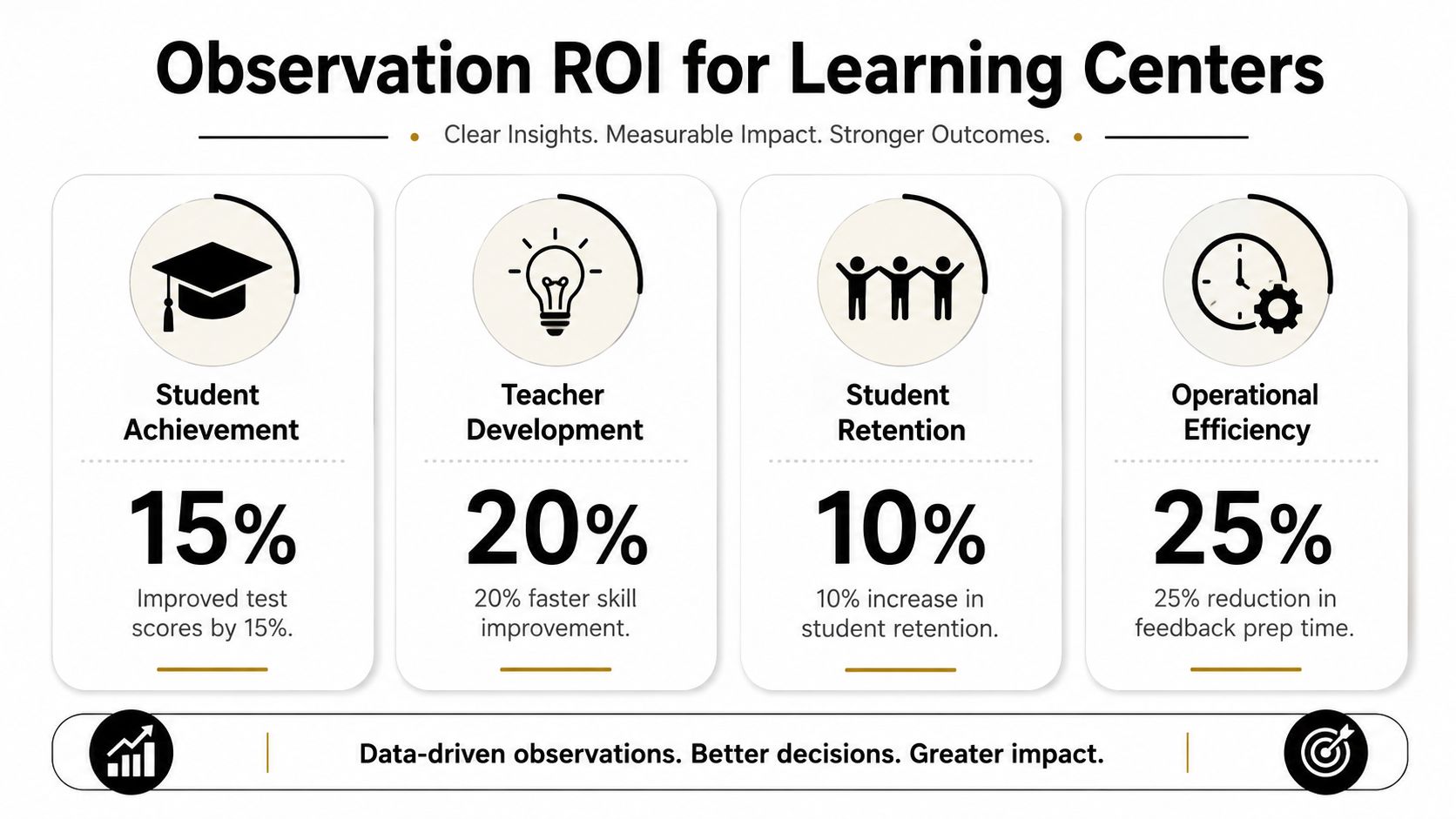
Better teaching quality usually pays through retention
Families don't renew because your rubric looked professional. They renew because classes feel organized, students progress, and communication stays consistent.
That's why quality control has to connect to commercial performance. In tutoring businesses, strong observation and coaching can help you standardize what your best teachers already do well:
- In test prep: keeping a predictable structure across SAT, ACT, IELTS, and TOEFL classes
- In language schools: correcting errors consistently across levels such as A1, A2, B1, and B2
- In after-school programs: managing mixed-attention groups without losing pace
- In music schools: balancing technique, encouragement, and parent-visible progress
When your center ties teaching quality to the wider operating system, the payoff gets more concrete. Tutoring management platforms that integrate admin workflows can deliver a 60% reduction in manual admin time, 3x faster onboarding, and a 42% boost in renewals. That doesn't prove observation alone causes those outcomes. It does show why center owners should think about quality and operations together instead of as separate software decisions.
Coaching beats isolated evaluation
There's another ROI lesson here. Feedback only works when it sits inside a coaching loop.
District-level evidence points to the same issue. Schools spend an average of $18,000 per teacher each year on professional development, yet only 3 in 10 teachers show measurable improvement, often because coaching isn't embedded in observation cycles. The lesson for private learning businesses is clear. Don't run observations as one-off audits.
A useful center workflow looks more like this:
| Stage | Weak approach | Strong approach |
|---|---|---|
| Observation | Quick drop-in | Planned look at a specific teaching skill |
| Feedback | General comments | Specific action steps |
| Follow-up | No next check | Future lesson tied to the same focus |
| Business link | Separate from operations | Connected to retention, attendance, and parent feedback |
Admin savings matter too
Most tutoring centers don't have a large academic leadership bench. The same person often handles staff scheduling, room changes, parent complaints, payroll checks, and teacher support. That's why process efficiency matters as much as pedagogy.
Operators managing 5 to 100+ teachers across 1 to 10+ branches often lose 10+ hours per week on manual admin work. If quality management adds another disconnected tool, the burden gets worse.
A smarter setup reduces the number of systems you have to update, cross-check, and explain.
You can see that more clearly when looking at how tutoring centers manage operations. The centers that improve quality sustainably usually don't separate teaching standards from scheduling, attendance, billing, and teacher workload. They run one operating model.
The real return doesn't come from “doing observations.” It comes from turning class quality into a repeatable management habit.
How to Evaluate Teacher Observation Tools
Most demos look better than real usage.
A vendor shows polished dashboards, clean charts, and a fast feedback screen. Then your academic manager tries to use it between lessons on a tablet while handling late arrivals and room swaps. That's when the wrong tool shows itself.
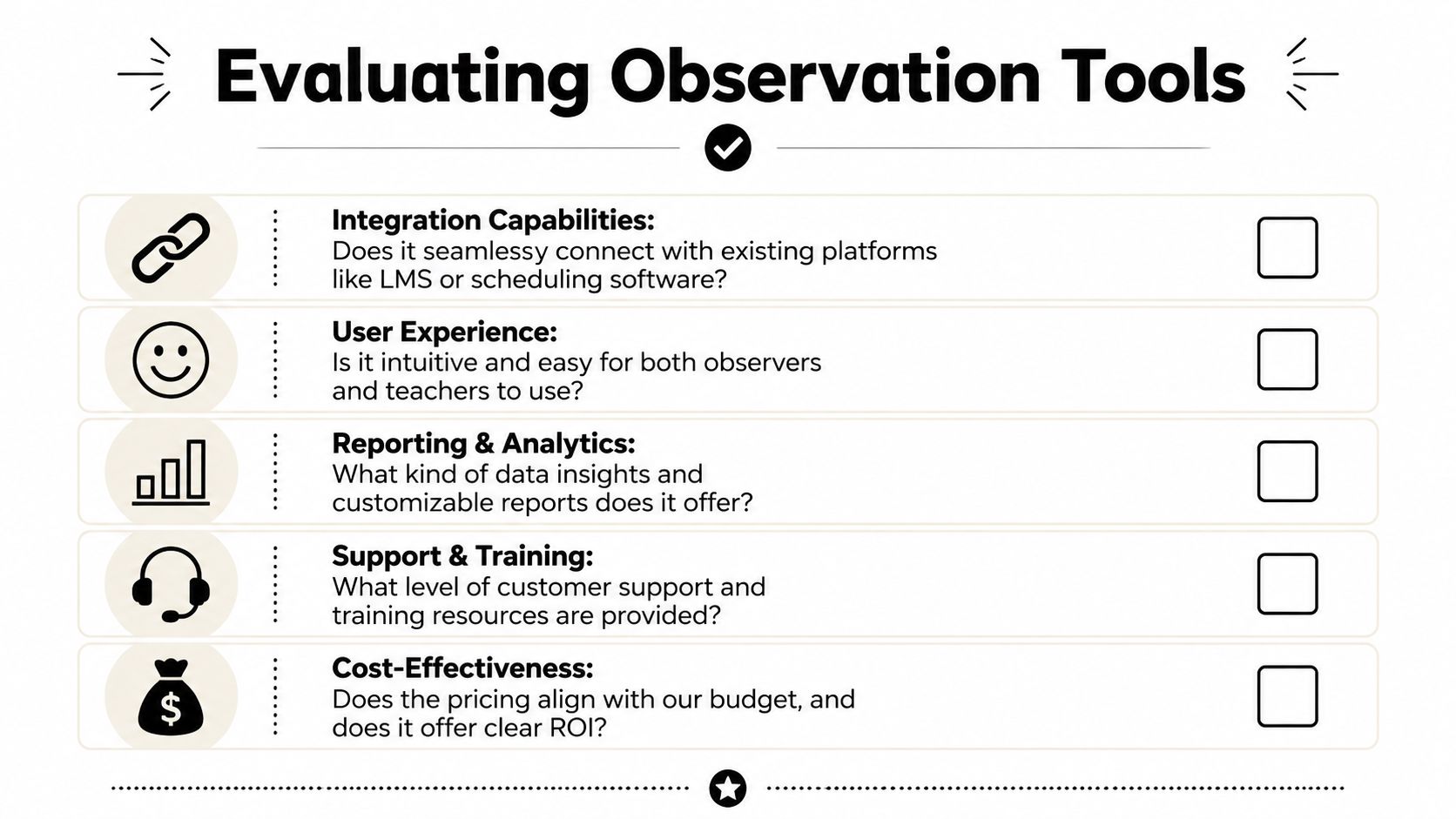
The first questions to ask
Start with fit, not features.
- Does it match your teaching model? A one-to-one math center needs a different observation workflow from a multi-branch language school.
- Can you customize by subject and level? Piano, AP Calculus, Mandarin conversation, and preschool phonics shouldn't all use the same review form.
- Will managers realistically use it live? If note capture is clunky, people go back to paper.
- Does it connect to your other systems? If not, it creates another silo.
Validity matters more than speed
Tutoring businesses often make the mistake of judging a teacher from a very short class visit. That feels efficient, but it can produce unreliable conclusions.
Observation protocols in formal appraisal systems often require enough time to gather meaningful evidence. T-TESS and related guidance use a minimum 45-minute observation as an example of what valid observation data can require. Even if your center uses shorter internal reviews, the principle still holds. Don't build a quality process on fragmented snapshots.
A five-minute drop-in can surface a concern. It usually can't support a fair judgment on its own.
A practical shortlist checklist
Use this when comparing tools:
- Integration quality: Can it share data with scheduling, attendance, or CRM systems?
- Observer experience: Can a branch manager complete an observation without training fatigue?
- Teacher buy-in: Does the workflow feel developmental, or purely punitive?
- Reporting usefulness: Can you compare patterns across teachers, sites, or subjects?
- Support model: Will the vendor help configure your rubric and process?
- Cost-effectiveness: Does the software save enough time or improve enough outcomes to justify another system?
If you're reviewing evaluation approaches more broadly, this guide on choosing the right 360 platform is useful because it sharpens the same core question. Are you collecting feedback that people can trust and use?
Red flags in the demo
Some signs should make you pause immediately:
| Red flag | Why it matters |
|---|---|
| Generic templates only | You'll force every subject into the same mold |
| No mobile-first workflow | Managers won't use it consistently |
| Weak reporting | You'll collect data without learning from it |
| No easy export or history | Records become hard to compare over time |
| Standalone by design | You'll spend more time reconciling systems |
A good observation tool should reduce ambiguity. If it adds admin burden or creates another disconnected record, it's solving the wrong problem.
A More Integrated Approach to Teacher Quality
For many tutoring centers, a dedicated observation platform is too much machinery for the problem.
That doesn't mean quality control is optional. It means the stronger approach often uses more than one signal, inside one system, instead of treating formal observation as the whole story.
What a fairer quality model looks like
Formal observation can help. It can also mislead when leaders over-trust a single score.
That risk isn't theoretical. Research from the U.S. Department of Education found meaningful bias in observation scores, including lower scores for teachers of ELA classes with higher percentages of minority students. For tutoring and language schools, the lesson is direct. One observed class should never become the sole verdict on teacher quality.
A better model combines multiple signals:
- Lesson observation: What happened in the room
- Student progress: Are learners advancing through levels or goals
- Attendance patterns: Do students keep showing up
- Parent feedback: Are families reporting confidence and clarity
- Teacher notes: Is there consistency in follow-up and communication
- Renewal behavior: Do students continue with that teacher or class
Why integrated systems usually win
When these signals live in separate places, nobody gets a clean picture.
Scheduling sits in Google Calendar. Billing sits in QuickBooks. Payroll sits in Excel. Parent comments sit in WhatsApp. Observation notes sit in a document folder. That setup already causes operational damage in many businesses. Fragmented tools can contribute to double-booked teachers and rooms in 30% of small tutoring businesses, alongside a 15% drop in retention tied to missed classes and poor communication.
The same fragmentation also weakens quality management. You can't fairly judge a teacher if your observation note says “class felt slow,” but your system can't show attendance stability, level progression, lesson history, or parent feedback in the same view.
That's why many operators are moving toward integrated workflows and broader team capability. This perspective on AY Automate's team AI native insights is useful because it focuses on process design, not just tool adoption. The point is to help your team make better decisions inside daily work.
What this looks like in practice
A practical integrated setup for a tutoring center usually includes:
- Persistent teacher notes: Internal notes, plus parent-shareable notes where appropriate
- Student progression tracking: Movement across subjects and levels
- Attendance-linked quality signals: Repeated absences or drop-offs tied to classes or teachers
- Operational context: Room, branch, timetable, and workload in the same record
- CRM history: Lead source, trial outcome, conversion, and renewal behavior connected to student records
That's why an integrated student and family record often becomes more useful than a dedicated observation score alone. For many operators, this CRM for tutoring businesses gives a more actionable picture of teacher effectiveness than a standalone classroom observation product.
The fairest view of teacher quality usually comes from multiple measures, not one polished evaluation form.
Frequently Asked Questions
Is teacher observation software necessary for a tutoring center?
Not always. If you run a large academic team with multiple supervisors, formal observation software can add structure. If your center is smaller, or if your operations are already fragmented, a dedicated tool may create another silo. Many centers get better results from integrated systems that combine notes, attendance, student progress, and parent feedback.
Can teacher observation software work for online tutors?
Yes, especially when lessons happen on Zoom or another recorded platform. Online classes make it easier to review teaching moves after the session. The key is whether your workflow turns those reviews into coaching, not just stored recordings.
What's the main mistake centers make with observations?
They treat observation as judgment instead of development. A quick drop-in, vague feedback, and no follow-up rarely changes teaching. A narrower focus, clear action step, and later check-in works much better.
How often should you observe teachers?
There isn't one correct schedule for every tutoring business. New teachers usually need closer support. Experienced teachers may need lighter-touch reviews plus spot checks around a specific goal, subject, or parent concern.
Should every subject use the same observation rubric?
No. A common core is helpful, especially around classroom management, pacing, and communication. But subject-specific teaching matters. IELTS speaking, Grade 5 math, and violin instruction need different criteria.
How do you get teacher buy-in?
Keep the process transparent and practical. Show teachers what you're looking for, use examples from real lessons, and make feedback specific enough to improve the next class. Teachers usually resist vague scoring more than observation itself.
Is more software always the answer?
No. More software often means more reconciliation work. If your scheduling, billing, payroll, notes, and parent communication already live in separate tools, adding one more platform can make quality management harder instead of easier.
If you want to improve teacher quality without adding another disconnected system, Tutorbase gives tutoring centers and language schools one platform for scheduling, billing, payroll, rooms, student tracking, teacher notes, and operational visibility. It's built for owners and operators managing 5 to 100+ teachers across 1 to 10+ branches, and it replaces spreadsheet-heavy workflows that eat up time every week. You can see how it works at tutorbase.com/register.


