


Choosing the top software for Japanese language schools means finding an integrated system that replaces fragmented spreadsheets and manual workarounds. The right platform automates complex scheduling, multi-level curriculum tracking, and flexible billing to support growth, reducing admin time by up to 60% and freeing you to focus on education.
Why Do Japanese Language Schools Need Specialized Software?
Running a Japanese language school involves operational complexities that generic business software or a simple calendar app cannot solve. You are not just booking appointments; you are managing a complex educational ecosystem with specific needs. Moving past manual methods is essential for staying competitive and efficient.

Beyond Spreadsheets and Calendars
When you first start, juggling Google Calendar for scheduling and Excel for billing feels manageable. But as your school grows, this disconnected approach quickly becomes a significant drain on time and resources.
- Booking Errors: Trying to manually coordinate teacher availability, student schedules, and classroom space is a recipe for double-bookings and constant conflicts. These errors damage your school's reputation.
- Billing Nightmares: You waste dozens of hours each month tracking prepaid lesson packages, hand-creating monthly invoices, and chasing late payments. This manual process is prone to costly mistakes.
- No Real-Time Visibility: It's almost impossible to get a clear, immediate picture of your class fill rates, teacher workloads, or financial health when your data is scattered across five different documents.
An effective system consolidates all operations, creating a single source of truth. This shift reduces administrative work by an average of 60%, freeing your team to focus on delivering incredible Japanese language instruction.
Adapting to a Growing Market
The demand for Japanese language education is growing rapidly. The global online Japanese learning market, valued at approximately $500 million in 2025, is projected to grow at a compound annual rate of 15% through 2033. This surge means more students, more classes, and far more administrative complexity.
A scalable software solution is the only way to handle this influx without hiring more admin staff. A modern platform becomes the operational backbone of your school. To help you choose the right one, we've put together a detailed guide on what to look for in language school management software.
Below is a quick summary of the non-negotiable features your software needs to support a growing Japanese language school.
Essential Software Criteria for Japanese Language Schools
This table breaks down the critical functions your school's software must handle to support growth and operational efficiency.
| Feature Category | Why It Is Critical for Japanese Schools | Example Pain Point Solved |
|---|---|---|
| Curriculum Management | Must support distinct JLPT levels (N5-N1), business courses, and cultural workshops. | Ends the headache of manually tracking which students are in which JLPT level and ensuring they are placed in the correct class. |
| Hybrid Class Support | Accommodates both in-person students in Tokyo and online learners from around the world in the same class. | Prevents confusion by managing physical room capacity and virtual meeting links from a single, unified schedule. |
| Automated Billing | Handles complex pricing like prepaid packages, monthly subscriptions, and trial lesson conversions effortlessly. | Eliminates the tedious, error-prone task of manually calculating and sending invoices for dozens of different student payment plans. |
| Multi-Branch Ready | Provides a unified view of all locations, whether they are in different cities or are online-only branches. | Stops the chaos of using separate, disconnected calendars and spreadsheets to manage each branch location. |
Without these core capabilities, you will find yourself hitting a wall, unable to scale efficiently as your school attracts more students.
What Are the Core Features Your School Needs?
When picking software, a simple feature list does not tell the whole story. For a growing Japanese language school, essential functions like scheduling, billing, and management must integrate perfectly to handle your unique operations. Let’s break down the four pillars of a system that will actually reduce your admin headaches and help your school grow.
Smart Scheduling for a Dynamic Classroom
Manual scheduling is the number one source of mistakes and wasted hours for language schools. A solid system does more than just fill a calendar; it uses smart automation to untangle the mess of recurring semester courses, teacher availability across time zones, and the constant flow of student inquiries. This is what stops the classic double-booked teacher or over-stuffed classroom dead in its tracks.
The goal is to turn a ten-minute scavenger hunt for a new student's first lesson into a quick, two-minute process. Good software does this by instantly finding and suggesting open slots based on a student’s JLPT level, preferred teacher, and available times.
If you're juggling group classes, private lessons, and trial sessions, an intelligent scheduling system is not a luxury—it's essential. It makes sure every booking maximizes both teacher time and classroom space, which directly fills empty seats and boosts your bottom line.
Automated Billing for Complex Pricing
Japanese language schools rarely have simple pricing. You likely offer a mix of intensive course packages, prepaid credits for flexible learners, and perhaps monthly subscriptions. Tracking all of that by hand is not just a grind; it's a recipe for mistakes that lead to lost revenue and unhappy students.
A powerful billing engine automates this entire workflow. It should let you set up unique pricing for different services, like a package of 20 lessons for an N3 prep course or a straightforward hourly rate for private conversation practice.
Here's what to look for in billing automation:
- Prepaid Credits: Think of it as a digital wallet. Students buy lesson bundles, and the software automatically deducts credits after each attended class.
- Package Management: The system should let you sell lesson packages with expiration dates, then track usage and send out renewal reminders on its own.
- Automated Invoicing: The software generates invoices automatically from attendance records. No more manual data entry, just timely and accurate payments.
Integrated Student and Teacher Management
Your school's success rides on how well you manage your students and teachers. For students, that means tracking their journey from N5 to N4. For teachers, it means handling complex payroll based on variable rates, not just a flat hourly wage.
The right software gives you one central place for both. You need to see a student's entire history—attendance, payments, progress notes—all at a glance. For teachers, the system must handle different pay models, whether it's per-lesson rates, a share of the revenue, or a bonus for teaching advanced business Japanese. You can get more ideas by exploring different types of scheduling software for language schools and how they handle these resources.
Curriculum and Resource Management
Finally, your software needs to organize what you teach and where you teach it. This means building a structured curriculum right in the system, where you can define subjects like "Beginner Kanji" or "Business Keigo" and assign levels to each. This setup is the bedrock of accurate scheduling and proper student placement.
But it's not just about the curriculum. The system also must manage classroom capacity for both your physical and online lessons. It should know how many seats are free in your Tokyo classroom while also managing the Zoom links for online students joining from overseas. This hybrid management is non-negotiable for modern schools. It ensures you never overbook a room or a teacher, and every lesson runs smoothly.
How Do Top School Management Platforms Compare?
When you choose software, you must look past marketing slogans and focus on the real-world tasks your Japanese language school handles every day. The true test of a platform is not its feature list; it's how it handles a request like booking a trial lesson or tracking a prepaid package. This is where the differences really show.
Let's compare Tutorbase against common alternatives like Teachworks and TutorCruncher, highlighting the operational gaps that can make or break your admin team's day.
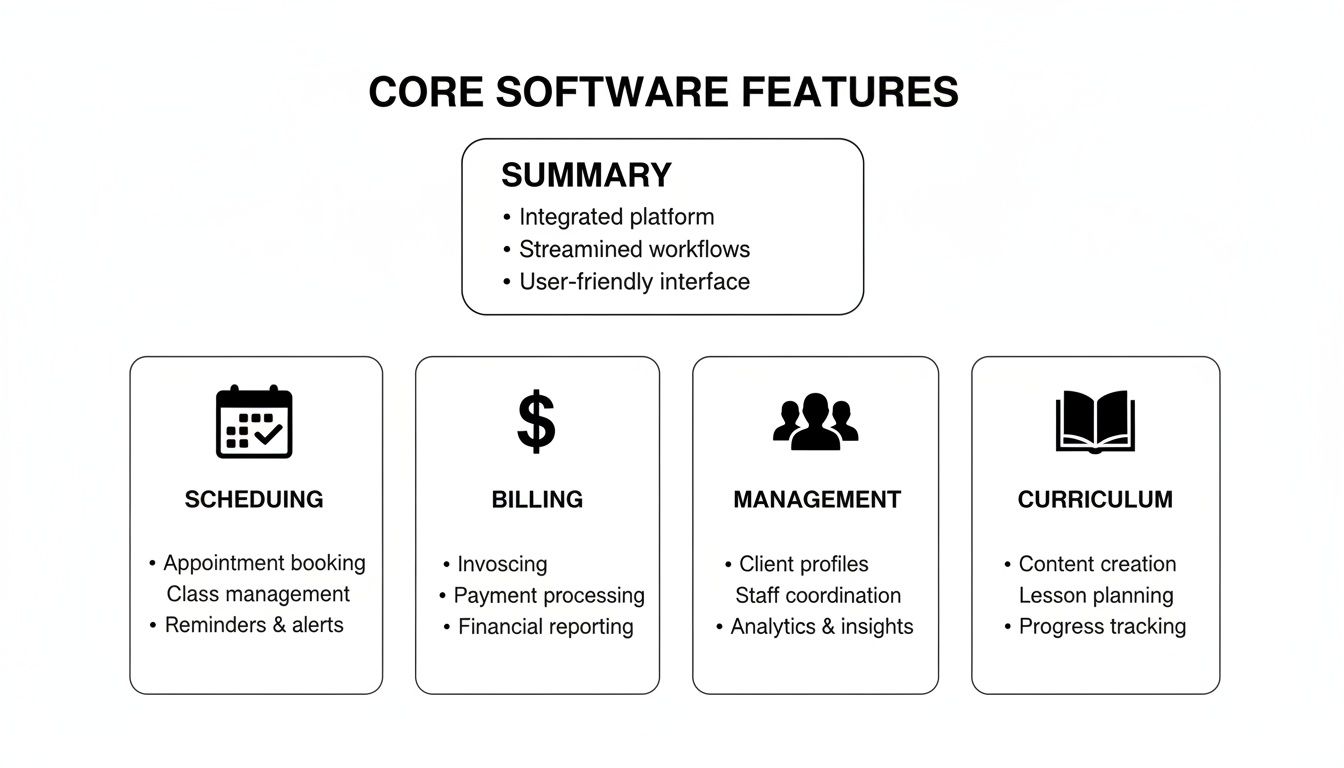
These four pillars—scheduling, billing, management, and curriculum—are not just separate features. They must work together perfectly to actually lift the administrative weight off your shoulders.
Intelligent Scheduling vs. Manual Calendar Hunting
Booking a student's first lesson should be a quick, satisfying win. But in many systems, this simple task turns into a frustrating hunt through calendars, manually checking teacher availability, room schedules, and class openings one by one.
Tutorbase’s AI-powered "Find Slot" feature changes this game. Your admin just needs to enter the student's criteria—say, "Beginner N5," "Tuesday afternoons," and "online"—and the system instantly generates every possible combination of teacher, time, and class. We've seen this turn a ten-minute slog into a task that takes less than two minutes, making student onboarding 3x faster.
With platforms like Teachworks or TutorCruncher, it’s a different story. The process often requires your admin to open multiple calendar views, filter for a teacher, check their schedule, then manually verify if a physical room or virtual link is free. It’s slow, tedious, and a recipe for human error.
The Tutorbase Difference: A potential student from a different time zone emails asking for a trial lesson. Instead of a long back-and-forth, your team can instantly find and offer three perfect slots. You secure the booking before the lead has a chance to look elsewhere.
Native Prepaid Credits vs. Clunky Workarounds
One of the most popular billing models for language schools is selling prepaid lesson packages. Students love the flexibility, but tracking credit usage in messy spreadsheets or with clumsy add-ons is a constant source of stress for administrators.
Tutorbase built its native prepaid credit system to solve this problem. When a student buys a 20-lesson package, their account is credited. As soon as a teacher marks attendance, one credit is automatically deducted. The system even sends automated low-balance alerts, which helps prompt renewals and boosts monthly renewal rates by up to 42%.
Other platforms frequently lack this built-in capability. You are often forced to manage packages by creating complicated service items or relying on third-party integrations that do not sync cleanly with attendance records. This creates billing errors and hours of wasted time reconciling everything.
Unified Multi-Branch Management
As your school grows, running a physical location in Tokyo while also managing a booming online program presents a huge challenge. You need a single dashboard to see everything—from your classroom in Shinjuku to your online teachers based in different countries.
Tutorbase is designed for this kind of complexity. You can manage multiple branches, each with its own set of rooms, teachers, and pricing structures, all from one central account. This unified view gives you a crystal-clear picture of resource usage across your entire operation. Competing software often provides limited support for this, forcing you into using separate accounts or confusing workarounds that keep your data in silos.
For an even deeper dive into the numbers and features of different platforms, check out our detailed guide on tuition management systems reviews.
Feature Comparison for Japanese Language School Scenarios
| Operational Scenario | The Tutorbase Approach | The Teachworks or TutorCruncher Approach |
|---|---|---|
| Booking a JLPT N4 Trial Lesson | AI-powered "Find Slot" instantly suggests available teachers and times. Booking takes under 2 minutes. | Manual search through multiple teacher and room calendars. Prone to errors and can take over 10 minutes. |
| Managing a 10-Lesson Package | Native prepaid credit system automatically deducts lessons after attendance is marked. Low-balance alerts drive renewals. | Requires manual tracking in spreadsheets or via limited add-ons, leading to missed billing opportunities. |
| Scheduling Hybrid Classes | One lesson entry can accommodate both in-person students in a physical room and online students via an integrated link. | Often requires creating two separate lesson entries, complicating schedules and risking confusion. |
| Running a School in Tokyo & Online | A single dashboard provides a unified view of all locations, teachers, and rooms, preventing resource conflicts. | Limited multi-branch support forces clunky workarounds or separate accounts, creating data silos. |
How Can You Scale Your School from a Local Studio to a Global Operation?
Making the leap from a beloved local Japanese studio to a multi-branch or global online school is a huge milestone. It’s also where the very tools that got you started—spreadsheets, separate calendars, manual invoicing—begin to break.
Suddenly, you're not just managing a handful of teachers and classrooms. You're juggling multiple locations and thousands of lessons every week. The administrative chaos becomes a bottleneck, pulling you away from curriculum quality and expansion. The operational backbone that once supported you now holds you back.
As you plan this exciting next phase, it’s worth exploring proven small business growth strategies to ensure your reach expands as smoothly as your ambition.
The Challenge of Multi-Branch and Hybrid Operations
One of the first and most painful signs of outgrowing your system is losing a single, unified view of your school. When your Tokyo branch runs on one calendar and your online program on another, you’re flying blind. This fragmentation makes it impossible to balance teacher workloads or get a clear picture of your finances.
To fix this, you need software built for this exact complexity. A platform like Tutorbase provides true multi-branch management, pulling everything into one central dashboard.
- Centralized Room Management: Track the availability and capacity for every classroom, whether it’s a physical room in Osaka or a dedicated Zoom link for your online students.
- Unified Teacher Schedules: See every teacher’s availability across all branches in one place. No more double-bookings or scheduling conflicts.
- Location-Specific Pricing: Easily set different pricing for your in-person programs versus your global online classes, all managed within the same system.
This central command post kills the data silos, giving you the visibility you need to make smart, data-driven decisions.
Supporting Diverse Programs with Multi-Brand Capabilities
Growth is not just about adding locations; it's often about diversifying your offerings. You might launch a specialized brand for corporate Japanese training or a separate one focused entirely on JLPT test prep. Each of these programs needs its own branding, but they might share teachers or curriculum. This is where an advanced feature like multi-brand support becomes a game-changer.
Tutorbase lets you run multiple, distinct brands from a single backend. This means you can give each student segment a polished portal that feels unique to them, while you efficiently share core resources on the backend. It’s the kind of scalability that stops you from having to buy and manage entirely separate software for every new venture.
The Scaling Tipping Point: We see many schools hit a wall when their software starts lagging under the weight of 1,000+ weekly lessons. A truly scalable architecture is designed to handle 10,000+ lessons per week without a hitch, ensuring your operations stay smooth as your student numbers climb.
Future-Proofing Your School for a Growing Market
The demand for scalable technology is backed by clear market trends. The edtech market in Japan is growing fast, projected to hit USD 85,409.9 million by 2034. This signals that students and digital infrastructure are ready for schools that can operate at scale. You can dig deeper into these Japanese edtech market findings to see the opportunity.
Ultimately, picking the right software is about thinking ahead. A system with robust multi-branch, multi-brand, and scalable performance empowers you to grow without fear. It turns your administrative foundation into a strategic asset.
How to Implement and Migrate to a New System
Switching your school management platform is a strategic investment in your school's future. When you get it right, the benefits are huge—slashing admin time by 60% and making student onboarding 3x faster. But the key is a structured, thoughtful approach.

This move is part of a bigger shift. The global language education software market hit USD 12,500 million in 2024 and is still climbing fast. This tells us modern platforms are becoming a major differentiator for schools that want to outpace the competition. You can dive deeper into the growth of the language education software market to see the trend for yourself.
Preparing Your Data for a Smooth Transition
First, you need a data audit. Before you can move anything, you have to know exactly what data you have and where it is. For most schools, this means digging into a mix of spreadsheets, calendars, and old billing software.
Here’s your export checklist:
- Student Information: Full names, contact details, current JLPT level, and enrollment status.
- Teacher Profiles: Contact information, the subjects they teach, and their specific payroll rates.
- Lesson History: Past attendance is crucial for accurate financial reports and tracking student progress.
- Billing Data: A clear record of outstanding invoices, prepaid lesson package balances, and payment histories.
The goal is to get all of this organized into clean CSV files. It is the most reliable way to ensure you are not importing a mess of errors into your new system.
A successful migration is 90% preparation. Take the time to clean up and structure your data now. It will save you from countless headaches later and ensure you start on the right foot with accurate, reliable information.
Executing a Phased Rollout and Training
Forget the "big bang" launch where everything changes overnight—that's a recipe for chaos. A phased rollout is much smarter. It minimizes disruption and lets your team get comfortable with the new system one step at a time.
Here’s a sequence that works for most schools:
- Start with Scheduling: Move all your lesson and room scheduling into the new platform first. This is a high-impact area where you will see immediate wins, like eliminating double-bookings for good.
- Introduce Billing and Payroll: Once scheduling is running smoothly, switch on the automated billing and payroll features. This is where you connect attendance directly to your finances, unlocking major efficiency gains.
- Onboard Students and Parents: Finally, roll out the student and parent portals. By this stage, your internal team will be pros, ready to confidently support your clients as they get acquainted with the new tools.
Staff training is non-negotiable. Focus on real-world scenarios your team deals with every day, like booking a tricky hybrid class or processing a payment for a lesson package. Ensure your admin staff feel empowered from day one. And do not forget to configure your pricing policies and cancellation rules at the very beginning—it ensures the system starts working for you immediately.
FAQ: Top Questions About School Management Software
School owners want to know how a system works in practice, not just what features it has. Here are the most common questions, answered directly to help you choose the right platform.
How can software handle different student proficiency levels?
The best platforms integrate student levels directly into operations. You can create custom fields for specific goals, like JLPT prep, and define distinct services for each level from N5 to N1. This structure lets you accurately match students with the right teachers and track their progress through your curriculum, ending the nightmare of cross-referencing spreadsheets for class placements.
Can one system manage a hybrid school?
Yes, and this is a non-negotiable feature for any modern Japanese language school. Leading software is built for hybrid operations. It lets you manage a physical classroom in Tokyo and online students from around the world within a single lesson entry. You can track attendance based on how each student showed up and manage both physical classrooms and virtual meeting links from one unified schedule.
What is the biggest operational mistake schools make?
The most expensive mistake is picking a system that only solves today's problems. A school with 20 students has completely different needs than one with 200 students and multiple locations. Too many owners grab cheap, basic software, only to face a painful migration 18 months later when they have outgrown it. Investing in a scalable platform from day one saves an incredible amount of time and money.
How does automated billing work with prepaid lesson packages?
A powerful system makes this seamless. When a student buys a 10-lesson package, their account is instantly credited. The moment a teacher marks them as attended, the software automatically deducts one credit from their balance. This automation eliminates manual tracking in spreadsheets. The system can also send automated low-balance alerts to students, which can boost monthly renewals by up to 42%.
Will I lose my school's data during migration?
With a well-planned migration, the risk of data loss is extremely low. The key is choosing a software partner that provides clear guidance and tools for the import. You will export your existing data into standard CSV files. Most top-tier platforms have a straightforward import process that lets you map your data to the fields in the new system, ensuring a smooth transition.
How much training is required for my staff?
Modern software is designed to be intuitive, but focused training is always beneficial. An admin team can typically get comfortable with core functions like scheduling and student onboarding in just a few sessions. For example, scheduling a new student—a process that might have taken 10+ minutes manually—can be mastered quickly when using a tool that finds open slots for you.
Ready to eliminate administrative chaos and scale your Japanese language school? Tutorbase provides the AI-powered tools you need to automate scheduling, billing, and payroll, giving you back over 10 hours every week.
See how it works and start your free trial today.


