


Key Takeaway: Effective tutoring center safety protocols are a multi-layered system that integrates physical security, rigorous staff vetting, digital safeguarding, and practiced emergency plans. Using tutoring center software helps centralize critical data, streamline incident reporting, and ensure your team can act decisively to protect students in any situation.
Building Your Foundation for a Secure Tutoring Environment
Creating a safe tutoring center is the bedrock of your reputation. Parents entrust you with their children's well-being, making a proactive safety strategy non-negotiable. This goes beyond ticking boxes on a checklist. It demands an integrated system that identifies potential risks long before they become problems, reducing administrative burden and building trust.
A strong safety framework must be holistic, covering every part of your operation from physical spaces to digital classrooms. A fragmented approach using different tools for different safety tasks creates gaps.
What are the core components of a safety framework?
Your first step is to build a solid foundation. A great starting point is to formalize your approach with a comprehensive occupational health and safety management system. This provides a structured way to manage risks and improve safety performance across your center.
Think of it in terms of these key pillars:
- Physical Security: This means controlled access to your facility, airtight visitor check-in procedures, and classroom layouts designed for clear visibility.
- Staff Vetting and Training: Your team is your first line of defense. This requires rigorous background checks, thorough reference verification, and ongoing, scenario-based training.
- Digital Safeguarding: Protecting students in virtual classrooms is just as critical. This involves secure platforms, clear digital conduct policies, and tutor training on online risks.
- Emergency Preparedness: You need clear, practiced plans for medical, environmental, or security threats. A calm, effective response during a crisis only comes from preparation.
This table breaks down the core areas that every comprehensive safety protocol must cover.
Key Pillars of Tutoring Center Safety
| Safety Pillar | Key Focus Areas | Primary Goal |
|---|---|---|
| Physical Security | Access control, visitor management, surveillance, room layout, environmental hazard checks. | To create a controlled, visible, and physically safe space that prevents unauthorized access and minimizes physical risks. |
| Staff Vetting & Training | Background checks, reference verification, ongoing safety training, child protection certification. | To ensure every team member is trustworthy, qualified, and equipped to uphold safety standards and respond to incidents. |
| Digital Safeguarding | Secure platforms, data privacy, online conduct policies, cyberbullying prevention, tutor monitoring. | To protect students from online risks during virtual tutoring sessions and ensure their digital interactions are safe and appropriate. |
| Emergency Response | First aid procedures, fire drills, lockdown protocols, incident reporting, communication plans. | To guarantee a swift, coordinated, and effective response to any emergency, minimizing harm and confusion. |
By addressing each of these pillars, you create a multi-layered defense that makes safety an integral part of your center's culture.
The global focus on educational safety has intensified. A 2024 report from the Stanford National Student Support Accelerator stressed that all high-impact tutoring programs must treat student safety as a core pillar, integrating rigorous tutor screening and oversight.
A truly secure environment is one where safety protocols are woven into the daily culture of the center, not just documented in a binder. It becomes an active, shared responsibility among all staff members.
Centralizing your critical information makes these protocols effective. Using dedicated tutoring center software allows you to securely manage emergency contacts, track attendance, and log incidents. This ensures vital data is instantly accessible when it matters most, turning hours of manual admin into minutes of automated tracking.
How to Vet and Train Your Team for Maximum Safety
Your tutoring center safety protocols are only as good as the people enforcing them. You can have the most secure building, but your team is your active defense against risk. Building that team is about finding qualified people with the right character and giving them the training needed to protect every student.
This starts with a rigorous and uncompromising hiring process. Your first line of defense is a background check that gives you a clear picture of who you are hiring.
Creating a Rigorous Vetting Process
A superficial check won't cut it when you are responsible for children. Your vetting process needs multiple layers, leaving no stone unturned.
- Mandatory Background Checks: This is non-negotiable. Run local and national criminal background checks on every person with student contact, from tutors to admin staff. Renew them periodically.
- Thorough Reference Verification: Do not just confirm employment dates. Ask previous employers specific, behavior-based questions. How did they handle a difficult student? What was their professional conduct like around children?
- Character-Based Interviews: Design your interview questions to reveal a person’s judgment and integrity. Ask them to walk through hypothetical situations like, "What would you do if a student seemed unusually withdrawn?" or "How would you handle a parent pushing professional boundaries?"
A résumé tells you what a candidate can do. This process tells you who they are.
Why is ongoing training so important?
Getting the right people is just the beginning. Safety is a skill that must be taught, practiced, and refreshed. A great training program turns your team from people aware of the rules into active guardians of your center's safety.
A safety policy is only as strong as the team trained to implement it. Consistent, scenario-based training builds the muscle memory needed to act decisively and correctly during a critical incident.
This cannot be a one-time onboarding session. Weave it into your professional development culture so that safety is always top of mind.
Developing Your Safety Training Curriculum
Your training must be practical and grounded in the realities of a tutoring center. It should cover everything from obvious emergencies to subtle red flags that are easy to miss.
Your core training modules should include:
- Recognizing and Reporting Abuse: Train your staff on the specific physical and behavioral signs of neglect and abuse. They must understand their legal duties as mandatory reporters and know your internal procedure for escalating concerns.
- Maintaining Professional Boundaries: Use concrete examples to define appropriate and inappropriate interactions, from physical contact to digital communication. Ban private social media connections and avoid favoritism.
- Digital Conduct and Online Safety: If you offer online tutoring, you need explicit rules. All communication must happen on official platforms. Staff needs training on professional language and spotting risks like cyberbullying.
- Emergency Response Drills: Theory is not enough. Run practical, role-playing drills for medical emergencies, fire alarms, or confrontations. Practicing these scenarios helps your team stay calm and effective under pressure.
Investing this heavily in vetting and training builds a powerful culture of safety. Your staff becomes your greatest asset, equipped not just to teach, but to protect every student in their care.
Securing Your Physical and Digital Learning Spaces
A solid safety plan must cover every single place where learning happens. Your safety protocols need to be just as strong for your online sessions as they are for your physical classrooms. This is a two-front effort: controlling who walks through your doors and managing who logs into your digital rooms.
The goal is to create spaces where students feel secure enough to focus and parents feel confident. This starts with thoughtful, visible security measures that are easy for everyone to follow.
How do you fortify your physical center?
First, you have to control who comes and goes. Uncontrolled access is a risk you cannot afford. Start by setting up a single, supervised entry point for all students, parents, and visitors. This immediately gives you a manageable checkpoint.
From there, you need a clear visitor management system.
- Mandatory Check-Ins: Every visitor, including a parent picking up a child early, must sign in at the front desk. A digital system is better for tracking names, visit purposes, and entry/exit times.
- Visible Identification: Give temporary badges to all visitors. This is a simple visual cue that helps staff immediately spot anyone who has not checked in.
- Staff Escorts: No visitor should ever wander your center alone. A staff member must walk them to their destination and escort them back to the exit.
Do not overlook your classroom design. We recommend rooms with interior windows or glass panels in the doors. This creates a natural "eyes-on" environment, promoting transparency and making it easy for managers to monitor sessions without disruption.
Effective physical security isn't about building a fortress. It's about designing a controlled, visible, and welcoming environment where safety procedures are a normal part of the daily routine.
Finally, student-to-tutor ratios are a non-negotiable safety protocol. Overcrowded rooms are an invitation for accidents and make supervision impossible. Set firm capacity limits for every room and use your scheduling software to enforce them, preventing the double-bookings and over-capacity classes that manual systems cause. You can review some common robust security measures for more ideas.
How do you safeguard your digital classrooms?
With so much tutoring happening online, your digital spaces need the same level of attention. The shift to virtual learning has made online safety a critical part of any modern protocol. A 2023 TutorPeers analysis showed that secure platforms can slash unauthorized access risks by 80%. This is critical, with global online tutoring sessions soaring past 2.5 billion in 2024.
Start by locking the "door" to your virtual classroom.
- Unique Session Logins: Stop using generic, reusable links. Generate a unique, password-protected meeting link for every session or student group to keep uninvited guests out.
- Utilize Waiting Rooms: Always enable the waiting room feature on your video conferencing software. This lets the tutor act as a virtual bouncer, verifying each student.
- Platform Recording Capabilities: Use platforms that allow you to record sessions. Inform parents and students that sessions may be recorded for quality and safety purposes. This adds a layer of accountability.
A clear digital code of conduct is also essential. This document should spell out rules for online behavior, such as no cyberbullying, no sharing personal info, and no inappropriate language. This also ties into data privacy rules. You can learn more in our guide to GDPR-compliant tutoring software.
By applying these deliberate security measures to both your physical center and virtual classrooms, you build a comprehensive safety net.
Developing Realistic Emergency Response Plans
An emergency plan collecting dust in a binder is useless. Real crisis management is about knowing what to do when a student has a severe allergic reaction or the power suddenly cuts out.
The goal is to build clear, actionable tutoring center safety protocols for the situations you are most likely to face. When things get chaotic, a simple, practiced plan is your team's best defense against administrative errors and harm.
Creating Simple Response Flowcharts
In an emergency, nobody has time to read a dense manual. Simple, one-page visual flowcharts save the day. For each potential incident, map out the critical steps and assign roles so there is zero guesswork under pressure.
- Medical Incident: Who is the designated first-aid provider? Who calls emergency services? Who is responsible for immediately contacting the parents?
- Facility Issue (e.g., Fire, Power Outage): Who leads the evacuation, and where is the safe meeting point? Who grabs the student roster to do a head-count?
- Security Threat: What is the lockdown procedure? Who secures the entrance? How do you communicate if phones are down?
Assigning these roles beforehand cuts through the dangerous hesitation that happens when everyone looks at each other, wondering who should act first.
The true test of an emergency plan is its simplicity. In a high-stress situation, your team will fall back on their most ingrained training. Clear roles and simple steps are what make a response effective.
This process flow shows how securing your learning spaces breaks down into logical steps.
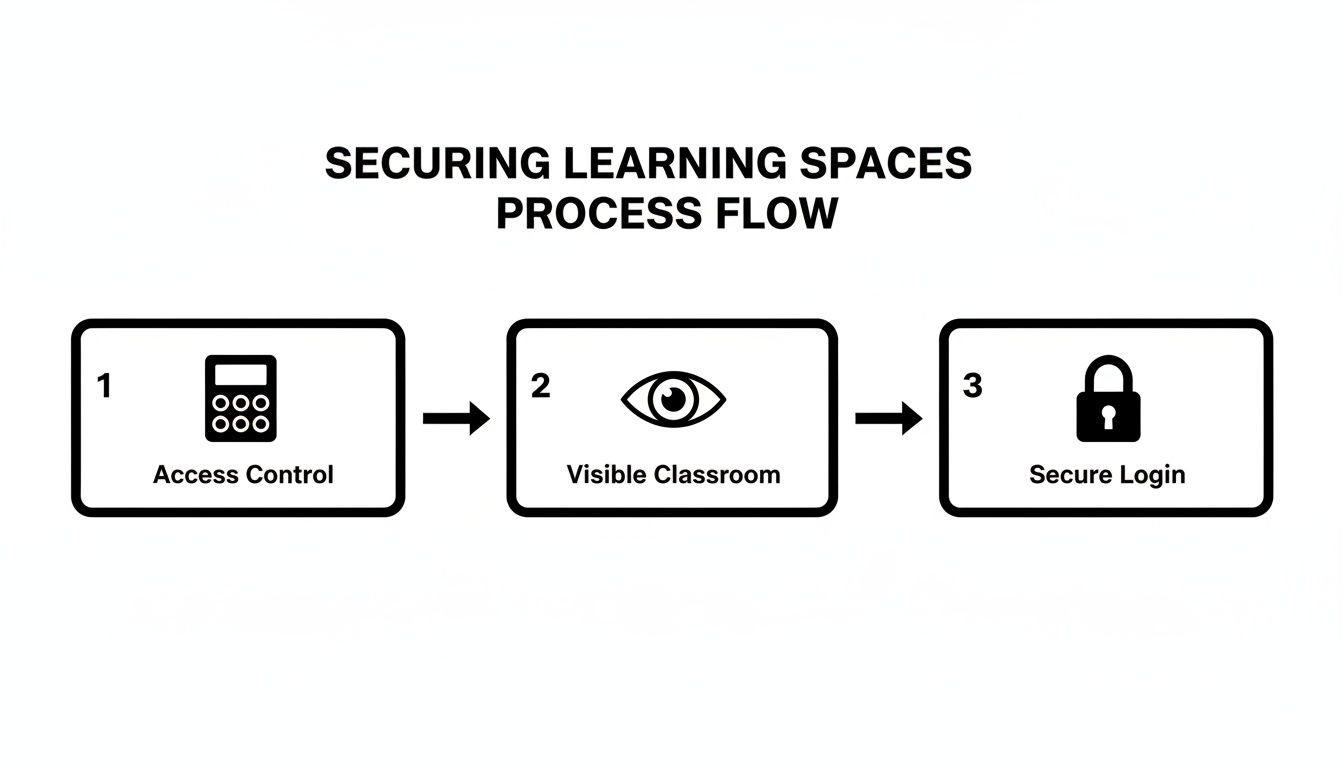
This visual guide breaks down security into three core actions: controlling access, ensuring visibility within classrooms, and using secure logins for digital spaces.
The Critical Role of Drills and Practice
An emergency plan you have not practiced is just a piece of paper. Regular drills build the "muscle memory" your staff and students need to respond swiftly and without panic.
You should run drills for your most likely scenarios at least twice a year.
- Announce the Drill: Let staff know a drill is planned for a specific week, but do not give them the exact day or time.
- Run the Scenario: Walk through the steps as if the event were real. Time how long it takes, watch how roles are carried out, and note any points of confusion.
- Hold a Post-Drill Huddle: Right after, gather everyone to talk about what worked and what did not. This feedback is gold for refining your plan.
Practice runs are about finding weak spots in a low-stakes setting. Fixing a procedural flaw during a drill can prevent a major catastrophe during a real crisis.
Why is centralizing emergency information important?
When an incident occurs, every second counts. Fumbling through filing cabinets for a parent's phone number or a student's allergy information is time you do not have. This is where your tutoring management software becomes a critical safety tool.
Every student's profile should have up-to-date emergency contacts and crucial medical alerts (like asthma or food allergies). When this data is in one centralized system, your staff can access it instantly on any device. This ensures the right information gets to the right people without delay.
Mastering Communication and Incident Reporting
Trust is the currency of any tutoring center. While having robust safety measures is a great start, it's your ability to communicate them effectively and handle incidents with transparency that builds lasting confidence. A clear, accountable system gives everyone peace of mind.
This system has two jobs. First, you need to proactively tell parents about your safety protocols. Second, you have to reactively manage any incidents that arise.
How should you communicate proactively with parents?
The best time to build confidence is before it is ever tested. Do not wait for a parent to ask about your tutoring center safety protocols; make it a core part of your onboarding experience. When a new family signs up, hand them a clear summary of your safety measures.
But this is not a one-time conversation. You need to keep reinforcing your commitment. Here’s how:
- Regular Updates: Send a quarterly email or newsletter that highlights a specific part of your safety plan. Maybe you just ran a fire drill or updated your digital conduct policy.
- Parent Portals: Use your center's software to create a dedicated section in the parent portal for your official safety handbook and any updates.
- On-Site Reminders: Simple signs explaining your visitor check-in process or pointing to emergency exits serve as constant reminders that you have created a secure environment.
This consistent communication shows parents that safety is an active, ongoing priority.
Establishing a Confidential Incident Reporting Process
No matter how airtight your plans are, incidents can still happen. What truly matters is how you respond. You need a confidential, no-blame reporting process that empowers everyone, from senior staff to part-time tutors, to raise concerns without fear.
A standardized incident report form is non-negotiable. It ensures you capture all critical information consistently, every single time.
A formal reporting process transforms an incident from a moment of chaos into a data point for improvement. It ensures every event is documented, reviewed, and used to strengthen your safety protocols for the future.
This form should be simple and capture the essentials:
- Date, time, and specific location of the incident.
- Names of everyone involved and any witnesses.
- A factual, objective description of what happened (no opinions, just facts).
- Immediate actions that were taken.
- Signatures of the person reporting and a manager who reviewed it.
Defining the Chain of Command and Follow-Up
Once a report is filed, a clear chain of command must kick in. A center director or operations manager should review the report first. Their job is to assess the severity and map out the next steps.
The follow-up procedure is just as critical. It should include a clear timeline for investigation, a plan for communicating with affected parties (like parents), and a method for documenting the final resolution.
Incident Response Communication Matrix
| Incident Type | Immediate Action | Who to Notify (Internal) | Who to Notify (External) |
|---|---|---|---|
| Minor Accident (e.g., scrape, small bump) | Administer first aid, comfort student. | Center Director | Parent/Guardian (informational call) |
| Medical Emergency (e.g., allergic reaction, injury) | Call 911, administer emergency care. | Center Director, Head of Operations | Emergency Services, Parent/Guardian (urgent call) |
| Behavioral Issue (e.g., bullying, disruption) | Separate students, de-escalate. | Center Director, Student's primary tutor | Parent/Guardian of all involved students |
| Safeguarding Concern (e.g., disclosure, suspicion of harm) | Follow safeguarding policy, do not investigate. | Designated Safeguarding Lead (DSL) immediately. | Child Protective Services / Local Authority (as per policy) |
This structured approach ensures nothing slips through the cracks. It moves your center from simply reacting to incidents to systematically learning from them.
Using student management software to log these reports is essential. A digital record in a system like Tutorbase creates a secure, permanent, and searchable history of all incidents. This is invaluable for spotting patterns and proving compliance.
Keeping Your Safety Protocols Sharp and Relevant
Safety protocols are not a "set it and forget it" document. Effective tutoring center safety protocols are living systems that must evolve. Safety is a process of continuous improvement, ensuring your center adapts to new challenges and remains a place where everyone feels secure.
This starts with being proactive. You cannot wait for an incident to reveal weak spots in your plan. The best way to pressure-test your protocols is to run regular safety audits.
Why should you run regular safety audits?
To get a true picture of your center's readiness, you need a mix of scheduled and unannounced audits. A scheduled annual review is great for a deep dive. But surprise spot-checks reveal how well your team follows rules on a typical Tuesday afternoon.
An audit checklist is your best friend. It must cover every part of your safety plan.
- Physical Security: Are doors locking properly? Is the visitor sign-in log being used every time? Are tutors keeping classroom doors open to meet visibility rules?
- Staff Readiness: Can a random tutor tell you the emergency evacuation route? Do they know who the Designated Safeguarding Lead is?
- Digital Safeguards: Are online tutors using unique, secure links for every session? Is the digital code of conduct being followed?
- Compliance Check: Are first-aid kits fully stocked and easy to find? Are new staff background checks complete and properly filed?
This regular scrutiny turns your written policies into lived, everyday practices.
How can you gather feedback to spot blind spots?
Your team, students, and their parents are your eyes and ears. They will see things you miss. Creating simple, confidential ways for them to share feedback is one of the most valuable things you can do to find gaps in your safety plan.
An open feedback loop is one of your most powerful safety tools. The people who experience your center daily often have the clearest view of potential risks and can offer practical solutions for improvement.
Simple methods are usually best. Send a short, anonymous annual survey to parents and staff. Ask pointed questions like, "On a scale of 1-10, how safe do you feel at our center?" followed by an open-ended question: "What is one thing we could do to improve safety?"
You can also get incredible insights from informal chats during team meetings. Ask tutors what safety challenges they have run into. Use this information to make meaningful updates to your safety handbook, training modules, and emergency plans.
FAQ: Frequently Asked Questions About Tutoring Center Safety
What should be in a tutoring center safety handbook?
A safety handbook is your single source of truth for safety procedures. It must cover your staff vetting process (background checks, references), a clear code of conduct on professional boundaries, and detailed emergency response plans for medical incidents, fires, and security threats. It should also include rules for online tutoring and a confidential incident reporting process.
How often should staff be trained on safety?
Safety training cannot be a one-time event. New hires must get comprehensive training immediately. We recommend mandatory refresher training for all staff at least annually. Additionally, hold shorter, focused sessions on topics like digital safety or first aid every few months. Running regular emergency drills is also non-negotiable to build muscle memory.
What is the best way to communicate safety protocols to parents?
Building trust starts with being proactive and transparent. Include a summary of your key safety protocols in your new parent welcome packet. Create a dedicated "Safety" page on your website or in your parent portal. Sending periodic email updates about recent training drills or policy refreshes also shows parents that safety is an ongoing priority.
How does tutoring software improve safety?
Tutoring software improves safety by centralizing critical information. It provides instant access to student emergency contacts and medical alerts. It also allows for secure, digital logging of incidents, ensuring a permanent record for compliance and analysis. This reduces the risk of manual errors and lost paperwork, which strengthens overall safety management.
Who is a "mandatory reporter" in a tutoring center?
A mandatory reporter is an individual required by law to report any suspicion of child abuse or neglect to the relevant authorities, such as Child Protective Services. In most regions, all staff in a tutoring center are considered mandatory reporters. Training must clearly define their legal obligations and the center’s internal reporting procedures.
Managing staff training records, logging incident reports, and keeping emergency contacts updated is nearly impossible with spreadsheets. Tutorbase consolidates this into a secure, centralized platform, reducing admin time by 60% and ensuring your safety data is organized and accessible in seconds.
Ready to see how an integrated platform can support your safety efforts? Start your free trial of Tutorbase today.


