
The Ultimate Guide to an Online Inquiry Form for Your Tutoring Center

Published: January 3, 2026 by Amy Ashford

A powerful online inquiry form is your tutoring center's best tool for converting website visitors into enrolled students. By asking the right questions upfront, you can automate lead capture, qualify families instantly, and reduce administrative work. An optimized form that integrates with your CRM transforms your website into a 24/7 enrollment machine.

An optimised online inquiry form is your tutoring centre’s single most important tool for capturing leads and turning curious parents into enrolled students. It’s the digital front door to your business.

Get this right, and you will see a huge impact. A well-designed form, especially when connected to a CRM like Tutorbase, can triple your onboarding speed and slash the hours your team spends on admin. It helps you convert interest into action, efficiently.

First Impressions Matter: What Your Inquiry Form Says About You

A woman signs documents at a counter with a tablet and an 'Enroll Faster' sign in a modern office.

Think of your online inquiry form as the first conversation you have with a prospective family. This is where they decide if you are organised, professional, and worth their time. It's the first step in their journey with you, designed to gather just enough information to get the ball rolling.

But a strategic form does more than collect a name and email. It qualifies the lead by asking about the student's year group, subjects of interest, and specific learning goals. This upfront data collection is a game-changer.

Collecting this information means your follow-up call is not a cold discovery session; it's an informed conversation. Your team already has the context they need to guide that family towards a successful trial lesson and, ultimately, a full enrolment.

Why Your Tutoring Centre Needs More Than a Basic Contact Form

That generic 'Contact Us' form on your website is a huge missed opportunity. It probably creates more admin work than it solves. A basic form is a digital message-in-a-bottle, but a strategic online inquiry form is the first step in an automated enrolment funnel that does the heavy lifting for you.

Your standard form likely has three fields: Name, Email, and Message. This simple approach forces your staff into a painful back-and-forth email chain just to get the basics. You waste precious time asking questions that a smarter form could have answered from the start.

This is not just inefficient for you; it's a frustrating experience for parents. They fill out your form, wait, and then answer more questions about their child's year level, subjects, and availability. That delay is often all it takes for them to lose interest and check out your competitor.

The Problem with a One-Size-Fits-All Approach

A basic form treats every inquiry the same, whether it's from a parent ready to sign up for a year of A-Level Physics or someone asking about holiday hours. This lack of specificity means you cannot prioritise high-intent leads, so your team ends up spending equal time on every submission.

This problem is getting worse as parent expectations change. A staggering 68% of parents in Hong Kong now use online platforms to find and inquire about tutoring, according to a 6wresearch's market report. This shows a clear demand for digital convenience, and a simple contact form no longer meets this need.

A purpose-built online inquiry form is more than a data collection tool. It is a diagnostic instrument that helps you understand a family's needs before you even speak to them.

What is a Strategic Online Inquiry Form?

A strategic online inquiry form for a tutoring centre is a custom-built tool designed to capture specific, relevant information about a prospective student right from the start. It goes beyond basic contact details to gather the crucial data your sales and academic teams need to qualify, segment, and nurture leads.

So, what makes it "strategic"? It usually includes features like:

  • Student-Specific Fields: Capturing the student's name, current school year, and subjects of interest.

  • Conditional Logic: The form intelligently shows or hides fields based on previous answers. For example, if a parent selects "Group Class," a new dropdown might appear.

  • Source Tracking: Automatically identifying where the lead came from, like a Google search or social media ad.

  • Direct CRM Integration: The information feeds directly into a lead management system like Tutorbase, creating a new student profile automatically.

This intelligent design transforms your form from a passive message box into an active, lead-qualifying machine.

Standard Contact Form vs. Strategic Tutoring Inquiry Form

The difference between a generic contact form and one built for a tutoring centre is night and day. One collects a message; the other starts a relationship. It gathers the context needed to make your follow-up calls warmer, more relevant, and far more likely to convert.

Let's break down the key differences in a table.

Feature

Standard Contact Form

Strategic Tutoring Inquiry Form

Data Captured

Name, Email, generic message.

Parent/student details, subjects, goals, availability, lead source.

Follow-up Process

Manual, repetitive questioning via email or phone.

Informed, personalised conversation based on submitted data.

Lead Qualification

None. All inquiries are treated equally.

Automatic. Prioritises high-intent families.

Admin Effort

High. Requires manual data entry and follow-up.

Low. Automates lead creation and data organisation.

Parent Experience

Slow and impersonal. Requires multiple interactions.

Fast and efficient. Gathers all key info in one step.

Ultimately, moving to a strategic online inquiry form is about making your centre more efficient and boosting your enrolment numbers. It ensures you never miss a beat and gives your team the information they need to turn interest into an enrolled family.

Designing an Online Inquiry Form That Actually Converts

A great online inquiry form for a tutoring centre is a balancing act. It must be simple enough for a busy parent to fill out on their phone, but detailed enough to give your team what they need. The goal is to make the process feel effortless for them and incredibly insightful for you.

Think of it this way: a well-designed form is your first filter. It helps you understand a family's needs from the start, cutting out frustrating back-and-forth emails. This means your team can have a warm, informed first conversation, which dramatically boosts the chances of turning that inquiry into an enrolment.

What are the Must-Have Fields for Any Tutoring Form?

These are the non-negotiables. Without this core information, your team cannot follow up effectively or understand what the prospective student needs. Keep this first part of your form short to get as many completions as possible.

  • Parent's Full Name: This is essential for personalising every email and call that follows.

  • Parent's Email Address: Your primary channel for sending confirmations and scheduling trial lessons.

  • Parent's Phone Number: Crucial for a follow-up call. A real conversation is still the fastest way to build rapport.

  • Student's Name: Knowing the student's name makes your first interaction feel personal, not transactional.

  • Student's Current Year Group: This is a critical piece of the puzzle. It immediately frames the academic context.

These five fields are the bedrock of your form. Any less, and you're wasting time. Any more at this initial stage, and you risk overwhelming the parent.

Game-Changer Fields for Deeper Insights

Once you have the basics, adding a few strategic questions can turn your form into a powerful lead qualification tool. These fields give you the context to prioritise high-intent families and tailor your entire approach.

Your inquiry form should not just collect contact details; it should start a conversation. Each field is an opportunity to learn about a prospective student's needs.

So, what are these game-changing fields?

  • Subject(s) of Interest: This tells you exactly what the parent is looking for, letting you route the inquiry to the right specialist instantly.

  • Specific Learning Goals or Challenges: An optional text box here can be pure gold. A parent writing "struggling with exam confidence" gives your team a massive head start.

  • How Did You Hear About Us?: This simple dropdown menu is invaluable for your marketing team. It shows you where your marketing budget is getting the best return.

What is Conditional Logic and Why Should You Use It?

Conditional logic is a smart feature that changes the questions a user sees based on their previous answers. For a tutoring centre, this means you can build a dynamic, intelligent form that does not bombard parents with irrelevant questions. It makes the experience feel shorter and more personal.

For instance, if a parent selects "Group Class," a new dropdown can appear showing available classes for their child's year group. A WPForms study found that cutting form fields can boost conversions by up to 120%. Conditional logic helps you get detail without making the form feel long.

Best Practices for User Experience (UX)

How your form looks and feels is just as important as the questions you ask. A clunky, poorly designed form will frustrate users and lead to them abandoning it halfway through, costing you good leads.

Here are a few essential UX tips:

  • Mobile-First Design: A huge percentage of parents will inquire on the go. Make sure your form is fully responsive and simple to use on a smartphone.

  • A Clear Call-to-Action (CTA): Your button text matters. Instead of "Submit," use something action-oriented like "Request a Free Trial."

  • Single-Column Layout: Stick to a single column. It's much easier for people to scan and complete, especially on mobile. Learn more by crafting the perfect contact form for tutoring businesses.

How to Automate Lead Management from Submission to Enrollment

An online inquiry form is just the start. The real magic happens when a parent clicks "Submit." When you automate the journey from that first click to a full enrolment, you eliminate manual work, stop leads from falling through the cracks, and create a seamless, professional experience for families.

The right tutoring software kicks off a series of automated actions upon submission. The data instantly creates a detailed lead profile inside your Customer Relationship Management (CRM) system. This profile has everything you collected, from the student's year group to their subjects of interest.

At the same time, an email notification automatically alerts the relevant staff about the new inquiry. Crucially, the system also tracks the lead source. You will know instantly if they came from Google, social media, or a referral, giving you clear data on which marketing efforts are working.
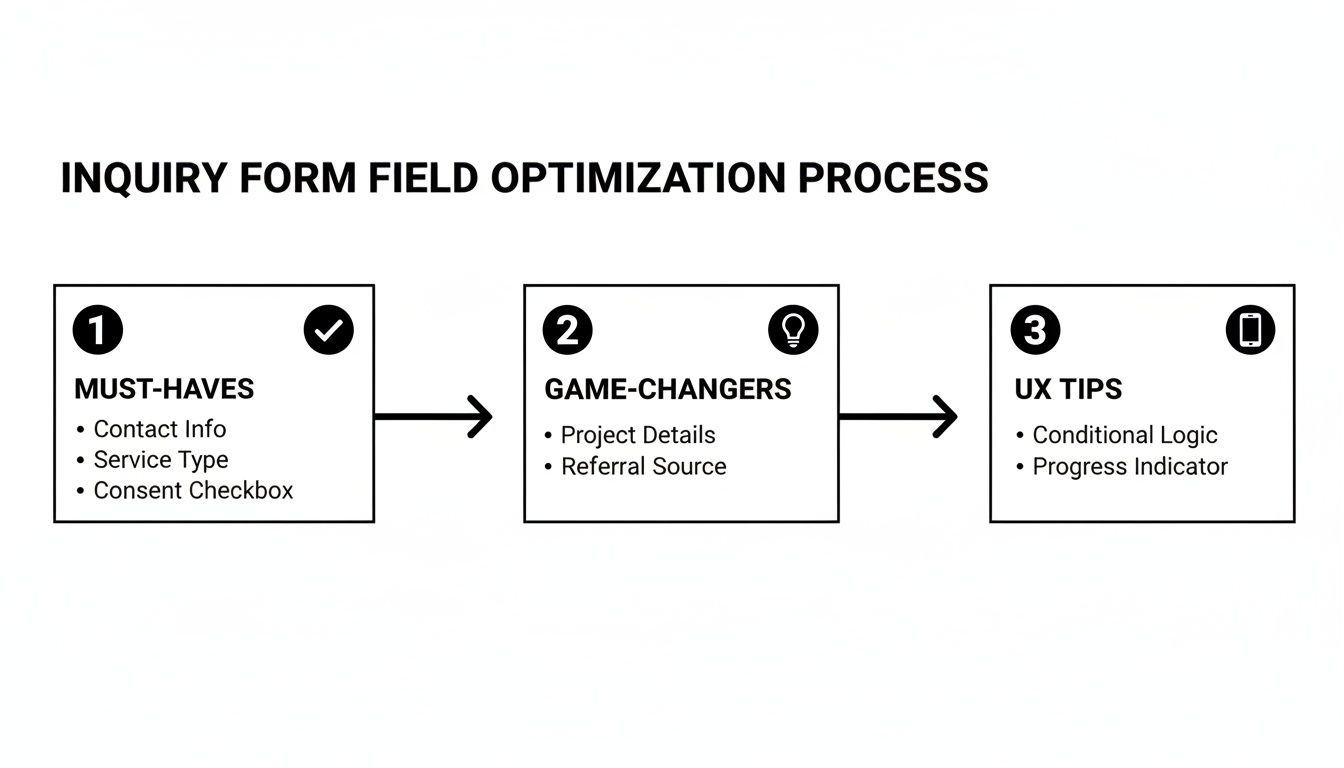
Flowchart detailing an inquiry form field optimization process with must-haves, game-changers, and UX tips.

As the graphic shows, while basic contact details are essential, it's the game-changing fields and smart UX design that turn a simple form into a powerful tool for qualifying leads.

From Initial Inquiry to Automated Follow-Up

Those first few seconds after a parent hits submit are critical. An automated system ensures you never waste this golden window. As soon as the form is completed, an automated confirmation email can be sent to the parent. This email should thank them and set expectations for the next steps.

This immediate response reassures parents that their inquiry was received and shows your centre is organised. It is a small touch that makes a huge professional impression. This first automated touchpoint is a key part of effective student inquiry management software.

Automation ensures every single lead gets a consistent, high-quality experience from the very first interaction. It removes the human error and delays that often cause potential students to get forgotten.

How Does Automated Nurturing Work?

After that initial contact, the automation keeps working. The lead profile created in your CRM becomes the central hub for all communication. Your admin team can see all the inquiry details and log notes from their follow-up call directly in the system.

Here’s what a typical automated workflow looks like:

  1. Lead Capture: A parent fills out the online inquiry form for your tutoring centre.

  2. Instant CRM Entry: A lead profile is automatically created in your management software (like Tutorbase), tagged with the marketing source.

  3. Staff Notification: An instant email or system alert notifies your admissions team.

  4. Parent Confirmation: An automated "Thank You" email is sent to the parent immediately.

This initial sequence saves hours of manual data entry. Studies show that a fast response can increase conversion rates by over 300%, making automation a powerful tool for growth.

Booking a Trial and Converting to Enrolment

The next goal is to book a trial lesson. Your CRM should make this simple. During the follow-up call, your staff can book a trial directly into the system, which then automatically sends a confirmation and calendar invitation to both the parent and the tutor.

Choosing the best lead management software is crucial for making this journey smooth. Once the trial is complete, the tutor simply marks attendance, which can trigger the final step.

The system can then prompt your team to follow up about full enrolment. Once the parent agrees, you change the lead status in the CRM to "Enrolled," and the system can even generate the first invoice automatically. This frees up your staff to focus on building relationships.

Embedding and Sharing Your Form for Maximum Reach

Laptop, smartphone, and printed paper displaying QR codes for sharing an online inquiry form.

So, you have built the perfect inquiry form. That is a huge step, but it is only half the battle. If parents cannot find it easily, all that hard work goes to waste.

Strategic placement is what turns your online inquiry form for your tutoring centre into an active, multi-channel tool. The goal is to make getting in touch completely effortless.

Modern form builders, like the one built into Tutorbase, make this simple. They generate a small snippet of code you can paste directly onto your website, ensuring it works perfectly on platforms like WordPress, Wix, or Squarespace.

Where Should You Place Your Inquiry Form on Your Website?

Your website is prime real estate for capturing new leads. Do not hide your form away on a single "Contact Us" page. Instead, you need to embed it in several high-traffic spots to catch parents the moment they feel ready to act.

Here are the essential locations:

  • Your Homepage: Place a concise version of the form or a bold call-to-action button where visitors can see it immediately.

  • Every Service Page: A parent reading about your IGCSE Maths programme is a highly qualified lead. An inquiry form should be right there on that page.

  • Your Website Footer: Adding a link in the footer means the option to inquire is always just a click away, no matter where a visitor is on your site.

Making your form a constant, accessible part of your website slashes friction for parents. This simple change can boost lead capture rates by up to 20%.

How Can You Share Your Form Beyond Your Website?

Your lead generation should not be confined to your website. In 2026, reaching busy parents requires a multi-channel approach. Think about all the digital and physical places you interact with your community and turn them into opportunities.

Your online inquiry form is not just a page on your site; it is a portable digital doorway to your tutoring centre. Share its link everywhere you interact with your community.

Here are a few effective tactics:

  • Social Media Profiles: Add the form link directly to your Instagram bio, your Facebook page's "About" section, and as a pinned post on X (formerly Twitter).

  • Email Signatures: Every email your staff sends can become a lead-generation tool. Add a simple link like, "Interested in our programmes? Inquire here."

  • QR Codes on Physical Materials: Print a QR code that links straight to your form. Put it on flyers, brochures, and posters at school open days and community events.

What Is a Website Embed Code?

A website embed code is a small piece of HTML or JavaScript that your form-building tool provides. When you paste this code into your website’s editor, it tells the browser to display your form directly on the page. This is far better than linking to another page because it keeps the user experience seamless.

For instance, Tutorbase forms embed on any website (Wix, Squarespace, WordPress tested). You can customize form fields to match your school's intake process. Forms feed directly into your leads CRM with source tracking, and email notifications alert staff to new submissions.

How to Track and Optimise Your Form's Performance

Building your inquiry form is just the first step. You need to treat it as a living tool you can constantly refine. You need to know what's working and what is causing parents to give up and close the tab. By tracking a few key numbers, you can make small, informed tweaks that lead directly to more and better leads.

What are the Key Metrics to Monitor for Your Inquiry Form?

Before you can improve your form, you need to know how it's performing. Focus on these core metrics to understand the journey a parent takes from landing on the page to hitting "submit."

  • View-to-Submission Rate: This is the percentage of people who start filling out the form after viewing the page. If this number is low, the page may not be compelling.

  • Completion Rate: Of all parents who start filling out your form, what percentage actually finish it? A big drop-off is a classic sign of a form that is too long or confusing.

  • Field Drop-off Rate: This metric tells you exactly which question is causing people to abandon the form. This is your roadmap for testing.

  • Conversion Rate: This is the ultimate measure of success. It is the percentage of form submissions that become enrolled students.

Your form's data is a direct reflection of the parent experience. A high drop-off rate on a particular field is a signal that you're asking for too much, too soon.

What Is A/B Testing for Forms?

A/B testing, also called split testing, is a simple way of comparing two versions of your form to see which one gets better results. You show version A to one group of visitors and version B to another, then measure which performs better. This takes the guesswork out of making changes.

For example, you could test a button that says "Submit Inquiry" against another that says "Book a Free Assessment." Over time, you will see which call-to-action encourages more clicks. If you are using Google Forms, you will need a solid Google Analytics for Google Forms setup guide for detailed tracking.

A few ideas to get you started:

  • Removing one non-essential field.

  • Changing the order of your questions.

  • Testing a multi-step form against a single-page layout.

You can learn more about bringing all your numbers together in our guide to building a tutoring analytics dashboard.

Frequently Asked Questions

How can I ensure the data collected is secure?

You must use a form builder or management software that uses SSL encryption. This creates a secure, private connection between a parent's browser and your server. Also, you need to comply with local privacy laws like Hong Kong's Personal Data (Privacy) Ordinance (PDPO) by being transparent about why you collect data.

What is the ideal length for an inquiry form?

Keep it short. Your goal with the online inquiry form for a tutoring centre is to open a conversation, not complete an entire file. A study by WPForms found that reducing form fields can boost conversions by as much as 120%. Stick to 5-7 essential fields like parent name, email, phone, student name, and year group.

Should I ask about budget on the inquiry form?

You should not ask directly about budget on the initial form. It can feel too intrusive and may deter parents who are just starting their research. Instead, handle pricing in a personal conversation where you can first establish the value of your services.

How quickly should we respond to a new inquiry?

You should respond as fast as possible. Aim for a personal response within one hour, but the top-performing centers often respond in under 15 minutes. An instant automated confirmation email reassures the parent their inquiry was received while your team prepares to follow up personally.

Can I embed the same form on multiple platforms?

Yes, and you should. A good form builder like Tutorbase provides a simple embed code that works on most website platforms like WordPress, Wix, and Squarespace. Using the same form everywhere allows you to track which marketing channels are generating the most leads.

Ready to stop juggling spreadsheets and automate your lead management? Tutorbase integrates a powerful online inquiry form directly into a complete management system, helping you convert leads faster and reduce admin work by 60%. See how it works at tutorbase.com/register.

The Ultimate Guide to an Online Inquiry Form for Your Tutoring Center

Published: January 2, 2026 by Amy Ashford

A powerful online inquiry form is your tutoring center's best tool for converting website visitors into enrolled students. By asking the right questions upfront, you can automate lead capture, qualify families instantly, and reduce administrative work. An optimized form that integrates with your CRM transforms your website into a 24/7 enrollment machine.

An optimised online inquiry form is your tutoring centre’s single most important tool for capturing leads and turning curious parents into enrolled students. It’s the digital front door to your business.

Get this right, and you will see a huge impact. A well-designed form, especially when connected to a CRM like Tutorbase, can triple your onboarding speed and slash the hours your team spends on admin. It helps you convert interest into action, efficiently.

First Impressions Matter: What Your Inquiry Form Says About You

A woman signs documents at a counter with a tablet and an 'Enroll Faster' sign in a modern office.

Think of your online inquiry form as the first conversation you have with a prospective family. This is where they decide if you are organised, professional, and worth their time. It's the first step in their journey with you, designed to gather just enough information to get the ball rolling.

But a strategic form does more than collect a name and email. It qualifies the lead by asking about the student's year group, subjects of interest, and specific learning goals. This upfront data collection is a game-changer.

Collecting this information means your follow-up call is not a cold discovery session; it's an informed conversation. Your team already has the context they need to guide that family towards a successful trial lesson and, ultimately, a full enrolment.

Why Your Tutoring Centre Needs More Than a Basic Contact Form

That generic 'Contact Us' form on your website is a huge missed opportunity. It probably creates more admin work than it solves. A basic form is a digital message-in-a-bottle, but a strategic online inquiry form is the first step in an automated enrolment funnel that does the heavy lifting for you.

Your standard form likely has three fields: Name, Email, and Message. This simple approach forces your staff into a painful back-and-forth email chain just to get the basics. You waste precious time asking questions that a smarter form could have answered from the start.

This is not just inefficient for you; it's a frustrating experience for parents. They fill out your form, wait, and then answer more questions about their child's year level, subjects, and availability. That delay is often all it takes for them to lose interest and check out your competitor.

The Problem with a One-Size-Fits-All Approach

A basic form treats every inquiry the same, whether it's from a parent ready to sign up for a year of A-Level Physics or someone asking about holiday hours. This lack of specificity means you cannot prioritise high-intent leads, so your team ends up spending equal time on every submission.

This problem is getting worse as parent expectations change. A staggering 68% of parents in Hong Kong now use online platforms to find and inquire about tutoring, according to a 6wresearch's market report. This shows a clear demand for digital convenience, and a simple contact form no longer meets this need.

A purpose-built online inquiry form is more than a data collection tool. It is a diagnostic instrument that helps you understand a family's needs before you even speak to them.

What is a Strategic Online Inquiry Form?

A strategic online inquiry form for a tutoring centre is a custom-built tool designed to capture specific, relevant information about a prospective student right from the start. It goes beyond basic contact details to gather the crucial data your sales and academic teams need to qualify, segment, and nurture leads.

So, what makes it "strategic"? It usually includes features like:

  • Student-Specific Fields: Capturing the student's name, current school year, and subjects of interest.

  • Conditional Logic: The form intelligently shows or hides fields based on previous answers. For example, if a parent selects "Group Class," a new dropdown might appear.

  • Source Tracking: Automatically identifying where the lead came from, like a Google search or social media ad.

  • Direct CRM Integration: The information feeds directly into a lead management system like Tutorbase, creating a new student profile automatically.

This intelligent design transforms your form from a passive message box into an active, lead-qualifying machine.

Standard Contact Form vs. Strategic Tutoring Inquiry Form

The difference between a generic contact form and one built for a tutoring centre is night and day. One collects a message; the other starts a relationship. It gathers the context needed to make your follow-up calls warmer, more relevant, and far more likely to convert.

Let's break down the key differences in a table.

Feature

Standard Contact Form

Strategic Tutoring Inquiry Form

Data Captured

Name, Email, generic message.

Parent/student details, subjects, goals, availability, lead source.

Follow-up Process

Manual, repetitive questioning via email or phone.

Informed, personalised conversation based on submitted data.

Lead Qualification

None. All inquiries are treated equally.

Automatic. Prioritises high-intent families.

Admin Effort

High. Requires manual data entry and follow-up.

Low. Automates lead creation and data organisation.

Parent Experience

Slow and impersonal. Requires multiple interactions.

Fast and efficient. Gathers all key info in one step.

Ultimately, moving to a strategic online inquiry form is about making your centre more efficient and boosting your enrolment numbers. It ensures you never miss a beat and gives your team the information they need to turn interest into an enrolled family.

Designing an Online Inquiry Form That Actually Converts

A great online inquiry form for a tutoring centre is a balancing act. It must be simple enough for a busy parent to fill out on their phone, but detailed enough to give your team what they need. The goal is to make the process feel effortless for them and incredibly insightful for you.

Think of it this way: a well-designed form is your first filter. It helps you understand a family's needs from the start, cutting out frustrating back-and-forth emails. This means your team can have a warm, informed first conversation, which dramatically boosts the chances of turning that inquiry into an enrolment.

What are the Must-Have Fields for Any Tutoring Form?

These are the non-negotiables. Without this core information, your team cannot follow up effectively or understand what the prospective student needs. Keep this first part of your form short to get as many completions as possible.

  • Parent's Full Name: This is essential for personalising every email and call that follows.

  • Parent's Email Address: Your primary channel for sending confirmations and scheduling trial lessons.

  • Parent's Phone Number: Crucial for a follow-up call. A real conversation is still the fastest way to build rapport.

  • Student's Name: Knowing the student's name makes your first interaction feel personal, not transactional.

  • Student's Current Year Group: This is a critical piece of the puzzle. It immediately frames the academic context.

These five fields are the bedrock of your form. Any less, and you're wasting time. Any more at this initial stage, and you risk overwhelming the parent.

Game-Changer Fields for Deeper Insights

Once you have the basics, adding a few strategic questions can turn your form into a powerful lead qualification tool. These fields give you the context to prioritise high-intent families and tailor your entire approach.

Your inquiry form should not just collect contact details; it should start a conversation. Each field is an opportunity to learn about a prospective student's needs.

So, what are these game-changing fields?

  • Subject(s) of Interest: This tells you exactly what the parent is looking for, letting you route the inquiry to the right specialist instantly.

  • Specific Learning Goals or Challenges: An optional text box here can be pure gold. A parent writing "struggling with exam confidence" gives your team a massive head start.

  • How Did You Hear About Us?: This simple dropdown menu is invaluable for your marketing team. It shows you where your marketing budget is getting the best return.

What is Conditional Logic and Why Should You Use It?

Conditional logic is a smart feature that changes the questions a user sees based on their previous answers. For a tutoring centre, this means you can build a dynamic, intelligent form that does not bombard parents with irrelevant questions. It makes the experience feel shorter and more personal.

For instance, if a parent selects "Group Class," a new dropdown can appear showing available classes for their child's year group. A WPForms study found that cutting form fields can boost conversions by up to 120%. Conditional logic helps you get detail without making the form feel long.

Best Practices for User Experience (UX)

How your form looks and feels is just as important as the questions you ask. A clunky, poorly designed form will frustrate users and lead to them abandoning it halfway through, costing you good leads.

Here are a few essential UX tips:

  • Mobile-First Design: A huge percentage of parents will inquire on the go. Make sure your form is fully responsive and simple to use on a smartphone.

  • A Clear Call-to-Action (CTA): Your button text matters. Instead of "Submit," use something action-oriented like "Request a Free Trial."

  • Single-Column Layout: Stick to a single column. It's much easier for people to scan and complete, especially on mobile. Learn more by crafting the perfect contact form for tutoring businesses.

How to Automate Lead Management from Submission to Enrollment

An online inquiry form is just the start. The real magic happens when a parent clicks "Submit." When you automate the journey from that first click to a full enrolment, you eliminate manual work, stop leads from falling through the cracks, and create a seamless, professional experience for families.

The right tutoring software kicks off a series of automated actions upon submission. The data instantly creates a detailed lead profile inside your Customer Relationship Management (CRM) system. This profile has everything you collected, from the student's year group to their subjects of interest.

At the same time, an email notification automatically alerts the relevant staff about the new inquiry. Crucially, the system also tracks the lead source. You will know instantly if they came from Google, social media, or a referral, giving you clear data on which marketing efforts are working.

Flowchart detailing an inquiry form field optimization process with must-haves, game-changers, and UX tips.

As the graphic shows, while basic contact details are essential, it's the game-changing fields and smart UX design that turn a simple form into a powerful tool for qualifying leads.

From Initial Inquiry to Automated Follow-Up

Those first few seconds after a parent hits submit are critical. An automated system ensures you never waste this golden window. As soon as the form is completed, an automated confirmation email can be sent to the parent. This email should thank them and set expectations for the next steps.

This immediate response reassures parents that their inquiry was received and shows your centre is organised. It is a small touch that makes a huge professional impression. This first automated touchpoint is a key part of effective student inquiry management software.

Automation ensures every single lead gets a consistent, high-quality experience from the very first interaction. It removes the human error and delays that often cause potential students to get forgotten.

How Does Automated Nurturing Work?

After that initial contact, the automation keeps working. The lead profile created in your CRM becomes the central hub for all communication. Your admin team can see all the inquiry details and log notes from their follow-up call directly in the system.

Here’s what a typical automated workflow looks like:

  1. Lead Capture: A parent fills out the online inquiry form for your tutoring centre.

  2. Instant CRM Entry: A lead profile is automatically created in your management software (like Tutorbase), tagged with the marketing source.

  3. Staff Notification: An instant email or system alert notifies your admissions team.

  4. Parent Confirmation: An automated "Thank You" email is sent to the parent immediately.

This initial sequence saves hours of manual data entry. Studies show that a fast response can increase conversion rates by over 300%, making automation a powerful tool for growth.

Booking a Trial and Converting to Enrolment

The next goal is to book a trial lesson. Your CRM should make this simple. During the follow-up call, your staff can book a trial directly into the system, which then automatically sends a confirmation and calendar invitation to both the parent and the tutor.

Choosing the best lead management software is crucial for making this journey smooth. Once the trial is complete, the tutor simply marks attendance, which can trigger the final step.

The system can then prompt your team to follow up about full enrolment. Once the parent agrees, you change the lead status in the CRM to "Enrolled," and the system can even generate the first invoice automatically. This frees up your staff to focus on building relationships.

Embedding and Sharing Your Form for Maximum Reach

Laptop, smartphone, and printed paper displaying QR codes for sharing an online inquiry form.

So, you have built the perfect inquiry form. That is a huge step, but it is only half the battle. If parents cannot find it easily, all that hard work goes to waste.

Strategic placement is what turns your online inquiry form for your tutoring centre into an active, multi-channel tool. The goal is to make getting in touch completely effortless.

Modern form builders, like the one built into Tutorbase, make this simple. They generate a small snippet of code you can paste directly onto your website, ensuring it works perfectly on platforms like WordPress, Wix, or Squarespace.

Where Should You Place Your Inquiry Form on Your Website?

Your website is prime real estate for capturing new leads. Do not hide your form away on a single "Contact Us" page. Instead, you need to embed it in several high-traffic spots to catch parents the moment they feel ready to act.

Here are the essential locations:

  • Your Homepage: Place a concise version of the form or a bold call-to-action button where visitors can see it immediately.

  • Every Service Page: A parent reading about your IGCSE Maths programme is a highly qualified lead. An inquiry form should be right there on that page.

  • Your Website Footer: Adding a link in the footer means the option to inquire is always just a click away, no matter where a visitor is on your site.

Making your form a constant, accessible part of your website slashes friction for parents. This simple change can boost lead capture rates by up to 20%.

How Can You Share Your Form Beyond Your Website?

Your lead generation should not be confined to your website. In 2026, reaching busy parents requires a multi-channel approach. Think about all the digital and physical places you interact with your community and turn them into opportunities.

Your online inquiry form is not just a page on your site; it is a portable digital doorway to your tutoring centre. Share its link everywhere you interact with your community.

Here are a few effective tactics:

  • Social Media Profiles: Add the form link directly to your Instagram bio, your Facebook page's "About" section, and as a pinned post on X (formerly Twitter).

  • Email Signatures: Every email your staff sends can become a lead-generation tool. Add a simple link like, "Interested in our programmes? Inquire here."

  • QR Codes on Physical Materials: Print a QR code that links straight to your form. Put it on flyers, brochures, and posters at school open days and community events.

What Is a Website Embed Code?

A website embed code is a small piece of HTML or JavaScript that your form-building tool provides. When you paste this code into your website’s editor, it tells the browser to display your form directly on the page. This is far better than linking to another page because it keeps the user experience seamless.

For instance, Tutorbase forms embed on any website (Wix, Squarespace, WordPress tested). You can customize form fields to match your school's intake process. Forms feed directly into your leads CRM with source tracking, and email notifications alert staff to new submissions.

How to Track and Optimise Your Form's Performance

Building your inquiry form is just the first step. You need to treat it as a living tool you can constantly refine. You need to know what's working and what is causing parents to give up and close the tab. By tracking a few key numbers, you can make small, informed tweaks that lead directly to more and better leads.

What are the Key Metrics to Monitor for Your Inquiry Form?

Before you can improve your form, you need to know how it's performing. Focus on these core metrics to understand the journey a parent takes from landing on the page to hitting "submit."

  • View-to-Submission Rate: This is the percentage of people who start filling out the form after viewing the page. If this number is low, the page may not be compelling.

  • Completion Rate: Of all parents who start filling out your form, what percentage actually finish it? A big drop-off is a classic sign of a form that is too long or confusing.

  • Field Drop-off Rate: This metric tells you exactly which question is causing people to abandon the form. This is your roadmap for testing.

  • Conversion Rate: This is the ultimate measure of success. It is the percentage of form submissions that become enrolled students.

Your form's data is a direct reflection of the parent experience. A high drop-off rate on a particular field is a signal that you're asking for too much, too soon.

What Is A/B Testing for Forms?

A/B testing, also called split testing, is a simple way of comparing two versions of your form to see which one gets better results. You show version A to one group of visitors and version B to another, then measure which performs better. This takes the guesswork out of making changes.

For example, you could test a button that says "Submit Inquiry" against another that says "Book a Free Assessment." Over time, you will see which call-to-action encourages more clicks. If you are using Google Forms, you will need a solid Google Analytics for Google Forms setup guide for detailed tracking.

A few ideas to get you started:

  • Removing one non-essential field.

  • Changing the order of your questions.

  • Testing a multi-step form against a single-page layout.

You can learn more about bringing all your numbers together in our guide to building a tutoring analytics dashboard.

Frequently Asked Questions

How can I ensure the data collected is secure?

You must use a form builder or management software that uses SSL encryption. This creates a secure, private connection between a parent's browser and your server. Also, you need to comply with local privacy laws like Hong Kong's Personal Data (Privacy) Ordinance (PDPO) by being transparent about why you collect data.

What is the ideal length for an inquiry form?

Keep it short. Your goal with the online inquiry form for a tutoring centre is to open a conversation, not complete an entire file. A study by WPForms found that reducing form fields can boost conversions by as much as 120%. Stick to 5-7 essential fields like parent name, email, phone, student name, and year group.

Should I ask about budget on the inquiry form?

You should not ask directly about budget on the initial form. It can feel too intrusive and may deter parents who are just starting their research. Instead, handle pricing in a personal conversation where you can first establish the value of your services.

How quickly should we respond to a new inquiry?

You should respond as fast as possible. Aim for a personal response within one hour, but the top-performing centers often respond in under 15 minutes. An instant automated confirmation email reassures the parent their inquiry was received while your team prepares to follow up personally.

Can I embed the same form on multiple platforms?

Yes, and you should. A good form builder like Tutorbase provides a simple embed code that works on most website platforms like WordPress, Wix, and Squarespace. Using the same form everywhere allows you to track which marketing channels are generating the most leads.

Ready to stop juggling spreadsheets and automate your lead management? Tutorbase integrates a powerful online inquiry form directly into a complete management system, helping you convert leads faster and reduce admin work by 60%. See how it works at tutorbase.com/register.