


A tutoring center rarely loses data in a dramatic movie-style failure. It usually happens on an ordinary day, right before classes start, when a spreadsheet won't open, a staff member overwrites the wrong file, or yesterday's attendance edits vanish and nobody knows which invoices are still accurate.
That's why backup and recovery systems matter. For a tutoring business, they protect schedules, billing, payroll inputs, parent contact details, and lesson history so your team can keep operating when something goes wrong, instead of rebuilding the week by hand.
What Data Loss Actually Costs a Tutoring Center
Monday, 8:15 a.m. Your front desk opens the scheduling file and gets an error. The recurring lessons for the week are gone, room assignments are incomplete, and one teacher says her afternoon classes look different from what she confirmed on Friday.
That's not an IT problem first. It's an operations problem.
A tutoring center runs on a handful of records that people often underestimate until one disappears:
- Upcoming schedules that tell teachers where to be and tell parents when lessons happen
- Attendance history that drives invoicing, makeup lessons, and disputes
- Parent and student contact details that staff need when something changes fast
- Teacher pay rules and rates that determine payroll accuracy
- Lesson notes and academic history that keep continuity when a student changes tutor
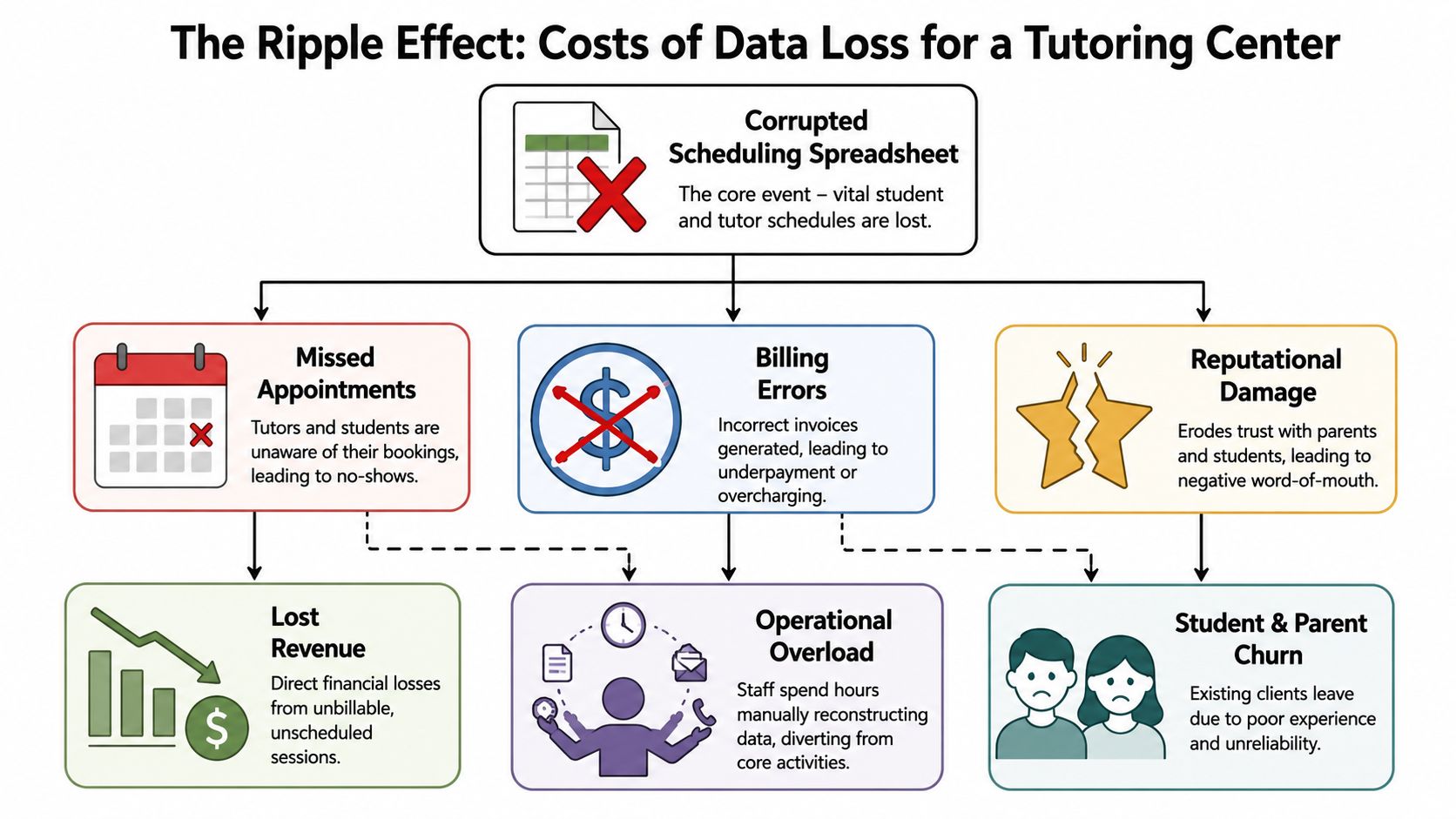
The first damage is confusion
When scheduling data breaks, the first cost is wasted time. Staff start calling parents, messaging teachers, comparing screenshots, and trying to reconstruct the day from memory.
Then the second wave hits:
- No-shows and missed lessons because nobody trusts the schedule
- Billing mistakes because attendance and lesson records no longer match
- Payroll disputes because hours, premiums, or class counts need manual checking
- Trust erosion because families see your operation as disorganized
Practical rule: If losing a piece of data would force your staff to call parents, delay invoices, or hold payroll, that data needs a recovery plan.
The broader business risk is real. In 2025, 96% of organizations had backup systems, only 13% could fully recover all their data after a ransomware attack, and 58% faced closure due to an inability to recoup losses from the disruption, according to Infrascale's disaster recovery statistics.
Your real risk list probably isn't what you think
Most center owners first think about student records. That matters, but in day-to-day operations, these are often the records that create the fastest chaos:
| Data asset | What breaks if it disappears |
|---|---|
| This week's timetable | Lessons, room use, tutor allocation |
| Attendance records | Invoices, makeup credits, reporting |
| Parent billing details | Collections, receipts, payment follow-up |
| Teacher compensation settings | Payroll preparation, dispute resolution |
| Branch-level room schedules | Capacity planning, double-booking prevention |
There's another overlooked point. Risk doesn't end with digital files you still use. Old laptops, retired office PCs, and replaced storage devices can still expose data if you dispose of them badly. A practical reference on preventing data breaches with ITAD is worth reviewing if your center has ever rotated admin machines without a formal process.
Defining Your Recovery Goals with RTO and RPO
Two terms decide whether your backup plan is realistic or just comforting paperwork: RTO and RPO.
RTO, or Recovery Time Objective, means how long your center can function before restored access becomes urgent.
RPO, or Recovery Point Objective, means how much recent data you can afford to lose and re-enter manually.
Translate the terms into tutoring center language
If your front desk loses access to the live schedule, ask one plain question: how long can you keep operating before parents start calling and teachers stand idle?
That answer is your RTO.
If your team loses the last batch of edits, ask a different question: how many hours of registrations, attendance updates, payment entries, and lesson changes could you realistically re-enter without wrecking the week?
That answer is your RPO.
A backup plan only works when it matches the speed of your actual operation.
Set targets from the business side first
A practical way to define these goals is to work backward from disruption:
List the moments where downtime hurts most
Opening hours, invoice runs, payroll prep, and high-volume class windows usually matter most.Separate critical data from useful data
Today's schedule needs much faster recovery than an archived marketing file.Decide what staff can rebuild
Re-entering a few notes is one thing. Rebuilding recurring timetables across branches is another.Write the targets down
If they stay verbal, people interpret them differently under pressure.
The formal version of this is standard discipline, not overkill. University of Michigan policy requires disaster recovery plans to document specific RTO and RPO targets, test them at least annually, and treat those targets as drivers of the whole recovery design.
If you want a business-friendly starting point before talking to any IT provider, this guide to SMB disaster recovery planning is useful because it frames recovery as an operational decision, not just a technical purchase.
Choosing the Right Backup System for Your School
Most tutoring centers end up in one of three setups. They either keep core records on a local machine or server, scatter operations across separate cloud tools, or use a more unified system with fewer moving parts.
The right choice depends less on storage theory and more on how many handoffs your team can tolerate when something breaks.
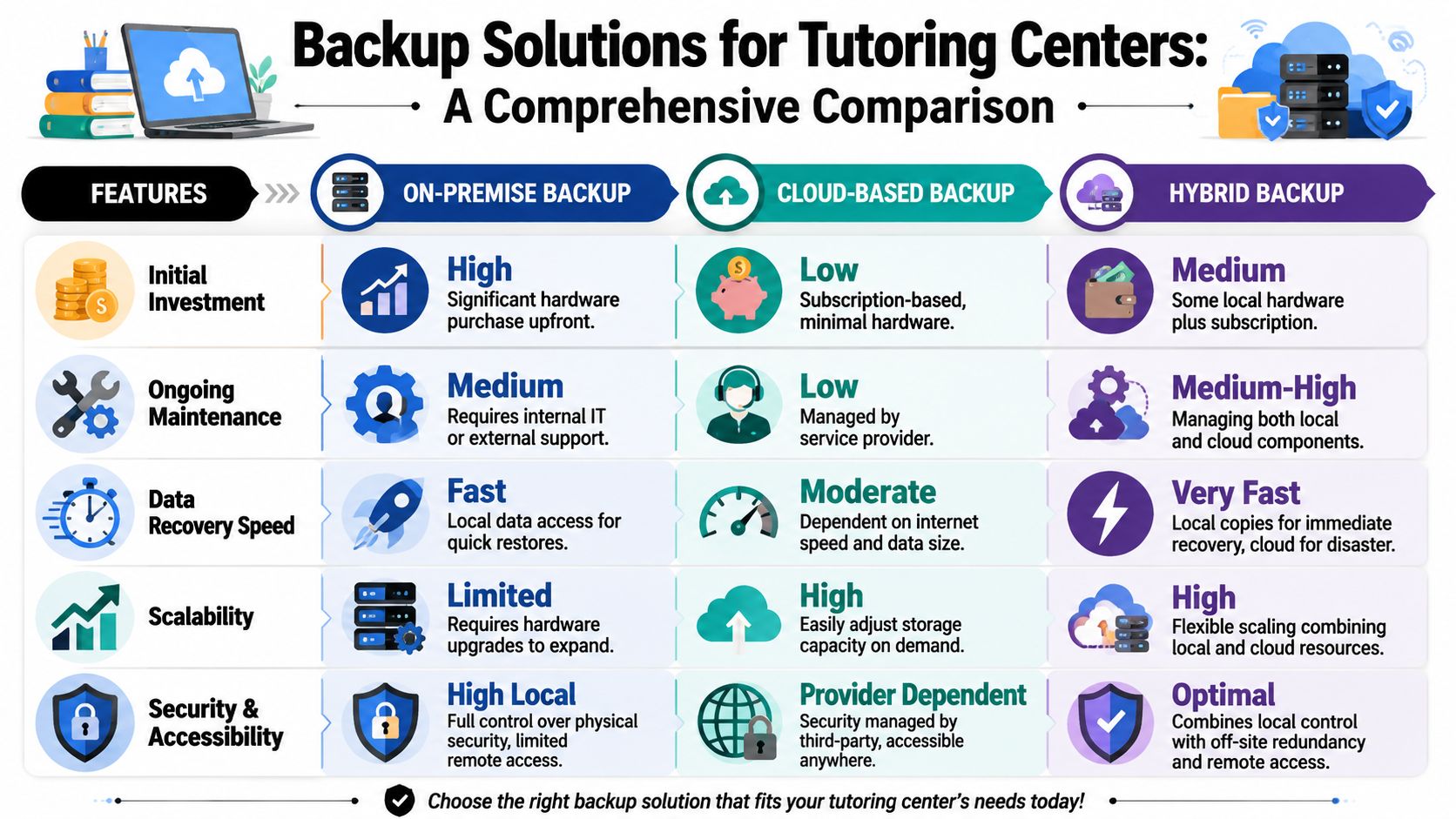
On-premise looks controlled until recovery day
A local server, office NAS, or desktop folder can feel safe because it's physically nearby. QuickBooks files, payroll spreadsheets, and exported schedules all sit where your team can see them.
The trade-off is that proximity isn't resilience. Hardware fails, staff save over the wrong version, and office-level incidents affect both production data and its backup if everything lives in the same place.
The long-standing 3-2-1 rule remains the clearest foundation here. It recommends three copies of data on two different media types with one copy offsite, a structure Rubrik describes as a durable resilience model that directly addresses hardware failure, user error, and site-level disasters in its overview of backup and recovery principles.
Fragmented cloud setups create hidden recovery work
This is the most common setup in growing centers:
- Scheduling in Google Calendar
- Billing in QuickBooks
- Payroll in Excel
- Teacher availability in WhatsApp
- Parent notes in email threads
- Files in Dropbox or Google Drive
Nothing is fully broken on a normal day. But recovery becomes messy because each tool has its own history, restore process, and permissions model.
A simple mistake can spread fast. Someone updates a room assignment in one place, forgets the billing notes in another, and your team spends the afternoon reconciling systems instead of running classes.
The hardest environment to recover is often the one that seems flexible day to day.
A consolidated platform reduces the number of failure points
A unified SaaS model doesn't remove the need for backup and recovery systems. It changes where the complexity lives.
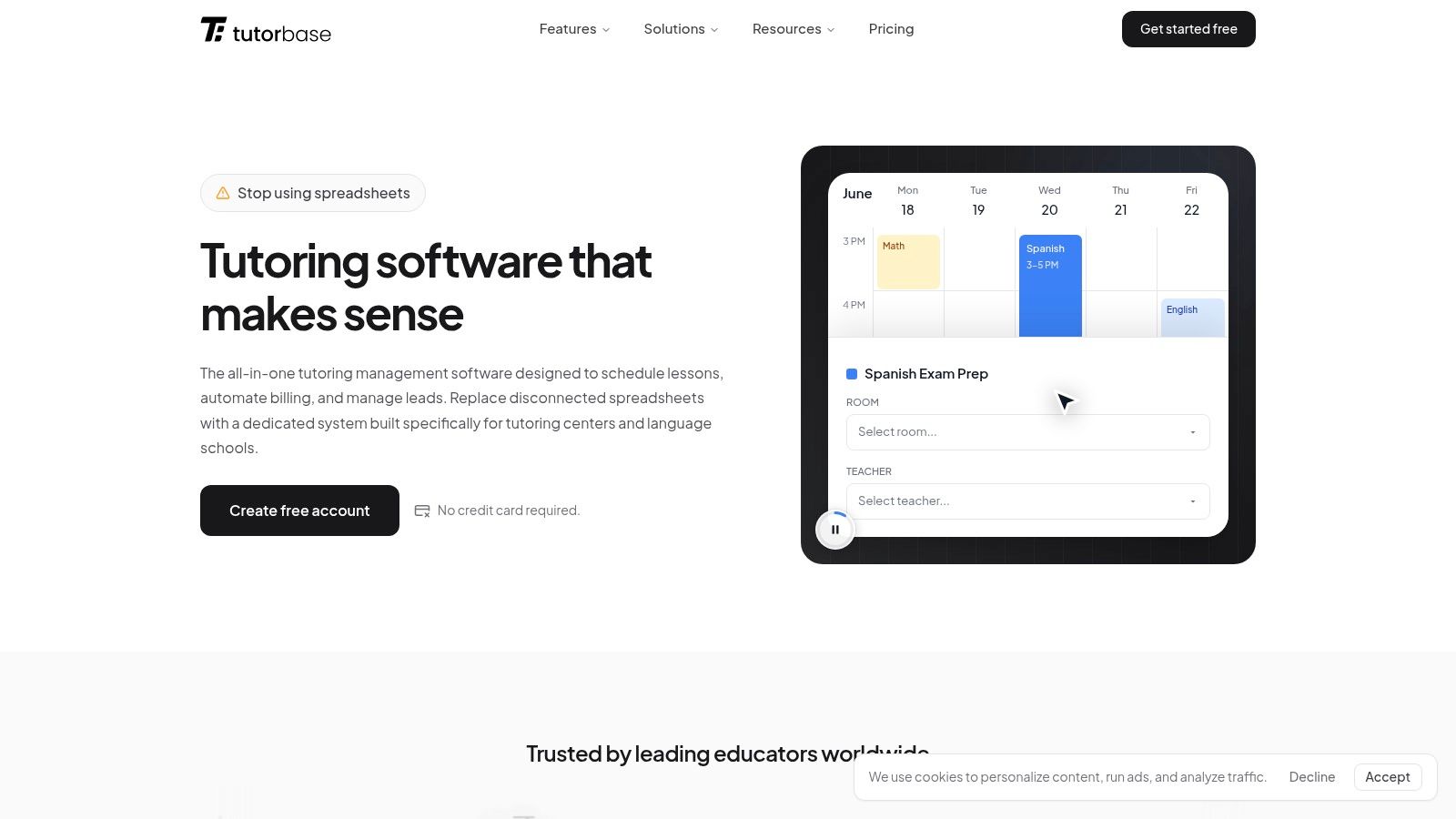
Instead of expecting your staff to manage exports, version control, duplicated records, and local backup routines, you choose a platform with clear security, handling, and recovery practices. That's also why it's worth reviewing a vendor's Tutorbase data handling policy or equivalent documentation before you trust it with schedules, billing, and student records.
This comparison helps frame the decision:
| Setup | What usually works | What usually fails |
|---|---|---|
| On-premise | Fast local access, direct control | Manual backups, weak offsite recovery, hardware dependence |
| Fragmented cloud | Easy to start, low friction tool choice | Version confusion, duplicate entry, slow cross-system recovery |
| Consolidated SaaS | Simpler operations, fewer handoffs, cleaner records | Requires confidence in vendor processes and controls |
If you're comparing architectures and want a plain-English overview of disaster recovery planning, review that before making a tooling decision. The useful question isn't “Where is the file?” It's “How many steps stand between a problem and a clean working day?”
Automating Your Backups and Security
Manual backups sound responsible right up until a busy week hits. Then the office manager forgets the export, the external drive isn't connected, or the latest file copy happens after the bad data already synced everywhere.
That's why automation matters more than good intentions.
Manual routines break under normal pressure
In a tutoring business, staff priorities change by the hour. A late teacher, a parent complaint, and an invoice dispute will always outrank “remember to copy data somewhere else.”
That's not laziness. It's reality.
What usually fails with manual backup routines:
- They depend on one person who may be absent or overloaded
- They happen after hours when nobody checks whether they completed properly
- They don't cover every system because data lives across multiple tools
- They rarely include restore practice, so nobody knows whether the backup is usable
Security has to support recovery
A useful backup isn't just available. It also has to be safe to restore.
CDW highlights two ideas that matter here in its guidance on backup and recovery mistakes. Immutable backups can't be altered or deleted, which helps protect recovery copies from ransomware. A clean room environment lets teams restore and inspect data without reintroducing malware into production.
For non-technical operators, the takeaway is simple. You don't just want copies of data. You want copies you can trust.
Operational advice: Ask any software provider how they separate production problems from recovery copies, and how they validate that restored data is clean and usable.
Security also includes the basics people forget to ask about, such as whether data is protected while moving between devices and while stored on servers. If you're evaluating a platform, its published Tutorbase security practices should answer those questions in concrete terms.
A short walkthrough can help you spot what a cleaner, more automated setup looks like in practice:
Automation won't remove every incident. It does remove one of the biggest causes of failure, which is relying on busy people to perform perfect backup discipline by hand.
How to Test Your Recovery Plan Without Causing Chaos
A backup that nobody has restored is still unproven. The good news is that a tutoring center doesn't need a dramatic full-system simulation to test readiness.
Start small. Test the records your team breaks, deletes, or needs to correct.
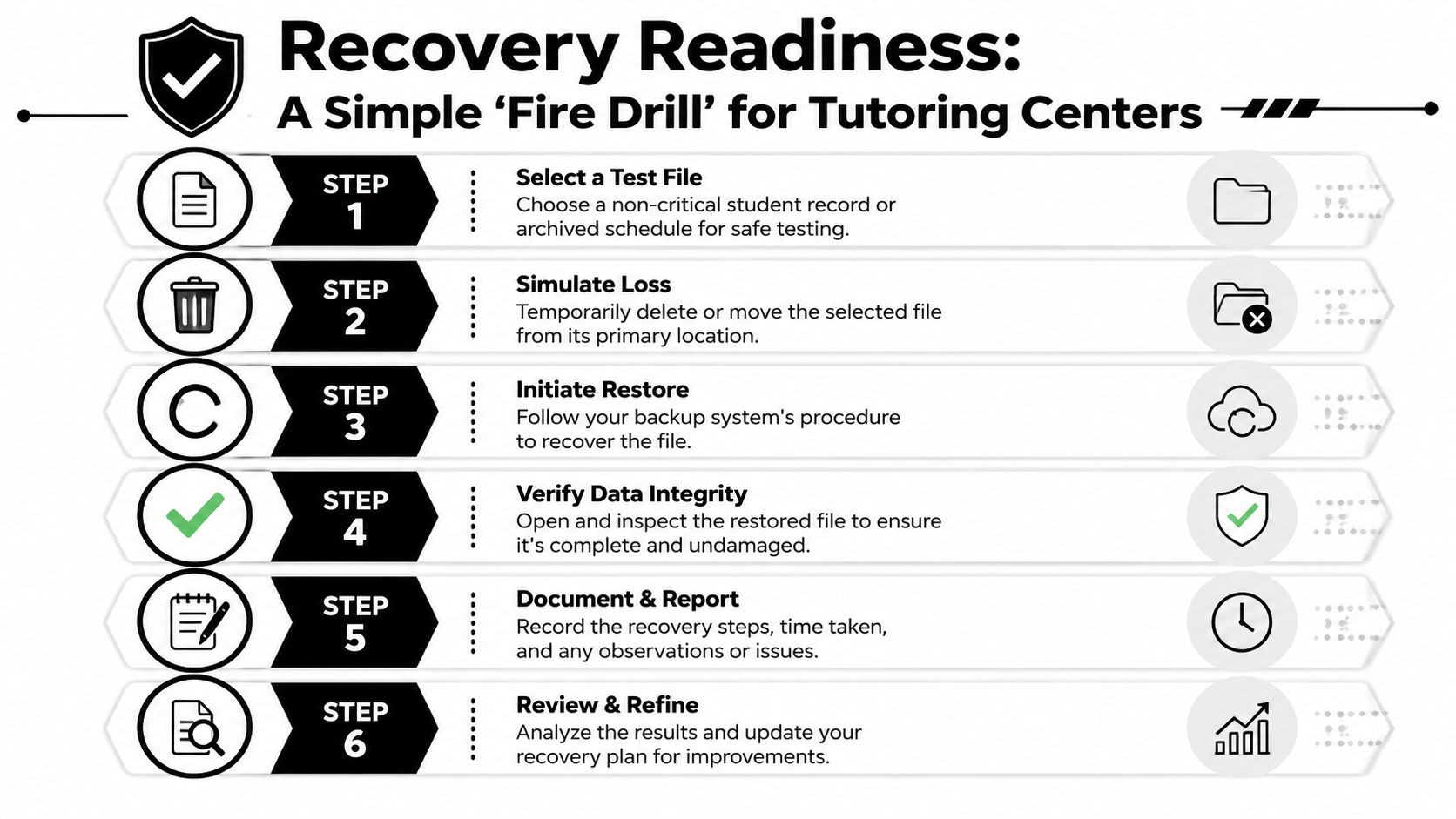
Run simple recovery drills
Use realistic scenarios:
- A recurring lesson series disappears after an admin edit
- A teacher's future availability is wrong and needs rollback
- A student record is deleted accidentally
- An invoice-related attendance entry changes and finance needs the prior state
- A branch manager overwrites a shared file with bad data
These drills work because they mirror ordinary mistakes, not rare disasters.
What to verify during the test
Recovery speed matters, but it isn't the only thing to check. After restoring data, confirm that it's complete, current enough to use, and visible to the right staff.
A short checklist helps:
- Pick one non-critical item that resembles real production data.
- Trigger the restore process using the same permissions your team would use in a real incident.
- Check integrity by opening the restored record and comparing key fields.
- Confirm usability in the workflow, not just in storage.
- Write down the result so the process improves next time.
Cohesity's guidance explains why mixed recovery options matter in its backup and recovery glossary. Full backups capture everything but can take much longer to restore at scale. Incremental backups capture changes only. Granular recovery lets you restore a single file, object, or even an entire virtual machine faster than a traditional bare-metal rebuild.
For a tutoring center, the practical lesson is straightforward. You shouldn't need to roll back an entire environment just to recover one student record or one broken schedule entry.
Frequently Asked Questions About Data Protection
Do small tutoring centers really need backup and recovery systems
Yes. Smaller teams often face more disruption because fewer people hold the operational knowledge needed to rebuild lost data manually. If one admin person knows the billing logic and another knows the timetable, a single data issue can stall both.
Is cloud software automatically safe
Not automatically. Cloud delivery reduces some local risks, but you still need to understand restore options, access controls, and how the provider handles recovery. Convenience and resilience aren't the same thing.
What data should I prioritize first
Start with the records that stop daily operations when they disappear. In most tutoring centers, that means schedules, attendance, parent billing information, student contact details, and teacher pay settings.
How often should we test recovery
At minimum, test often enough that the process stays familiar and documented. Annual testing is a sensible baseline for formal recovery planning, and high-change operations usually benefit from more frequent checks on common restore scenarios.
What's the difference between backup and disaster recovery
A backup is a protected copy of data. Disaster recovery is the broader process of getting operations running again, which can include restore steps, fallback workflows, system access, and who does what under pressure.
Can we rely on exported spreadsheets as our backup plan
Only if you're comfortable with manual effort, version confusion, and slower recovery. Exports can help, but they usually don't give you the cleanest or fastest path back to normal operations.
What should I ask a software vendor before trusting them with school data
Ask how they handle backup creation, restore requests, security controls, recovery testing, and data isolation. You should also review their stance on education data privacy so your operational needs and compliance expectations stay aligned.
If your tutoring center still runs critical operations across spreadsheets, disconnected apps, and manual exports, this is a good time to simplify. Tutorbase brings scheduling, billing, payroll, room management, and student tracking into one system so your team spends less time reconstructing records and more time running the center.


