


A student progress center is the mission control for your tutoring business, a central dashboard where every student's entire journey is visible at a glance. It’s more than a digital folder for grades; it's a dynamic hub designed to replace the chaos of scattered spreadsheets, calendars, and billing tools, saving you 10+ hours of admin work per week.
What Is a Student Progress Center?
A student progress center is a feature within tutoring management software that consolidates all student-related data into a single, unified view. Instead of piecing together a student's story from fragmented sources, you can see their attendance history, track curriculum milestones, check their payment status, and review parent communications, all in one place.
Managing your business with spreadsheets is like navigating with a paper map. You might get there, but it’s slow and error-prone. A student progress center is your GPS—it shows you the best route, helps you avoid operational traffic jams (like double-bookings), and gives you a clear picture of your business's health.
This level of insight is no longer a "nice-to-have." The Student Information System (SIS) market was valued at USD 11.29 billion in 2024 and is growing fast, driven by the demand for real-time monitoring. This isn't just a corporate trend; it reflects a global need. UNESCO's 2023 GEM Report data highlights how critical efficient progress monitoring has become for education centers tackling worldwide learning challenges.
A true student progress center acts as the central nervous system for your tutoring business. It connects every administrative action to a student outcome, transforming scattered data points into a clear picture of business health and student success.
From Manual Chaos to Centralized Control
For too many tutoring center owners, "student tracking" is a messy collection of disconnected tools. This fragmented approach easily costs 10+ hours per week and leads to real revenue loss. Does this sound familiar?
- Schedules managed in Google Calendar, where double-bookings are a constant risk.
- Billing information stored in QuickBooks, completely detached from actual lesson attendance.
- Payroll calculated in complex Excel spreadsheets that are fragile and prone to human error.
- Parent communications buried in endless email chains and WhatsApp threads.
Tutorbase replaces this chaos by bringing all these functions under one roof. When a tutor marks a student as "Attended," the system automatically updates their academic record, queues up the correct invoice, and adds the session to the tutor's payroll report. That integration is where the magic happens.
We dig deeper into moving beyond spreadsheets in our detailed guide on how to track student progress. This automated, error-free workflow gives you the clarity to manage everything—from a single student's payment status to a teacher's entire workload—without losing your mind.
Manual Tracking vs. a Student Progress Center
The difference between wrestling with manual tools and using an integrated system like Tutorbase is night and day. One drains your time and energy, while the other gives you the leverage to grow.
| Aspect | Manual Method (Spreadsheets, Google Calendar) | Integrated Student Progress Center (Tutorbase) | Impact |
|---|---|---|---|
| Attendance | Manually updated on a spreadsheet; no link to billing or payroll. | Tutor marks attendance in-app; auto-triggers invoicing and payroll. | Saves 2-3 hours/week; eliminates billing errors. |
| Invoicing | Manually created in a separate tool; requires cross-checking attendance. | Invoices are auto-generated based on completed lessons. | Prevents missed charges and ensures 100% accurate billing. |
| Parent Updates | Notes are emailed or texted; hard to track and easily lost. | Notes are logged in a shared parent portal for instant access. | Improves transparency and boosts parent satisfaction. |
| Reporting | Requires hours of manually combining data from multiple sources. | Real-time dashboards show revenue, attendance, and progress. | Provides instant business insights for faster, better decisions. |
| Scheduling | Prone to double-bookings and time-consuming back-and-forth. | AI finds available slots, cutting booking time from 10+ minutes to under 2. | Cuts scheduling time by 80% and eliminates conflicts. |
Ultimately, clinging to manual methods means you're spending your most valuable resource—time—on low-value administrative tasks. An integrated system frees you up to focus on what actually matters: teaching students and growing your business.
The Anatomy of a Powerful Student Progress Center
An effective student progress center isn’t a random collection of tools. It’s an integrated system where every part works together, feeding information into the next. For any tutoring center looking to scale up, these are the non-negotiable features.
Think of it as the central hub of your business, connecting everything from a student's grades and attendance to their billing history.
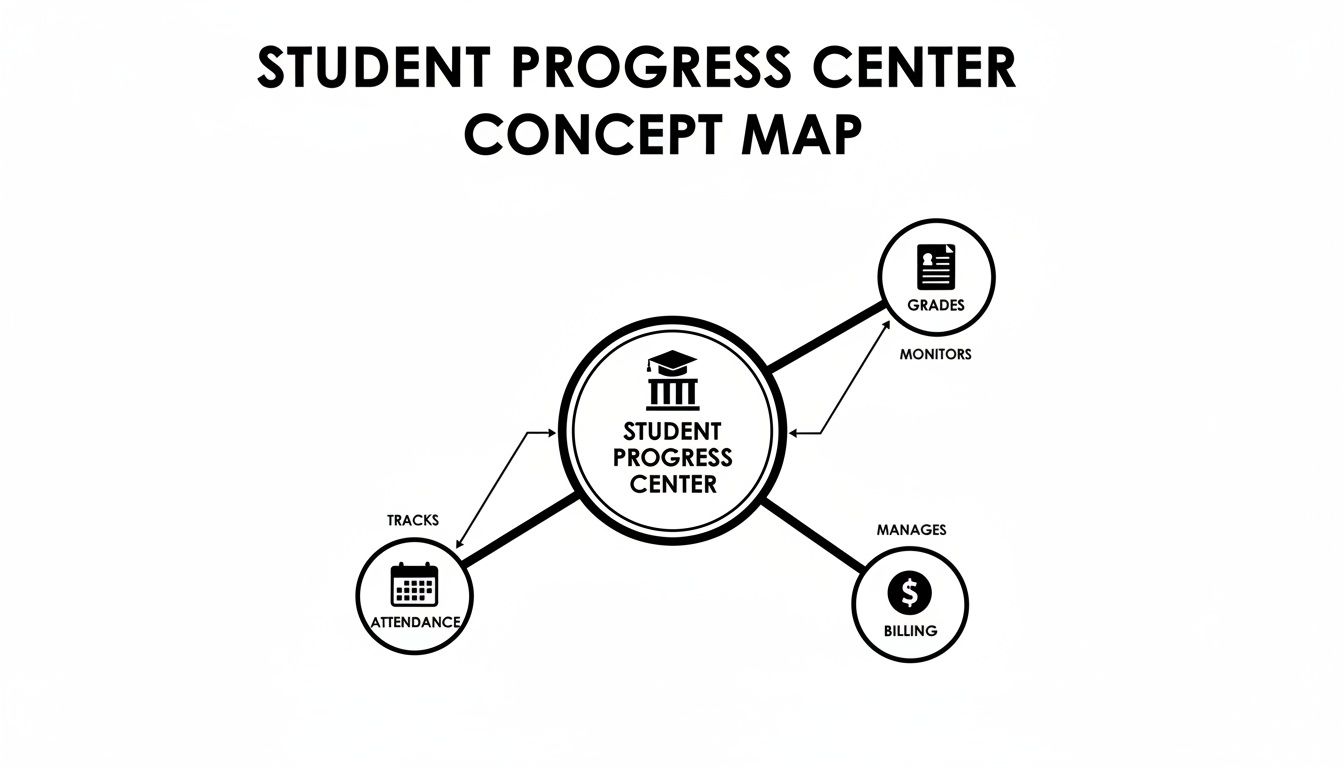
When these key areas are linked, you get the full picture of every student. No more hunting for information in siloed spreadsheets or separate apps.
Academic and Curriculum Tracking
To prove your value, parents need to see real, tangible progress. Your student progress center must track academic milestones alongside your curriculum. It connects students to specific subjects and levels, like Spanish B1, AP Calculus, or Piano Grade 3.
Every time a tutor logs lesson notes or completes an assessment, the student's record updates automatically. This creates a clear, chronological history of their learning journey. It makes reporting back to parents a breeze and instantly highlights any areas needing more focus.
Attendance and Scheduling History
Manually tracking attendance is a recipe for lost revenue and administrative headaches. A modern system captures the status of every single lesson automatically.
This isn’t just about who showed up. It’s about the details:
- Attended: The student was there. This automatically triggers billing and adds the session to the tutor’s payroll.
- No-Show: The student missed the lesson without notice, letting you enforce your no-show policy without awkward conversations.
- Late Cancelled: The student cancelled outside your grace period, which automatically triggers a cancellation fee.
- Scheduled: The lesson is on the books and ready to go.
This automation ensures you never miss a billable event again. It also gives you a complete historical record of every student's attendance, a lifesaver for resolving payment disputes or understanding a student's commitment level.
A Unified Financial Overview
Parents want financial clarity, not confusion. A critical feature of a student progress center is a unified financial dashboard that both you and your clients can access. It brings every dollar into one place.
Instead of sending a confusing series of separate emails for invoices, payments, and credit adjustments, you provide a single source of truth. Parents can log in anytime to see their entire transaction history and current balance.
For many centers, this transparency cuts down on parent emails and phone calls by over 50% and gets invoices paid much faster. It gives parents the self-service tools they expect.
This includes:
- Invoices: A complete history of every invoice and its status (Paid, Overdue, Draft).
- Payments: A clean log of every payment made, with dates and amounts.
- Credit Balance: A clear view of their prepaid credit wallet, showing deductions after each lesson.
Giving families this single pane of glass for their finances builds trust and ends administrative back-and-forth. You can check out a full list of integrated Tutorbase features that make this single-view system possible. Building this comprehensive profile—one that links academics, scheduling, and finances—is the true cornerstone of modern tutoring management.
Unlock Real Business Growth with Centralized Tracking
 Moving from a patchwork of spreadsheets to a single student progress center isn't just about getting organized. It's about directly connecting your day-to-day operations to measurable business growth. This is where smart software stops being a cost and starts fueling the financial health of your tutoring business.
The impact is immediate. For tutoring centers using Tutorbase, it adds up to a staggering 60% reduction in admin time. For owners running 5 to 100+ tutors with high-volume schedules, features like auto-billing from attendance, prepaid credits, and complex payroll turn hours of painful work into minutes.
This efficiency frees you to focus on what keeps students coming back: proving their progress. As competition heats up, solid data is a necessity. It’s a major reason Tutorbase centers report a 42% increase in monthly renewals. This focus on results is vital in growing sectors; for instance, with fluctuating visa numbers, STEM OPT program participation has hit all-time highs, making strong progress data a key differentiator. You can dig deeper into these kinds of educational shifts in the latest 2026 trends report from ApplyBoard.
Automate Billing to Improve Cash Flow
The biggest financial headache for many tutoring centers is manual invoicing. It's tedious, error-prone, and a constant source of friction with parents. A student progress center completely removes this bottleneck.
Here’s how it works in practice: A student finishes a lesson. The tutor marks them "Attended" in their portal. That's it. Tutorbase instantly logs it and adds the lesson to the family's next invoice. Your admin team doesn't have to chase tutors for timesheets. This one change transforms invoicing from hours of manual labor into a quick review, directly boosting cash flow.
Eliminate Costly Scheduling Errors
Double-booking your star math tutor or overfilling a classroom isn't just an operational scramble; it’s a direct hit to your bottom line and reputation. These mistakes are common with manual tools like Google Calendar, creating chaos.
A centralized system acts as the single source of truth for all availability.
When you can see every teacher's, room's, and student's schedule in one place, you prevent conflicts before they happen. Tutorbase guarantees zero double-bookings and optimizes resource use, ensuring every class runs as planned.
This oversight also gives you a crystal-clear view of your center's capacity. You can instantly see which classes have open seats and which tutors have free slots, letting you proactively fill gaps and maximize revenue. To make the most of this data, you need to know what to measure—check out our guide on the essential tutoring center KPIs you should be tracking. This strategic view is what separates centers that are just managing from those that are actively growing.
Measure What Matters in Your Progress Center
A student progress center is the central nervous system of your tutoring business, a tool that gives you real-time feedback on the health of your operations.
To get the most out of it, you must track the key performance indicators (KPIs) that reveal what’s really going on. These numbers aren’t just data; they're signals that help you make smart decisions to boost retention, improve your teaching, and stop leaving money on the table.
Key Operational KPIs to Monitor
Instead of getting lost in a sea of data, focus on a few core metrics. These will give you a clear, actionable picture of your center’s performance and where you have opportunities to grow.
- Student Attendance Rate: This is more than a roll call. If one class consistently has low attendance, it could point to a poor tutor-student fit, a difficult time slot, or a curriculum that isn't landing.
- Late Cancellation & No-Show Ratio: High numbers here are a direct hit to your revenue. A sudden spike is a clear sign to review and enforce your cancellation policies, a process that a system like Tutorbase automates.
- Lead Conversion Time: How many days does it take to turn an interested parent into a paying student? If that timeline is stretching out, your follow-up might be too slow or your trial lesson booking process is clunky.
- Credit & Package Utilization Rate: This KPI shows you how quickly families use prepaid lesson packages. Slow credit consumption could be a sign of waning interest, giving you a chance to step in before they decide not to renew.
By watching these KPIs, you stop putting out fires and start preventing them. Instead of waiting for a parent to complain or a tutor to quit, you spot the warning signs in the numbers and fix problems before they get bigger.
Turning Data Into Actionable Strategy
Numbers on a dashboard are useless unless they lead to a real-world decision. Your student progress center should make it easy to connect the dots between a metric and a clear action plan.
For example, if you see a high no-show rate for your online-only sessions, maybe it’s time to experiment with offering a hybrid option. If one tutor consistently has a low student retention rate after the first month, that’s a signal they might need more training or a performance review.
For centers that prep for specific tests, tracking academic milestones is everything. Knowing what constitutes a good Cogat score and logging that progress in the center gives parents tangible proof of your value. It’s hard evidence that your methods work.
Ultimately, measuring what matters lets you run your business with precision. It replaces guesswork with confidence, ensuring every move you make is backed by data and aimed at long-term, sustainable growth.
How to Implement a Student Progress Center
Ready to get out from under that mountain of admin work? Putting a real student progress center in place is a step-by-step process that moves your tutoring business from messy spreadsheets and a dozen different apps into one central command center.
This is less about becoming a tech wizard and more about smart, focused planning. Follow a clear roadmap, and you can get your team and clients on board without derailing your day-to-day operations.
Your Five-Step Implementation Checklist
Think of this as your game plan for getting from data-disaster to operational clarity. Each step builds on the last, ensuring you roll this out smoothly and with confidence.
Find Your Biggest Headaches First: Before you change a thing, know exactly what’s broken. Is it the hours spent building invoices by hand? Chasing tutors for attendance sheets? Sorting out scheduling conflicts? Naming these pain points makes it clear what your new system must fix.
Round Up All Your Data: Now it's time for digital house cleaning. Gather all the scattered pieces of information, student contact details, tutor schedules, prepaid lesson packages, and billing history, from every spreadsheet, calendar, and payment app you’re currently using.
Set Up Your Business Rules: A great system like Tutorbase lets you build your company's unique logic right into the software. This is where you configure your pricing tiers, define your cancellation policy, and map out your curriculum by subject and level. You’re telling the software how you run your business.
Train Your Team for a Smooth Handover: Your team’s buy-in is everything. Run short, focused training sessions for your admins and tutors. Don’t just show them features; show them how it makes their job easier, from marking attendance on their phone to seeing their schedule update instantly.
Announce the Upgrade to Parents: Let your clients know about the new, improved experience. Frame it as a win for them, highlighting the parent portal where they can track progress, view notes, and manage payments. Good communication turns a backend system change into a front-facing customer service win.
Pro-tip: A phased rollout is your friend. Start small. Get just your scheduling sorted first, or onboard a small group of your most tech-savvy tutors. This lets you iron out the wrinkles and build confidence before going all-in.
The Growing Need for Centralized Systems
The push for a single, reliable system isn't just about convenience; it’s about survival. Public school enrollment in the U.S. is expected to hit 56.8 million by 2026, fueling more demand for tutoring than ever before. You can see the full breakdown from the National Center for Education Statistics.
Centers still burning 10+ admin hours a week on manual tasks are going to get left behind. Sticking with fragmented tools like Teachworks, TutorCruncher, or a mess of spreadsheets doesn't just waste time—it actively costs you revenue and makes it impossible to scale.
Frequently Asked Questions
You've got questions, and we've got answers. Here are a few of the most common things tutoring center owners ask when they're thinking about a student progress center.
How is a student progress center different from a CRM?
A standard CRM tracks leads and sales contacts. A student progress center, a key component of tutoring management software, does everything a CRM does and much more. It tracks the student's entire journey with you. It connects their first inquiry to their final progress report, integrating academic tracking, complex schedules, attendance-based billing, and parent communications all in one place.
Can this system help with parent communication?
Absolutely. A good system completely changes the dynamic from reactive to proactive. Instead of your admin fielding constant calls about schedules or payments, you give parents a portal where they can find everything themselves, 24/7. They can see attendance records, check lesson notes, review their payment history, and see their credit balance anytime. Automated alerts for low balances or upcoming payments mean your staff isn't spending their days making reminder calls.
Can it handle our center's unique pricing rules?
Yes. A powerful student progress center like Tutorbase is designed to handle complexity. You can create specific pricing and cancellation rules for different services, locations, or even individual students. This means you can automatically enforce a fee for a late cancellation without any of those awkward phone calls. The system applies the rule consistently every single time, so your team doesn't have to remember complex policies.
Is it hard to switch from using spreadsheets?
While any new system involves some setup, the transition is designed to be as smooth as possible and deliver a quick return on the time you invest. Most platforms, including Tutorbase, will help you import your existing data from spreadsheets to get you up and running fast. Once configured, you’ll immediately start saving hours, and the 60% reduction in admin time users report comes directly from making this exact switch.
How does a student progress center handle multi-branch operations?
A true student progress center is built to run multiple locations from a single dashboard. You can manage tutors, students, and room availability across all your branches without having to log in and out of different accounts. This means you can see in an instant that your downtown branch is fully booked while your uptown location has open slots. That insight lets you direct new leads to the right place and maximize your capacity across the entire business.
How does Tutorbase compare to Teachworks or TutorCruncher?
Tutorbase was built by tutoring center owners to solve the problems that other platforms don't. While Teachworks and TutorCruncher handle basic scheduling and billing, Tutorbase provides an AI-powered "Find Slot" feature that cuts booking time from 10 minutes to under two. It also includes native multi-brand management, complex payroll models, and a built-in WhatsApp integration, which are features that alternatives lack.
Ready to replace administrative chaos with a single, intelligent platform? Tutorbase consolidates your scheduling, billing, payroll, and student tracking into one system, giving you the clarity to grow your tutoring business. Start your free trial today.


