


Key Takeaway: A WhatsApp lead form for tutoring instantly captures parent inquiries from your website, creating a lead in your CRM automatically. This eliminates manual data entry, reduces response times to seconds, and can increase your lead-to-enrollment rate by over 40% in 2026 by meeting parents on their preferred platform.
When you connect a WhatsApp lead form to your tutoring website, you automate your entire inquiry process. From the moment a parent shows interest, the system captures their details. You can even schedule trial lessons automatically, slashing administrative work by up to 60%.
This automation saves valuable time. Your team can focus on teaching, not chasing leads. You can rest easy knowing no potential student slips through the cracks. This creates a faster, smoother enrollment cycle that converts curious parents into paying students with minimal manual effort.
How a WhatsApp Lead Form Supercharges Your Enrollment
Why Is WhatsApp a Game Changer for Tutors?
Traditional lead forms are becoming less effective. Parents expect instant answers. Every minute they wait for an email reply is an opportunity for them to find your competitors. This is where a WhatsApp lead form for your tutoring business changes the game.
It’s more than a button on your website. It is a direct, automated pipeline from a parent’s initial interest to a qualified lead in your system. The moment a parent taps the button and sends a message, their details are logged straight into your CRM.
- No more manual data entry.
- No more chasing vague email inquiries.
- Tutoring centers using this report a 3x faster student onboarding process.
This instant connection is crucial in a fast-moving market. It closes the gap between curiosity and commitment. If you want to dive deeper, we've covered the fundamentals of using WhatsApp Business for tutoring in another detailed guide.
Manual Lead Follow-Up vs. Automated WhatsApp Lead Form
This table breaks down the real-world impact of switching from emails and phone calls to an automated WhatsApp system. It shows tangible gains in time, money, and student sign-ups.
| Metric | Manual Follow-Up (Email/Phone) | Automated WhatsApp Lead Form |
|---|---|---|
| Response Time | 2-24 hours | Instant |
| Admin Time / Lead | 15-20 minutes | 1-2 minutes |
| Lead Capture Rate | 60-70% | 90-95% |
| Conversion Rate | 10-15% | 25-40% |
| Cost per Lead | High (staff time, missed opportunities) | Low (automation, higher conversion) |
The numbers speak for themselves. While manual methods cause delays and friction, an automated WhatsApp flow captures nearly every lead and converts them at a much higher rate. You meet parents where they already are, and you do it faster than anyone else.
How Do I Get My WhatsApp Lead Widget Live?
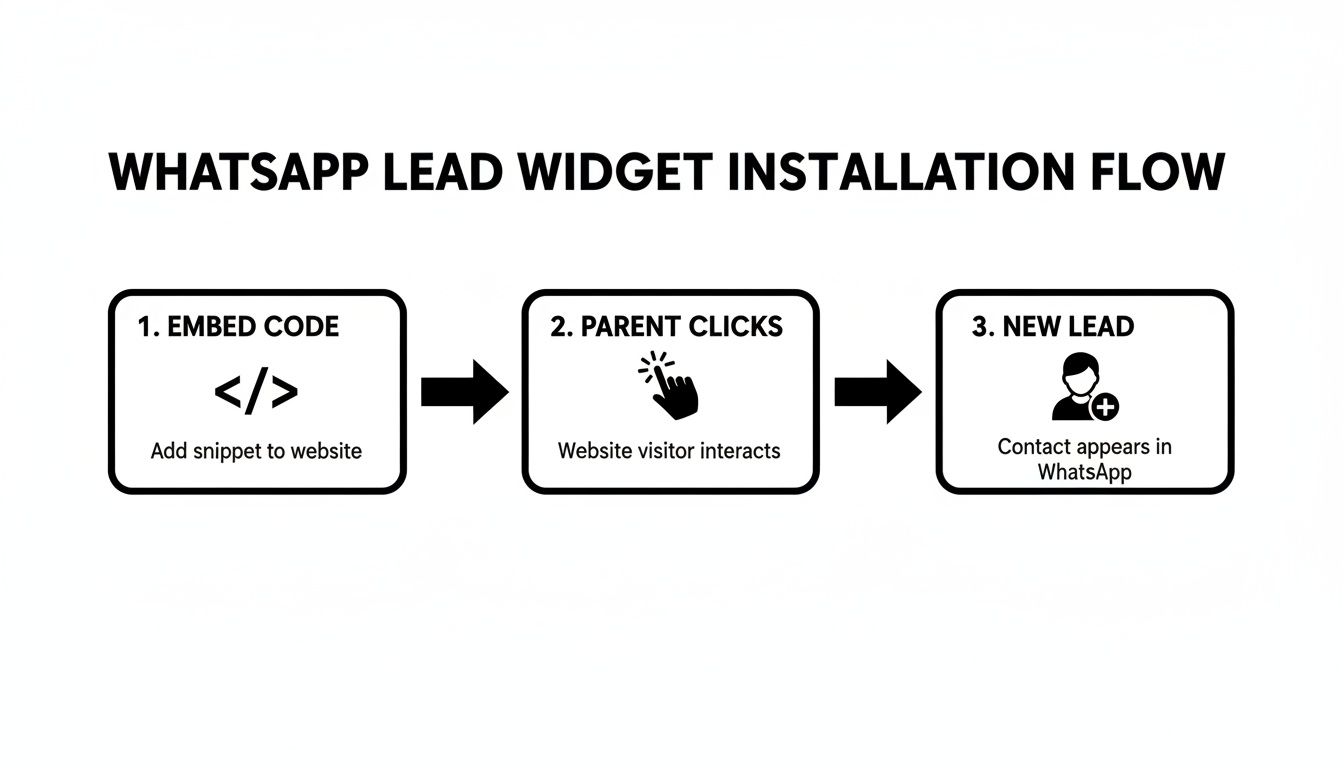
Putting a WhatsApp lead form on your website is simple. You will not need a developer. It involves embedding a single line of code into your site. This code is compatible with popular platforms like WordPress, Wix, and Squarespace.
The moment a parent clicks the widget and sends a message, the system activates. Instantly, the system captures their name and phone number to create a new lead profile in your CRM. At the same time, an email notification alerts your staff.
- The parent's WhatsApp message creates the lead.
- All details are mapped directly to your CRM.
- Staff receive email notifications for new leads.
- The widget installs with one line of code.
This immediate capture is crucial for engaging parents at peak interest. For a full walkthrough, check our guide on setting up the Tutorbase WhatsApp widget and have it running in minutes. The widget also includes a "Powered by Tutorbase" backlink for SEO benefit.
Automating the Journey from Inquiry to Enrollment
Capturing a lead instantly is just the start. An effective WhatsApp lead form tutoring system automates the entire student journey, from initial interest right through to enrollment. It ensures no lead is left behind and follow-up is immediate.
Once a new lead lands in Tutorbase, it can trigger a sequence of automated actions. Pre-written message templates go out immediately to qualify the parent's needs. This asks the right questions so your team doesn't have to manually.
From there, you can use smart scheduling tools to offer trial lessons. The system checks the student's subject against tutor availability and presents perfect options. It then handles reminders and even processes trial payments through Stripe.
This end-to-end automation eliminates administrative bottlenecks. It frees up your team to focus on teaching, not paperwork. We dive deeper into this in our full guide on WhatsApp for tutoring business automation.
How to Craft WhatsApp Templates That Convert
Your automated messages are your first real conversation with a potential family. They need to be concise, warm, and guide parents toward booking a trial lesson. Think of them as your friendly digital receptionist.
Start with a welcoming message that confirms you received their inquiry. It shows you're responsive and reassures them. Right after, ask a simple qualifying question, like "Great to hear from you! What subject and grade level are you looking for?"
Then, use a clear call-to-action to maintain momentum. A prompt such as, "We have a few trial slots open next week. Would you like me to share the available times?" moves the parent smoothly towards booking.
Create slightly different scripts for your various offerings, like group classes versus one-on-one tutoring. This small touch makes the conversation feel more personal and relevant. For more ideas, see these strategies for creating online forms that convert.
How Can I Measure Success with Key Metrics?
To understand if your WhatsApp lead form is working, you need to track key performance indicators (KPIs). The goal isn't just getting more messages, it's enrolling more students. Effective tracking reveals the true impact on your business.
Track these essential KPIs to get the full story:
- Lead Response Time: Automation should make this almost instant.
- Lead-to-Trial Booking Rate: The percentage of inquiries that book a trial.
- Trial-to-Enrolment Conversion Rate: The percentage of trial students who enroll.
Analyzing this data shows where automation is improving your enrollment funnel. In 2026, many tutoring centers expect that introducing a WhatsApp lead form can drive a 42% increase in lead-to-enrollment rates. You can dig into broader trends in reports on the growth of after-school tutoring.
If you use QR codes on flyers to drive traffic to WhatsApp, tracking is crucial. Knowing which campaigns perform helps optimize your marketing spend. For more, check this guide on How a QR Code Generator With Analytics Can Transform Your Marketing.
Frequently Asked Questions (FAQ)
What is a WhatsApp Lead Form?
A WhatsApp lead form is a digital tool, often a website widget, that allows parents to start a conversation with your tutoring center directly on WhatsApp. When a parent sends a message, it automatically captures their contact information and creates a lead in your customer relationship management (CRM) system.
How does the WhatsApp widget create a lead automatically?
When a parent clicks the widget on your site and sends their first message, the system captures their name and phone number from WhatsApp. This information is then used to instantly create a new lead profile in your CRM, such as Tutorbase, without any manual data entry from your staff.
Can I install the widget on my Wix or WordPress site?
Yes, the Tutorbase WhatsApp widget is designed for maximum compatibility. You can install it on most modern website builders, including WordPress, Wix, and Squarespace, by embedding a single line of code. No advanced technical skills are required.
What happens after a lead is created?
Once a lead is created, you can trigger automated workflows. This includes sending pre-written welcome messages, asking qualifying questions about subjects, and offering available trial lesson slots. The system can also send automated reminders to parents to ensure they attend the trial.
How does the system handle complex questions from parents?
The system can be configured to recognize when a human needs to intervene. You can set up rules that flag complex or specific inquiries. When a parent's message triggers a rule, the system instantly notifies your admin staff to jump into the conversation and provide a personal touch.
Can I customize the automated messages?
Absolutely. You have complete control to create and edit message templates for various scenarios, including initial greetings, qualifying questions, and calls-to-action for booking trial lessons. This ensures your communication always reflects your tutoring center’s unique brand voice.
Ready to stop losing leads and automate your enrollment process? Tutorbase integrates scheduling, billing, and lead management into one powerful platform. See how it works.


