
Change who pays for a student
Replace a student's responsible payer in Tutorbase and check the new link on the student and payer profiles.
Last updated
To change who pays for a student in Tutorbase, open People > Students, select the student, then choose Edit > Change payer. Choose the existing payer and save. The student's responsible payer changes, and the student moves from the previous payer's Related profiles to the chosen payer's.
Before you start
Have the student's profile ready and agree who will be responsible for paying. Choose Existing when that person already has a payer profile, so you use the same profile. Choose New payer for someone without a payer profile, or Self-paying when the student will pay for themselves.
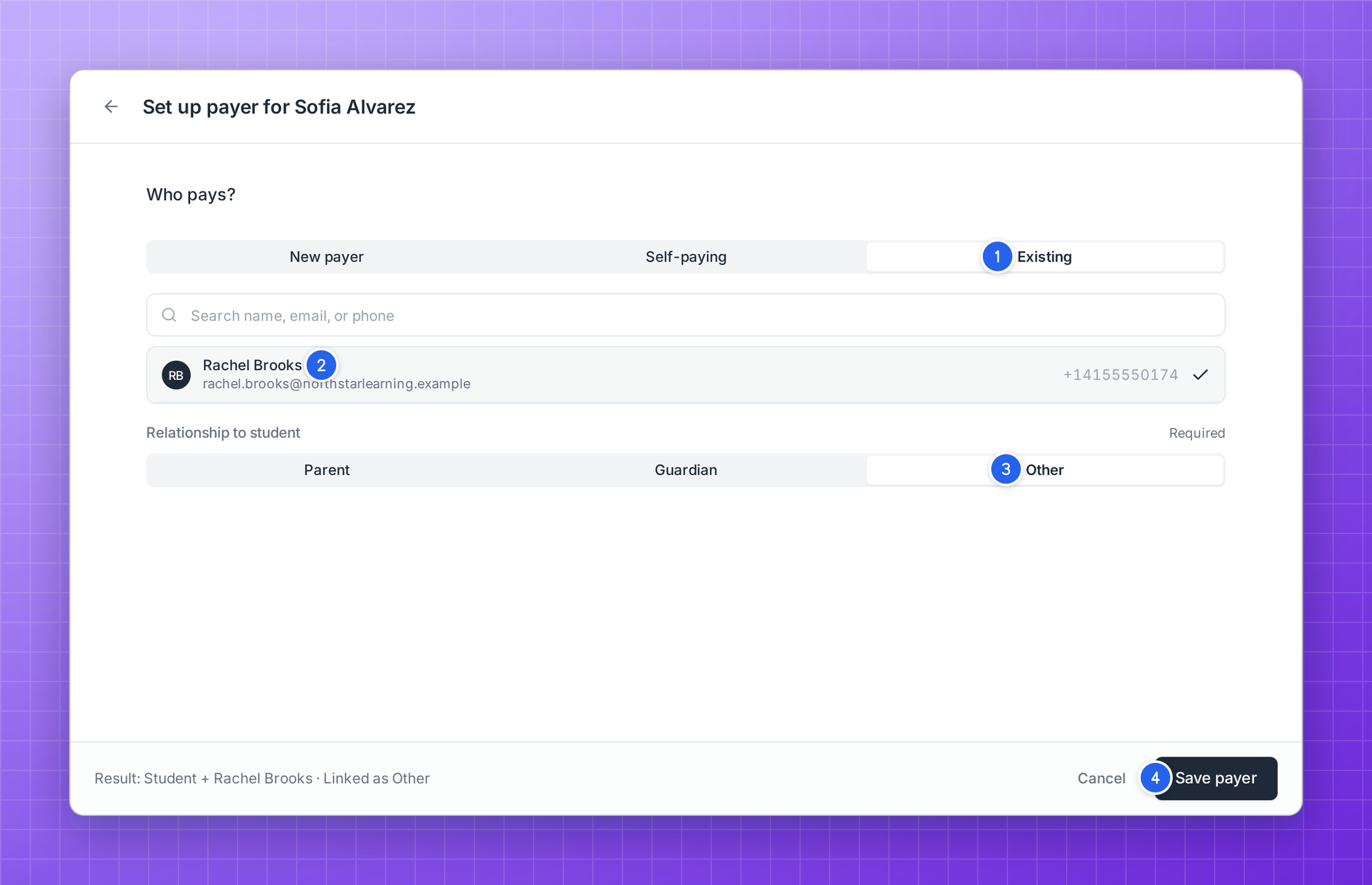
Sofia Alvarez already has a student profile. Her next payer is Rachel Brooks, who already has a payer profile; the school has recorded their relationship as Other.
Open the student
Under People, select Students.
Select the student's name, Sofia Alvarez.
Select Edit on the student profile. Change payer appears under Related profiles.
Change the payer
Under Related profiles, select Change payer. The payer setup form opens with the student's name.

Set the responsible payer:
Under Who pays?, choose Existing. The form starts with New payer selected; choose Existing for Rachel because she already has a payer profile.
Select the payer by searching Search name, email, or phone, then choosing Rachel Brooks. Check the name and contact details before choosing a payer so you select the intended profile.
Under Relationship to student, choose Other. No relationship is selected for you; choose Parent or Guardian only when that is the known relationship, and Other when neither applies.
Select Save payer. The student's profile opens with the saved payer.
After you change the payer
The student's Related profiles shows the chosen person as Payer. The chosen payer's Related profiles lists the student as Student. The student is no longer listed under the previous payer's Related profiles.
Check the payer name on the student's profile before continuing with the student's account, so a mistaken selection is caught promptly.
Common questions
How do I change the parent who pays for a student?
Under People > Students, open the student and select Edit, then Change payer under Related profiles. Choose the next payer, set Relationship to student to Parent, and select Save payer.
What if the student now pays for themselves?
In the student's Change payer form, choose Self-paying under Who pays?. The form names the student as the payer and does not ask for Relationship to student.
How do I correct the wrong payer on a student?
Open the student's profile under People > Students, select Edit, then Change payer. Choose the correct existing payer and relationship, select Save payer, and check the student's Related profiles for the correct payer name.
Does replacing a payer leave the student linked to the previous payer?
After you save a different existing payer, the student appears under the chosen payer's Related profiles and is no longer listed under the previous payer's Related profiles.
Does Payer mean the person is a parent or guardian?
No. The student's Related profiles uses the label Payer. Relationship to student records whether the person is a Parent, Guardian or Other.
Does selecting the payer save the change?
No. Selecting an existing payer and a relationship prepares the choice. Select Save payer to save the responsible payer, then check the student's Related profiles.